Configuration - hugalafutro/model-hotel GitHub Wiki
Model Hotel is configured through environment variables (startup-only) and runtime database settings (changeable without restart).
A normal deployment needs two secrets in .env: MASTER_KEY and POSTGRES_PASSWORD.
Everything else on this page has a working default.
Reach for the rest only when something specific applies to you: a reverse proxy in front
(TRUSTED_PROXIES, COOKIE_SECURE), a self-hosted LLM server on a private address
(ALLOWED_PROVIDER_HOSTS), passkey login (WEBAUTHN_RP_ID), or a log
collector (LOG_FORMAT, METRICS_TOKEN, OTEL_EXPORTER_OTLP_ENDPOINT).
Important
With the stock docker-compose.yml, putting a variable in .env is not enough. The app
service has no env_file:; it receives only the explicit environment: list, and Compose
reads .env just to fill in the ${...} references in that list. The stock file passes
through MASTER_KEY, POSTGRES_USER, POSTGRES_PASSWORD, POSTGRES_DB, ADMIN_TOKEN,
WEBAUTHN_RP_ID and WEBAUTHN_RP_ORIGINS from .env (and uses HOST_PORT for the port
mapping and in CORS_ORIGINS). It hardcodes POSTGRES_HOST=db, DATA_DIR=/data,
ALLOW_HTTP_PROVIDERS=false, ALLOW_EMBED=false, RATE_LIMIT_ENABLED=true,
DEBUG_LOG=false, CORS_ORIGINS, and empty ALLOWED_PROVIDER_HOSTS, TRUSTED_PROXIES and
KNOWN_PROXIES. Any other variable on this page (COOKIE_SECURE, LOG_FORMAT,
METRICS_TOKEN, OTEL_*, the rate-limit and pool sizes, and so on) takes effect only once you
add it to the app service's environment: block, e.g. - COOKIE_SECURE=${COOKIE_SECURE:-always},
or edit the hardcoded value there. compose.dev.yml additionally passes through
KNOWN_PROXIES, TRUSTED_PROXIES, LOG_FORMAT, METRICS_TOKEN,
OTEL_EXPORTER_OTLP_ENDPOINT and OTEL_SERVICE_NAME.
Runtime behaviour (timeouts, retries, rate limits, discovery, backups) is changed in the
Settings UI, not in .env: those live in the database and take effect without a restart.
Environment variables are read once at server startup and cannot be changed at runtime. The application reads the process environment, plus a .env file in its working directory (via godotenv; variables already set win). The Docker image excludes .env files, so in a container only the service's environment: list counts (see above); the .env file is loaded directly only when the binary runs outside Docker.
| Variable | Type | Default | Description |
|---|---|---|---|
MASTER_KEY |
string | - | Master encryption key for provider API keys. Used as input to Argon2id key derivation before AES-256-GCM encryption. Must be strong and kept secret. Rotating this key invalidates ALL encrypted provider API keys - they must be re-encrypted after rotation. Generate with openssl rand -base64 32. A key shorter than 32 characters still boots but logs a warning: the at-rest key derivation uses low-cost parameters that assume a high-entropy random value, not a memorable passphrase. |
POSTGRES_PASSWORD |
string | - | PostgreSQL password. Required if DATABASE_URL is not set. Used to construct the connection string from POSTGRES_USER, POSTGRES_HOST, and POSTGRES_DB. Generate with openssl rand -hex 16. |
Note
DATABASE_URL takes precedence over the POSTGRES_* components. If DATABASE_URL is set, the other PostgreSQL variables are ignored.
| Variable | Type | Default | Description |
|---|---|---|---|
DATABASE_URL |
string | (constructed) | PostgreSQL connection string. If not set, constructed from POSTGRES_USER:POSTGRES_PASSWORD@POSTGRES_HOST:5432/POSTGRES_DB. E.g. postgres://user:pass@localhost:5432/modelhotel
|
POSTGRES_USER |
string | modelhotel |
PostgreSQL username (used if DATABASE_URL not set). |
POSTGRES_HOST |
string | db |
PostgreSQL host (used if DATABASE_URL not set). In Docker Compose, this is the db service name; use localhost for local dev. |
POSTGRES_DB |
string | modelhotel |
PostgreSQL database name (used if DATABASE_URL not set). |
PORT |
string | :8080 |
Server listen address inside the container. E.g. :8080
|
HOST_PORT |
string | 8081 |
Docker Compose deployment only. Port exposed on the host machine. Maps to container port 8080. Not read by the Go application - used exclusively by docker-compose.yml for port mapping. |
DATA_DIR |
string | ./data |
Directory for persistent data (admin token file, etc.). In Docker, mounted to /data. |
ADMIN_TOKEN |
string | (auto-generated) | Fixed admin token for API authentication. Auto-generated on first run if empty, displayed once in logs, then stored as SHA-256 hash in <DATA_DIR>/admin-token. Regenerate by deleting that file and restarting. Generate with openssl rand -hex 16. |
ALLOW_HTTP_PROVIDERS |
bool | false |
Allow HTTP (non-HTTPS) provider base URLs. Useful for local Ollama instances or testing with mock servers. |
COOKIE_SECURE |
string | always |
Secure attribute on the dashboard session/CSRF cookies, and on Front Desk's fd_session/fd_csrf pair (Front Desk reads the same env var). always (default) sends them only over HTTPS; auto sets Secure from the request scheme (TLS or X-Forwarded-Proto: https); never disables it. localhost/127.0.0.1 are browser secure contexts, so the default works in local dev. Set never only for a plain-HTTP LAN deployment on a non-localhost address (accepted-risk opt-out; the session cookie then rides cleartext). |
ALLOW_EMBED |
bool | false |
Allow the UI to be embedded in iframes (e.g. workspace embedded browsers, Home Assistant). Removes X-Frame-Options: DENY and CSP frame-ancestors 'none' headers. Enabled by default in compose.dev.yml. Warning: enabling this allows any origin to embed the page. |
RATE_LIMIT_ENABLED |
bool | true |
Hard kill-switch for rate limiting. When false, the rate-limiting middleware is always mounted but becomes a complete pass-through (no buckets allocated, no headers, no 429 responses). Cannot be overridden at runtime. |
RATE_LIMIT_IP_RPS |
float | 30 |
Per-IP requests per second for the token bucket rate limiter. Clamped to 0–10000. |
RATE_LIMIT_IP_BURST |
int | 60 |
Per-IP maximum burst size for the token bucket. Clamped to 1–10000. |
PWNED_PASSWORD_CHECK_ENABLED |
bool | true |
Screen new dashboard passwords against the Have I Been Pwned range API using k-anonymity (only a 5-char SHA-1 prefix is sent; the password never leaves the box). Hard kill-switch: when false, no breach check runs and the pwned_password_check_enabled DB toggle has no effect. The check fails open: an unreachable endpoint never blocks a password change. |
PWNED_PASSWORD_API_URL |
string | https://api.pwnedpasswords.com |
Base URL of the breach range API. Point at a self-hosted mirror (e.g. http://hibp-api:8000) for offline/egress-restricted deployments. Request path is <base>/range/<prefix>. See Breached-password screening. |
MAX_REQUEST_SIZE |
int | 52428800 |
Maximum request body size in bytes. Clamped to 1KB–100MB. Default is 50 MB, sized for multipart audio uploads to /v1/audio/transcriptions (OpenAI's audio file limit is 25 MB). Also sizes the body read budget (see Security: Slow-Client Protection), so a larger ceiling lengthens the longest hold a hostile body can buy. |
CORS_ORIGINS |
string (comma-separated) | http://localhost:5173,http://localhost:8081 |
Comma-separated list of allowed CORS origins. Must include the scheme (e.g. http://). Wildcard * is explicitly rejected (incompatible with credentials=true). |
ALLOWED_PROVIDER_HOSTS |
string (comma-separated) | (empty) | Comma-separated provider host allowlist (exact hostnames, case-insensitive). Empty: any public host is accepted and private/loopback addresses are refused. Non-empty: it becomes a strict allowlist. A provider base_url must then be a built-in provider host (below) or be listed here; every other host is rejected, public ones included (e.g. api.moonshot.ai, Azure, Bedrock, regional Vertex hosts, any OpenAI-compatible reseller). Hosts listed here bypass the private/loopback checks at save time and at dial time, so localhost or an internal hostname can be added for a local Ollama. E.g. localhost,api.example.com
|
TRUSTED_PROXIES |
string (comma-separated CIDR) | (none) | Comma-separated CIDR ranges for trusted reverse proxies (e.g. 10.0.0.0/8,172.16.0.0/12). When set, X-Forwarded-For headers from these IPs are trusted everywhere a client address is used: rate limiting, access and auth log lines, the audit trail, and the active-sessions list. List only proxies you control (never 0.0.0.0/0): a trusted peer's header dictates the address these records store. This controls inbound trust only; it is unrelated to outbound SSRF protection (see KNOWN_PROXIES). |
KNOWN_PROXIES |
string (comma-separated CIDR) | (none) | Comma-separated CIDR ranges (e.g. 10.0.0.0/8,192.168.1.0/24) that the outbound SafeDialer may connect to despite being private. It only relaxes the dial-time check: provider URL validation at save time ignores it, so it does not let you add a provider whose host is (or resolves to) a private address; that needs ALLOWED_PROVIDER_HOSTS. It matters for a host that passed validation but resolves into one of these ranges when dialed (split-horizon DNS, for instance), while every other private/loopback address stays blocked. |
WEBAUTHN_RP_ID |
string | (empty) | Relying Party ID for WebAuthn/FIDO2 passkey authentication (typically your domain, e.g. example.com). When empty, passkey login is disabled. When set, users can register and log in with passkeys (Touch ID, Windows Hello, YubiKey, etc.) alongside the admin token. |
WEBAUTHN_RP_DISPLAY_NAME |
string | Model Hotel |
Display name for the WebAuthn relying party, shown in the browser's passkey dialog. |
WEBAUTHN_RP_ORIGINS |
string (comma-separated) | (falls back to CORS_ORIGINS) |
Comma-separated list of allowed origins for WebAuthn registration/authentication (e.g. https://example.com). Falls back to CORS_ORIGINS if empty, then to http://localhost:<port>. |
DATABASE_MAX_CONNS |
int | 25 |
Maximum database connection pool size. Clamped to 1–1000. |
DATABASE_MIN_CONNS |
int | 5 |
Minimum database connection pool size. Clamped to 1–1000. The two bounds are clamped independently, so setting a minimum above the maximum is not rejected at startup: the pool driver decides what to do with it. |
MODELSDEV_ENABLED |
bool | true |
Load the models.dev catalog at startup for model enrichment data. A failed load is retried in the background (1, 2, 4, 8, then every 15 minutes) until it succeeds; the next discovery scan after that is enriched. |
DEMO_READONLY |
bool | false |
Demo-hardening switch. When true, every state-changing request to the admin API (POST/PUT/PATCH/DELETE on /api/*, so creating, editing, or deleting providers, virtual keys, settings, backups, etc.) is refused with 403. Read endpoints (the whole dashboard), the admin chat/arena (/api/chat), and the public proxy (/v1) are unaffected, so visitors can browse and chat against the pre-seeded providers but cannot change anything. Intended for public demos where the admin token is shared. |
DEMO_SHOW_TOKEN |
bool | false |
Publishes the admin token on the login screen so a demo visitor can sign in without being handed it. Only takes effect when DEMO_READONLY is also true and ADMIN_TOKEN is set; on its own it is inert and a warning is logged at startup saying so. |
DEBUG_LOG |
bool | false |
Enable Debug-level structured logging for all scopes. Accepts true/1/yes. (Does not change the output format - see LOG_FORMAT.) |
DEBUG_LOG_SCOPES |
string (comma-separated) | (empty) | Enable Debug logging for only the named scopes, when DEBUG_LOG is off - e.g. failover,resolve. The scope is the prefix before the first : in a log message (case-insensitive), matching the scope list in Request Logging. Most App Logs sources are not scopes: one that emits no Debug records (ratelimit, settings, netguard and others) has nothing to enable. Lets you debug one noisy area without flooding everything at high RPS. Ignored when DEBUG_LOG=true. The parsed scopes are echoed once at startup (debuglog: per-scope debug enabled). |
LOG_FORMAT |
string | text |
Output format for the docker-logs (stdout) surface. text (default): human-readable TIME level=LEVEL source: message k=v …. json: one JSON object per line (time, level, source, msg, plus each attr) for log collectors (Fluent Bit, Vector, Promtail, Datadog). The App Logs page (ring buffer + DB) is unaffected. No prompt content appears in either format. |
METRICS_TOKEN |
string | (empty) | Dedicated token for scraping /metrics, so a Prometheus scrape config need not hold the admin token. It must be presented as Authorization: Bearer <token>, never as a query parameter, so it cannot leak into proxy access logs or browser history. Once set it replaces admin auth on /metrics: the admin token no longer opens that endpoint. Leave it empty and /metrics falls back to normal admin authentication. Setting it is what flips the Observability panel's Prometheus row to active. |
OTEL_EXPORTER_OTLP_ENDPOINT |
string | (empty) | Setting this (or OTEL_EXPORTER_OTLP_LOGS_ENDPOINT) turns on OpenTelemetry export: the same structured records the App Logs page holds are pushed to an OTel collector. Logs only, no traces or metrics. |
OTEL_EXPORTER_OTLP_PROTOCOL |
string | http/protobuf |
Transport for the OTLP exporter. Set grpc for a gRPC collector; OTEL_EXPORTER_OTLP_LOGS_PROTOCOL overrides it for logs alone. The other standard OTEL_EXPORTER_OTLP_* variables (headers, timeouts, TLS) apply as usual, and OTEL_SERVICE_NAME / OTEL_RESOURCE_ATTRIBUTES name the service in the collector. |
The following provider hosts are always allowed as provider base_url values, regardless of ALLOWED_PROVIDER_HOSTS:
api.openai.comapi.nano-gpt.comapi.z.aiapi.kimi.comkimi.comapi.minimax.iominimax.ioapi.deepseek.comapi.anthropic.comollama.comopencode.aiapi.x.aigenerativelanguage.googleapis.comaiplatform.googleapis.comapi.cohere.comapi.cohere.aiopenrouter.aiapi.neuralwatt.comneuralwatt.com
Subdomains of the vendor domains are allowed too, so a regional or tenant-specific endpoint
needs no allowlist entry: .nano-gpt.com, .z.ai, .kimi.com, .minimax.io, .deepseek.com,
.anthropic.com, .ollama.com, .opencode.ai, .x.ai, .cohere.com, .cohere.ai,
.openrouter.ai, .neuralwatt.com.
These correspond to most of the vendor hosts recognised by detectByHost in
internal/provider/discovery.go, but not all: Azure (*.openai.azure.com,
*.services.ai.azure.com), Bedrock (bedrock-mantle.<region>.api.aws) and regional Vertex or
Gemini hosts (e.g. us-central1-aiplatform.googleapis.com) are detected yet not always
allowed, so once ALLOWED_PROVIDER_HOSTS is set they must be listed in it.
At dial time the SafeDialer skips its IP checks for the exact hostnames in the list above and
for every ALLOWED_PROVIDER_HOSTS entry. Hosts accepted only through a subdomain suffix are
still resolved and IP-checked on every connection.
-
MASTER_KEYis never used directly as an AES key. It is fed through Argon2id key derivation (per-provider random salt in v2) to produce the 256-bit AES key. See Security for details. -
ADMIN_TOKENis stored as a SHA-256 hash. Legacy plaintext tokens are automatically migrated to hashed format on first validation. -
RATE_LIMIT_ENABLEDis a hard kill-switch - whenfalse, the rate-limiting middleware is always mounted but becomes a complete pass-through (no buckets, no headers, no 429s). The DB settingrate_limit_enabledhas no effect when the env var isfalse. -
SSRF protection (server-side request forgery: tricking the server into calling an address it should not) has two layers. Provider URL validation runs when a provider is saved; the SafeDialer re-checks the resolved IP on every outbound connection (except to the exact built-in hostnames and
ALLOWED_PROVIDER_HOSTSentries, which it trusts by name), so a hostname that later resolves to a private address is still blocked. -
TRUSTED_PROXIESis about inbound metadata (which reverse proxies may setX-Forwarded-For).KNOWN_PROXIESis about outbound connections (which private CIDRs the SafeDialer may dial). They point in opposite directions. -
ALLOWED_PROVIDER_HOSTSnames specific hostnames and bypasses both SSRF layers.KNOWN_PROXIESnames CIDR ranges and bypasses only the SafeDialer's private-IP block, so provider URL validation still applies and still refuses a private address. A provider on a private address therefore always needs anALLOWED_PROVIDER_HOSTSentry;KNOWN_PROXIESalone cannot get it created. Built-in provider hosts need neither. Remember that settingALLOWED_PROVIDER_HOSTSturns it into a strict allowlist for every non-built-in host. - Self-hosted providers (Ollama, LM Studio, KoboldCPP, LocalAI, SGLang, TabbyAPI) run on an address you choose and are not in the built-in host allowlist; add them to
ALLOWED_PROVIDER_HOSTS. The same URL validation applies to the probe that confirms the server type when the provider is added: a host the validation rejects (a private address withALLOWED_PROVIDER_HOSTSunset, for instance) cannot be added at all. - Neither variable applies to the admin-configured endpoints (OIDC issuer, apprise-api, Front Desk members). Those go through a separate guard that already allows private and loopback addresses and blocks only link-local/metadata ones, so an internal IdP needs no allowlisting at all. It has no env vars; see netguard.
-
WEBAUTHN_RP_IDis empty by default, meaning passkey login is disabled. Set it to your domain to enable FIDO2/WebAuthn passkey authentication.WEBAUTHN_RP_ORIGINSfalls back toCORS_ORIGINSand then tohttp://localhost:<port>. -
DATABASE_MAX_CONNSandDATABASE_MIN_CONNSare each clamped to the range 1–1000, independently of one another. -
CORS_ORIGINSexplicitly rejects*wildcard - it is incompatible withcredentials=true(CORS spec forbids it) and would silently break auth.
These settings are stored in the settings table and can be changed at runtime via the Settings UI or the PUT /api/settings endpoint - no restart required. Changes take effect immediately (within 30 seconds of cache TTL at most, or instantly via the subscription notification system).
| Method | Endpoint | Description |
|---|---|---|
GET |
/api/settings |
Returns all settings as a JSON key-value map. Requires admin token auth. |
PUT |
/api/settings |
Updates one or more settings. Body: {"key": "value", ...}. Max 50 keys per request. Requires admin token auth. |
DELETE |
/api/settings |
Resets settings to their Go-side defaults by deleting them from the database. Body: {"keys": ["key1", ...]}. Empty keys array resets all settings. Returns the full updated settings map. Requires admin token auth. |
All 62 writable keys, grouped by the area they govern. Keys owned by another page get a one-line row here and their full treatment there. This table is also the reference for what a Reset to Defaults restores.
| Setting | Type | Default | Description | Valid values / range |
|---|---|---|---|---|
discovery_interval |
duration string | 6h |
Model auto-discovery interval. 0 disables periodic discovery entirely. |
30m, 1h, 6h, 24h, 0
|
discovery_on_startup |
bool string | true |
Run model discovery at server startup. Skipped if the last run was within 5 minutes. |
true, false
|
discovery_on_provider_create |
bool string | true |
Run discovery when a provider is added. Enforced in the dashboard, not on the server: the frontend reads the flag and decides whether to fire discovery after creating the provider. |
true, false
|
model_prune_days |
int string | 7 |
Days a model the provider stopped listing stays in the table as a disabled row before the scheduled discovery pass deletes it. 0 keeps every row. |
0..180
|
discovery_claim_alert_days |
int string | 7 |
Age at which an unaddressed discovery claim raises an alert. The ceiling is derived from the 30-day claim window and served read-only as discovery_claim_window_days. See Alerting. |
1..29
|
log_retention |
duration string | (empty) | How long to keep request and app logs. Any Go duration; the dashboard slider stores whole days as hours. Legacy 1d/1w/1m still accepted (1m is the 30-day token, not one minute). Empty, 0, or a zero duration keeps logs forever; unreadable values are skipped and logged as a warning. Cleanup runs hourly. request_logs rows still inside an open budget period of any virtual key or user are kept regardless of the window (budgets are summed from them), and if the budgets cannot be read that hour request_logs are left alone. |
24h, 48h, 168h, 720h, 1w, (empty) |
stale_request_timeout |
duration string | 30m0s |
Timeout for marking in-progress request logs as failed. Rows stuck in pending or streaming state longer than this are marked failed. |
30m, 1h, etc. |
request_timeout |
duration string | 1m0s |
Per-request timeout for non-streaming requests. Streaming requests use 10x this value. |
30s, 1m, 5m, 10m
|
key_cache_ttl |
duration string | 10m0s |
How long a decrypted provider API key is held in memory before it must be derived again. |
1m, 10m, 1h, etc. |
ttft_timeout |
duration string | 1m0s |
Time-to-first-token probe timeout for streaming requests. After the upstream answers 200, the proxy reads ahead to confirm the first token arrives before committing the stream to the client. A token is a frame carrying model output (content, reasoning, a tool call, an Anthropic content block carrying text, thinking, tool input or a tool name); a role-only opener, a usage-only chunk, an Anthropic message_start or a keepalive comment does not count, so a provider that answers 200 and then pings without producing anything is failed over, not waited on. A stream that ends behind such frames is an empty answer and is committed as one. 0s disables the probe (immediate stream commit). |
0s, 30s, 1m0s, etc. |
stream_stall_timeout |
duration string | 30s |
Maximum silence during streaming before the connection is terminated and the circuit breaker records a failure. After 50 chunks the effective timeout is multiplied by 3 to tolerate tool-call pauses and long reasoning chains. 0s disables the watchdog. |
0s, 10s, 30s, 1m0s, etc. |
upstream_header_timeout |
duration string | 2m0s |
Maximum wait for a provider to send its response headers. Caps a non-streaming request whose request_timeout is longer, and a streaming provider that thinks before its headers arrive. 0s removes the limit. |
0s, 2m0s, 5m0s, etc. |
failover_on_rate_limit |
bool string | true |
Fail over to the next provider when an upstream returns HTTP 429. 5xx errors always trigger failover. |
true, false
|
circuit_breaker_enabled |
bool string | true |
Enable the per-model circuit breaker for hotel/ failover routes. A model whose circuit is open is skipped during failover selection. |
true, false
|
circuit_breaker_threshold |
int | 5 |
Consecutive failures before a model's circuit opens. | 1–100 |
circuit_breaker_span_models |
int | 2 |
How many of a provider's models must have an open circuit before the provider itself is skipped for every model. One model refusing is evidence about that model; corroboration across models is what indicts the provider. 1 restores the older behaviour, where the first open circuit sidelines the whole provider. |
1–100 |
circuit_breaker_cooldown |
duration string | 1m0s |
How long an open circuit stays open before it goes half-open, meaning the next real request is let through as a probe: if it succeeds the circuit closes, if it fails the circuit opens again. |
30s, 60s, 120s, etc. |
circuit_breaker_quota_pin_max |
duration string | 24h0m0s |
When a circuit opens because the provider's quota window is spent, pin its cooldown to the provider's real reset deadline instead of circuit_breaker_cooldown, so an exhausted provider is not re-probed every minute for the rest of the window. This is the ceiling on how far out a pin may push the cooldown. It also bounds the circuit the quota poller opens by itself when a fresh reading says the account is spent and nothing is holding the provider dark yet, so a restart does not leave an exhausted provider in rotation until real requests fail against it. 0s switches pinning off (seeding included) and releases a pin already in force, though the change takes up to about 30 seconds to reach the proxy (settings cache TTL). |
0s, 1h, 6h, 24h, etc. |
circuit_breaker_pin_probe_interval |
duration string | 1h0m0s |
How often a circuit pinned on a response's own claim (a "no credits" body with no stated reset) lets one probe through. A refused probe re-pins for another interval; a success closes the circuit. 0s disables the probe. Pins measured by the quota advisor are unaffected. |
30m, 1h, 0s
|
circuit_breaker_backoff_max |
duration string | 15m0s |
Double an open circuit's cooldown for every half-open probe that fails, so a model that stays broken is retried less and less often, up to this ceiling. A probe that succeeds closes the circuit and resets the doubling. The ceiling is also the longest a recovered model can stay untried, so raise it only if you can wait that long for a recovery to be noticed. 0s switches backoff off and releases one already in force, subject to the same ~30s cache TTL; a value at or below circuit_breaker_cooldown leaves backoff nothing to add. |
0s, 5m, 15m, 1h, etc. |
circuit_breaker_open_on_exhaustion |
bool string | true |
Open a model's circuit on a single spent-quota answer instead of waiting for the failure threshold. See Failover. |
true, false
|
failover_exhaustion_status_429 |
bool string | true |
Answer an all-busy group with 429 and a Retry-After instead of 502. See Failover. |
true, false
|
server_error_retry_enabled |
bool string | true |
Let the last candidate retry a transient 5xx once before the error reaches the client. See Failover. |
true, false
|
rate_limit_classify_enabled |
bool string | true |
Master switch for telling a briefly busy provider from one whose quota is spent. See Failover. |
true, false
|
rate_limit_saturation_max_wait |
duration string | 60s |
A Retry-After at or below this counts as busy; longer is treated as a spent window. See Failover. |
30s, 60s, etc. |
rate_limit_recent_success_window |
duration string | 60s |
An unrecognised 429 from a model that succeeded this recently counts as busy. See Failover. |
30s, 60s, etc. |
inflight_limiter_enabled |
bool string | true |
Learn each provider's real concurrency from its busy 429s. See Failover. |
true, false
|
inflight_grow_after |
int | 20 |
Clean completions a capped provider serves before its allowance grows by one. See Failover. | 1–1000 |
inflight_forget_after |
duration string | 10m |
How long a capped provider goes without a busy signal before its allowance returns to unlimited. See Failover. |
5m, 10m, etc. |
hedging_enabled |
bool string | false |
Race a backup provider when the first is slow to send its first token (streaming failover groups only). Off by default: it doubles the upstream request on slow starts, so provider capacity is used up faster. See Request hedging. |
true, false
|
hedge_delay |
duration string | 4s |
How long to wait for the first provider's first token before also firing a backup. Only read when hedging is on. |
2s, 4s, 10s, etc. |
rate_limit_enabled |
bool string | true |
Runtime toggle for rate limiting. Overridden by the RATE_LIMIT_ENABLED env var: if the env var is false, this setting has no effect. |
true, false
|
rate_limit_ip_enabled |
bool string | true |
Runtime toggle for per-IP rate limiting. Only effective when RATE_LIMIT_ENABLED=true. |
true, false
|
rate_limit_ip_rps |
float | 30 |
Per-IP requests per second. 0 means no per-IP limit. |
0–10000 |
rate_limit_ip_burst |
int | 60 |
Per-IP burst size for the token bucket. | 1–10000 |
rate_limit_rps |
float | 10 |
Per-virtual-key requests per second. 0 makes every per-key bucket unlimited. |
0–10000 |
rate_limit_burst |
int | 20 |
Maximum burst bucket size per virtual key. | 1–10000 |
rate_limit_tpm |
int | 0 |
Global default tokens-per-minute cap for keys without a per-key rate_limit_tpm. 0 means no cap. API-only: there is no Settings UI control for it. |
0–100000000 |
rate_limit_max_wait_ms |
int | 200 |
Maximum wait (ms) in the rate-limiter queue before rejecting with 429. Shared by the per-IP and per-key limiters. | 0–10000 |
backup_enabled |
bool string | false |
Enable periodic database backup with son/father/grandfather rotation. Enabling it for the first time prunes any existing backups that fall outside the rotation tiers. |
true, false
|
backup_interval |
duration string | 24h |
Interval between automatic backups. Values below 5 minutes are accepted but silently floored to 5 minutes; values above 168 hours are capped to 168 hours. |
1h, 24h, 168h, etc. |
backup_son_retention |
int | 7 |
Daily backups to keep (son tier): the most recent backup from each of the last N days. | 1–365 |
backup_father_retention |
int | 4 |
Weekly backups to keep (father tier), excluding sons. | 0–52 |
backup_grandfather_retention |
int | 3 |
Monthly backups to keep (grandfather tier), excluding sons and fathers. | 0–120 |
quota_refresh_interval_min |
int | 5 |
How often the sidebar and dashboard refresh provider quota snapshots, in minutes. 0 disables polling. A reading that stops or comes back (a lapsed subscription, a rejected key) is pushed over SSE as quota.status_lost / quota.status_restored (quota.status_synced on a fleet member for a provider the primary is feeding) as soon as the server's own poll, a manual refresh or a fleet push stores the change, so the badges do not also wait for their next client-side tick. |
0..30
|
session_idle_timeout_minutes |
int | 60 |
Signs out a forgotten open dashboard tab after this long without activity. 0 disables it. Browser-side only, and instance-local (not replicated by config sync). |
0..240
|
pwned_password_check_enabled |
bool string | true |
Runtime toggle for breached-password screening. Overridden by the PWNED_PASSWORD_CHECK_ENABLED env var: if the env var is false, this setting has no effect. Lets an operator turn the check off without a redeploy. |
true, false
|
alert_enabled |
bool string | false |
Master switch for outbound alerting. See Alerting. |
true, false
|
alert_apprise_api_url |
URL | (empty) | Base URL of the apprise-api container, validated against SSRF. See Alerting. | http://apprise:8000 |
alert_apprise_targets |
string | (empty) | Notification destination URLs. Encrypted at rest and masked on read. See Alerting. | Apprise URLs |
alert_events |
string | the 11 default-on events: circuit_breaker.open,circuit_breaker.closed,failover.sync_error,fleet.conflict,quota.schema_drift,model.auto_disabled_gone,provider.scheduled_disable,budget.warning,budget.exceeded,quota.status_lost,quota.status_restored
|
CSV of the event types that fire an alert. See Alerting. | event-type CSV |
oidc_enabled |
bool string | false |
Enable OpenID Connect single sign-on. See Security. |
true, false
|
oidc_issuer_url |
URL | (empty) | OIDC discovery base URL, validated against SSRF. See Security. | issuer URL |
oidc_client_id |
string | (empty) | OAuth client id. See Security. | client id |
oidc_client_secret |
string | (empty) | OAuth client secret. Encrypted at rest and masked on read. See Security. | client secret |
oidc_allowed_emails |
string | (empty) | Comma or newline separated sign-in allowlist. Fleet-synced. See Multi-User. | email list |
oidc_public_base_url |
URL | (empty) | This instance's external origin, used to build the redirect URI. See Security. | https://example.com |
github_sso_enabled |
bool string | false |
Enable GitHub single sign-on. See Security. |
true, false
|
github_client_id |
string | (empty) | GitHub OAuth App client id. See Security. | client id |
github_client_secret |
string | (empty) | GitHub OAuth App client secret. Encrypted at rest and masked on read. See Security. | client secret |
github_allowed_emails |
string | (empty) | Comma or newline separated allowlist of verified GitHub emails. Fleet-synced. See Multi-User. | email list |
github_public_base_url |
URL | (empty) | This instance's external origin, used to build the callback URI. See Security. | https://example.com |
GET /api/settings also returns read-only status keys that no PUT may write: app_version,
app_commit, discovery_claim_window_days, and the three log_export_* flags the
Observability panel reflects.
The TTFT probe holds the client connection open without sending any bytes until the upstream produces its first token (up to ttft_timeout). If Model Hotel runs behind a reverse proxy, load balancer, or CDN, that intermediary's idle-read timeout can close the silent connection before the first token arrives, and Model Hotel only sees its inbound connection drop.
To avoid this, either:
- raise the proxy's read timeout above
ttft_timeout(nginx:proxy_read_timeout 600s;) and disable response buffering for streaming (nginx:proxy_buffering off;), or - set
ttft_timeoutbelow the proxy's read timeout, so Model Hotel's own probe fires first and fails over to the next provider while the connection is still alive.
A request cut off this way is logged as a provider_timeout (502) whose message names the likely reverse-proxy cause, and the stalling provider's circuit breaker records the failure, so repeated stalls open the breaker and subsequent requests skip that provider.
When PWNED_PASSWORD_CHECK_ENABLED is true (the default) and the runtime pwned_password_check_enabled toggle is on, every new dashboard password (set at user creation, admin reset, or self-service change) is checked against the Have I Been Pwned Pwned Passwords corpus before it is accepted. If the password appears in a known breach, the change is rejected and the user is asked to pick a different one.
The lookup uses k-anonymity: the password is hashed with SHA-1, only the first 5 hex characters of the hash are sent to the range API, and the full password never leaves the box. The API returns every suffix sharing that prefix along with a breach count, and Model Hotel matches the remaining suffix locally.
The check is fail-open: if the range endpoint is unreachable, times out, or errors, the password change is allowed rather than blocked - it only ever adds a rejection, never a lock-out. The 8-character length minimum is enforced first and short-circuits the lookup.
For air-gapped or egress-restricted deployments, point PWNED_PASSWORD_API_URL at a local mirror that speaks the same GET /range/{prefix} contract. IncogniPwn serves the full Pwned Passwords corpus (~80 GB) from a downloader + API pair. Add it to your docker-compose.yml:
services:
  hibp-downloader:
    # One-shot: downloads the Pwned Passwords corpus into the shared volume.
    # Re-run periodically to refresh. Expect ~80 GB and a long first run.
    image: ghcr.io/millaguie/incognipwn-downloader:latest
    volumes:
      - hibp-data:/data
    restart: "no"

  hibp-api:
    # Serves GET /range/{prefix} on port 8000 from the downloaded corpus.
    image: ghcr.io/millaguie/incognipwn-api:latest
    volumes:
      - hibp-data:/data
    expose:
      - "8000"
    restart: unless-stopped

  app:
    # ... your existing Model Hotel service ...
    environment:
      PWNED_PASSWORD_API_URL: http://hibp-api:8000
    depends_on:
      - hibp-api

volumes:
  hibp-data:
The mirror only needs to be reachable from the app container: do not expose it publicly. Because the check fails open, Model Hotel keeps accepting password changes even while the downloader is still populating the corpus.
All database settings can be reset to their Go-side defaults via the Reset to Defaults feature in the Settings UI:
- Global reset (header icon): Type "RESET" to confirm. Deletes all settings from the database.
- Section reset (icon left of collapse toggle): Confirms via dialog. Resets only the settings in that section.
- Per-setting reset (inline icon after label): Resets a single setting. No confirm dialog.
Reset works by deleting the row from the settings table. The Go code then falls through to its hardcoded default value, which is the Default column of the Settings Reference above. The returned settings map reflects the post-reset state.
The rate limiting system has two layers, both using token buckets (backed by golang.org/x/time/rate):
Per-IP rate limiting (DoS protection, always-on when enabled):
- Applied before authentication, before the per-key limiter
-
rate_limit_ip_rpscontrols the per-IP refill rate (default 30) -
rate_limit_ip_burstcontrols the per-IP maximum burst size (default 60) -
rate_limit_ip_enabledtoggles this layer at runtime (requiresRATE_LIMIT_ENABLED=true) - Independent bucket per client IP address
Per-virtual-key rate limiting (usage control):
- Each key gets its own independent bucket
-
rate_limit_rpscontrols the refill rate (tokens per second, default 10) -
rate_limit_burstcontrols the maximum bucket size (default 20) - Setting
rate_limit_rps=0makes every bucket unlimited (no per-key rate limiting) - A separate optional token rate limit caps tokens/minute and rejects
over-budget requests with
429. It has a global default setting (rate_limit_tpm,0= no cap, API-only, with no Settings-UI control) plus a per-key override on the virtual_keys row; a key'snullfalls back to the global default. See Virtual Keys.
Shared settings:
-
rate_limit_max_wait_ms(default 200) - maximum time a request waits in the rate-limiter queue before being rejected with 429. Applies to both per-IP and per-key limiters. - The
RATE_LIMIT_ENABLEDenvironment variable is a hard kill-switch - whenfalse, both layers are always mounted but become a complete pass-through (no buckets, no headers, no 429s) - When rate limiting is re-enabled after being disabled, all existing buckets are reset to ensure fresh state
- Unused buckets are cleaned up by a periodic cleanup task that runs every 5 minutes and removes entries that have been idle for more than 10 minutes
When a request is rate-limited, the response includes:
-
Retry-After: <seconds>- When the client can retry -
X-RateLimit-Limit: <rate>- The refill rate -
X-RateLimit-Remaining: <tokens>- Remaining tokens in the bucket -
X-RateLimit-Burst: <burst>- The burst capacity -
X-RateLimit-Scope: <ip|key>- Indicates whether the rate limit applies toip(per-IP) orkey(per-virtual-key)
User preferences are stored in localStorage (client-side only, never sent to the server):
| Key | Description |
|---|---|
theme |
dark, light or system (default dark) |
accentColor |
Hex color string (unset: the UI style's default accent) |
uiStyle |
clean-saas (default), cyber-terminal, or glassmorphism-lite |
toastPosition |
Toast notification position |
toastTimeout |
Toast display duration (ms) |
toastFuse |
Whether a toast shows the burning outline that counts down its display time (default true) |
persistChat |
Whether to persist chat state across sessions |
persistConversation |
Whether to persist conversation state |
persistArena |
Whether to persist arena state |
arenaHistoryEnabled |
Whether to persist arena battle history across sessions |
arenaHistoryLimit |
Maximum number of arena history entries to keep (default: 25) |
sidebarChatSubMode |
chat/conversation |
sidebarArenaSubMode |
competition/compare |
sidebarLogsSubMode |
request/app |
sidebarQuotaDisabled |
Whether to hide the quotas pill in sidebar (inverted: true = hidden). The refresh interval beside it is a database setting (quota_refresh_interval_min), not a localStorage key. |
dashboardRefreshSec |
Dashboard refresh interval in seconds |
i18nextLng |
Interface language chosen in the language picker (read by the language detector) |
The Settings page has 10 collapsible sections. On a managed fleet member the instance-local sections (Authentication, Appearance, Observability, and the local half of Alerts) come first, followed by the managed banner and the fleet-synced sections. The primary shows an amber banner at the same boundary noting that the sections above stay per-member (except the password policy, the sign-in email allowlists and the alert event routing, which are synced) while everything below is pushed to the fleet on the next config sync.

-
Passkeys: WebAuthn/FIDO2 credential management: register new passkeys, rename and delete existing ones. Registration is available only when
WEBAUTHN_RP_IDis configured (see Security). -
Two-Factor (TOTP): Authenticator-app 2FA (RFC 6238) for admin login. Enabled at runtime from Settings (scan a QR code, confirm a 6-digit code, save the one-time recovery codes); no environment variable is required. When enabled, the raw admin token alone no longer authenticates and must be combined with a code on the login screen (see Security). If you lose the authenticator and all recovery codes, an operator can clear it with
make totp-disable. -
Tab timeout (
session_idle_timeout_minutes, default 60, 0 = disabled): signs out a forgotten open tab after this long without activity. It is a browser-side timer only: closed tabs are unaffected, and every login expires on its own after 3 days without use, and after 30 days at most (AuthTokenTTL/AuthTokenMaxLifetime, see Security). Instance-local: not replicated by config sync. - Active sessions: every live login for your identity with device, IP (trusted-proxy-aware), and last-seen; revoke one or sign out all others.
- Password policy & SSO: the breached-password check and the OIDC / GitHub single sign-on settings. The password policy and the SSO email allowlists are fleet-synced on managed members; the rest of the SSO config (enable flags, issuer, client credentials, public base URL) is per-member, so a fleet can offer an IdP on some members and not others.
Backend settings: alert_enabled, alert_apprise_api_url, alert_apprise_targets,
alert_events, discovery_claim_alert_days. Outbound notification through an apprise-api
container: which events fire, where they go, and how old an unaddressed discovery claim may get
before it raises one. The destination URL and targets are instance-local; the event routing is
fleet-synced. Full walkthrough on Alerting.
Backend settings: discovery_interval, discovery_on_startup, discovery_on_provider_create, model_prune_days
-
UI Style:
clean-saas(default),cyber-terminal,glassmorphism-lite- stored in localStorageuiStyle -
Theme:
dark/light- stored in localStoragetheme -
Accent Color: 10 preset swatches + custom hex picker - stored in localStorage
accentColor -
Toast Notifications: 6-position visual picker (
toastPosition) and 1s–15s auto-dismiss slider (toastTimeout)
Note:
theme,ui_style, andaccent_colorare not in the backendAllowedSettings- they are localStorage-only and cannot be set viaPUT /api/settings.
Backend settings: log_retention, stale_request_timeout. Everything else is localStorage-only.
- Session Persistence: Toggle for chat, arena, and conversation state across page reloads
- Arena History: Save match history toggle, limit (10/25/50/100), clear button
- Cache & Resets: Clear provider quota cache, reset dismissed error banners
-
Sidebar Quotas: Show/hide the quotas pill (
sidebarQuotaDisabled, inverted) and the refresh interval (quota_refresh_interval_min, a backend setting) -
Dashboard Refresh: Interval 10s/30s/1m/2m/5m/10m/Disabled (
dashboardRefreshSec) - Logging: Retention and stale-request timeout, plus purge actions for request logs and app logs
Read-only status panel with no backend settings to persist. Reflects which of the three log-export integrations are active (each enabled via its own environment variable) and shows enable instructions for those that are off:
-
JSON logs (stdout): active when
LOG_FORMAT=json -
Prometheus metrics: active when a dedicated
METRICS_TOKENis set. Without one,/metricsis reachable with normal admin authentication; with one, the bearer token replaces it -
OpenTelemetry logs (OTLP): active when
OTEL_EXPORTER_OTLP_ENDPOINTis set, pushing the same structured logs to an OTel collector (logs only; standardOTEL_EXPORTER_OTLP_*vars apply, http/protobuf by default orOTEL_EXPORTER_OTLP_PROTOCOL=grpc)
Backend settings: backup_enabled, backup_interval, backup_son_retention, backup_father_retention, backup_grandfather_retention
-
Backup: Download a PostgreSQL dump of the database (custom format, zstd-compressed at level 12 here and level 19 for scheduled backups, so restoring outside the app needs
pg_restore16 or later built with zstd; thepostgres:16-alpineimage qualifies). The list shows the combined size of every backup on disk. - Restore: Upload a previously downloaded backup file to restore. The confirm dialog takes the backup's signature (optional; "Copy signature" on a signed backup's row puts it on the clipboard) so the dump is integrity-checked before it is applied; leaving it empty is allowed for backups that have no signature, but the dashboard then asks for an explicit "restore anyway" confirmation, because an unsigned dump's contents cannot be verified (see Security)
- Periodic Backup: Enable automatic scheduled backups with son/father/grandfather rotation (see backup settings above)
When periodic backup is enabled, backups are classified into three tiers:
-
Son (daily): Keeps the most recent backup from each of the last
backup_son_retentiondays -
Father (weekly): Keeps the most recent backup from each of the last
backup_father_retentionweeks (excluding those already kept as sons) -
Grandfather (monthly): Keeps the most recent backup from each of the last
backup_grandfather_retentionmonths (excluding sons and fathers) - All other backups are pruned automatically
When enabling periodic backup for the first time, a confirmation dialog shows which existing backups would be removed under the rotation scheme.
A background scheduler (started about a minute after the server boots) drives periodic backups - there is no external cron job. While backup_enabled is true, each due cycle it creates one backup with pg_dump, then immediately applies the son/father/grandfather rotation above (pruning any backup outside the retention tiers), and sleeps for backup_interval (default 24h, floored at 5 minutes, capped at 168 hours) before repeating. The interval is measured from the newest scheduled backup on disk, not from process start, so a restart or redeploy inside the interval sleeps out the remainder rather than taking an extra backup. A dump is written under a temporary name and renamed once complete, so a process killed mid-dump leaves nothing that could count as a backup. backup_enabled, backup_interval, and the retention counts are re-read every cycle, so changes take effect without a restart. Each scheduled backup publishes a backup.created event, which surfaces as a success toast in the dashboard (when a session is connected) and as an App Logs entry. The manual Download / Restore buttons are separate, on-demand actions.
Backend settings: rate_limit_enabled, rate_limit_ip_enabled, rate_limit_rps, rate_limit_burst, rate_limit_ip_rps, rate_limit_ip_burst, rate_limit_max_wait_ms. rate_limit_tpm is writable through the API but has no control in this section.
The largest section, laid out as four groups in a two-column grid: Failover, Hedging, Rate Limit (429) Handling, and Adaptive Concurrency.
Failover group: circuit_breaker_enabled, failover_on_rate_limit, circuit_breaker_threshold,
circuit_breaker_span_models, circuit_breaker_cooldown, circuit_breaker_quota_pin_max,
circuit_breaker_backoff_max.
- Failure Threshold: Consecutive failures before a model's circuit opens (default 5).
- Models Before Provider Skip: How many of a provider's models must have an open circuit before the provider itself is skipped for every model (default 2, range 1-100). At 1 the first open circuit sidelines the whole provider.
-
Cooldown Period: How long an open circuit stays open before it goes half-open (default
60s). - Backoff Limit: Double the cooldown for every half-open probe that fails, up to this limit (default 15 minutes). Zero switches backoff off, and releases a backoff already in force within about 30 seconds. See Probe backoff.
-
Quota Pin Limit: When a circuit opens on a spent quota window, hold it open until the provider's quota actually resets rather than re-probing every cooldown, up to this ceiling (default
24h). Zero switches pinning off, and releases a pin already in force within about 30 seconds. - The number of half-open probe successes needed to close the circuit is fixed in code (
HalfOpenMaxProbes, default 1) and is not a runtime setting.
Hedging group: hedging_enabled, hedge_delay. Off by default. When on, a streaming request
that has waited hedge_delay for its first token also fires a backup provider and keeps
whichever answers first. The notice under the toggle spells out the trade-off: on slow starts
this doubles the upstream request, so provider rate limits and capacity are consumed faster and
a backup that ignores cancellation can keep generating in the background. Full mechanics under
Request hedging.
Rate Limit (429) Handling group: rate_limit_classify_enabled,
rate_limit_saturation_max_wait, rate_limit_recent_success_window,
circuit_breaker_open_on_exhaustion, failover_exhaustion_status_429, and, last in the group,
server_error_retry_enabled. The 429 settings read each 429 to
tell a provider that is briefly at capacity from one whose quota window or balance is spent, and
decide what the client sees when every member of a group is unavailable. See
429s: saturated vs exhausted.
- Retry a Transient 5xx Once: Let the last candidate back off briefly and try once more on a 500, 502, 503 or 504 before the error reaches the client.
Adaptive Concurrency group: inflight_limiter_enabled, inflight_grow_after,
inflight_forget_after. Learns each provider's real concurrency from its busy 429s, shrinking
the allowance when one arrives and growing it back on clean completions. See
Adaptive in-flight limiter.
Backend settings: request_timeout, key_cache_ttl, ttft_timeout, stream_stall_timeout, upstream_header_timeout
-
Request Timeout: Base per-request timeout (default
1m0s). Streaming requests get 10x this. -
Key Cache TTL: How long a decrypted provider key stays in memory (default
10m0s). -
TTFT Timeout: Time-to-first-token probe timeout for streaming requests (default
1m0s). Set to0sto disable. -
Stream Stall Timeout: Maximum silence during streaming before termination (default
30s). After 50 chunks the effective timeout is multiplied by 3. -
Upstream Header Timeout: Maximum wait for a provider to send its response headers (default
2m0s). Caps a non-streaming request whose Request Timeout is longer, and a streaming provider that thinks before its headers arrive. Set to0sfor no limit.
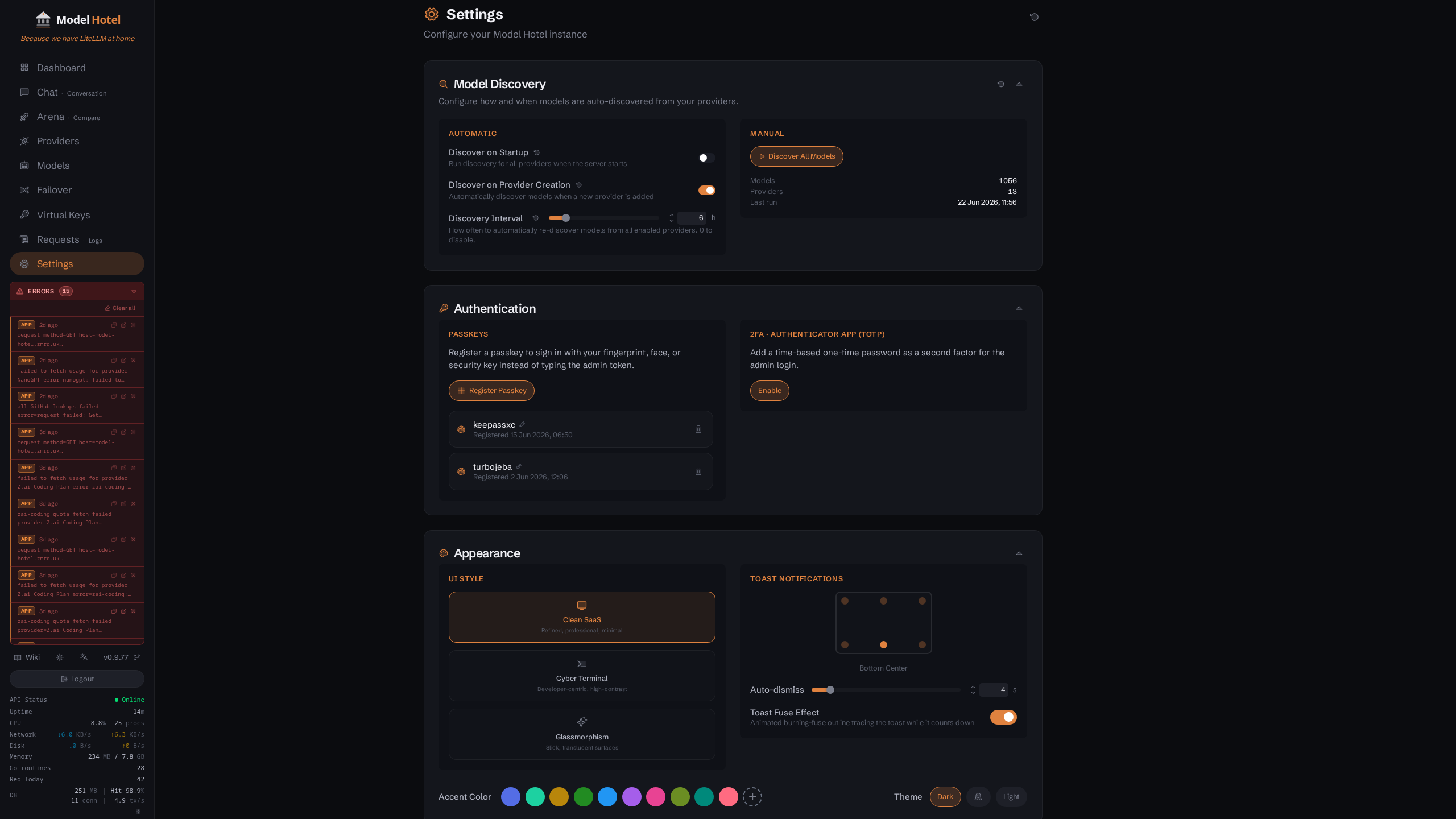
The Settings page header and its collapsible sections. Each section's controls are shown expanded in the screenshots that follow.
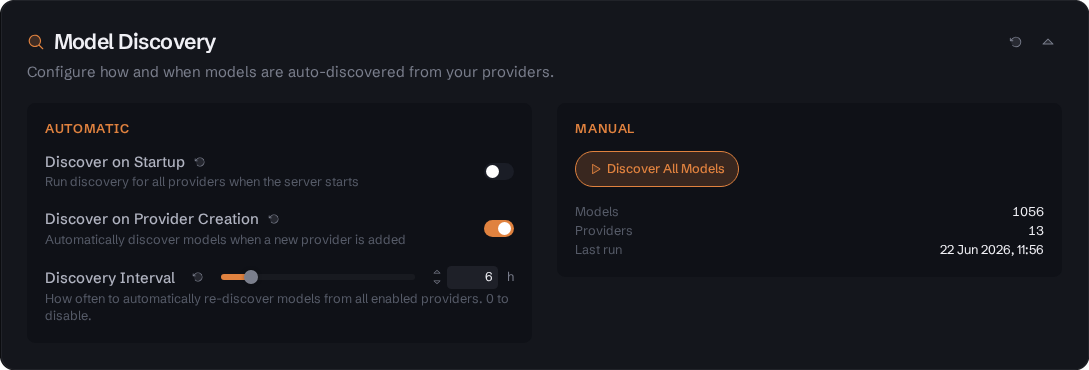
Settings page - Model Discovery section: the automatic toggles (discover on startup, discover on provider creation, re-discovery interval) alongside the manual "Discover All Models" trigger and a live count of discovered models, providers, and last run.
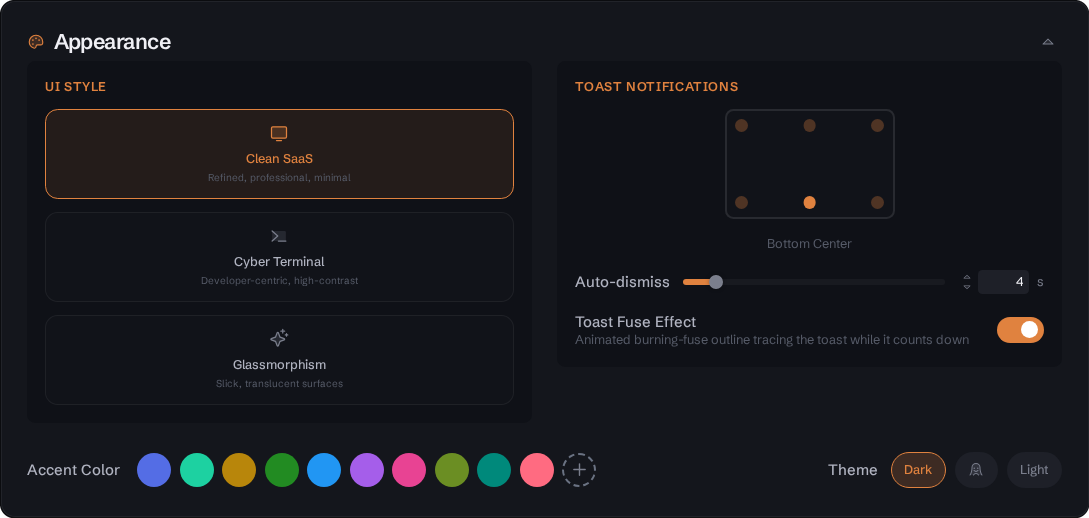
Settings page - Appearance section expanded, showing the UI Style cards (Clean SaaS, Cyber Terminal, Glassmorphism), Theme toggle, and Accent Color picker.
The three UI styles applied to the dashboard (dark mode, each style's default accent):

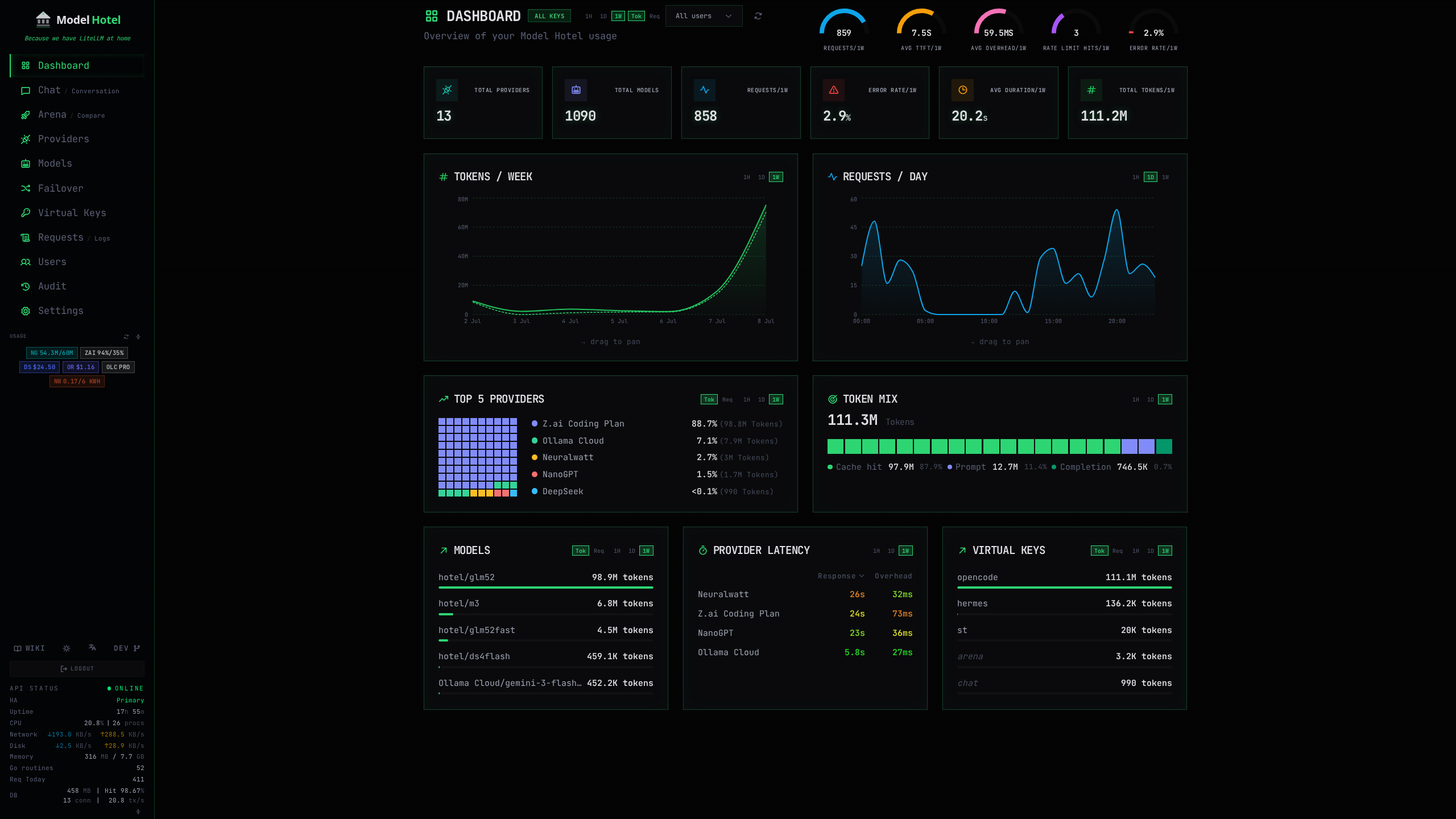

Left to right: Clean SaaS (default), Cyber Terminal, Glassmorphism.
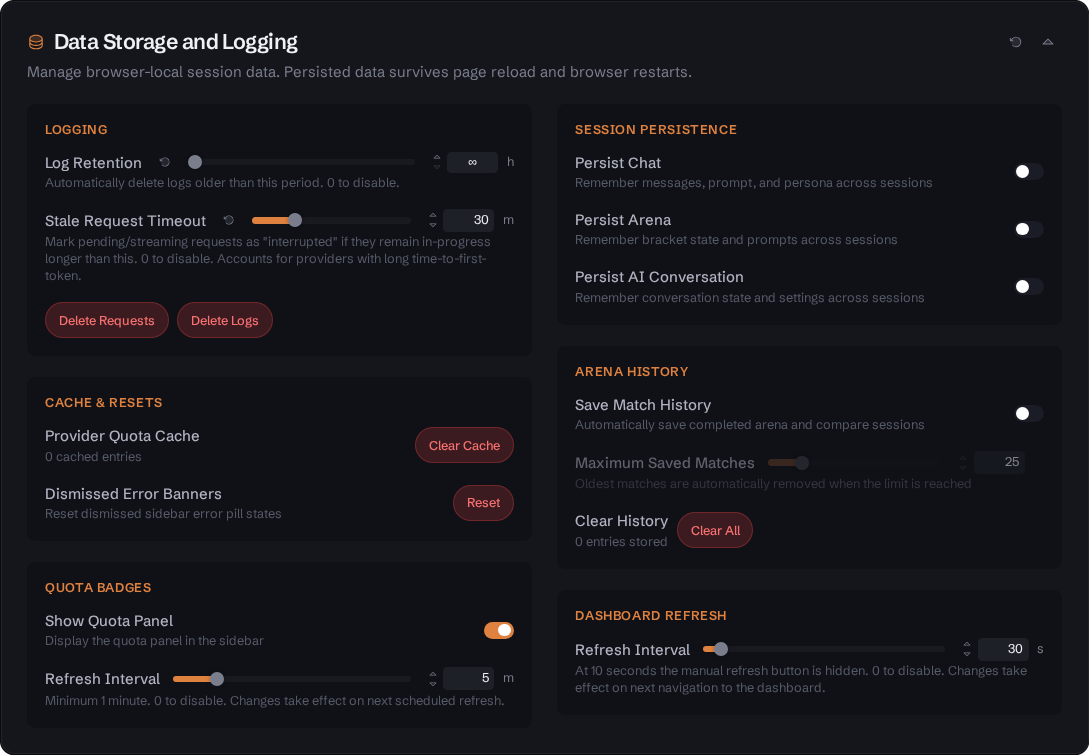
Settings page - Data Storage and Logging section: log retention and stale-request timeout with one-click purge of request and app logs, cache and dismissed-banner resets, sidebar quota-badge controls, browser-local session persistence (chat, arena, conversation), arena history limits, and the dashboard refresh interval.

Settings page - Observability & Log Export section: read-only status of the three log-export integrations. JSON logs enabled here; Prometheus and OTLP disabled, each showing its copyable enable instruction.
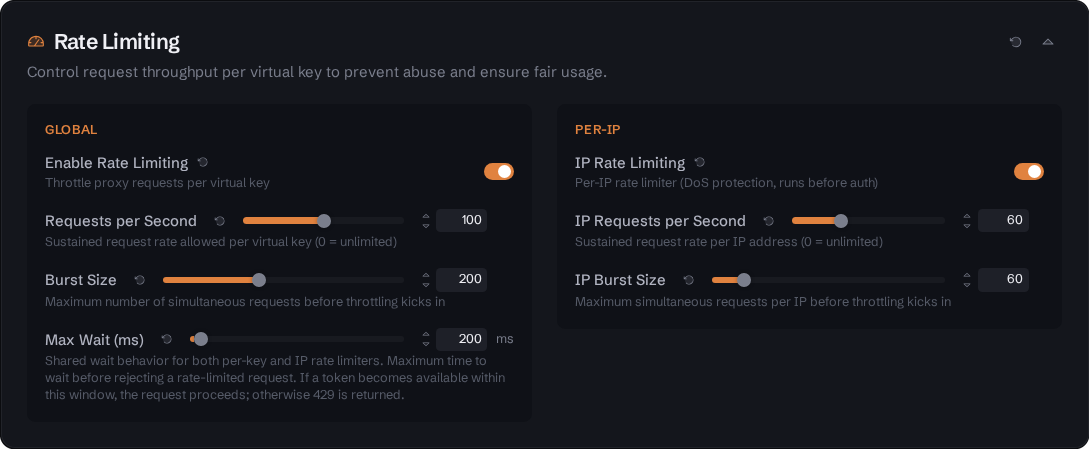
Settings page - Rate Limiting section expanded, showing the enable toggle, RPS selector, and Burst selector.
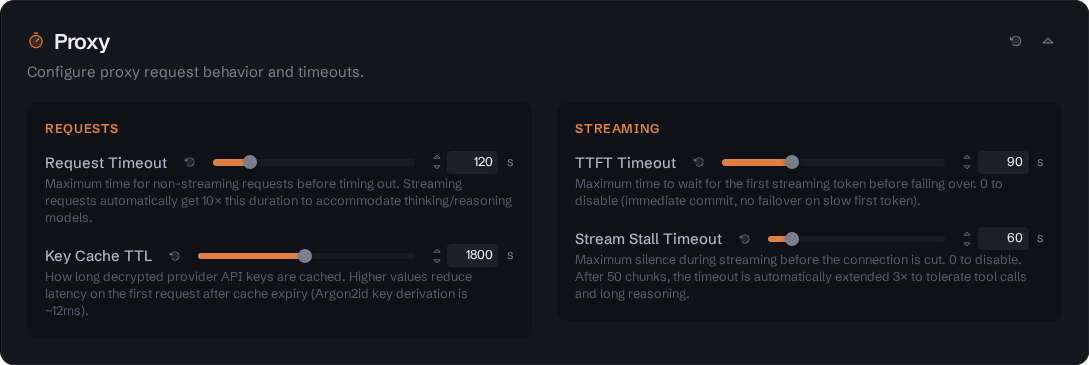
Settings page - Proxy section, showing the request timeout, key cache TTL, TTFT Timeout, and Stream Stall Timeout settings.
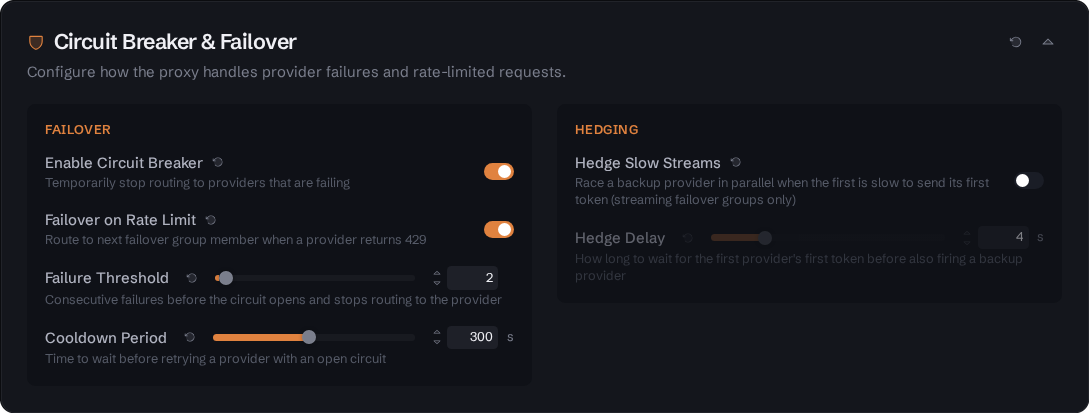
Settings page - Circuit Breaker & Failover section: the failover column with cooldown, failure threshold and the quota-pin controls, and the Hedging column with its trade-off notice beneath the toggle.
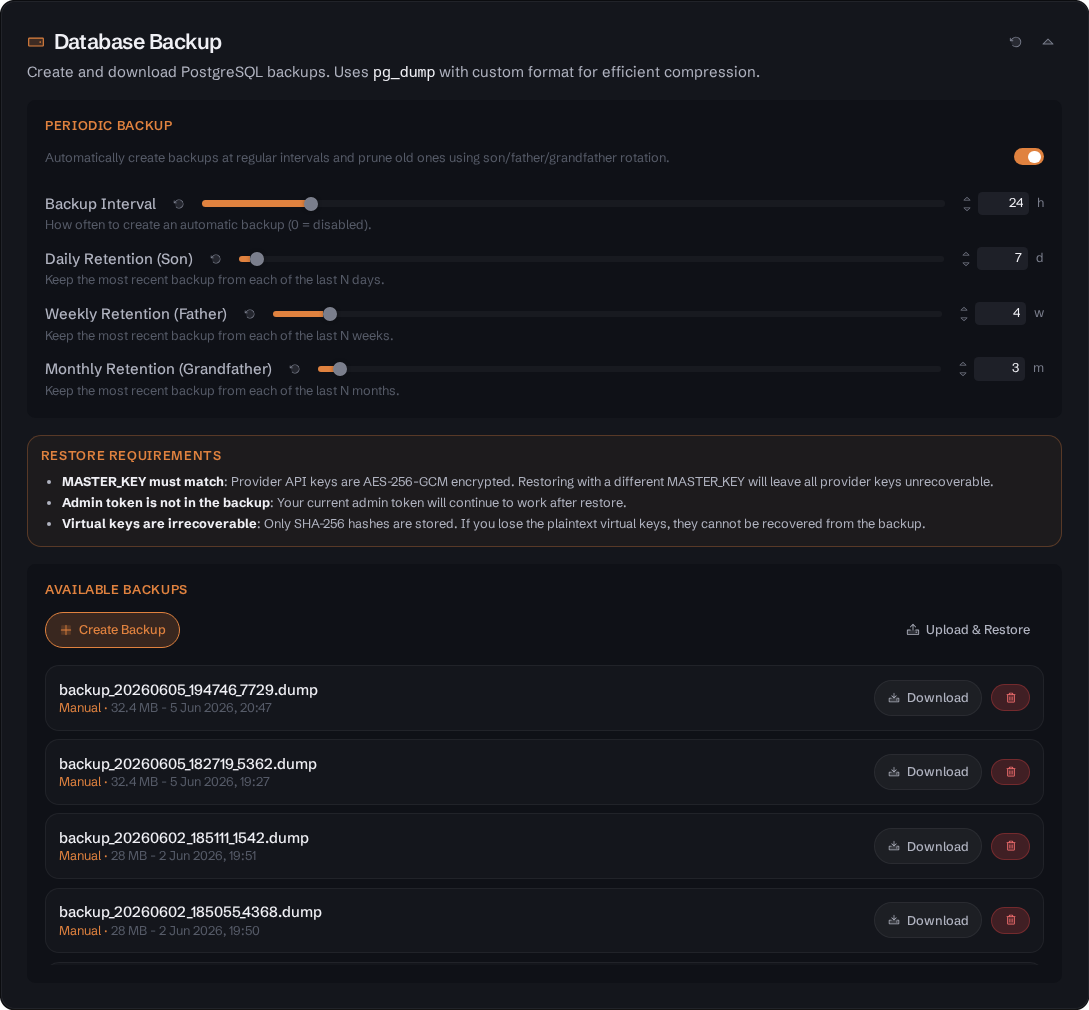
Settings page - Database Backup section, showing backup and restore controls.
The docker-compose.yml sets up the following services. For local development, run it with the
compose.dev.yml overlay, which mounts the Docker socket and turns on DEBUG_LOG and
ALLOW_EMBED: see Development.
| Configuration | Value | Description |
|---|---|---|
| Build |
. (args VERSION, COMMIT) |
Builds from the root Dockerfile; prebuilt ghcr.io/Docker Hub images can be used instead (commented alternatives in the file) |
| Ports | ${HOST_PORT:-8081}:8080 |
Maps host port (default 8081) to container port 8080 |
| Environment | See below | Environment variables passed to the container |
| Volumes | ./.data:/data |
Persistent data storage (admin token, etc.) |
| Volumes |
/var/run/docker.sock:/var/run/docker.sock:ro (commented out by default)
|
Read-only Docker socket access for container stats in sidebar |
| Restart | unless-stopped |
Auto-restart on failure or daemon restart |
| Stop grace period | 75s |
How long Docker waits after SIGTERM before SIGKILL. See "Graceful shutdown" below |
| Depends on |
db (healthy) |
Waits for PostgreSQL to be ready |
Environment variables (docker-compose.yml):
environment:
  - MASTER_KEY=${MASTER_KEY:?MASTER_KEY must be set in .env}
  - POSTGRES_USER=${POSTGRES_USER:-modelhotel}
  - POSTGRES_PASSWORD=${POSTGRES_PASSWORD:?POSTGRES_PASSWORD must be set in .env}
  - POSTGRES_HOST=db
  - POSTGRES_DB=${POSTGRES_DB:-modelhotel}
  - ADMIN_TOKEN=${ADMIN_TOKEN:-}
  - ALLOW_HTTP_PROVIDERS=false
  - ALLOW_EMBED=false
  - DATA_DIR=/data
  - RATE_LIMIT_ENABLED=true
  - DEBUG_LOG=false
  - CORS_ORIGINS=http://localhost:5173,http://localhost:${HOST_PORT:-8081}
  - WEBAUTHN_RP_ID=${WEBAUTHN_RP_ID:-}
  - WEBAUTHN_RP_ORIGINS=${WEBAUTHN_RP_ORIGINS:-}
  - ALLOWED_PROVIDER_HOSTS=
  - TRUSTED_PROXIES=
  - KNOWN_PROXIES=
There is no env_file:, so this list is everything the app receives: a variable set only in
.env and not referenced here has no effect. Add a line for it (or edit the hardcoded value).
Graceful shutdown. On SIGTERM (docker compose stop, docker compose down, a container
restart) the server winds down in stages rather than dropping what is in flight. It cancels the
background maintenance loops, ends every open SSE stream and proxied stream so they finish with a
proper terminal frame, then stops accepting and drains the HTTP requests still running, joins the
background loops, flushes the pending audit rows, flushes the application log writer, flushes the
OTLP log exporter if one is configured, and closes the database pool last.
Each stage is budgeted. Worst case, in order: 10s HTTP drain + 35s background join + 10s audit drain (one record's 5s insert plus the 5s retention prune it piggybacks) + 5s app-log writer stop
- 5s OTLP flush = 65s. The join budget is the 30s ceiling of the scheduled-disable sweep plus a 5s
margin: that sweep deliberately finishes the statement it has already started, and the join waits
it out rather than letting the database pool close underneath it. The retention and stale-log
sweeps are the other way round. They carry no ceiling at all, so that a first sweep over a large
backlog runs as long as the database needs, and when the join budget expires they are cancelled
rather than awaited. The closes around all of this (the event bus, the proxy handler, discovery,
the docker client, the rate limiters and the database pool) carry no budget of their own, so the
stop_grace_period: 75son theappservice is a ceiling with headroom over the 65s, not the sum. Docker's default grace is 10s, which would SIGKILL the process partway through the drain and lose the audit rows and the last log lines, so the setting is not optional. If you run Model Hotel outside this compose file (Kubernetes, systemd, your own compose), give it the same 75s.
| Configuration | Value | Description |
|---|---|---|
| Image | postgres:16-alpine |
PostgreSQL 16 on Alpine Linux |
| Ports | (none) | Not exposed to the host - reachable only from the app container on the compose network |
| Command | postgres -c log_min_error_statement=panic ... |
Quietened logging (errors only, no checkpoint logs) |
| Environment |
POSTGRES_USER, POSTGRES_PASSWORD, POSTGRES_DB
|
Database credentials |
| Volumes | ./.data/pgdata:/var/lib/postgresql/data |
Persistent database storage |
| Restart | unless-stopped |
Auto-restart on failure or daemon restart |
| Healthcheck | pg_isready -U ${POSTGRES_USER} |
Checks database readiness every 5s |
A third service sits commented out at the bottom of docker-compose.yml. Uncomment it to run a
stateless caronc/apprise container, then switch alerting on in Settings and press "Set up
alerts": the wizard checks http://apprise:8000, builds the destination URL for you (ntfy,
Telegram, Discord, email, or a raw Apprise URL), tests it, and saves at Finish. It is not
exposed to the host, only Model Hotel reaches it, and only event summaries are sent: no request
content. See Alerting.
git clone https://github.com/hugalafutro/model-hotel.git
cd model-hotel

cp .env.example .env
nano .env          # set a strong MASTER_KEY and POSTGRES_PASSWORD

docker compose up --build
On first launch the auto-generated admin token is printed once, in a framed box labelled
ADMIN TOKEN (save now ...). To find it again in the logs:
docker compose logs app | grep -A 3 "ADMIN TOKEN"It is shown once and stored only as a SHA-256 hash, so it cannot be read back later. If you lose
it, delete .data/admin-token and restart to generate a new one. To pick the token yourself
instead, set ADMIN_TOKEN in .env before the first start; the box is printed on that first boot either way, showing the token you chose.
The Dockerfile is a three-stage build.
-
Base:
node:26-alpine, with pnpm 12.11.2 installed vianpm install -g [email protected](the versionpackageManagernames; pnpm self-switching is off, seepmOnFailinweb/pnpm-workspace.yaml). -
Working directory:
/app/web. - Copies
package.json,pnpm-lock.yamlandpnpm-workspace.yamlbefore the sources, then installs with--frozen-lockfile. The workspace file must be present: pnpm 12 reads the dependencyoverridesfrom it, and without it the lockfile check fails. - Also copies
web-shared/, the shared frontend modules the app pulls in through the@web-shared/*alias. -
Build command:
pnpm run build:docker, which skipstsc -b. Type-checking is gated by the pre-push hook and by CI's fullpnpm run build, so the image build stays off the typecheck path.
-
Base:
golang:1.27.2-alpine, working directory/app. - Copies the frontend
dist/from stage 1 intocmd/server/static/, the directory the Go binary embeds. -
Build command:
go build -o server ./cmd/server/, with-ldflagsstamping theVERSIONandCOMMITbuild args into the binary.COMMITis passed in because.gitis excluded from the build context.
-
Base:
alpine:3.24, namedruntimeso a cached build can exclude just this stage (buildx --no-cache-filter=runtime) and still pick up base-image security patches. - Runs
apk upgradethen installsca-certificates,postgresql16-clientandsu-exec. - Creates a non-root user
appuserwith uid 1000, which matches the typical host user. - Copies the server binary to
/app/serveranddocker-entrypoint.shto/usr/local/bin/, and chowns/apptoappuser. -
Exposed port:
8080. Healthcheck:wget --spider http://localhost:8080/health, every 30s with a 10s timeout, a 40s start period and 3 retries. -
ENTRYPOINT:
docker-entrypoint.sh. CMD:["./server"].
The entrypoint starts as root only long enough to fix ownership, then drops privileges:
- Creates
/data/backupsand givesappuserownership of/data,/data/backupsand an existing/data/admin-token. It deliberately does not recurse into/data/pgdata: those files belong to the PostgreSQL container and rechowning them would break it. - If
/var/run/docker.sockis mounted, reads the socket's group id and makes that the process's primary group, so the non-root user can talk to the daemon. A root-owned socket (gid 0) is skipped, since no group membership can grant access there. -
exec su-exec appuser ...to run the server unprivileged.
Because the process runs as uid 1000, the ./.data bind mount on the host ends up owned by uid
1000. If your host user has a different uid you may need to adjust ownership before Model Hotel
can write to it.
| Path | Source | Purpose |
|---|---|---|
/app/server |
Backend binary | The whole application: the frontend build and the SQL migrations are embedded in it, not shipped as separate files |
/usr/local/bin/docker-entrypoint.sh |
Repo root | Ownership fixes and privilege drop before the binary runs |
The template lives in the repository:
.env.example. Copy it to
.env and edit that copy. It is a starting point, not the full list: the app reads every
variable in the tables above from its process environment whether or not the template mentions
it. Under Docker Compose, though, a .env entry reaches the app only if the app service's
environment: block in docker-compose.yml references it (see
What you actually need to touch for the stock list); add a
line there for anything else you set.
What you must set before the first start:
-
MASTER_KEY(openssl rand -base64 32): encrypts provider API keys at rest. Rotating it invalidates every stored key. -
POSTGRES_PASSWORD(openssl rand -hex 16): the database password, unless you setDATABASE_URLinstead. - Nothing else is required.
ADMIN_TOKENis optional: leave it empty and one is generated and printed on first launch.
| Category | Count | Runtime Changeable |
|---|---|---|
| Environment Variables | 37 (one of them, HOST_PORT, is read by Docker Compose rather than the app) |
No (restart required) |
| Database Settings | 62 | Yes (via API/UI) |
| Frontend localStorage | 14 | Yes (client-side only) |
Key Architecture Points:
-
Environment variables are loaded once at startup via
godotenv.Load()and theconfig.Load()function. -
Database settings use a 30-second cache with change notifications via
Subscribe()for immediate updates. -
Rate limiting has a hard kill-switch (
RATE_LIMIT_ENABLEDenv var) that completely disables the middleware whenfalse. -
Provider host validation always allows built-in providers;
ALLOWED_PROVIDER_HOSTSis for custom/local providers and, once non-empty, is a strict allowlist for every other host. - Admin token is auto-generated on first run and stored as a SHA-256 hash.