Security - hugalafutro/model-hotel GitHub Wiki
Model Hotel implements multiple layers of security to protect sensitive data and prevent unauthorized access. This document describes the security architecture, encryption mechanisms, authentication flows, and protective measures.

Provider API keys are encrypted using AES-256-GCM. The MASTER_KEY environment variable is never used directly as the encryption key. Instead, it is fed through Argon2id key derivation (with a per-provider random salt) to produce a 256-bit AES key. This means the MASTER_KEY can be any length - only the derived key is ever used in cryptographic operations.
Each provider gets a unique random 32-byte salt (generated via crypto/rand), stored alongside the ciphertext and nonce in the database (key_salt column). This ensures each provider has a unique derived key - compromising one does not compromise others.
| Parameter | Value |
|---|---|
| Salt | Random 32-byte per-provider (stored in key_salt column) |
| Time cost | 1 |
| Memory cost | 8 MB |
| Threads | 4 |
| Output length | 32 bytes (256 bits) |
Decrypted provider keys are held in an in-memory cache to avoid re-deriving the Argon2id key on every request:
-
TTL: 10 minutes (configurable via
key_cache_ttlsetting) - cached entries expire and must be re-decrypted -
Thread safety: Protected by
sync.RWMutex- multiple goroutines can read concurrently; writes are exclusive - Cache key: Derived from the hex-encoded ciphertext + nonce + salt, so changing a provider's key invalidates the cache entry naturally
- Eviction: Each server binary runs a sweep on its background group, ticking on the current TTL and purging expired entries; it is joined at shutdown
-
Warm-up: On startup, all enabled providers' keys are pre-loaded into the cache (
WarmKeyCache)
This is a security trade-off: caching reduces Argon2id computation overhead on hot paths, but means decrypted keys exist in memory for up to 10 minutes. In practice, this is acceptable because:
- The keys are short-lived in cache (10-minute TTL)
- An attacker with memory access has already compromised the process
- Argon2id is intentionally expensive - without caching, each request would pay the full derivation cost
Virtual keys use the sk- prefix (e.g., sk-a1b2c3d4e5f6a7b8c9d0e1f2a3b4c5d6) and are stored as SHA-256 hashes only:
- The raw key is generated using
crypto/rand(16 random bytes, hex-encoded with thesk-prefix) - The raw key is shown once on creation, then discarded - it is never stored in plaintext
- Only the SHA-256 hash is persisted in the
virtual_keystable - Lookup compares SHA-256 of the provided Bearer token against the stored hash
- A key preview (
sk-...ef01) is stored for display purposes in the UI
The admin token is SHA-256 hashed before storage:
- Plaintext token is displayed once on first run (in the server logs)
- Hash stored in
<DATA_DIR>/admin-tokenwith0600permissions (owner read/write only) - Regenerate by deleting the file and restarting
-
Constant-time comparison via
crypto/subtle.ConstantTimeCompareprevents timing attacks - Legacy plaintext token files are migrated on startup: a file whose contents are neither
sha256:-prefixed nor exactly 64 characters long is assumed to be plaintext, so it is hashed and rewritten with thesha256:prefix - A malformed hash is an error, not a token to migrate: a
sha256:prefix not followed by exactly 64 hex characters, or a bare 64-character value that is not hex, stops startup with a message naming the file - A bare 64-character hex hash is read as a hash and deliberately left alone: rewriting a file that already stores a valid hash would buy nothing
The generated token is 32 hex characters (derived from a random UUID hashed with SHA-256, truncated).
Stored admin token hashes use the sha256: prefix format:
sha256:<64-character-hex-hash>
A plaintext file is hashed and rewritten in this format on first access. A bare 64-character hex hash is accepted as it stands.
Two credentials reach the admin API, and AuthMiddleware tries them in that order: the browser's session cookie first, then the Authorization: Bearer header.
Browser: the session cookie. The dashboard never keeps a raw token. Every login path (admin token, passkey, TOTP, SSO) mints the same DB-backed session token, which is handed to the browser as mh_session, an HttpOnly cookie the page's own JavaScript cannot read, alongside a readable mh_csrf cookie. Both are SameSite=Strict, and their Secure attribute follows COOKIE_SECURE (default always).
A cookie-authenticated request using an unsafe method (anything other than GET, HEAD or OPTIONS) must echo the CSRF cookie back in the X-CSRF-Token header, or it is refused with HTTP 403. That double-submit check is what stops a cross-site form from riding the ambient cookie. When a session's expiry slides forward, the middleware re-issues the cookie pair with the new lifetime so the browser does not drop it on the original schedule.
The admin token is traded for that cookie by POST /api/auth/admin-exchange, which validates the token and sets the cookie without echoing either token back; POST /api/auth/logout revokes the session and clears the pair. Both sit in the auth-exempt route group, because the exchange runs before any session exists and logout has to work on an already-invalid one. With TOTP enabled the exchange refuses outright and directs the caller to the TOTP login flow.
API clients: the Bearer header.
Authorization: Bearer <admin-token>
The presented token is SHA-256 hashed and compared against the stored hash with crypto/subtle.ConstantTimeCompare, so a timing difference cannot leak the valid token. Failure is a generic HTTP 401. A Bearer that is not the admin token is then tried as a session token, which is how a non-browser client can use a session it was issued.
Header callers are exempt from the CSRF check: an explicit header is not a credential a browser attaches on its own.
When WEBAUTHN_RP_ID is set, users can log in with FIDO2/WebAuthn passkeys (Touch ID, Windows Hello, YubiKey, etc.) as an alternative to the admin token. Passkey login is disabled by default.
A finished passkey login mints the same DB-backed session token every other login path produces, so nothing downstream is passkey-specific. The session manager itself is constructed unconditionally rather than only when WEBAUTHN_RP_ID is set, because TOTP and SSO logins mint their sessions through it too. WEBAUTHN_RP_ID gates the passkey ceremony alone.
Session tokens:
- Generated using
crypto/rand(32 bytes, hex-encoded) - SHA-256 hashed before database storage - the raw token is never persisted
- Sliding expiry: a session lives 3 days without use (
AuthTokenTTLininternal/webauthn/session.go) and every use pushes that window forward, up to an absolute cap of 30 days from login (AuthTokenMaxLifetime); the extension rides the same 5-minute throttle as the last-seen stamp, and the cookie pair is re-issued with the new lifetime whenever the server extends. Both constants are shared by the server-side expiry and the cookie MaxAge. Nothing revokes an existing session when its owner logs in again, so the idle window bounds how long an unused stolen token stays usable and the cap bounds one in constant use; tests enforce a ceiling on both. - Constant-time comparison via
crypto/subtle.ConstantTimeCompare - Tokens are revoked on credential deletion or explicit logout
Signing other sessions out. Because logging in does not end sessions already open elsewhere, Settings → Authentication → Active sessions has a "Sign out others" action (POST /api/auth/sessions/revoke-others). It revokes every session belonging to your identity except the one you clicked from, so you are not logged out by your own click, and it reports how many it ended.
Whose sessions end is decided by the identity the auth middleware resolved, never by a credential read back off the request. Those two can disagree, because credential resolution falls through to the bearer when the session cookie is invalid, and a handler that re-read the request could be pointed at a different identity than the one that authenticated. The presented tokens only decide which session is spared, and one that does not belong to your identity spares nothing.
A caller holding the raw admin token has no session of its own to keep, so every admin session is revoked, which is the shape you want when you still have the token but suspect a browser session was stolen. Note this path only exists with TOTP disabled: once TOTP is on, a bare admin-token bearer is rejected outright and you act from a session like everyone else.
This is deliberately an explicit action rather than automatic revocation on every login. The admin-token exchange and all three TOTP login paths mint sessions under one shared "admin" identity, so automatic revocation would evict your other devices during ordinary sign-ins and quickly train you to ignore it.
WebAuthn routes:
| Route | Method | Auth | Description |
|---|---|---|---|
/api/webauthn/available |
GET | IP rate-limited | Check if WebAuthn is enabled |
/api/webauthn/login/start |
POST | IP rate-limited | Begin passkey login |
/api/webauthn/login/finish |
POST | IP rate-limited | Complete passkey login, receive session token |
/api/webauthn/register/start |
POST | Admin/session token | Begin credential registration |
/api/webauthn/register/finish |
POST | Admin/session token | Complete credential registration |
/api/webauthn/credentials |
GET | Admin/session token | List registered credentials |
/api/webauthn/credentials/{id} |
PATCH | Admin/session token | Rename a credential |
/api/webauthn/credentials/{id} |
DELETE | Admin/session token | Delete a credential |
/api/webauthn/logout |
POST | Admin/session token | Revoke the current session token |
Login endpoints are IP rate-limited to prevent brute-force probing of passkeys. Registration and credential management require admin or session token auth.
Per-key backoff on top of the rate limiter. Every login ceremony except passkeys (TOTP, SSO, GitHub, and dashboard passwords) also keeps an in-memory failure counter per client IP. After 5 failures it starts refusing with an exponential backoff, from 1 second up to a 5-minute cap, and a success clears the counter. Because the delay is capped and self-clearing, a sustained attack slows the real admin down but never locks them out.
SSE events:
| Event Type | When |
|---|---|
webauthn.credential_registered |
A new passkey is registered |
webauthn.credential_deleted |
A passkey is deleted |
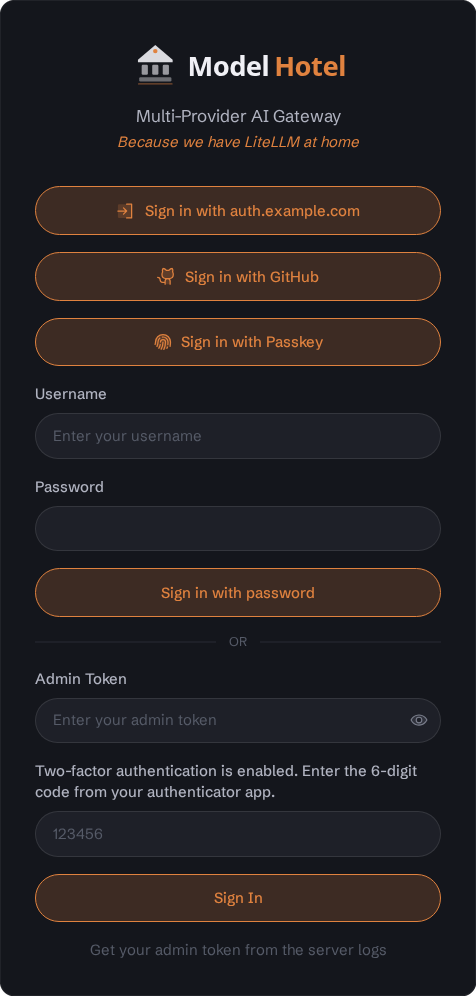
Login screen with WebAuthn passkey option visible when WEBAUTHN_RP_ID is configured.
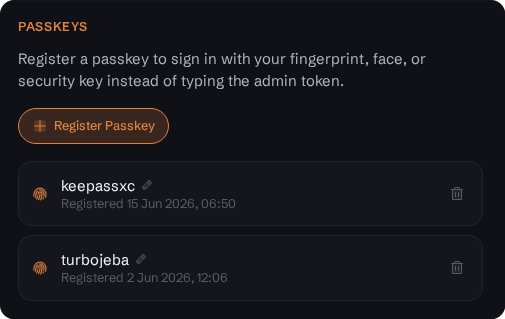
Settings page - Passkey credential management, showing registered credentials with rename and delete options.
Time-based one-time passwords (RFC 6238) add a second factor to admin login, independent of passkeys. TOTP needs no environment variable: it is opt-in at runtime from the Settings page (scan the QR code with any authenticator app, enter the 6-digit code, and save the one-time recovery codes shown). The TOTP secret is encrypted at rest with AES-256-GCM under MASTER_KEY, the same as provider keys, and is never logged.

The Authentication settings page, split into its three sections. Click any panel for the full view.
Settings page - Authentication section: passkey registration and the registered-credential list with the active sessions beneath them, the authenticator-app (TOTP) enable control, the tab timeout and the password policy (breached-password screening, with an inline note on what the lookup sends), then the single sign-on (OIDC and GitHub) configuration, the admin-login methods managed together.
Enforcement (first-factor downgrade): When TOTP is enabled, the raw admin token stops being a standalone bearer. It becomes a first factor that, combined with a valid 6-digit code, is exchanged on the login screen for a session token (the same DB-backed session infrastructure passkeys use). Only the session token then authorizes /api/* calls, which closes the static-token replay a bare bearer would otherwise allow. The same gate covers passkey management and backup restore.
Scope: TOTP guards the admin-token login path, and nothing more. A passkey login and an SSO login (OIDC or GitHub) mint the same admin session without asking for a code: a passkey is a phishing-resistant factor on its own, and an IdP login carries the IdP's own second factor when the IdP enforces one, so a code on top would duplicate it. Configure that factor at the IdP if SSO is your admin login. Sessions minted before TOTP was enabled stay valid too; revoke them from the active-session list if the enablement was a response to a suspected theft. This is by design, not an oversight.
Single-use codes: Each accepted 30-second step is recorded (admin_totp.last_used_step, migration 049), so a code cannot be replayed within the validation skew window (enforced by an atomic conditional UPDATE). Verification uses constant-time comparison.
Recovery codes: 10 single-use codes are shown once at enable time and stored only as SHA-256 hashes. A recovery code signs you in once so you can disable or re-enroll. Disable is gated on a current TOTP code or an unused recovery code, and the authorize-plus-delete runs in a single transaction so a recovery code is never spent without the disable completing.
Lost authenticator and all recovery codes: an operator can remove 2FA directly against the database with make totp-disable (or DELETE FROM admin_totp_recovery; DELETE FROM admin_totp; via psql against the stack's Postgres), then log in with the admin token alone and re-enroll. Like the in-app disable, the escape hatch clears both the config and the recovery-code hashes so no orphaned rows are left behind.
TOTP routes:
| Route | Method | Auth | Description |
|---|---|---|---|
/api/totp/status |
GET | None (public), IP rate-limited | Report whether TOTP is enabled (login UI gating) |
/api/totp/login |
POST | IP rate-limited; failures back off per IP and per account | Exchange admin token + 6-digit code (or a recovery code) for a session token. Body must be application/json (415 otherwise) |
/api/totp/enroll/start |
POST | Admin/session token | Begin enrollment; returns the otpauth URI + base32 secret |
/api/totp/enroll/verify |
POST | Admin/session token | Verify the first code, enable TOTP, return recovery codes + a session token. 409 while TOTP is already on; wrong codes back off |
/api/totp/disable |
POST | Admin/session token | Disable TOTP (gated on a current code or recovery code; wrong codes back off) |
The login endpoint is IP rate-limited, and failed second-factor guesses back off both per source IP and per account, so a brute force spread across IPs is throttled too (a wrong admin token charges only its IP, so it cannot lock the account). Enroll-verify and disable back off on wrong codes as well. Enroll and disable require admin or session token auth; once TOTP is enabled the raw admin token alone no longer satisfies that gate, so the second factor cannot be bypassed.
Admins can sign in through an external OpenID Connect provider (Authentik, Authelia, Keycloak, Pocket-ID, Okta, Google, Entra, and so on) as a fourth login path alongside the admin token, passkeys, and TOTP. SSO is configured at runtime from the Settings page (issuer URL, client ID, client secret, and the allowlist of verified emails, all visible in the Authentication screenshot above) and needs no environment variable. A "Sign in with SSO" button then appears on the login screen. Any standards-compliant OpenID Connect provider works (the names above are just examples): the flow relies only on standard discovery, PKCE, and ID-token verification, so the single requirement is that the provider releases the signing-in user's verified email (in the ID token, or from its UserInfo endpoint), because the allowlist is email-based and fails closed.
Additive, never a replacement. A successful SSO login mints the same DB-backed session token that passkey and TOTP logins produce, so nothing downstream changes. Local login is never removed: a misconfigured or unreachable provider cannot lock you out, because the admin token, passkeys, and TOTP all keep working.
Identity and allowlist. Logins are gated by an email allowlist that fails closed (an empty allowlist denies everyone) and matches only on the provider's email_verified claim. A user is anchored on the stable (issuer, subject) pair, which is logged on each successful login (app log, source oidc, with a masked email), so an allowlisted address cannot be hijacked through a second provider or a reused email. When the ID token omits the email (as Authelia does), the handler falls back to the OIDC UserInfo endpoint.
Flow hardening. The exchange uses PKCE plus a single-use state nonce, both bound to a short-lived login-state record (10-minute TTL) carried across the IdP round trip in a cookie. The client secret is AES-256-GCM encrypted at rest under MASTER_KEY, like provider keys. The minted session token never appears in a URL: the callback sets it as the HttpOnly session cookie and redirects to /, so there is nothing to leak through a Referer header, a request log, or a proxy's record of the 302 Location.
Transient network failures. All four OIDC hops (discovery, token exchange, JWKS, UserInfo), and GitHub login's equivalents, go out through the guarded client described in netguard, which re-issues a request that failed before it ever reached the provider. A momentary DNS or dial fault at the token exchange therefore costs a 250ms retry instead of the entire login: without it the user is returned to the login screen to repeat the whole IdP round trip, consent screen included. That section covers exactly what is and is not retried, and why re-issuing a token exchange cannot burn the single-use authorization code.
Because Model Hotel is self-hosted there is no turnkey "Google login": each operator registers their own OIDC app with the provider and points it at the redirect URI <oidc_public_base_url>/api/auth/oidc/callback (shown in Settings). OIDC SSO covers both the main admin dashboard and Front Desk: Front Desk reuses the same session seam and is configured independently from its own Settings page (its own issuer, client, allowlist, and public base URL, since it runs as a separate service on its own address), so the operator registers a redirect URI under Front Desk's own base URL. GitHub login is offered on the main dashboard only, by design.
When you register the app with your provider, two values must match what Model Hotel sends, or login fails before it starts:
-
Redirect URI: exactly
<oidc_public_base_url>/api/auth/oidc/callback(Front Desk uses its own base URL, e.g.https://front-desk.example.com/api/auth/oidc/callback). Any mismatch is rejected by the provider, not by Model Hotel. -
Allowed scopes: the client must permit all three of
openid,email, andprofile. The login request asks for all three; a client that allows fewer is refused witherror=invalid_scopeand the log lineoidc: idp returned error error=invalid_scope. Only the verified email is actually consumed, butprofileis still requested, so the client must allow it.
Then, in Model Hotel's own Settings, the allowlist must contain the exact verified email of the account that will sign in (lowercased, comma-separated for several). A mismatch is the oidc: login denied: email not allowlisted log line. The placeholder you started with is not magic: put the real address the provider returns.
The issuer URL is the provider's bare origin (e.g. https://auth.example.com), not its .well-known path: discovery is appended automatically. For a worked client registration, and for how your provider's own login policy interacts with all this, see Appendix: Authelia client example.
| Route | Method | Auth | Description |
|---|---|---|---|
/api/auth/oidc/status |
GET | None (public), IP rate-limited | Report whether SSO is enabled and the provider display name (login UI gating) |
/api/auth/oidc/start |
GET | IP rate-limited | Begin login: build PKCE + state, redirect to the provider |
/api/auth/oidc/callback |
GET | IP rate-limited | Provider redirect target: verify state/PKCE/ID token, enforce the allowlist, mint a session token |
/api/auth/github/status |
GET | None (public), IP rate-limited | Report whether GitHub login is enabled (login UI gating) |
/api/auth/github/start |
GET | IP rate-limited | Begin GitHub OAuth: build state, redirect to GitHub |
/api/auth/github/callback |
GET | IP rate-limited | GitHub redirect target: verify state, enforce the allowlist, mint a session token |
Every route under /api, the status routes included, sits behind the per-IP limiter, which charges a request once however many times it is mounted. Status routes need no authentication: the login screen polls them, and they read a few cached settings keys and make no outbound call. Start and callback write a login-state row per request. The GitHub callback is additionally covered by the per-key backoff described above; GitHub OAuth Apps support neither PKCE nor a nonce, which is why its flow is state-only.
Configuration lives entirely in the settings store (no migration): oidc_enabled, oidc_issuer_url, oidc_client_id, oidc_client_secret (encrypted), oidc_public_base_url, and oidc_allowed_emails.
GitHub works the same way as a separate option. GitHub is OAuth2 only (no OpenID Connect, no ID token), so instead of verifying an ID token it reads the account's verified emails from the GitHub API and matches them against the same kind of allowlist: an unverified address never counts, and the account's stable numeric id and login are logged on each sign-in (source github). Register a GitHub OAuth App, set its Authorization callback URL to <public base URL>/api/auth/github/callback, and paste the Client ID and secret into Settings. A "Sign in with GitHub" button then appears alongside the SSO button. As with OIDC, the session is delivered over an HttpOnly cookie, and local login always keeps working.
The proxy API requires a virtual key, in the Authorization header or (for Anthropic-style clients) the x-api-key header:
Authorization: Bearer <virtual-key>
x-api-key: <virtual-key>
Validation flow:
- Extract the key from
Authorization: Bearer, falling back tox-api-key; neither present is HTTP 401missing authorization header - Compute SHA-256 hash of provided key
- Look up the hash in the
virtual_keystable, bounded by its own 10-second timeout so a wedged database cannot park requests here. An unknown hash is HTTP 401invalid virtual key; a lookup failure is HTTP 500, or 499 when the client disconnected mid-lookup - A key whose owner account is disabled is HTTP 401
virtual key disabled: owner account is disabled - On success: store the key's identity, limits, budgets and owner's aggregate limits in the request context for downstream middleware
- On success: update
last_used_attimestamp asynchronously (fire-and-forget with 5-second timeout)
Every 401 from this middleware sets Connection: close. See Virtual Keys for the full context contract.
The generic error message prevents enumeration attacks (attackers cannot determine if a key format is valid vs. completely invalid).
Model Hotel uses a two-layer rate limiting system:
Applied before authentication, before the per-key limiter:
- Independent buckets per client IP address
- Configurable via DB settings:
-
rate_limit_ip_rps(default: 30) -
rate_limit_ip_burst(default: 60) -
rate_limit_ip_enabled(default: true)
-
- Always active when
RATE_LIMIT_ENABLED=true(cannot be bypassed by users) - Mounted before auth middleware to catch unauthenticated floods (brute-force key guessing, etc.)
- Respects
X-Forwarded-ForandX-Real-IPheaders only when request originates from trusted proxy (configured viaTRUSTED_PROXIESCIDR list) - The same resolved client IP is what access log lines, auth warnings, the audit trail, the active-sessions list, and each request-log row (
request_logs.client_ip) record, so every surface reports one consistent address per request - List only CIDRs of proxies you control in
TRUSTED_PROXIES: an entry there lets that peer's forwarded header dictate the address recorded in logs and the audit trail, so an over-broad list (never use0.0.0.0/0) turns the audit trail forgeable
Applied after authentication:
- Independent buckets per key (no cross-key interference)
- Configurable via DB settings:
-
rate_limit_rps(default: 10) -
rate_limit_burst(default: 20)
-
- Per-key overrides supported (set when creating virtual key)
- Unlimited mode: set
rate_limit_rps=0to disable limiting for specific keys - An owned key also counts against its owner's aggregate RPS and TPM caps, shared across every key that user owns, and on a Front Desk fleet member each cap is divided by the number of active members (fleet fair-share); see Virtual Keys
- Optional per-key token rate limit (
rate_limit_tpm): caps tokens/minute (prompt + completion; reasoning is part of completion); over-budget keys get429until the minute budget refills. Null falls back to the globalrate_limit_tpmsetting (0= no cap).
Both layers share:
-
rate_limit_max_wait_ms(default: 200ms) - maximum time a request waits in the rate-limiter queue before being rejected with HTTP 429 - Returns standard
Retry-AfterandX-RateLimit-*headers on 429 responses -
Environment variable kill-switch (
RATE_LIMIT_ENABLED=false) completely removes the rate-limiting middleware - it is not merely "disabled", it becomes a no-op - Runtime toggle via
rate_limit_enabled/rate_limit_ip_enabledsettings (only effective when the env var istrue) - When rate limiting is re-enabled after being disabled, all existing buckets are reset
- Unused buckets are cleaned up after 10 minutes of inactivity
When a request exceeds the instantaneous rate limit but is within max_wait_ms:
- Request is queued (not rejected)
- Waits for token availability (up to
max_wait_ms) - Proceeds if token becomes available within timeout
- Returns HTTP 429 if timeout exceeded
This provides smoother handling of bursty traffic while still enforcing limits.
Two ceilings apply, and the tighter one wins.
The gateway's router caps every request at MAX_REQUEST_SIZE (default: 50 MB, sized for multipart audio uploads to the /v1/audio/* endpoints). The middleware uses http.MaxBytesReader which enforces the limit at the stream level - the entire request body is never buffered beyond this limit. On /v1 the gateway does not buffer the body until the virtual key has been verified: an unauthenticated request is answered 401 from its headers and the refusal closes the connection, so a client without a key cannot make the gateway hold an upload in memory. (Go's HTTP server still discards up to 256 KB of such a body after the refusal, under the body read deadline above, so a trickling client holds the connection no longer than that deadline.)
The backup restore upload (POST /api/backups/restore) is the one exemption: it skips this cap and sets its own 100 MB bound in the handler, so a dump is not cut at the general ceiling.
Control-plane JSON routes (the dashboard API, the auth ceremonies, and every Front Desk endpoint) are bounded again at 1 MB, because 50 MB is sized for an audio upload and is the wrong bound for a login body. Two routes carry their own ceiling instead: a config-sync import (8 MB) and the fleet announce heartbeat (1 KB). Front Desk runs as its own binary and mounts no global size middleware, so for its handlers the per-route ceiling is the only one.
Exceeded limits return HTTP 413 (Payload Too Large). A body that is malformed, truncated, or carries anything after its one JSON value returns HTTP 400.
A size ceiling bounds how much a client may send, not how long it may take to send it, so both listeners (the gateway and Front Desk) also bound the time a connection can be held without doing work. The posture is decided once, in internal/httpx.NewServer, and is the same for both binaries:
-
Headers: a request must deliver its request line and headers within 10 seconds (
ReadHeaderTimeout). - Body: a request that carries a body gets a per-request read deadline of 30 seconds plus one second per 128 KiB of its length, capped at 15 minutes.
-
Idle keep-alive: a connection that has finished one request must start the next within 180 seconds (
IdleTimeout). The server side of an idle race should be the longer one, so this sits above the pools under the project's control: Traefik's default 90-second upstream idle, Front Desk's member clients (90 seconds), and the gateway's own 120-second outbound pool when one Model Hotel is a provider for another. Bellhop's OkHttp pool keeps a connection for five minutes and is deliberately left above it: OkHttp checks a pooled socket before reuse and retries a connection failure, and the listener's idle bound has to stay bounded rather than chase every client's pool.
How the body budget is sized. The length that earns time is the declared Content-Length, clamped to the largest body the listener accepts (MAX_REQUEST_SIZE on the gateway, the 1 MB JSON ceiling on Front Desk). A body that declares no length at all (Transfer-Encoding: chunked, as sent by a Go client streaming a file, a browser fetch with a stream body, or curl -T - uploading from a pipe) is budgeted as that largest body.
So a control-plane JSON body or an ordinary chat request has to arrive within the 30 seconds, a 20 MB vision request earns 190 seconds, and a 100 MB backup restore 830 seconds. An honest upload on a poor uplink still fits, while a client that declares a huge length and trickles bytes earns nothing past the listener's ceiling. Raising MAX_REQUEST_SIZE for larger uploads therefore also lengthens the longest hold a hostile connection can buy: 430 seconds at the 50 MB default, 830 seconds at the 100 MB maximum.
The clock starts when the request enters the handler chain, so the milliseconds routing and auth take count against it. The deadline covers the body only: once the body has been read, a streaming completion or an /api/events stream runs as long as it needs, and a request without a body never gets a deadline at all. A body the handler rejects before reading (a 401 on a POST, say) keeps its deadline, so the client cannot hold the connection open through the server's drain of the remainder either.
There is deliberately no whole-request ReadTimeout or WriteTimeout on either listener: streaming responses run for minutes to hours, and a write timeout would cut them off.
Cross-Origin Resource Sharing is controlled by the CORS_ORIGINS environment variable (default: http://localhost:5173,http://localhost:8081). Only origins in this list are allowed to make browser requests.
The middleware:
- Checks the
Originheader against the allowlist - Sets
Access-Control-Allow-Originonly for matching origins - Sets
Access-Control-Allow-Methods: GET, POST, PUT, PATCH, DELETE, OPTIONS - Sets
Access-Control-Allow-Headersto the headers the preflight names inAccess-Control-Request-Headers(browser SDKs send their own, such asanthropic-versionorx-stainless-*), or toContent-Type, Authorization, X-CSRF-Token, x-api-keywhen it names none - Sends
Vary: Origin, Access-Control-Request-Headersso a shared cache never replays one preflight's answer to another - Sets
Access-Control-Allow-Credentials: true - Sets
Access-Control-Max-Age: 86400(24-hour preflight cache) - Handles
OPTIONSpreflight requests with204 No Content
All HTTP responses include standard security headers (set globally via middleware):
| Header | Value | Purpose |
|---|---|---|
X-Content-Type-Options |
nosniff |
Prevents MIME type sniffing |
X-Frame-Options |
DENY |
Prevents clickjacking via iframes |
Referrer-Policy |
strict-origin-when-cross-origin |
Controls referrer information sent with requests |
Strict-Transport-Security |
max-age=63072000; includeSubDomains; preload |
Enforces HTTPS connections |
Content-Security-Policy |
default-src 'self'; script-src 'self'; style-src 'self' 'unsafe-inline'; img-src 'self' data: blob:; connect-src 'self'; frame-ancestors 'none'; base-uri 'self'; form-action 'self' |
Prevents injection of unauthorized scripts and resources |
Two of those are conditional:
- HSTS is set only when the connection itself is TLS. The server listens over plain HTTP, so behind a TLS-terminating reverse proxy this header is never emitted by Model Hotel. That is deliberate: a plain-HTTP listener that advertised HSTS would teach browsers to redirect to an HTTPS port that does not exist. Set the header at the proxy instead.
-
ALLOW_EMBED=truedrops both frame protections.X-Frame-Options: DENYis omitted and the CSP losesframe-ancestors 'none', so any origin may put the dashboard in an iframe (workspace browsers, Home Assistant). Everything else in the policy is unchanged. Leave it off unless you need the embed.
The ValidateProviderURL function enforces multiple security checks to prevent SSRF (Server-Side Request Forgery):
-
HTTPS by default - HTTP is only allowed if
ALLOW_HTTP_PROVIDERS=true(this scheme check runs in the provider API handler,internal/api/providers.go, just beforeValidateProviderURL) -
Loopback block -
localhost,127.0.0.1,::1are rejected by default (prevents SSRF) -
IP resolution check - the host is resolved and every returned address is checked against the same blocked ranges the runtime dialer enforces (see SafeDialer), so a
base_urlaccepted here cannot be silently refused later at dial time. A resolution that fails outright is not treated as a rejection: the name may simply be unresolvable from the box doing the saving, and the dial-time check is the authoritative one -
Allowed hosts - optional allowlist via
ALLOWED_PROVIDER_HOSTS:- Built-in provider hosts are always allowed regardless of the allowlist, and skip the loopback and IP checks entirely:
api.openai.com,api.nano-gpt.com,api.z.ai,api.kimi.com,kimi.com,api.minimax.io,minimax.io,api.deepseek.com,api.anthropic.com,ollama.com,opencode.ai,api.x.ai,generativelanguage.googleapis.com,aiplatform.googleapis.com,api.cohere.com,api.cohere.ai,openrouter.ai,api.neuralwatt.com,neuralwatt.com - Any subdomain of a known provider domain is accepted the same way, by suffix:
.nano-gpt.com,.z.ai,.kimi.com,.minimax.io,.deepseek.com,.anthropic.com,.ollama.com,.opencode.ai,.x.ai,.cohere.com,.cohere.ai,.openrouter.ai,.neuralwatt.com. Runtime dialing still applies the reserved-IP checks to these, so the suffix rule does not widen SSRF exposure - Hosts explicitly listed in
ALLOWED_PROVIDER_HOSTSbypass the loopback and reserved-IP restrictions - this is intentional, to allowlocalhostor an internal address for a self-hosted Ollama - When
ALLOWED_PROVIDER_HOSTSis empty (the default), any non-loopback HTTPS URL that does not resolve to a blocked address is accepted
- Built-in provider hosts are always allowed regardless of the allowlist, and skip the loopback and IP checks entirely:
While ValidateProviderURL blocks dangerous URLs at configuration time, the SafeDialer in internal/proxy/safe_dialer.go provides runtime SSRF protection when the proxy makes outbound connections to providers.
- Resolve first, dial by IP: The dialer first resolves the hostname to a list of IP addresses, then checks all IPs against blocked ranges (private, loopback, link-local, cloud-metadata). If all are blocked, the connection is refused.
- DNS rebinding protection: By resolving first and dialing by IP (not hostname), the dialer closes the TOCTOU (time-of-check to time-of-use) gap where DNS could resolve to a different address between check and dial.
- Redirect validation: HTTP redirect targets are also validated - the redirect host's IPs are checked against the same blocked ranges.
-
Known bypass via
KNOWN_PROXIES: IPs within CIDRs listed inKNOWN_PROXIESbypass the private-IP block, allowing connections to internal LLM servers (e.g. self-hosted Ollama on 10.0.0.5:11434). -
Host bypass via
ALLOWED_PROVIDER_HOSTS: Hostnames inALLOWED_PROVIDER_HOSTSskip the SafeDialer IP checks entirely.
| Category | CIDR/Address | Reason |
|---|---|---|
| Unspecified / "this network" |
0.0.0.0/8, ::
|
A dial to any of them lands on the local machine |
| Loopback |
127.0.0.0/8, ::1
|
Localhost |
| Private |
10.0.0.0/8, 172.16.0.0/12, 192.168.0.0/16, fc00::/7
|
Internal networks |
| Carrier-grade NAT | 100.64.0.0/10 |
Internal networks (RFC 6598, not covered by Go's private-address check) |
| Link-local unicast |
169.254.0.0/16, fe80::/10
|
Link-local |
| Link-local multicast |
224.0.0.0/24, ff02::/16
|
Never a legitimate HTTP endpoint |
| Cloud metadata | 169.254.169.254 |
AWS/GCP/Azure metadata endpoint (also link-local, checked again by name) |
The same list backs both provider-URL validation and the runtime dialer, so the two layers cannot drift apart.
A NAT64 address under the well-known prefix 64:ff9b::/96 is judged by the IPv4 address it embeds, since that is where the translator delivers it. A local-use NAT64 address (64:ff9b:1::/48, RFC 8215) is refused outright, because its prefix length is operator-chosen and the embedded address cannot be read with certainty; for a provider on such a network, ALLOWED_PROVIDER_HOSTS is the escape hatch. Setting it turns provider URL validation into an allowlist, so every custom provider host then has to be listed.
SafeDialer guards the proxy's path to LLM providers, which are external SaaS, so
it blocks every private range. The endpoints an admin configures are the
opposite case: an OIDC identity provider, the apprise-api notification
container, and Front Desk members all legitimately live on the internal network.
internal/netguard is the guard for those, and it refuses only the addresses
that are never a legitimate destination and are the classic SSRF targets.
| Destination | netguard | Reason |
|---|---|---|
Link-local unicast (169.254.0.0/16, fe80::/10) |
Blocked | Contains the 169.254.169.254 cloud-metadata endpoint |
| Link-local multicast | Blocked | Never a legitimate HTTP endpoint |
Unspecified / "this network" (0.0.0.0/8, ::) |
Blocked | A dial to any of them lands on the local machine |
Private (10.0.0.0/8, 172.16.0.0/12, 192.168.0.0/16, fc00::/7) |
Allowed | Where an internal IdP or the apprise container lives |
Loopback (127.0.0.0/8, ::1) |
Allowed | Same-host deployments |
netguard reads NAT64 addresses the same way SafeDialer does: a well-known-prefix
address is judged by the IPv4 address it embeds, and a local-use (RFC 8215) one
is refused. ALLOWED_PROVIDER_HOSTS does not apply here, so an identity
provider, apprise container, or Front Desk member behind a local-use NAT64
prefix is unreachable; give it an address outside that prefix.
It backs the OIDC SSO handler (discovery, token exchange, JWKS, UserInfo), the
GitHub SSO handler, and the alert dispatcher. Without it, go-oidc and oauth2
would fall back to http.DefaultClient, letting an admin-configured issuer URL
reach the metadata endpoint. (SSO provider config is per-instance and never
fleet-synced; only the email allowlists replicate.)
Note the trust consequence of per-member SSO config in an HA fleet: the fleet-wide email allowlist is only as strong as each member's own SSO configuration, since any member's admin can point that member's issuer at an IdP they control. This is not an escalation (settings writes already require admin), but it is why the allowlists sync while the provider config does not: revoking an address still takes effect everywhere on the next sync.
The refusal is a net.Dialer Control hook, so it runs after DNS
resolution, on the address actually being dialled. That closes the
check-then-dial (TOCTOU) window and catches DNS rebinding, where a hostname that
validated cleanly resolves to a metadata address at connect time. Every redirect
hop is dialled through the same hook, so a 3xx toward the metadata endpoint
fails at connect time as well; a redirect to a literal blocked IP is rejected
earlier and more clearly, and the chain is capped at 10 hops.
Settings-save validation (ValidateURL) is the cheap first pass: it requires an
http/https scheme and a host, and rejects a literal blocked IP. It
deliberately does not resolve DNS, both to keep an operator's save off a network
lookup and because the dial-time hook is the authoritative check.
HTTP(S)_PROXY is honoured like http.DefaultTransport, so a deployment that
reaches an external IdP through an egress proxy keeps working. The dial guard
still runs on the connection to the proxy.
Setting up a connection is bounded at 5 seconds for DNS resolution plus TCP
connect, and again at 5 seconds for the TLS handshake, against a 15-second budget
for a whole SSO request. Those bounds are what make a second attempt possible: a
resolver that took the entire request budget to fail would leave nothing to retry
with. net/http leaves both unbounded by default, so they are set explicitly
rather than inherited.
The rescue is still best-effort at the extreme. An attempt that exhausts both bounds (a TCP connection accepted and then stalled through the whole handshake) spends 10 of the 15 seconds on its own, so the retry gets what is left rather than a full connection setup of its own. The common case, a resolver that fails in well under its 5 seconds, leaves the retry ample room.
The 5-second dial bound is shared across a host's addresses, not granted to each: Go splits it between the candidates it tries in sequence, with a 2-second floor per address. A hostname resolving to several addresses of the same family therefore gets roughly 2s, 2s, then 1s rather than 5 seconds each. Dual-stack hosts are unaffected, since IPv4 and IPv6 are raced in parallel. If an IdP of yours is reached only after two of its addresses time out, prefer fixing the stale address record over expecting the dial to wait.
The SSO clients wrap netguard in a retry that re-issues a request which failed before any byte reached the origin server. It rescues a login from a momentary resolver failure at the token exchange, which happens after the user has already authenticated and consented at the IdP and would otherwise send them back to the login screen to repeat the whole round trip.
The scope is deliberately narrow:
-
Retried: DNS resolution failures other than NXDOMAIN, and failed dials,
including the dial of an egress proxy. Nothing left the process, so re-issuing
is safe even for the non-idempotent token
POST. -
Never retried: anything at or after the origin connection. A lost response
may mean the server already consumed the single-use authorization code, and
replaying it would turn a transient error into a hard
invalid_grant. Also never retried: a blocked address (a permanent security refusal, not a transient fault), NXDOMAIN (the resolver's definitive "host does not exist", usually a typo'd issuer), and any request whose body cannot be reproduced. -
One shape is not purely pre-connection.
net/httpre-issues a request itself when a pooled connection dies, and if the follow-up dial then fails, that dial error arrives here even though an earlier attempt was already written to a server. The stdlib only re-issues a request it deems replayable (GET,HEAD,OPTIONS,TRACE, or one carrying anIdempotency-Key), so those are idempotent by HTTP semantics and one more issue changes nothing. The tokenPOSTcan never reach that path. - One retry, 250ms later. Two attempts in total, never more.
- Alerting keeps the plain client. A notification is fire-and-forget, not a flow a user is waiting inside.
Each retry writes one WARN line to the app log under source netguard:
netguard: retrying request after pre-connection failure method=POST host=auth.example.com attempt=1 error=dial tcp: lookup auth.example.com on 127.0.0.11:53: server misbehaving
One line means exactly one extra attempt, so the line count is the retry count. This is the only signal that a resolver is flaking, and worth watching: repeated lines mean the resolver, not Model Hotel, needs attention. The text carries the host and the resolver error, never a credential (those live in the request body, which is never logged). See Request Logging for the App Logs view and its source filter.
| Variable | Default | Description |
|---|---|---|
MASTER_KEY |
(required) | Base secret for Argon2id key derivation. Should be 32+ characters; a shorter value logs a startup warning but still boots, since rotating it would invalidate every encrypted key. Never log or commit. |
ADMIN_TOKEN |
(auto-generated) | Admin API authentication token. Read on first boot only, when no <DATA_DIR>/admin-token file exists yet; once that file holds a hash it takes precedence and this variable is ignored. Auto-generated when unset. |
RATE_LIMIT_ENABLED |
true |
Master kill-switch for all rate limiting. false removes middleware entirely. |
RATE_LIMIT_IP_RPS |
30 |
Default requests per second for IP-based limiting. |
RATE_LIMIT_IP_BURST |
60 |
Default burst size for IP-based limiting. |
MAX_REQUEST_SIZE |
52428800 |
Maximum request body size (50MB; covers multipart audio uploads). |
CORS_ORIGINS |
http://localhost:5173,http://localhost:8081 |
Comma-separated list of allowed origins. |
ALLOW_HTTP_PROVIDERS |
false |
Allow HTTP (non-HTTPS) provider URLs. Enable only for local development. |
ALLOWED_PROVIDER_HOSTS |
(empty) | Comma-separated allowlist of provider hostnames. Empty = all non-loopback HTTPS allowed. |
TRUSTED_PROXIES |
(empty) | CIDR list of trusted proxy IPs. Required for X-Forwarded-For header validation. Controls inbound trust only. |
KNOWN_PROXIES |
(empty) | CIDR list of internal LLM server networks. Bypasses SafeDialer private-IP blocking for outbound connections. |
WEBAUTHN_RP_ID |
(empty) | Relying Party ID for WebAuthn/FIDO2 passkey login. Empty = disabled. |
WEBAUTHN_RP_ORIGINS |
(empty) | Comma-separated origins accepted during passkey ceremonies. Empty falls back to CORS_ORIGINS, then to http://localhost:<PORT>. |
COOKIE_SECURE |
always |
Secure attribute on the session cookie pair: always, auto (only over TLS), or never. Unset or unrecognized values fall back to always. |
ALLOW_EMBED |
false |
Allows any origin to embed the dashboard in an iframe by dropping X-Frame-Options and the CSP frame-ancestors directive. |
METRICS_TOKEN |
(empty) | Bearer token for /metrics scrapes. Empty means the endpoint falls back to normal admin auth. |
DEMO_READONLY |
false |
Refuses every mutating request on the admin CRUD surface with a 403, and also refuses passkey management, backup download, config export and reading stored alert targets. Admin chat and the public proxy stay usable, and refused attempts are still recorded in the audit trail. |
DEMO_SHOW_TOKEN |
false |
Publishes the admin token on the login screen for a public demo. Inert (and warned about at startup) unless DEMO_READONLY is also on. |
PWNED_PASSWORD_CHECK_ENABLED |
true |
Hard kill-switch for breached-password screening of new dashboard passwords (Have I Been Pwned range API, k-anonymity: only a five-character SHA-1 prefix leaves the box, fail-open). false disables it outright; the runtime toggle under Settings > Authentication > Password policy cannot re-enable it. See Configuration. |
PWNED_PASSWORD_API_URL |
https://api.pwnedpasswords.com |
Base URL of the range API; point at a self-hosted mirror for air-gapped deployments. |
DATA_DIR |
./data |
Directory for admin token storage. Must have restricted permissions. |
- Set
MASTER_KEYto a cryptographically random value (32+ bytes) - Store
MASTER_KEYin environment or secrets manager - never in version control - Restrict
DATA_DIRpermissions to owner-only (0700) - Set
ADMIN_TOKENexplicitly in production (don't rely on auto-generation) - Configure
CORS_ORIGINSto match your frontend domain(s) - Set
TRUSTED_PROXIESif running behind a load balancer or reverse proxy - Set
KNOWN_PROXIESif using self-hosted LLM servers on private networks - Set
WEBAUTHN_RP_IDto enable passkey authentication (leave empty to disable) - Consider enabling TOTP 2FA from Settings for an additional admin-login factor (no environment variable required)
- Keep
RATE_LIMIT_ENABLED=truein production - Monitor rate limit 429 responses for potential attacks
- Use HTTPS for all provider URLs in production
- Regularly rotate virtual keys and provider API keys
- Review access logs for unusual patterns
The app itself listens over plain HTTP and terminates no TLS, so a public deployment always has a proxy in front of it. Four things to get right:
- Terminate TLS at the proxy and set
Strict-Transport-Securitythere, since the app will not. - Set
TRUSTED_PROXIESto the CIDRs of that proxy only, or every logged client IP is whatever the caller claims. - Leave
COOKIE_SECUREatalways(the default) so the session cookie is never sent over cleartext. Useneveronly for a plain-HTTP LAN deployment. - Do not publish the app's port (8081 in the stock compose file) to the WAN. Only the proxy should be able to reach it.
Provider API Keys:
- Update the provider's encrypted key via admin API
- Old key is immediately invalidated (cache entry expires naturally)
- The new key is encrypted with a freshly generated per-provider salt
Virtual Keys:
- Delete the old virtual key via admin API
- Create a new virtual key
- Distribute new key to clients
- Old key hash is removed from database - immediate invalidation
Admin Token:
- Stop the server
- Delete
<DATA_DIR>/admin-token - Restart server - new token generated and logged
- Update all clients with new token
- Alert on unusual 401/403 rates (potential brute-force)
- Alert on rate limit 429 spikes (potential DoS)
- Monitor provider key decryption failures (potential
MASTER_KEYmismatch) - Track virtual key usage patterns for anomaly detection
- Log admin API access (with key hashes, never plaintext tokens)
- Watch the app-log source
netguard: every line there is a retried connection, so a run of them means your resolver is flaking. A blocked-address refusal is not a line of its own; it surfaces inside the failing caller's error text (anoidc:line for SSO)
Database backups are pg_dump --format=custom files sitting in DATA_DIR/backups. Anything able to write into that directory could otherwise replace a dump with a crafted one containing an injected admin account, and a later restore would activate it.
Each backup is therefore signed when it is written, manually or by the rotation scheduler. The signature is HMAC-SHA256 under a key derived from MASTER_KEY via HKDF (HMAC-based key derivation) with a dedicated label, so the signing key is not the key that encrypts provider credentials, and it lives in a <backup>.dump.sig sidecar rather than inside the dump, which keeps the dump a valid pg_restore input. Deleting or pruning a backup removes its sidecar with it.
The signature covers the filename as well as the contents. Signing contents alone would let a dump and its sidecar be renamed together and still verify, so an attacker able to write to the directory could drop an older genuine backup into today's name. It would verify clean and restore stale state, reinstating revoked virtual keys and deleted accounts without forging anything. Binding the name makes that swap fail the check.
Where it is enforced. Verification happens on download, because a restore consumes an upload and a download is how a backup leaves the server on its way to one. A dump whose contents changed after signing is not served at all: the request gets 409, and a backup.integrity_failed event is raised. The check reads the same open file handle the response streams from, so swapping the file at that path after it is opened cannot slip different bytes past the check. Content is streamed lazily, so an attacker who can write in place to the same file (not merely replace it in the directory, which is a stronger permission) can still alter bytes mid-transfer; closing that would mean buffering the whole dump. Restore additionally verifies when the caller supplies the sidecar's contents in the signature form field (the dashboard's restore dialog has a field to paste it into), and rejects a mismatch outright.
What is deliberately not blocked. A backup with no signature (taken before signing existed, or produced by another instance) is still served and still restorable, because refusing it would make legitimate old backups unrecoverable. The backups API reports signed per file so unprotected backups can be identified, and a restore performed without a signature raises a backup.restore_unverified warning event. In the dashboard, restoring with the signature field empty is a deliberate second step: the dialog states that the dump's contents cannot be verified and asks for an explicit "restore anyway" before the upload happens, because the pre-restore inspection checks the kinds of objects in the dump, not the rows they hold, so a dump with a planted admin account or a repointed provider address would pass it. In the backup list, a signed backup carries a "Copy signature" button (backed by GET /api/backups/{name}/signature) that puts the sidecar's contents on the clipboard for that field, since the download hands over the dump alone; an unsigned backup has no such button, which is the only per-backup indication of signed the dashboard shows. Otherwise the signal an operator sees is the 409 on download and the events.
Limits worth knowing.
- The signing key is derived from
MASTER_KEY, which lives in the application's environment, so this does not defend against an attacker who has already compromised the app container: they can read the master key and forge a signature. What it does defend is backups at rest wherever the directory is reachable by something that lacks that environment, such as a NAS share or a sync target. - Because the signature binds the filename, a backup renamed after download (a browser adding a suffix to a duplicate, for instance) will not verify at restore. You can restore without the
signaturefield, which proceeds and records the restore as unverified, but only do that when you can account for why the name changed. A mismatch you cannot explain means the contents changed, and restoring it unverified is exactly the outcome this feature exists to prevent. Rename the file back to the name it was downloaded under before reaching for that. - Rotating
MASTER_KEYinvalidates every existing sidecar, so previously signed backups stop downloading with a409until their sidecars are removed from the backup directory. There is no in-app control for that today. - Verification reads the whole dump before the first byte is sent, so a download of a very large backup starts slower than it used to.
- Dumps themselves are not signed against the database they came from, only against tampering after the fact.
Dumps are not encrypted. Provider keys, TOTP secrets, and fleet member tokens are already AES-256-GCM encrypted in the database, so a dump alone does not expose them; what a dump does contain is Argon2id password hashes and SHA-256 hashes of virtual keys. Store backups on encrypted volumes if that matters to your threat model.
Provider API keys are cached in decrypted form for up to 10 minutes to avoid Argon2id computation overhead on every request. This is an intentional trade-off:
- Risk: Decrypted keys exist in process memory
- Mitigation: Short TTL (10 min), process isolation, memory protection
- Acceptable because: Attacker with memory access has already compromised the host
Argon2id parameters (t=1, m=8MB, p=4) are below RFC 9106 minimums (t=3, m=64MB):
-
Rationale:
MASTER_KEYis a high-entropy random value (32+ bytes), not a user-chosen password - Threat model: Argon2id's primary defense is against low-entropy brute-force, which does not apply here
- Benefit: Lower latency on every provider key decrypt (including per-request operations)
If you discover a security vulnerability, please report it privately before public disclosure. Include:
- Description of the vulnerability
- Steps to reproduce
- Potential impact
- Suggested fix (if any)
Your provider's own login policy (how many factors it prompts for) is independent of Model Hotel. With Authelia, authorization_policy: one_factor gives a one-click sign-in once you have an Authelia session, while two_factor makes Authelia prompt for its own second factor (passkey/TOTP) before returning. Neither changes Model Hotel's behaviour; pick the friction you want at the IdP.
Authelia example client (identity_providers.oidc.clients):
- client_id: model-hotel-frontdesk
  client_name: Model Hotel Front Desk
  client_secret: '$pbkdf2-sha512$...'   # the hashed digest from: authelia crypto hash generate pbkdf2 --variant sha512 --random
  public: false
  authorization_policy: one_factor       # or two_factor for an IdP-side second factor
  redirect_uris:
    - https://front-desk.example.com/api/auth/oidc/callback
  scopes:
    - openid
    - email
    - profile                            # required: omitting it causes invalid_scope
  response_types:
    - code
  grant_types:
    - authorization_code
  token_endpoint_auth_method: client_secret_basic
  pkce_challenge_method: S256
Paste the secret's plaintext (the "Random Password" the hash command prints, not the digest) into the client-secret field in Settings; the digest goes in the Authelia config.
The provider's token-signing key (Authelia's identity_providers.oidc.jwks, plus the hmac_secret) is a one-time, provider-wide bootstrap, not per-client: you generate it once when you first enable OIDC on the IdP, and every client after that (a second app, Front Desk, etc.) reuses it. So if you set up the main dashboard first, registering Front Desk needs only the client block above, no new key. Neither Model Hotel nor Front Desk ever holds that private key; they verify tokens with the IdP's published public key fetched via discovery.
- Virtual Keys - Virtual key creation, hashing, and management
- Multi-User - Accounts, roles, and per-user grants on the admin surface
- Privacy - Data handling, logging, and privacy guarantees
- Request Logging - Request log structure and retention