Multi User - hugalafutro/model-hotel GitHub Wiki
Model Hotel ships with a single shared admin token by default. Multi-user access adds named dashboard accounts on top of that: each user signs in with a username and password (plus their own optional TOTP second factor) on the same login screen, and is scoped to exactly the parts of the dashboard they need.
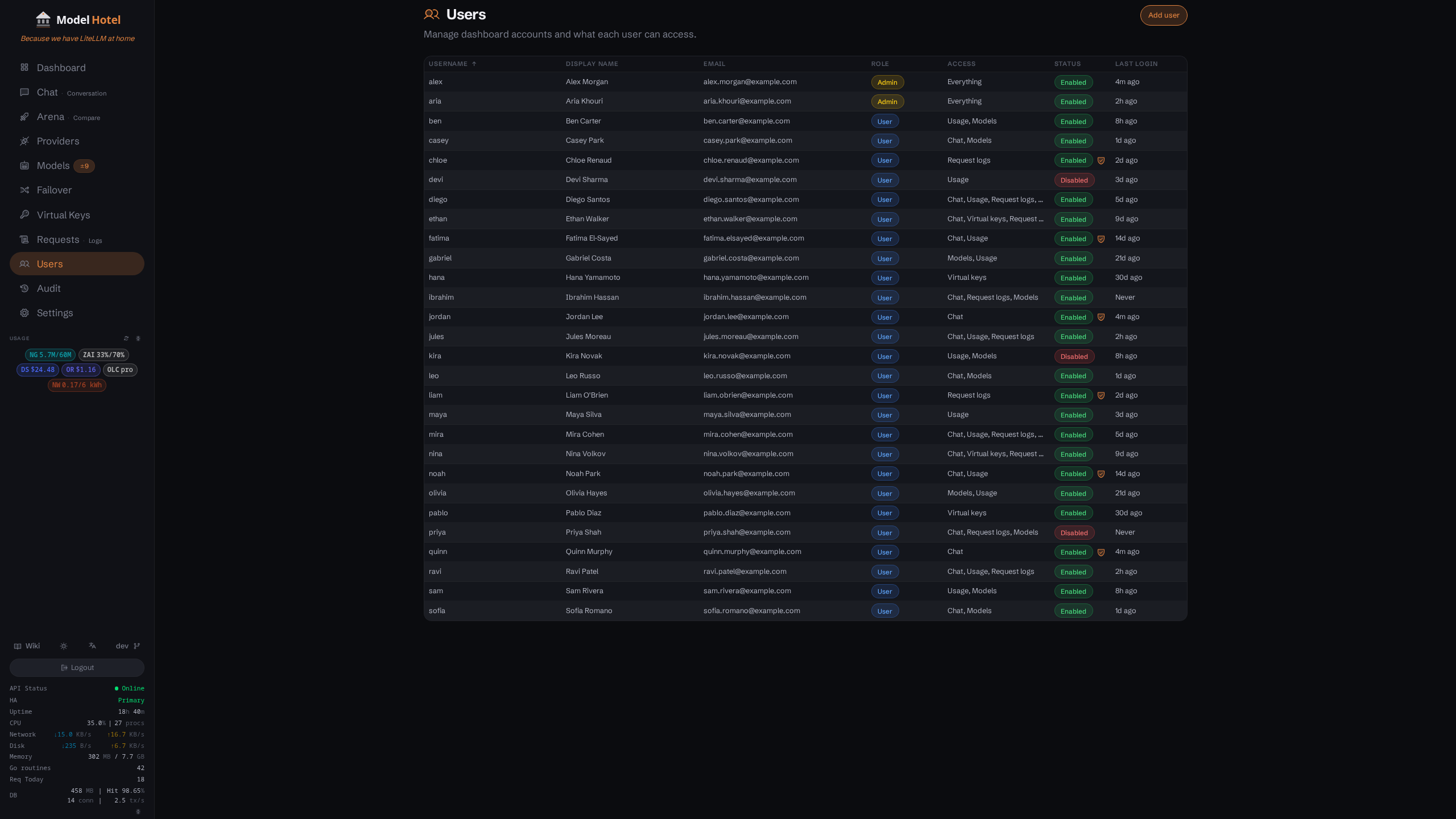
The Users page: one admin and several scoped user accounts, with role, grants, status, and last-login columns
- Named accounts live in the
userstable, separate from the env admin token. - Two roles: admin (full access, every grant implied) and user (access bounded by a grant list).
- A user owns their virtual keys. Per-account rate limits (RPS / burst / TPM) cap that account's aggregate traffic: every virtual key the user owns, plus what they send from the dashboard Chat and Arena pages.
- An account can also carry a provider cap, an admin-set list of the providers it may reach. The cap bounds every key that account owns.
- The username/password login form appears on the login screen only once at least one enabled user exists. A fresh install keeps the single admin-token flow.
- Local admin-token login is never removed, so a locked-out or misconfigured user can never lock you out of the dashboard.
| Role | Access |
|---|---|
admin |
Everything: the Users page, all settings, providers, virtual keys, and logs. Grants are implied (the Access column reads "Everything"). |
user |
Only the pages allowed by their grants list, plus their own Security page. The admin-only pages (Users, Providers, Failover groups, Audit, Settings) stay out of reach whatever the grants say. |
Grants apply to user accounts only. An admin implies all of them.
| Grant | What it allows |
|---|---|
chat |
The Chat and Arena pages and the admin chat endpoints. |
usage |
Stats and usage dashboards (read-only). |
logs |
Request logs: routing metadata only, never prompt content. |
models |
The models list (read-only). |
virtual_keys |
The Virtual Keys page, with full CRUD over the user's own keys. |
The edit modal renders its checkboxes from the backend grant catalog (internal/user/grants.go), so the list above is always what the server actually enforces.
Admins manage accounts from the Users page:
- Create: choose a username, display name, email, role, and grants, then set an initial password. Share that password with the user out of band; the user signs in with it and the flow proceeds as normal.
- Edit: change profile fields, role, or grants, and enable or disable the account. Disabling revokes the account's live sessions immediately. An admin cannot disable or demote their own account, so nobody saws off the branch they sit on.
- Reset password: set a new password for the user. This signs them out everywhere, so a reset always forces a fresh login.
- Reset two-factor authentication: clear a user's TOTP enrollment if they lose their authenticator. It removes the authenticator binding and all of that user's recovery codes; their password is untouched.
- Delete: remove the account and its sessions. Virtual keys the account owned are kept and become unowned, not deleted.

The edit modal: profile fields, role, grants, provider access cap, proxy limits and budget, the enabled switch, then password reset and delete below the save row
Passwords must be at least 8 characters. When breached-password screening is enabled (the default), they are also checked against the Have I Been Pwned corpus and a known-breached password is refused. See Security for that check and what it sends.
The Email field is more than a profile detail: it is the binding key for single sign-on. A verified OIDC or GitHub login carrying that address signs in as this account. One account binds to one external identity, so a second provider cannot claim it later by asserting the same email.
The table shows each account's role, access, enabled/disabled status (a shield icon marks accounts with a confirmed TOTP second factor), and last-login time.
A signed-in user account gets its own Security page (the env admin token has no user row and uses Settings instead). From there a user can:
- Change their own password, presenting the current one first. On success every session of the account is revoked, including the one making the change, so they sign back in with the new password.
- Enroll, view, or disable their own authenticator app, and see how many recovery codes are left.
Admins never see a user's password or TOTP secret; the only admin actions are reset and clear.
Each account can carry an optional provider cap: the list of providers that account is allowed to reach. The default is no cap, meaning every provider, and every account that existed before the cap was introduced keeps that default, so an upgrade changes nothing until you set one.
Admins set it on the Users page alongside role and grants. The Provider access column reports the account's state at a glance: "All providers" for an uncapped account, the first allowed provider plus a count of the rest for a capped one, and "No providers" for an account whose cap has been emptied.
The cap bounds every virtual key that account owns. Enforcement is an intersection at request time: on each request the key's own allowed_providers list is intersected with the owner's cap, and the request may route only to a provider present in both. Narrowing a cap therefore takes effect on the very next request, with no need to edit or re-issue any of the account's existing keys. The same cap applies on the dashboard Chat and Arena pages, which carry no virtual key at all, so there the account cap is the whole rule.
Three consequences are worth knowing before setting one:
- A capped account does not automatically receive newly added providers. The cap names providers explicitly, so adding a provider to Model Hotel immediately widens what every uncapped account can reach and changes nothing for a capped one. Each capped account that should have the new provider must be granted it. This is what the Provider access column is for: an account quietly falling behind the provider list is otherwise invisible.
- Deleting the last provider in an account's cap leaves that account able to reach nothing. Deleting a provider strips it from every account cap and every key allow-list that named it. An account whose cap held only that provider ends up with an empty cap, and an empty cap means exactly zero providers, never all of them. The Users page shows this state explicitly as "No providers" rather than letting it read as unrestricted, and the affected keys are marked on the Virtual Keys page too.
- Admins are bound by the cap at write time as well. Creating or updating a virtual key that names a provider outside its owner's cap is refused, and the refusal names both the provider and the account. An admin who wants a key to reach a provider raises the owner's cap first, then sets it on the key. Creating a key for a capped account without naming any provider stores the owner's cap on the key, which is what "everything this account may reach" means in practice.
Each account can carry optional RPS, burst, and TPM caps. These are aggregate limits: they bound that account's combined traffic, on top of the per-key limits on individual keys. A null value means no cap; set values follow the same bounds as per-key limits (RPS 0 to 10000, burst 1 to 10000, TPM 1 to 100000000). This lets you hand a user several keys and still bound their total consumption. See Configuration for how the per-key and per-user buckets interact.
The account bucket covers every surface the account can send from, not only its virtual keys. Requests made from the dashboard Chat and Arena pages carry no virtual key, and they are charged to the same bucket. So a user who exhausts an aggregate cap sees the Chat page fail with 429 Too Many Requests carrying user rate limit exceeded (the RPS/burst cap) or user token rate limit exceeded (the TPM cap), exactly as their API traffic would. Set these caps expecting them to bound the person, not only the keys they hold.
- A user signs in with username and password on the standard login screen. A "Sign in with password" block appears alongside passkey, SSO, and the admin token once any enabled user exists.
- If the user has enrolled TOTP, the login completes with their own 6-digit code (separate from the admin TOTP). Recovery codes are per account.
- Unknown username, wrong password, and disabled account all return the same 401, and a missing username costs the same hashing work as a wrong password, so the form leaks neither which usernames exist nor which are enabled.
- Failed sign-ins back off after five failures, per IP address and per username, growing from one second up to a five-minute ceiling. The backoff always expires: an attacker hammering a username cannot lock its owner out permanently.
- Sessions are the same DB-backed session tokens that passkey and admin TOTP login use, with the same hashing and expiry. See Security for session lifetime and the sign-out-others controls.
- The admin token, passkeys, and SSO all keep working regardless of how many user accounts exist.
Every mutating dashboard action (POST, PUT, PATCH, DELETE on the authenticated /api/* surface) by any signed-in account, admin or user, is recorded in an audit trail. Two kinds of call are left out because they are not admin actions: machine-to-machine fleet traffic (the heartbeat Front Desk sends every member, and the quota snapshots it relays to them), and a read-only POST that answers a question without changing anything (the backup prune preview). Viewing the trail is admin-only.

The Audit page: who changed what, with the detail modal open on a model-test entry
Each entry records who (actor and role), what (HTTP method and route pattern), the target entity, the response status, the caller's remote address, and when. Request and response bodies are never stored, so secrets (provider keys, passwords) can never end up in the trail.
- The Entity column resolves the target's UUID to its current display name at read time (model, provider, virtual key, failover group, or username). Names are never stored: after a rename the trail shows the new name, and a deleted entity leaves only its UUID as the trace.
- Clicking a row opens a detail modal with copyable fields: full timestamp, actor, entity name and UUID, endpoint pattern, the concrete request path, and remote address.
- The list filters by actor and method, and pages newest-first.
- The trail can be purged from the page. The purge is itself a mutating request and is recorded, so a wiped trail always shows who wiped it.
- The trail is instance-local operational telemetry: it is not fleet-synced (a database backup does carry it, like every table), and old rows are pruned against a retention window (90 days unless
audit_retention_dayssays otherwise).
See API Reference for the /api/audit endpoints.
- Passwords are hashed with argon2id, each with its own random salt, and stored as a PHC string (a self-describing hash that carries the salt and cost parameters alongside the digest, so the cost can be raised later without a migration). It is the same key-derivation function used for
MASTER_KEY. Plaintext passwords are never stored. - User TOTP secrets are AES-256-GCM encrypted at rest with
MASTER_KEY, like provider keys. - Grants are enforced server-side on every request. The UI gating is convenience, not the security boundary: a user who loses a grant cannot reach that data even by calling the API directly.
- On a demo instance running with
DEMO_READONLY=true, every user-management write is refused along with the rest of the admin CRUD surface. The roster stays browsable. - In a High Availability fleet, user accounts (including the password hash, role, grants, limits, and provider cap) are replicated by Front Desk config-sync alongside providers, virtual keys, settings, and failover groups, so a user can sign in against any healthy member with the same credentials. Two things stay local to each member: per-user TOTP enrollments and recovery codes, which are never synced, so a user enrolls a second factor separately on each member and resets it there; and user management writes, which a managed member refuses, because the primary owns the roster and replaces it on the next sync. See High Availability.