The Bridge and Broker Sensors - TheThinkingHome/device_sentinel GitHub Wiki
The Bridge and Broker Sensors
When your Zigbee stick crashes, sixty sensors don't suddenly die at exactly the same second. The coordinator they talk through stopped.
Device Sentinel watches your devices, and it also watches what they rely on: the coordinator they talk through, and the MQTT broker underneath it. When either fails, the devices behind it go quiet. These sensors let Device Sentinel name the coordinator or broker as the cause, not the devices.
When Device Sentinel finds a coordinator or broker, it automatically creates a sensor for it. Here is what they tell you.
Bridge Sensors
You get one sensor for each coordinator Device Sentinel finds: Bridge: Zigbee2MQTT, Bridge: ZHA, or both if you are running a mixed house.
They share three core states:
running: The coordinator is up. This is what you want to see.down: The coordinator has stopped, crashed, or gone quiet long enough that it cannot be read.unknown: Nothing has been heard yet, usually right after a restart. A coordinator that is slow to start readsunknownrather thandownfor the first few minutes. This is so that a restart does not produce an outage that clears itself a minute later.
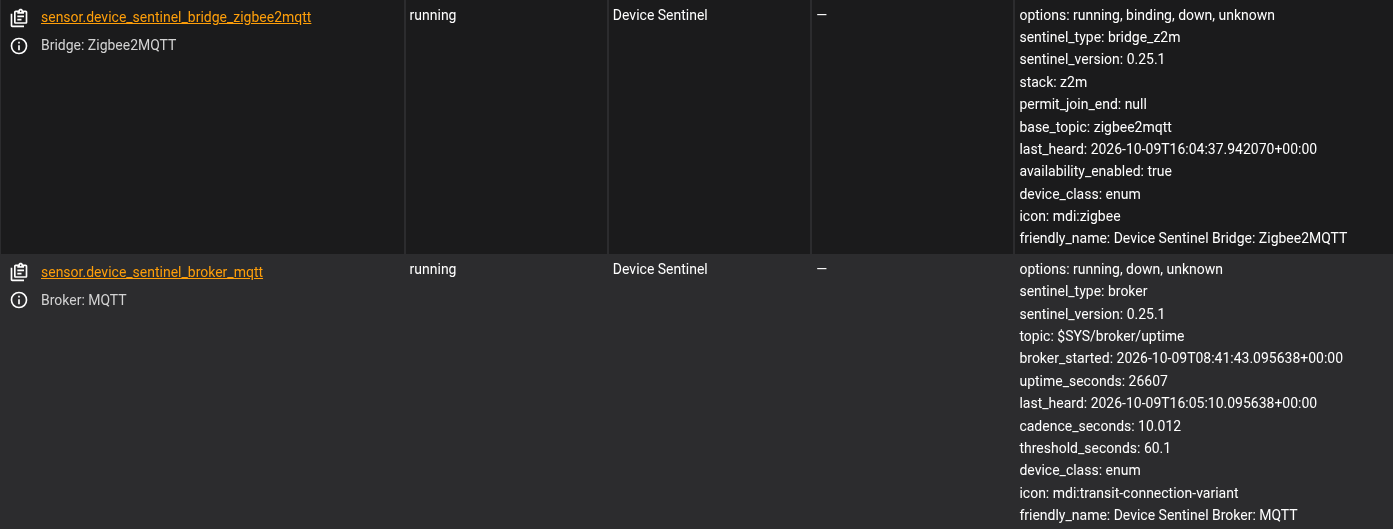
Bridge: Zigbee2MQTT adds a fourth state: binding. This appears while your pairing window is open. It also carries an availability_enabled attribute so you know if Zigbee2MQTT's own availability feature is switched on (which gives you the second opinion described in the Zigbee2MQTT guide).
Bridge: ZHA has no binding state because ZHA handles pairing differently. Instead of opening a readable window, ZHA simply announces when a device is re-paired, reconfigured, or removed. Device Sentinel listens for those announcements directly, as the ZHA page explains.
Bridge: WiFi
If you configured Wi-Fi outage tracking on the WiFi screen, you will see a Bridge: WiFi sensor. There is no physical "coordinator" behind this; the integration is watching your actual wireless network. It reads running normally, or down while a Wi-Fi outage is declared.
Broker: MQTT
A bridge cannot report that its own transport has failed. If your MQTT broker dies, Zigbee2MQTT can't send a message to tell you about it.
That is why the broker gets its own sensor. It reads running, down, or unknown. Its attributes carry the vital stats: when the broker started, its uptime, when it was last heard from, the interval it publishes on, and the topic. If you don't use MQTT, this sensor stays safely switched off and reads unknown forever.
Why You Actually Care
These sensors aren't just dashboard decoration. They fundamentally change how the integration judges your home:
One alert, not sixty. When a coordinator goes down, the problem list, the dashboard card, and your phone carry one single line naming the dead bridge and counting the devices behind it. You don't get spammed with a notification for every sensor in your house. Fix the bridge, and that one row counts your devices home as they return, giving the slow ones a few minutes before any of them is reported on its own.
Silences aren't learned during an outage. If your network is down for four hours, your devices didn't choose to take a four-hour nap. A gap that spans a bridge or broker outage measures the outage, not the device. That silence is thrown out. Without this, one bad night would permanently widen the freeze window for every device in your house.
Human fixes are credited to humans.
When your Zigbee2MQTT sensor reads binding, Device Sentinel knows your pairing window is open. Any device that suddenly wakes up during that window is treated as your handiwork, not a natural recovery, so it doesn't corrupt the device's learned rhythm. (For work that the system can't automatically see, like a battery swap, use Maintenance Mode).
A broker outranks a bridge. If your MQTT broker dies, it takes every bridge with it. The broker takes the blame, because two rows for one fault is noise.
Turning Them Off
Don't want to see these sensors on your dashboard? Turn them off in Home Assistant. A sensor is just a window onto a state, not the engine doing the reading. Device Sentinel keeps watching the coordinator and broker whether you display the sensor or not.