Zigbee2MQTT - TheThinkingHome/device_sentinel GitHub Wiki
Zigbee2MQTT
Device Sentinel pulls more context from Zigbee2MQTT than from any other stack. Because Z2M exposes so much useful information about its own state, Device Sentinel can tell more about your network without you having to configure a thing.
Every Zigbee2MQTT device gets the full treatment automatically: its reporting rhythm is learned, its freeze window is tailored to that rhythm, and its battery and signal health are actively monitored.
Beyond that, Device Sentinel reads the Z2M bridge directly, which gives you three things.
Watching the Bridge
Your coordinator is watched just like a device. A Bridge: Zigbee2MQTT sensor tracks whether the bridge is running, binding (pairing), down, or unknown.
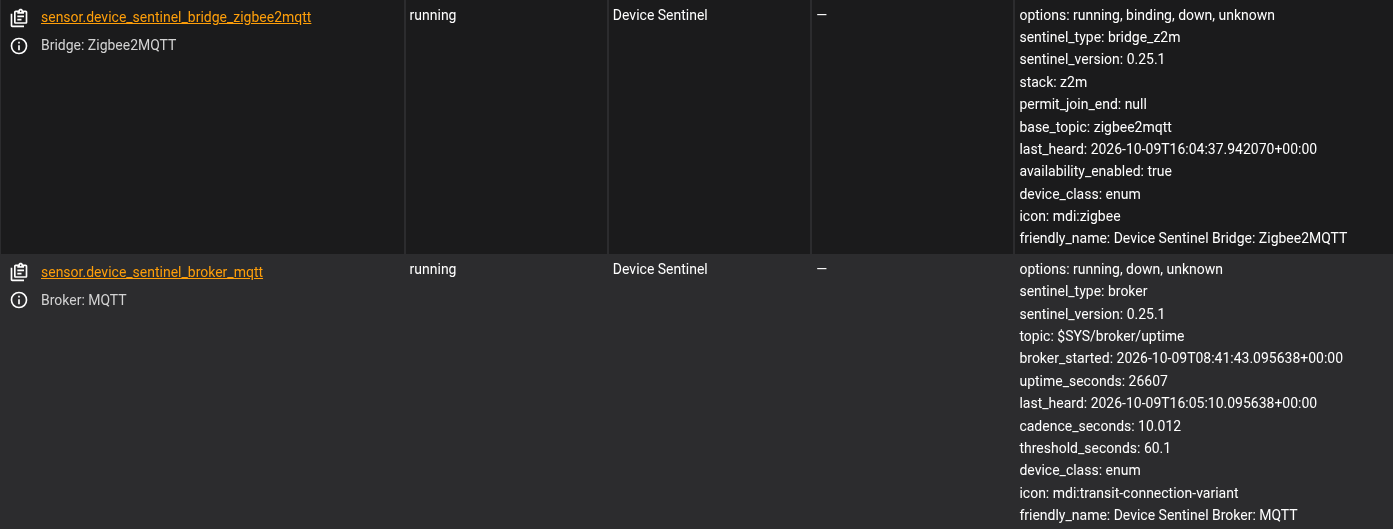
If the coordinator crashes or loses power, you do not get a separate alert for each lightbulb, smart plug, and door sensor in your house. You get one single row on your problem list naming the coordinator and counting the devices behind it. When the bridge comes back, that row counts your devices home as they rejoin and gives the slow ones a few minutes before any of them is reported on its own. And any gaps that span the outage are set aside, so a crashed bridge doesn't permanently ruin your devices' learned rhythms.
It Knows When You Are Pairing
When you click "Permit Join" in Z2M to re-pair a flaky sensor, the Bridge sensor shifts to binding.
Device Sentinel sees this window open. If a silent device suddenly wakes up and reports during this window, the integration knows that recovery was your handiwork, not a natural heartbeat. It safely discards that silence gap instead of learning it, so your manual repairs never teach the system that being broken is "normal."
The Second Opinion
Zigbee2MQTT has its own native "Availability" feature, and Device Sentinel reads it to provide a second opinion right beside its own freeze verdicts.
But you have to know how to read it, because the availability reading confirms; it does not decide.
Here is why: Z2M generally allows a mains-powered device 10 minutes of silence before calling it offline. Battery-powered devices get twenty-five hours. Because battery sensors spend most of their lives asleep, Z2M has to cast a massive, generic net.
If you rely solely on Z2M's availability, a dead door sensor will sit on your dashboard looking perfectly healthy for a full day and a night before the system finally admits it is gone.
That is why Device Sentinel's own learned window is the sharper of the two. If Device Sentinel reports a sensor frozen in two hours, an "online" reading from Z2M is not a contradiction. Z2M is simply still waiting out its generic 25-hour clock. But an "offline" reading from Z2M confirms the fault: Zigbee2MQTT agrees with what Device Sentinel already found.
(Note: If the availability_enabled attribute on the bridge sensor reads false, this feature is switched off inside Zigbee2MQTT itself. Turning it on in Z2M is what activates this second opinion).
The One Instance Limit
Device Sentinel is currently designed to read one Zigbee2MQTT instance. If you run multiple Z2M instances on a single Home Assistant server, the secondary instances are not read separately.
See Also
- The Bridge and Broker Sensors, for what each state means and what the MQTT broker sensor adds.
- The Diagnostic Reports, to see the
no (pairing)entries these states produce in the silence episodes report. - Maintenance Mode, for logging your hand-fixes when you aren't using the Z2M pairing window.