How Device Sentinel Learns - TheThinkingHome/device_sentinel GitHub Wiki
How Device Sentinel Learns
A fixed timeout is a terrible way to judge a smart home. A motion sensor reporting every thirty seconds requires a completely different baseline than a door sensor checking in twice a day. Apply a global timeout, and you either get false alarms all morning or a dead motion sensor that goes unnoticed until tomorrow.
Device Sentinel solves this by quietly learning the reporting rhythm of each device in your home.
Watching What Matters
If any entity on a device reports a real value, that device is alive. Watching at the device level means a multisensor with thirty entities is one device, not thirty.
The system automatically ignores virtual software, cloud connections, disabled hardware, and integrations you have chosen to exclude. If it cannot physically fail in your house, Device Sentinel doesn't watch it.
Learning the Rhythm
To figure out what is normal for a device, Device Sentinel measures its gaps, the quiet time between reports.
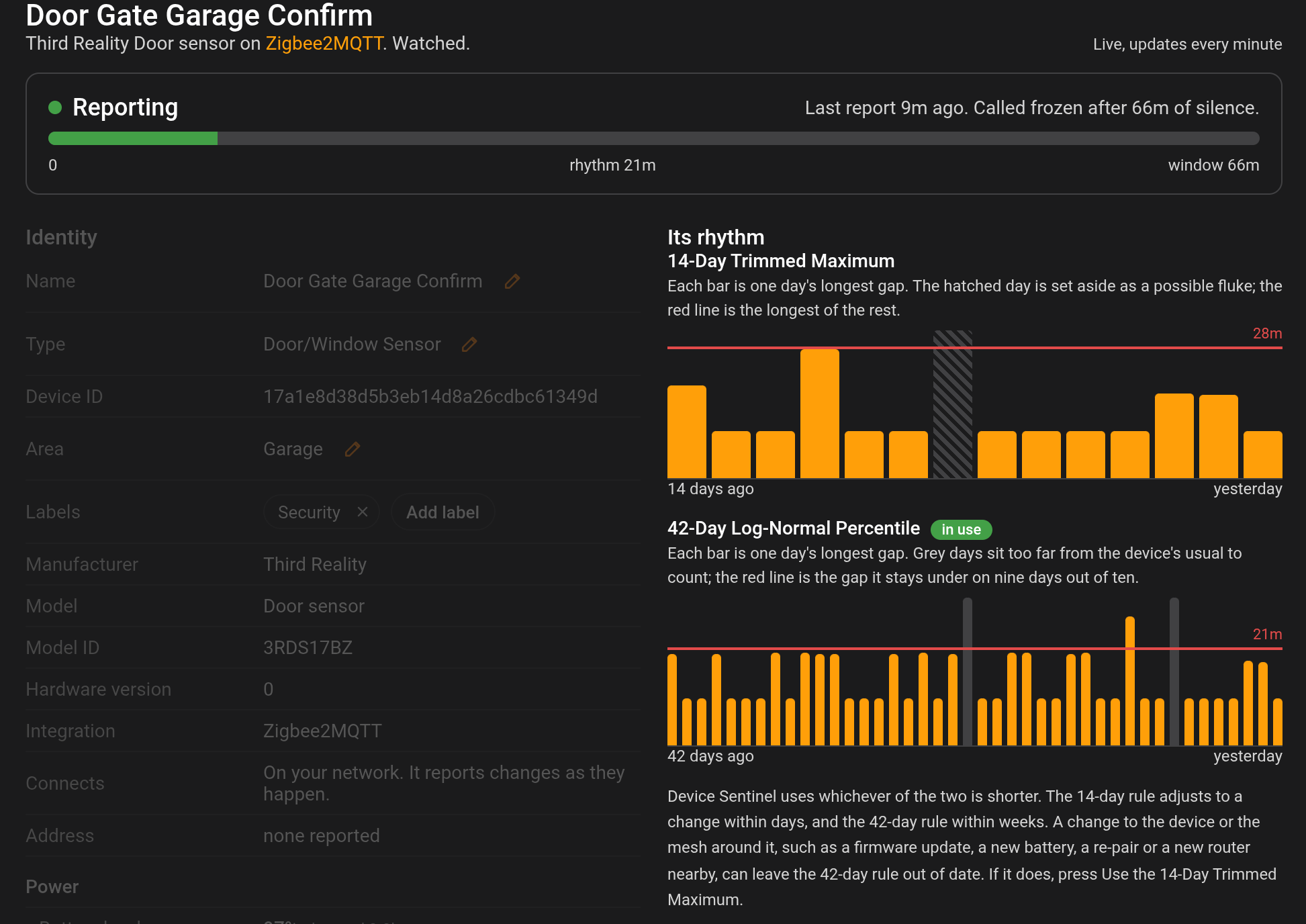
Every day, the system records the single longest gap a device produced, and each day keeps its date, so a day Device Sentinel didn't hear the device is marked as skipped rather than counted. To find the true rhythm, the first rule reads the last two weeks, discards the absolute worst day as a fluke (like a temporary mesh hiccup or a router reboot) and takes the longest surviving gap as the baseline.
A second rhythm, and the shorter one wins. A rhythm from the last two weeks can be widened by one or two strange days. From its 28th day, Device Sentinel also works out a second rhythm from up to six weeks of history, with days far longer or far shorter than usual set aside, and judges the device by whichever of the two is shorter. Freeze Detection explains both.
Only completed gaps are learned. This is a key rule. A device that goes silent and stays silent has not finished its gap. It is dead. The system will never learn that freezing is normal behavior, because a gap only counts when the device finally wakes up and speaks again.
Only gaps Device Sentinel could hear are learned. If the device's bridge, broker, integration or Wi-Fi was down during a gap, if Home Assistant stopped without shutting down cleanly, or if the system clock jumped, the gap is forgotten and the next one starts fresh. An outage that ended before the device was due to report could not have hidden a report, so that gap is learned whole.
When Judging Begins
A new device begins learning the moment you pair it. It takes seven days of history before it can be judged frozen. Until then, it is watched for unavailable states, but it will never be judged frozen because a brand-new schedule has no window to miss. A battery needs two weeks of history before Device Sentinel can tell whether it is falling.
Devices without a natural heartbeat, like push buttons or remotes that only wake when pressed, never establish a regular rhythm. They will never arm, which is entirely by design. Because of this, your Devices: Watched count will always be higher than your Devices: Learned count.
Knowing When a Device Actually Spoke
Restarts, integration reloads, and bridge reconnects can produce massive bursts of traffic. When a Zigbee coordinator comes back online, it often republishes the last known state of every device it manages.
Device Sentinel looks past these artificial echoes by reading exact hardware timestamps whenever they are available. It knows the difference between a real sensor checking in and a system reboot echoing old data.
This is why the Enable Last Seen button on the device page matters. Where a device publishes a last_seen entity, that timestamp is the coordinator's own record of when it last heard from the hardware, and no republished state can fake it. To switch it on for one device, use the device's page on the dashboard.
Bursts and Polling
Sometimes all of an integration's devices report in the exact same second. Usually, this means a hub just reconnected. The burst is recorded, and a silence running through it is cut short there rather than learned whole, the way a restart cuts one short.
Some integrations deliberately poll their hardware on a timer. If an integration does this repeatedly, more than ten times in an hour, Device Sentinel recognizes the pattern, stops treating the bursts as events, and lets those devices safely learn their poll cadence as their normal rhythm.
Ignored Silences
Not every silence is a natural rhythm. The system deliberately throws out gaps caused by external events:
- Coordinator, broker, integration and network outages: If your Zigbee bridge, MQTT broker, an integration or your Wi-Fi goes down, the devices behind it are cleared of blame. The outage itself is recorded rather than learned as a massive, fake silence for innocent sensors.
- Unavailable stretches: Brief mesh hiccups are learned. A device that reads unavailable for longer than ten minutes plus a tenth of its freeze window was really down, and the gap across it is thrown out.
- Device Sentinel's own downtime: Time when Home Assistant or Device Sentinel was stopped is taken out of a gap before it is learned. A device was not silent while nobody was listening.
- Pairing and Maintenance: If a device recovers during a pairing window or while you have Maintenance Mode active, your hands are credited and the silence is discarded.
Every one of these decisions is written down in your diagnostic reports so you always know why a gap was handled the way it was.
Lasting Memory
Everything learned survives a reboot. Device clocks, rhythms, and active faults are saved to disk. A device that has been silent for twenty hours before you restart Home Assistant is still twenty hours silent the moment the system comes back up.