Exclusions and Muting - TheThinkingHome/device_sentinel GitHub Wiki
Exclusions and Muting
This configuration screen is your primary tool for eliminating noise. Device Sentinel is built to monitor physical hardware, but Home Assistant integrations do not always declare their virtual devices or helper entities correctly.
This page holds two different tools to help you curate what you monitor, and the difference between them is the most important rule to learn: Excluding discards data. Muting silences alerts.
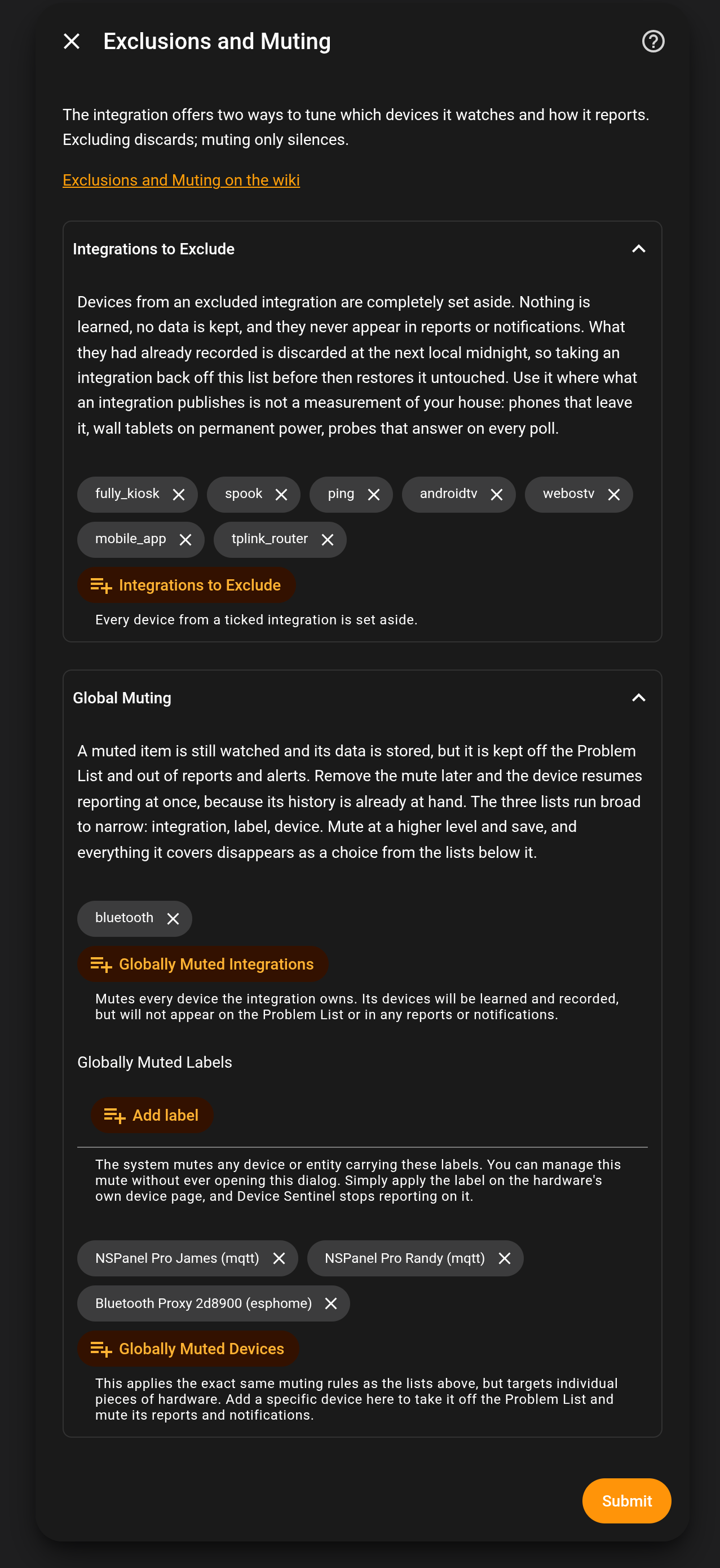
1. Integrations to Exclude
An excluded integration is completely set aside. Its devices are never watched, never learned from, and never recorded. They will never show up in reports, alerts, or your to-do list.
Exclude an integration when its data is unreliable, useless, or erratic by design. If what an integration publishes is not a measurement of your physical house, exclude it.
Common examples of what to exclude:
- Virtual integrations: Integrations like
spookorpinghave no physical hardware to monitor. They will answer on every poll and never fall silent, or they monitor software states. - Mobile devices: The
mobile_appintegration tracks phones, tablets, and watches. These devices get put on chargers, they leave the house, and they transition from Wi-Fi to cellular. Their data is useless for establishing a baseline reporting rhythm. - Misbehaving hardware: Many smart TV integrations (like LG or Samsung) report what the TV is doing while it is on, but when you turn the TV off with the remote, the integration reports
unavailableinstead ofoff. This creates massive amounts of noise because they do not conform to Home Assistant standards.
Note: If you exclude an integration, its previously recorded data is discarded at the next local midnight, not the moment you press Submit. Taking an integration back off this list before midnight restores it untouched.
Clones need no exclusion. If two integrations see the same hardware, Home Assistant lists it twice. A Bluetooth proxy, for example, can appear under ESPHome, Bluetooth and your router integration. Device Sentinel watches the copy that reports and sets the others aside as clones, so you don't have to exclude the extra integrations to keep one device from being reported three times. The watched device's page names its clones under Same hardware.
2. Global Muting
Muting suppresses judgment and reporting, never observation.
A globally muted device is silenced from reports, alerts, and the to-do list, but it is still watched and tracked. Device Sentinel keeps recording its data and maintaining its history.
Use Global Muting for physical hardware that you do not really care about right now, but might care about later.
- Examples: Bluetooth proxies, wall-mounted dashboard screens (NSPanels), or seasonal smart plugs.
- The benefit: Because the data is still being recorded, if you unmute that device six months from now, Device Sentinel has everything it needs to monitor it perfectly from that exact moment. There is no new learning period required.
3. Section-Specific Muting (Fine-Tuning)
You do not have to mute a device globally. Device Sentinel allows you to mute devices specifically from Battery, Signal, or Freeze judgments on their respective configuration screens: Low Battery, Signal Strength, and Freeze Detection.
If you only want to silence one kind of report for a device you otherwise care about, use that section's mute list.
Example: A wall-mounted tablet that is permanently plugged into power will constantly read as charging or 100%. You should mute it on the Low Battery screen, but leave it monitored for Freeze Detection so you know if it drops off your Wi-Fi.
4. The Muting Ladder
Whether you are using Global Muting or Section-Specific Muting, the lists run from broad to narrow: Integrations > Labels > Devices.
- Integrations: Mutes every device owned by that integration. (Note: Hardware an integration merely sees, but does not own, is not caught. A router tracking a Wi-Fi camera does not drag the camera into the mute list with it).
- Labels: Devices and entities carrying these labels are muted. This is a pro-tip for managing large systems: apply a label to a device directly from its own page in Home Assistant or on the Device Sentinel dashboard, and the mute takes effect in Device Sentinel automatically without ever opening the configuration dialog.
- Devices: Pick specific hardware directly.
How the ladder interacts:
Broader mutes hide devices from narrower lists. If you mute at a higher level (like an entire integration) and save, everything it covers disappears from the narrower lists (labels and devices) below it, and any narrower picks it covers are erased from your saved settings, permanently. Removing the broad mute later does not bring those narrower picks back; the configuration screens warn about this before you save. A device globally muted also disappears from the Low Battery, Signal Strength, and Freeze Detection pickers entirely, because it is already muted everywhere.
5. Muting From the Dashboard
You don't have to open these screens to mute one device. On a device's page on the dashboard, mute it for freeze, battery, signal or everything; muting everything is the same as adding it under Global Muting. On the dashboard's Problem List tab, each problem has the mute that matches it beside it: Mute freeze, Mute battery or Mute signal. Either way, Device Sentinel saves the same setting these screens do, and the muted item leaves the problem list quietly, with no recovery announced.
A mute that comes from a label or an integration shows on the device's page too, with a note naming the screen where you can change it.
How Do I Know What is Muted or Excluded?
The dashboard's Classification tab lists every device, whether it is watched, and if it is muted, by which rule, and a set-aside device says why, "clone" among the reasons; the Integrations tab shows each integration's standing.
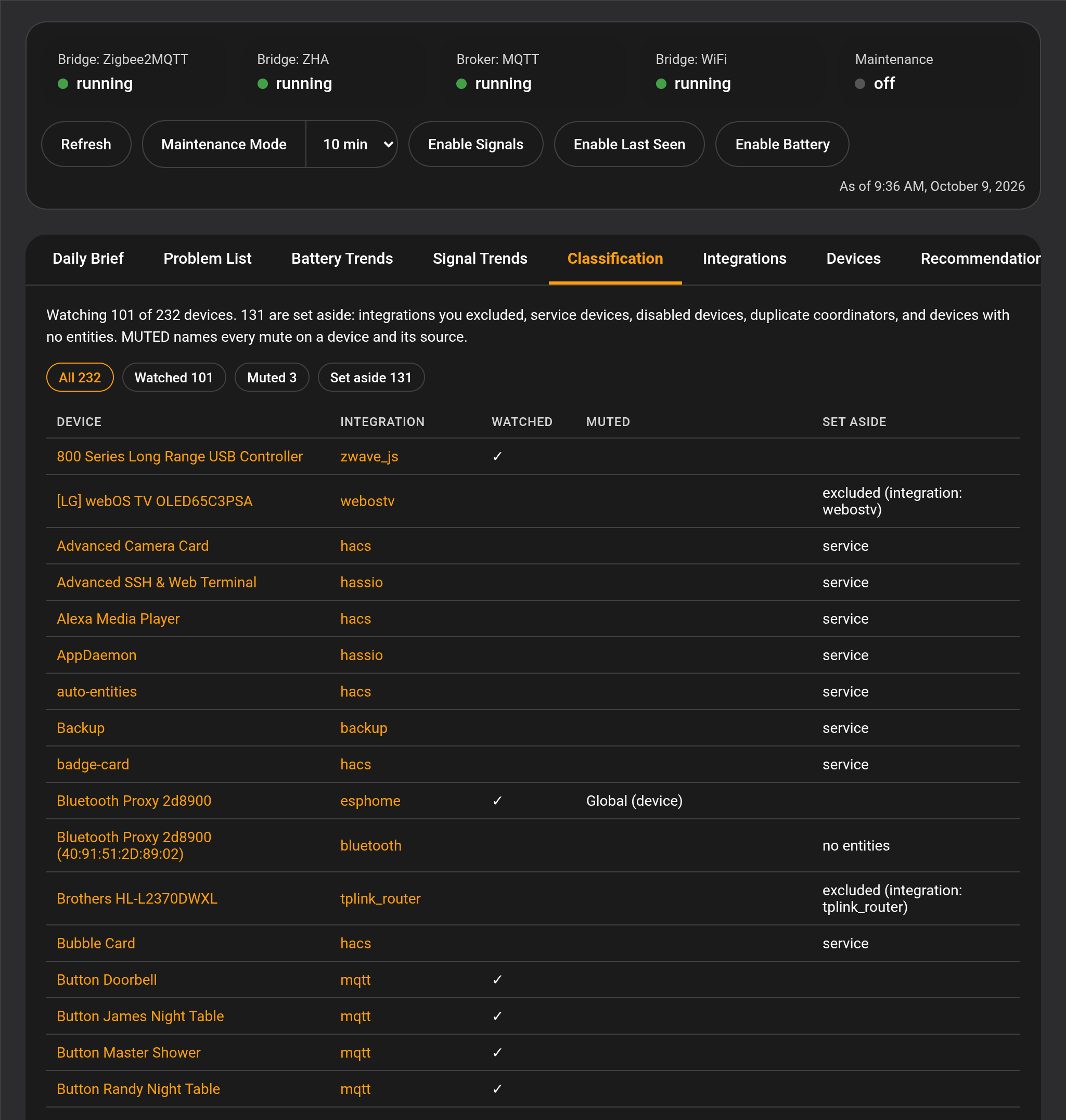 For the same answer in a file you can share, check your diagnostic files:
- classification.md: This file lists every device and explicitly states if it is WATCHED or SET ASIDE. If it is set aside, it names the reason (e.g., service device, disabled in HA, or excluded by you). If it is watched but muted, it tells you which muting rule caught it.
- device_telemetry.md (Learned Statistics): This file shows the learned statistics for your devices. The STATUS column will read "Reported" for judged devices, and "Muted" for silenced ones, accompanied by a code indicating why (GLB for global, BAT for battery, SIG for signal, FRZ for freeze).