Signal Strength - TheThinkingHome/device_sentinel GitHub Wiki
Signal Strength
Signal monitoring is experimental. Everything here is recorded and reported, but nothing about a weak link raises a phone alert yet. The one exception is a link stuck at a "rail" value, which is a false reading rather than a weak one, and does notify. Weak-link alerting stays off because no signal pattern has been shown to predict a real failure, and that takes examples of meshes that actually misbehave. If yours does, see Help Map Signal Failures at the foot of this page.
Device Sentinel watches the radio link quality of each device that reports one. It learns each device's normal range and watches for a link that sits unusually low against its own normal. This screen tunes how that judgment works and allows you to mute noisy devices from it.
1. Judged Against Itself, Never a Chart
There is no universal number for a healthy signal. A sensor two rooms from the coordinator lives its whole life at a level that would mean trouble for a sensor in the same room, yet both can be perfectly reliable.
Because of this, Device Sentinel never compares a device to a fixed threshold or to other devices. Each is judged against its own history alone.
- Two Scales: Devices report in either LQI (0 to 255, higher is better) or RSSI (dBm, closer to zero is better). Each device is judged on whatever it reports, and the two are never mixed.
- Rails vs. Drops: A reading stuck at exactly 255 LQI or -128 RSSI is a stale "rail" report, not a strong or weak link. A device pinned there for three days is reported as "railed" on the problem list. This page handles the other problem: a working link that is suddenly struggling.
2. What Makes a "Bad Signal Day"
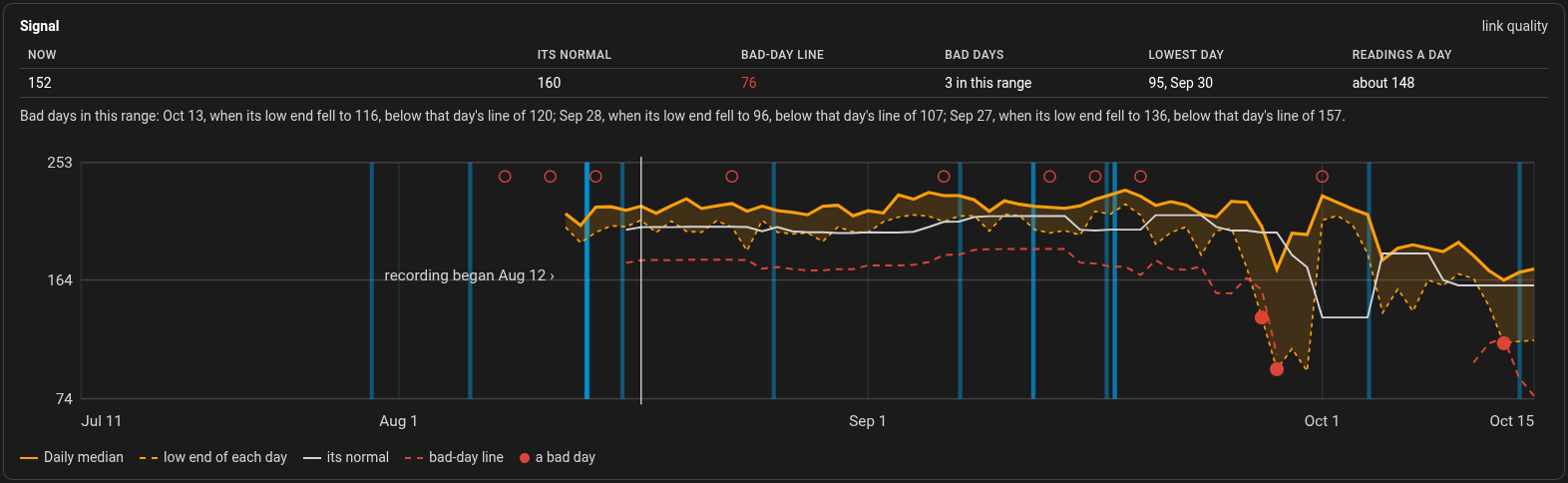
Each night, Device Sentinel looks at the low edge of the day for each device, ignoring single bad packets that are just noise.
It then compares that daily low to the device's own recent normal. A day is marked as bad only when it passes two checks:
- A Big Enough Drop: The signal fell far enough in its own units (for example, a drop of 25 LQI points).
- An Unusual Drop: The fall was unusually large compared to the device's normal, everyday bounce.
Both are needed. The size of the fall keeps a trivial wobble on a very steady device from counting. The second check keeps a naturally bouncy sensor from being marked bad each day for doing what it always does.
(You can see the results on the dashboard's Signal Trends tab and on each device's page.)
3. Tuning the Sliders
These four sliders control the two checks above.
- Bad Day Drop, LQI (default 25): The flat fall in LQI points that marks a bad day.
- Raise it to mark fewer days. Lower it to mark more.
- Bad Day Drop, RSSI (default 6): The same flat fall in decibels, for devices that report in dBm.
- Raise it to mark fewer days. Lower it to mark more.
- Bad Day Sensitivity (default 4.0): How unusual a drop must be compared to the device's normal bounce. This keeps erratic sensors from being marked bad each day. At a setting of 4, a sensor that routinely swings 10 points needs a 40-point plunge to trigger.
- Raise it to tolerate more bounce. Lower it to mark more days.
- Days of Signal History (default 7): How many past days are used to figure out what is "normal" for the device.
- Fewer days react quicker and forgive quicker. More days are steadier and slower to notice a decline.
4. Signal Muting
Muting a device here stops signal judgment and reporting for that device only; its battery and freeze watching continue. If you want to drop a device from tracking entirely, use Exclusions and Muting. You can also mute a device for signal from its page on the dashboard, or with Mute signal beside it on the dashboard's Problem List tab.
The lists run from broad to narrow: Integrations > Labels > Devices.
Muting suppresses judgment, not observation. The device keeps recording its history in the background, so if you un-mute it later, it resumes reporting instantly with its history intact.
5. Help Map Signal Failures
Signal is the one part of Device Sentinel that records weak links without alerting you about them.
Nobody yet knows which signal pattern perfectly predicts a device failing. A link can sit low for months and never miss a report, while another looks healthy and drops out weekly. Turning on live alerts before that relationship is mapped would mean a stream of warnings about devices that are fine, teaching you to ignore the system.
Real failures settle this, and if your mesh is flaky, yours can help.
Open an issue at the Device Sentinel GitHub titled contribute signal, and attach a diagnostics download (Settings > Devices and Services > Device Sentinel > 3-dot menu > Download diagnostics). It carries every device's signal history and names, and no passwords or tokens.
Most important: Say in the issue which devices actually give you trouble and roughly how often. That human context is the piece no file contains, and it is what turns a set of numbers into a real answer.