User Guide GeoDMS GUI - ObjectVision/GeoDMS GitHub Wiki
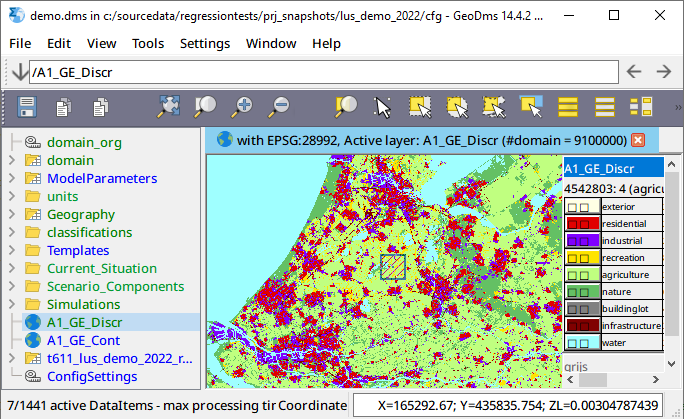
This guide is mainly for the user who views the primary data, calculates model results, starts new cases, and makes limited extensions and edits to the configuration. It therefore gives a detailed description of the structure of the client application, the different viewers, editors and dialogs.
This user guide does not contain enough information for modellers to set up a new configuration or a new calculation scheme. For that, see the section How To Model, which describes the basics of configuring a model with the GeoDMS.
The GeoDMS GUI runs on Windows and on Linux. This user guide does not describe generic functions of the operating system, such as how to close, maximize or minimize a window. An Internet connection and an installed browser are recommended, as the most current help is on this wiki.
- Desktop components
- TreeView
- Main menu
- Detail pages
- Map View
- Table View
- ValueInfo
- Eventlog
- Classification and Palette editor
- Export primary data
- GUI Options dialog
- Local machine Options dialog
- Config Options dialog
- Command line options
GeoDmsGuiQt.exe accepts a configuration to open, an item to select in it, and a set of status flags.
The status flags overrule the user's own settings for that one session:
GeoDmsGuiQt.exe [/L<LogFile>] [/T<TestScript>] [/S<X> /C<X> …] [/noconfig] [<ConfigFile.dms> [<Item>]]
In this way a project shortcut can open one configuration with, for example, hidden items visible (/SA) or
state colours off (/CC), without changing the setting for every other project. See
Command line options for the arguments, the full status-flag table, and the order in which they must be
given.
Configurations tend to grow until nobody has an overview of the whole configuration any more. This is especially true for long-running projects with multiple contributors. Parts are added to the configuration, but less attention goes to removing unused parts of the configuration or source data. One reason is that it is not always clear which items or data are still 'in use'.
The GUI helps the user to find unused parts of the configuration or source data. In the TreeView pop-up menu or the main menu (Tools > Code analysis...), you can set items as:
- source (set source, Alt-K): to find out which other items use this item.
- target (set target, Alt-B): to find out which other items are used to calculate this item. You can add more targets with add target (Alt-N). Clear target resets the selection.
The TreeView marks the items involved. This tool is not meant to be a fully automatic clean-up procedure, because:
- there is no objective way to find out whether parts of a configuration or data are no longer useful;
- cleaning up configuration files automatically would also mean reformatting them, which we think the modeller can do better.
You can also use the Source Descr tab of the Detail pages to find all data sources used for a certain result or container.