Config Options dialog - ObjectVision/GeoDMS GitHub Wiki
User Guide GeoDMS GUI - Config Options dialog
dialog
The Config Options dialog can be activated from the Settings main menu option.
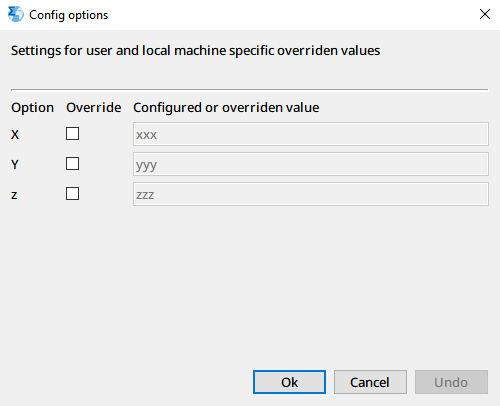
The contents of this dialog is dependent on the opened configuration. All string parameters configured in the container ConfigSettings > Overridable are presented in this view. Each parameter can be overruled with this dialog to set a local machine specific value, which is stored in the Windows Registry of the local machine. Tick Session to keep the override for the current session only, so that the configuration's own value returns the next time the project is opened.
This way, the generic configured folders can be configured to the folders as they occur on your computer.
settings the GeoDMS itself recognises
Most entries under ConfigSettings > Overridable are read by the configuration itself, through the placeholder mechanism. A few names are read by the GeoDMS:
| Name | Effect |
|---|---|
ShowHiddenItems |
'True' or 'False': whether items configured with IsHidden = "True" are shown in the TreeView when this configuration is opened. Lets a project — a demo, a delivered model — keep its scaffolding out of sight on whoever's machine it is opened, instead of depending on the setting that user happens to have. (since 20.18.0) |
Such a setting is applied to the session, not written to the registry: the user's own preference in the [GUI Options dialog]] stays as it was, the checkbox there still works for the rest of the session, and reopening the configuration applies its value again. A /SA or /CA on the [command line was an explicit choice for that one session and wins over the configuration.
A value that is neither true nor false is ignored, with a warning in the Eventlog. So is a value that cannot be calculated at all — the setting decides whether a tree item is visible, and that is never a reason to refuse to open the configuration.
For background on the Multi Tasking (MT1/MT2) options, see Multi Tasking.