ValueInfo - ObjectVision/GeoDMS GitHub Wiki
User Guide GeoDMS GUI - value info
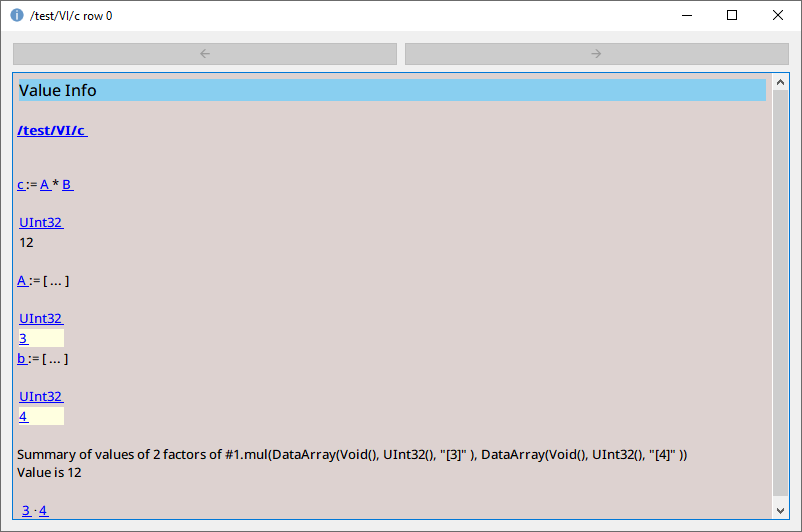
The value info dialog presents the trace on how individual cells in a Table View or elements in a Map View are calculated.
The example shows the value info dialog for a cell in the table, presenting parameter c with as value: 12. This value is calculated by multiplying two other parameters, A with a value of 3 and B with a value of 4. The value info dialog presents these parameters and their values. For attributes it would also present the relevant values needed to calculate the requested value.
If for instance the value 4 of parameter B is also the result of a calculation, click on the value 4 to get the value info for this value. Step by step, you can trace the whole calculation path, until the final sources (data read from source files) are reached. Backward and Forward buttons are available, to assist the user in tracing backward and forward in the calculation path.
A null value is what the dialog is most often opened for, and it is answered in two ways.
Usually the trace answers it by itself. The dialog resolves the explained row into each argument, and
follows a resulting index numbers on into the domain unit it points at. For
lookup(relation, values) you therefore see the relation value at the explained row and, when that
value is defined, the row of values it selects — so a null in either one is visible where it arises.
What a trace cannot reach is the absence of a row: no argument row can be shown to explain why nothing matched. There the function states the reason next to the value itself:
| function | reported for a null result |
|---|---|
| invert, invertAll | no row of the inverted attribute refers to this row |
| rlookup, rlookup_with_null | no row of the searched attribute has this value |
The reason is left out when the trace already shows the cause — for rlookup a null foreign_key value, which the dialog displays as a null anyway. (since 20.16.0)
GeoDmsRun.exe <config> @valueinfo <row> <item> writes the same page to stdout, for inspecting a
value from a script or a log. See User Guide GeoDMS Run. (since 20.16.0)