msa options overview - ajtruckle/meeting-schedule-assistant-support GitHub Wiki
Settings
The Settings window lets you control how Meeting Schedule Assistant behaves across key areas such as schedule formatting, email handling, workbook data, backups, and update checks.
It uses a tabbed layout to group related options together, with each tab covering a different part of the application. This makes it easy to tailor the software to your congregation’s needs and workflow.
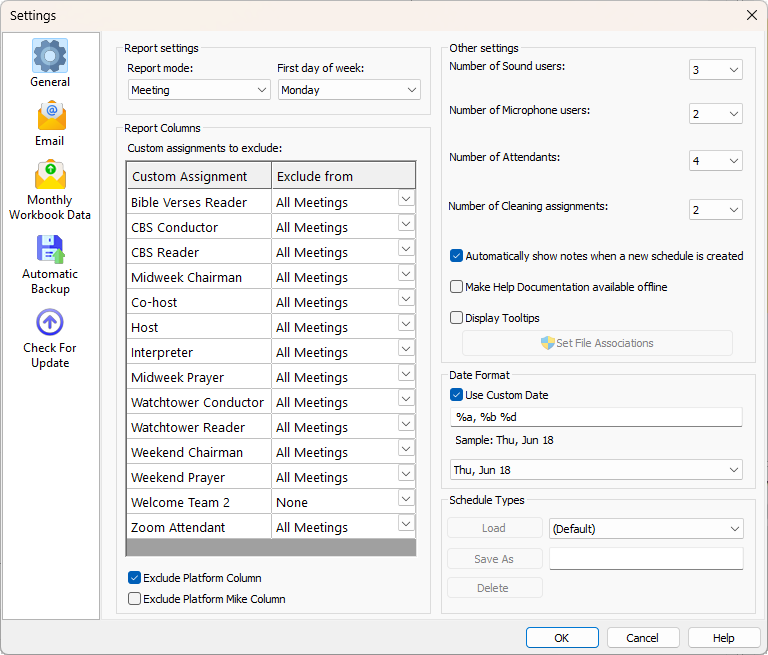
Figure 127. The Settings window showing the General tab.
How to Access
You can access this feature in two ways:
- Options — Settings
- Toolbar — Settings
General
Controls the overall behaviour of Meeting Schedule Assistant, including report mode, excluded custom assignments, user counts, date format, and schedule types.
Allows Monthly Data Volunteers to configure automatic emailing of exported data ZIP archives.
Monthly Workbook Data
Specifies where the Meeting Editor saves exported data ZIP archives and whether they should be emailed automatically.
Automatic Backup
Configures automatic backups to help with disaster recovery and long‑term data protection.
Check for Update
Controls how often the application checks for new versions and whether it should also check for updated Meeting Workbook schedule data.
Related Topics
Navigation
- Parent topic: Options Menu
- Previous topic: Custom Assignments
- Next topic: Headings