Finance Inpatient Interim Bills - hmislk/hmis GitHub Wiki
Inpatient Interim Bills
Introduction
An interim bill is a mid-stay summary of charges generated while the patient is still admitted. It shows all services, medications, procedures, and accommodation charges accumulated so far, without closing the admission. Interim bills are used to give patients and families a cost update, collect partial payments, or meet insurance pre-authorisation requirements.
Navigation
There are three ways to reach the Interim Bill, and which one you use matters — only the last two show up-to-date payment totals immediately:
- Main Menu → Inward (bed icon) → Billing → Interim Bill — lands on a blank "Find Inpatient" search box. Search the BHT and click Continue to (re)generate the bill; this always recalculates fresh, including any payments made since the bill was last opened.
- Inpatient Dashboard → Interim Bill button — opens the bill directly for the currently selected admission, freshly recalculated.
- Inward Payment page → Interim Bill button (top-right, after making a payment) — returns straight to the same admission's interim bill with totals, including the payment just made, already recalculated. This is the fastest way to confirm a payment was applied correctly.
Generating an Interim Bill
- Locate the patient's BHT (Bed Head Ticket) via the Interim Bill search box or ward census.
- Navigate to
inward/inward_bill_intrim.xhtml. - The system loads all unbilled charges for the admission.
- Review the charge breakdown by category (Room, Nursing, Investigation, Pharmacy, Surgery, etc.).
- Verify the total and click Continue.
- Print from
inward/inward_bill_intrim_print.xhtml.
What Is Included
| Charge Category | Examples |
|---|---|
| Room Charges | Daily bed rate, ICU/special room premium |
| Nursing Charges | Nursing procedures, dressings |
| Investigation Charges | Lab tests, radiology, ECG |
| Pharmacy Charges | Medications dispensed from ward pharmacy |
| Surgery Charges | OT charges, anaesthesia |
| Other Services | Physiotherapy, dietary supplements |
All charges already included on a previously printed interim bill may appear again if not yet settled — verify with the billing team before collecting payment.
Charge Breakdown (Gross, Discount, Service Charge, VAT)
For users with the Show Service Charges privilege, each Charges tab (Service and Investigation Charges, Professional Fees, Assistant Charges) and the "Charges" summary table show the full monetary breakdown per line, not just the net value:
| Column | Meaning |
|---|---|
| Gross | The item's rate before any discount or VAT |
| Discount | Discount applied to the line |
| Service Charge | Margin/service charge component |
| Net | Gross − Discount + Service Charge (the amount billed before VAT) |
| VAT | VAT calculated on the net value, for items marked VATable with a VAT percentage set in Manage Items |
The Summary panel mirrors the same breakdown at the whole-bill level — Gross Total, Service Charge (Margin), Bill Level Discount, and VAT — alongside the existing Total Charges and Paid By Patient figures:
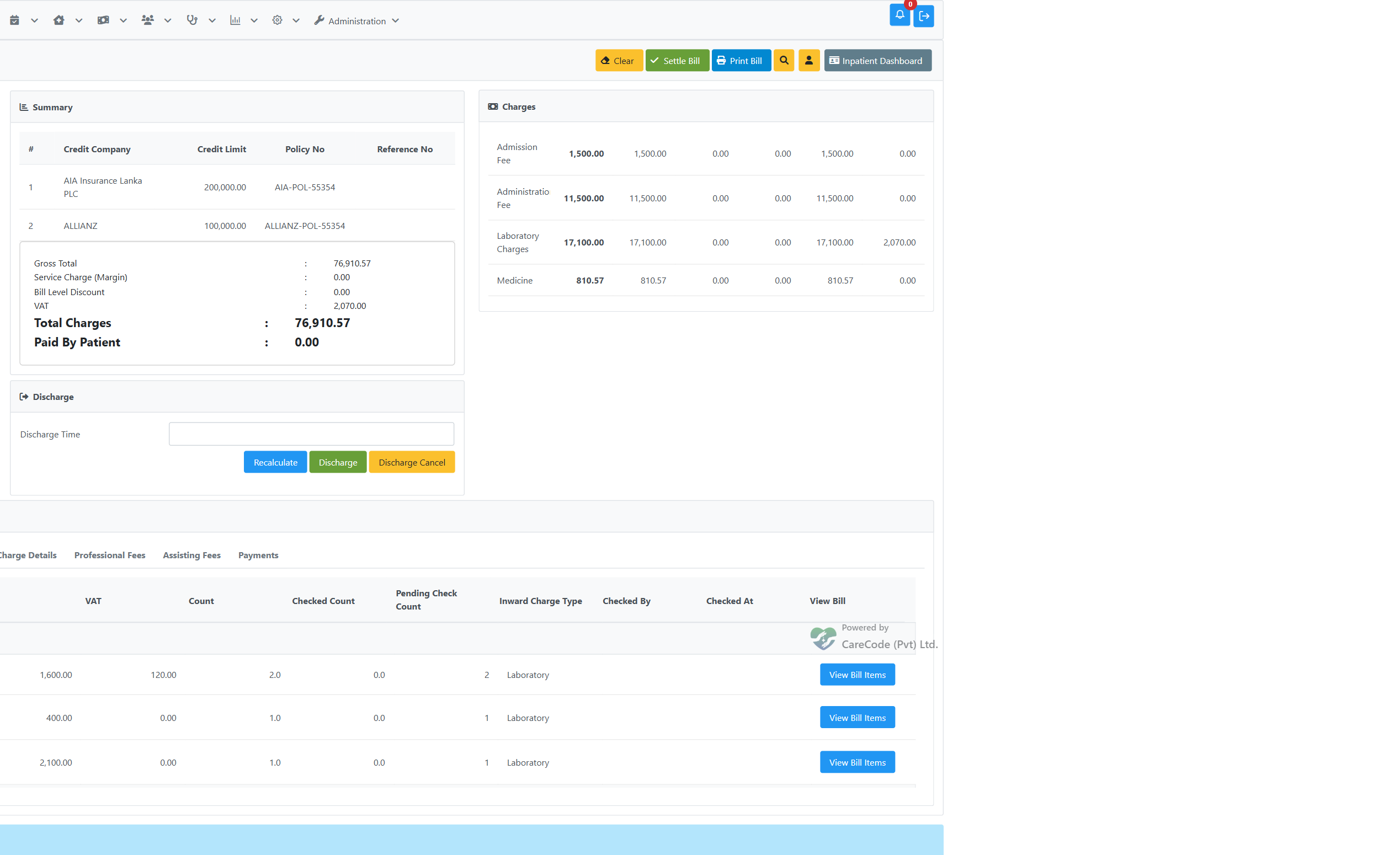
The Service Details tab breaks the same figures down per item/investigation:

Users without the Show Service Charges privilege see only the Charge Type / Total columns and the plain Total Charges summary — the breakdown columns are hidden, not shown as zero.
Medicine and Consumable Charges — Issue and Return Detail
The "Medicine and Consumable Charges" tab breaks the Pharmacy/ETU/Inward/
Theatre/Store/Inventory charge-type totals down into the individual bills
that make them up. Each department sub-tab lists every medicine issue
(View Issue) and every return/cancellation (View Returns/View Return, shown with a negative Bill Total) for that department, in one
combined, chronologically sorted table — the footer Total always exactly
matches the charge-type figure shown above, because both are computed from
the same set of bills (issue #23871).
This includes returns made through the porter-based ward return flow (Inpatient Dashboard → Return Medicines to Pharmacy, see Inward Ward Return to Pharmacy), which is a different underlying bill shape from a direct-issue or on-request return — it now appears as its own negative row here too, with a View Return button that reprints it:

Row 9 (Inward//26/050563, -19.40) is a porter-flow ward return — it nets against the Pharmacy Medicine total the same as any other return, and reprints via its own View Return button.
When Medicine, Sort by the type of department that issued it. is on (the department-split tabs shown above), a return is listed and totalled under the department that issued the medicine, not the department that processed the return — so a porter return initiated from the ward still counts against the issuing pharmacy's Medicine total, matching where the original issue was charged.
For an admission with many pharmacy transactions, all rows for a department render together (the table is not paginated or scroll-clipped) — scroll the page, not a nested box, to see the rest:

All 26 Pharmacy rows for this admission — 18 issues and 8 returns/cancellations — render in one list; the footer Total already reflects the net of issues minus returns.
Timed Service Charges — Stop or Delete
The Timed Service Charges tab lists every timed service on the admission that has not been deleted. Two buttons on each row do very different things:
| Button | Use it when | What happens |
|---|---|---|
| Stop | The service has ended | The current time becomes its Stopped Time, the charge is worked out up to now, and the service stays on the bill. Shown only on a service that is still running. |
| Delete | The service was entered by mistake (wrong service or wrong patient) | After you confirm, the service and its charge leave the bill, and the row drops off this list straight away. The system records who deleted it and when. |
To record an earlier end time than now, enter the Stopped Time yourself and press Update instead of Stop.

The Oxygen service has been stopped, so it shows Update, Delete and Check. The Nebulization service is still running, so it also has Stop, and Check stays disabled until it is stopped. Staff names are masked.

Delete always asks first. Press No to leave the service as it is.
Do not say "Remove" for timed services. "Remove" could mean ending a service (that's Stop) or undoing a mistaken entry (that's Delete). They have opposite effects on the bill. A deleted service does not appear on the interim bill again, and that is correct: it was never part of the patient's care. A stopped service always stays on the bill.
Timed Service Charges — Checking
Each timed service added to an admission is billed on its own inward service bill, so the Timed Service Charges tab carries the same verification (“checking”) step as the other charge tabs. Alongside the service and its times, each row shows the Bill No it was billed on, a Status badge, and Checked By / Checked At once it has been verified:

Top row is checked: its times and the Update/Delete buttons are greyed out, and only Uncheck remains. Bottom row is still pending, so it can still be edited, deleted or checked. (This screenshot predates the rename; the button it shows as "Remove" is now labelled Delete.)
| Control | What it does |
|---|---|
| Check | Marks that timed service's bill as verified. Needs the Inward Check privilege. Disabled while the service is still running: press Stop (or enter a Stopped Time and press Update) first, because a running service's charge is still growing. |
| Uncheck | Reverses the check, reopening the row for editing. Needs the Inward Uncheck privilege. |
| View Bill | Opens the timed service's own bill, where it can also be checked, returned or cancelled. Back To Interim returns here. |
A checked timed service is frozen. Its Start and Stopped Times become read-only and Update and Delete are disabled, so a charge somebody has verified cannot then change underneath that verification. To correct a checked service, uncheck it first, make the change, and check it again.
Rows showing No Separate Bill are timed services added from the Surgery Dashboard, or added before timed services were billed individually. They are charged through the admission rather than on a bill of their own, so there is no separate bill for a cashier to check.
Unchecked timed services block the final bill
The final bill cannot be created while any inward bill on the admission is still unchecked — timed services included. Attempting it returns to the interim bill with:

Create Final Bill refuses while a timed service bill is still pending check.
Check the remaining services (the Status column shows which are pending) and the final bill proceeds. Staff holding the Inward Bill Settle Without Check privilege may settle anyway and are shown a warning instead of a block.
Whether this gate applies at all is controlled by the application option “Inward bills must be checked before the final bill is settled”, which is on by default.
Checking a Professional Fee, Deposit, or Payment Row
Professional payments are typically entered by one staff member and verified ("checked") by another before the final bill can be settled — the same check/uncheck pattern used elsewhere on this page (see Timed Service Charges — Checking above). The Professional Fees, Assistant Charges, Deposits & Payments, and Post Final Payment tabs each carry an Added User column (who entered the row) and a Checked User / Checked At pair (who verified it, and when) that fills in once a reviewer opens the row's own bill and clicks Mark As Checked:

The Checked User column shows the actual staff member who clicked Mark As Checked on the fee bill — distinct from the Added User who originally entered the fee.
Partial Payment Against Interim Bill
The Interim Bill page itself has no payment form — payments and deposits are collected from the Inpatient Dashboard's Billing panel instead. See Inpatient — Make a Payment and Make a Deposit for the current entry point; the steps below describe the payment form itself, which is the same form reached either way.
- From the Inpatient Dashboard's Billing panel, click Make a Payment (or Make a Deposit).
- Search and select the patient's BHT.
- Select a Payment Mode (Cash, Credit Card, Cheque, Slip Payment, e-Wallet, Patient Deposit, or Online Settlement — note "Credit" as an overall billing method is not a selectable mode here; that is collected separately once the final bill is settled, see Inpatient Final Bill Payment).
- Enter the amount (and card/cheque/slip details if applicable) and click Pay. A deposit receipt is printed.
- To record a second payment in the same visit, click + New Payment — this returns to the BHT search box; search and select the same BHT again.
- Click the Interim Bill button (top-right) to jump straight back to the Interim Bill with Paid By Patient and Due already reflecting every payment just made — no manual refresh needed:

The patient remains admitted; the admission is not closed by interim billing.
Reprinting an Interim Bill
Navigate to inward/inward_report_invoice_journal.xhtml (Invoice Journal) or use the BHT bill search to locate the interim bill and reprint.
Discharge and Settlement Gate
When the Discharge button is used on the interim bill to settle and close the admission, the system enforces nursing discharge as a prerequisite (for admission types with room charges):
- If nursing discharge has not been confirmed, clicking Discharge shows: "Nursing discharge must be completed before the bill can be settled."
- If nursing discharge is confirmed but the selected discharge time is earlier than the nursing discharge time, the error is: "Discharge time must be on or after the nursing discharge time."
This means billing staff cannot close the bill until nursing staff have completed the nursing discharge step. See Inpatient — Nursing Discharge for the full workflow.
Technical Reference
| Item | Detail |
|---|---|
| Page | inward/inward_bill_intrim.xhtml |
| Print page | inward/inward_bill_intrim_print.xhtml |
| Controller | BhtSummeryController |
| BillType | InwardBill |
| Charge model | InwardChargeType enum (~100+ values) |