Words Regex and Logic - cruisinme30/spelunk GitHub Wiki
How Spelunk matches the words you type: phrases, regexes, case, whole words, fuzzy file names, and how to combine terms with AND, OR and NOT. Every operator is on one screen in Query Language.
| Write | Matches |
|---|---|
retry policy |
The lines of files whose text has both words, and the files whose name has both |
match:fuzzy usrsvc |
Also file names that have its letters in order, like UserService.ts (see Fuzzy file names) |
"read timeout" |
The exact phrase, spaces included |
/Retry(Policy|Config)/ |
A regular expression (RE2: no backreferences or lookaround) |
/except TransientError:\n\s*delay/ |
A regex with \n in it: matches across lines (see Regexes across lines) |
struct:"backoff(:[call], tries=:[n])" |
Code shaped like the template, however it is laid out (see Code by its shape) |
Matching ignores case unless you add case:yes, press Aa, or turn on the Case Sensitive setting; case:smart
matches case only when the query has a capital letter. A word also
matches inside longer words (retry finds retryCount) unless you add word:yes, press ab, or turn on the Whole
Word setting.
Screen 1: Plain text: names and contents · Screen id plain-text-search · milestone M1

The built panel
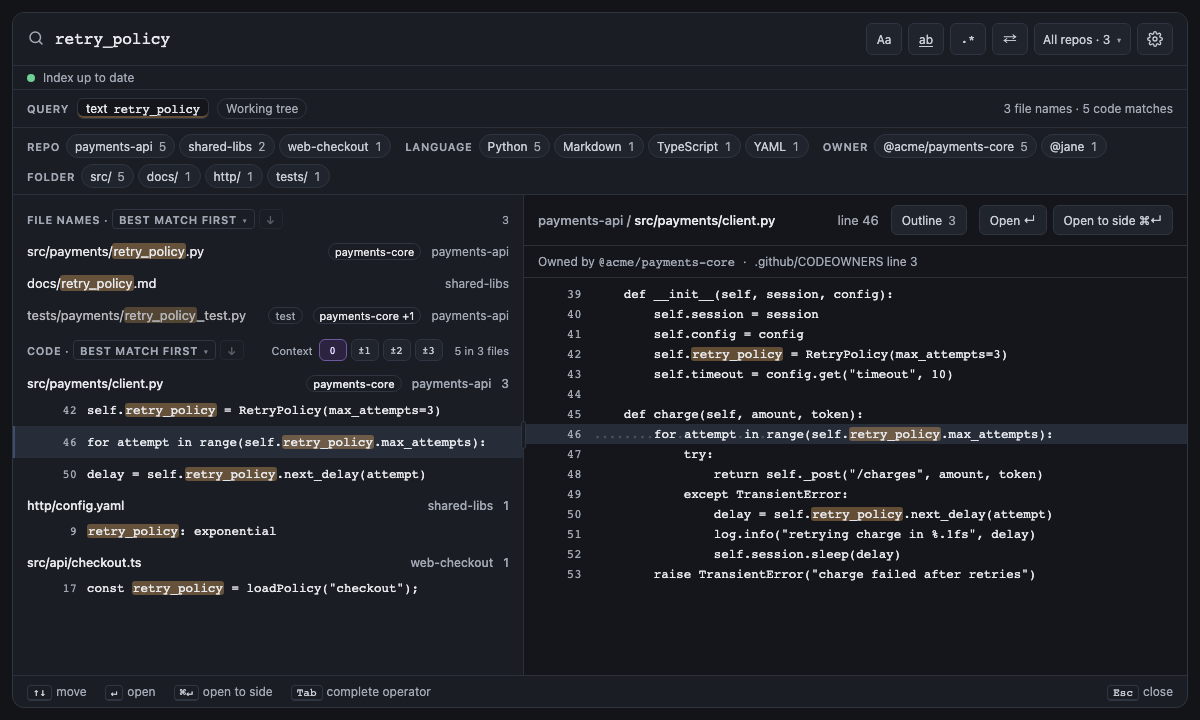
A /regex/ is RE2, as in Go: linear time, no backreferences or lookaround, so no query can hang the search.
Screen 8: case: + /regex/ + lang: · Screen id case-regex-language · milestone M1

The built panel
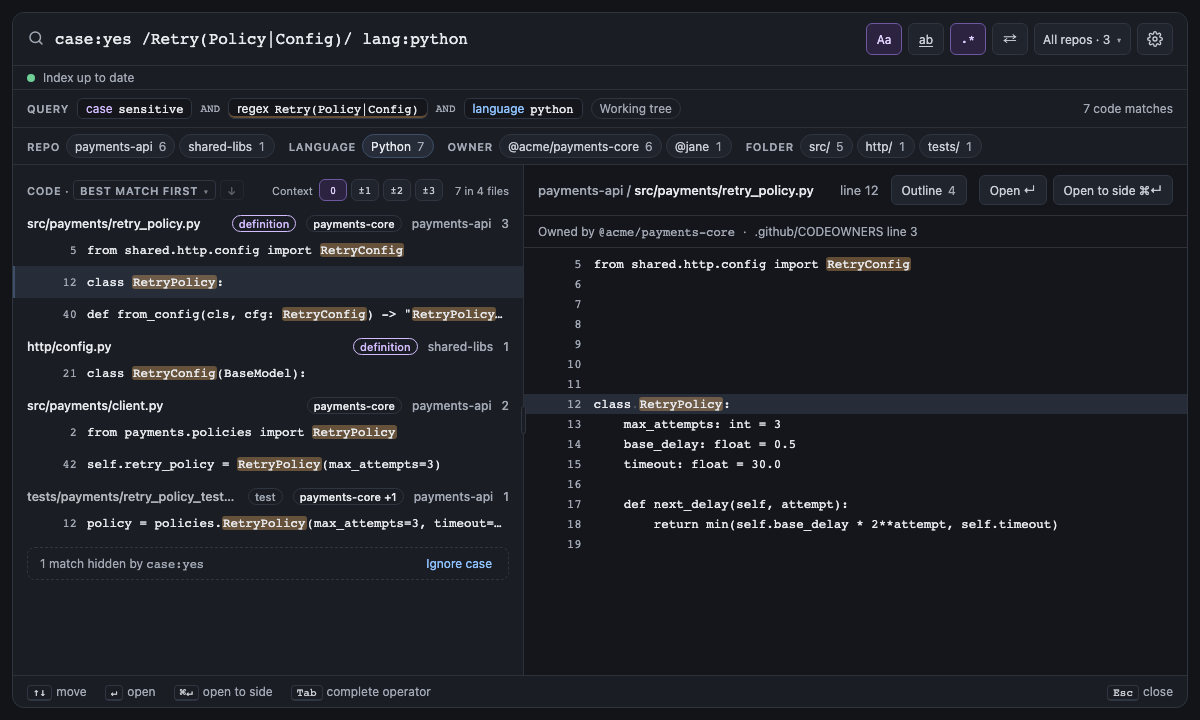
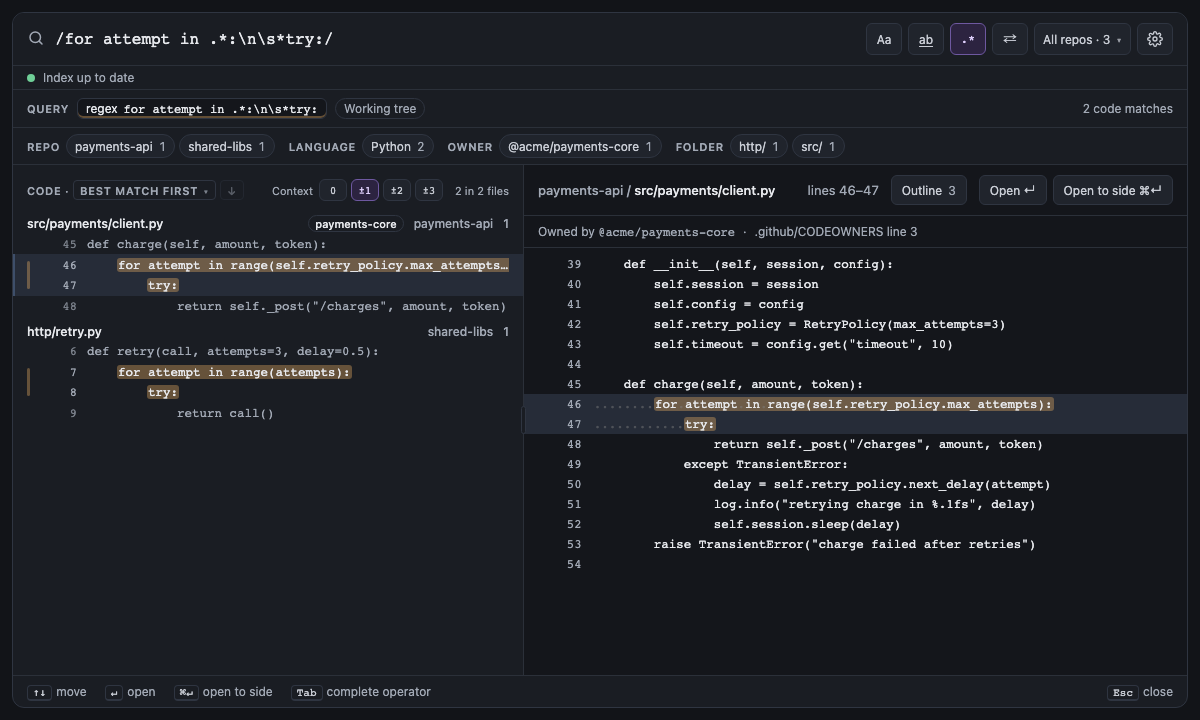
A regex matches one line at a time, as in ripgrep, so \s and [^x] never run onto the next line. A regex with
\n in it (or \x0a) is the exception, as in VS Code's search: it is matched against the whole file, so
/except TransientError:\n\s*delay/ finds an except whose next line sets a delay. ^ and $ still mean the start
and end of a line, and lines that end in \r\n match the same as ones that end in \n. Each match is one result on
the line it starts, showing every line it spans (up to ten, then "14 more lines, to line 25"); matches that share a
line, or another term's match on one of its lines, join it. The preview marks the whole match and opening it selects
all of it.
It works in current files only: a commit search matches each changed line on its own, so such a regex warns there, and Replace can't change a match across lines.
Screen 39: Multiline regex: a regex with \n matches across lines, one result per match · Screen id multiline-regex · milestone 1.2
/@retry\(.*\)\n\s*async def/ finds the async functions decorated with @retry: the decorator on one line, async def on the next. In 1.1 every regex matched one line at a time, so the panel said "No results". Now each match is
one result that shows both lines under their numbers, with a bar beside them, the matched part of each marked but not
its indentation, and 3 in 2 files counts matches, not lines. The preview's header says lines 29–30 and marks
both, and opening the result selects the whole match. A longer match shows ten lines after its first and then "⋯ 14
more lines, to line 25"; with context lines, they sit above its first line and below its last.

The built panel
| Short | Takes | Searches | Example |
|---|---|---|---|
| none |
yes, no, or smart (match case only when the query has a capital letter) |
Current files and commits | case:yes RetryPolicy |
With case:smart, or the Case Sensitive setting on smart, case matches only when what you search for has a capital
letter: retry finds retry, Retry and RETRY, but RetryPolicy finds only RetryPolicy. As in ripgrep's
--smart-case, only the text terms and the values of symbol:, ref: and message: count, not filters such as file: or
repo:. In a regex only literal letters count, so /\W+retry/, /\p{Lu}/, /[A-Z]/ and letters after (?i) don't
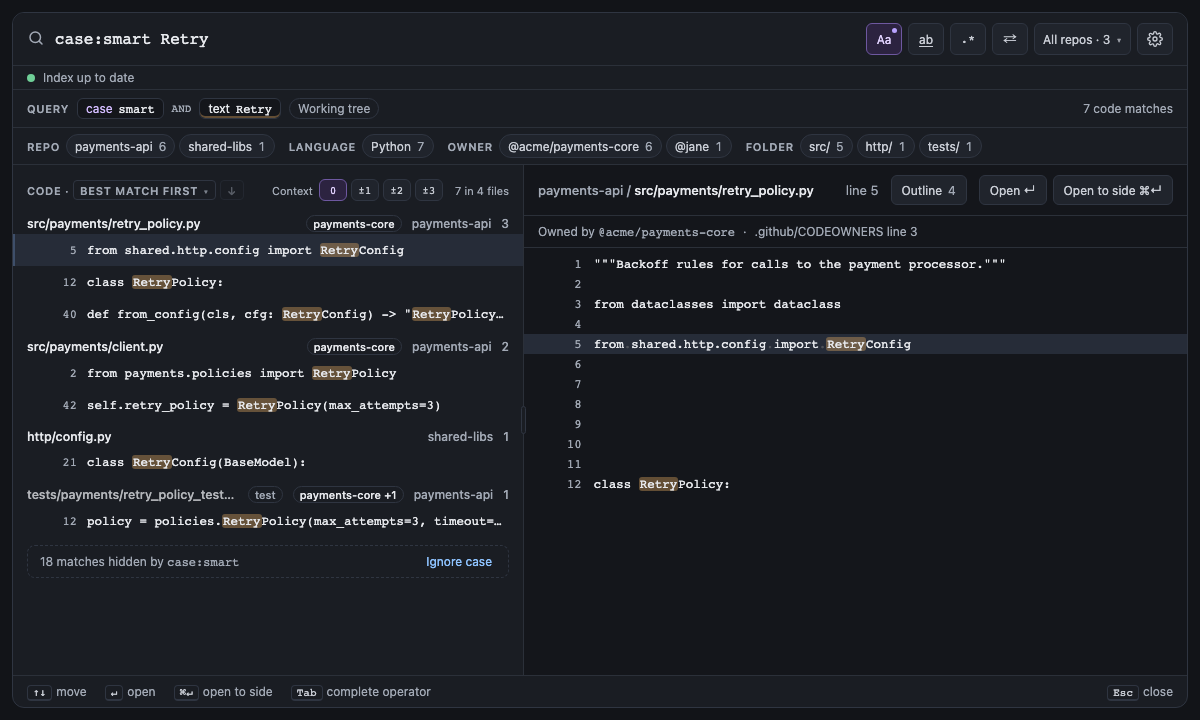
make it match case. When smart case matches case, the panel says what that hid ("18 matches hidden by case:smart ·
Ignore case").
Screen 29: case:smart matches case when the query has a capital · Screen id smart-case · milestone 1.1
case:smart Retry matches case because Retry has a capital letter: RetryPolicy and RetryConfig, but not
retry_policy or retry(). Aa is pressed and carries a dot, which means smart case decided; its tooltip says
which way. A note counts the matches that differed only in case, with Ignore case, which writes case:no. With
the Case Sensitive setting on smart, a plain Retry looks the same, without the case smart chip.

The built panel
| Short | Takes | Searches | Example |
|---|---|---|---|
| none |
yes (whole words only) or no (parts of words too) |
Current files and commits | word:yes retry |
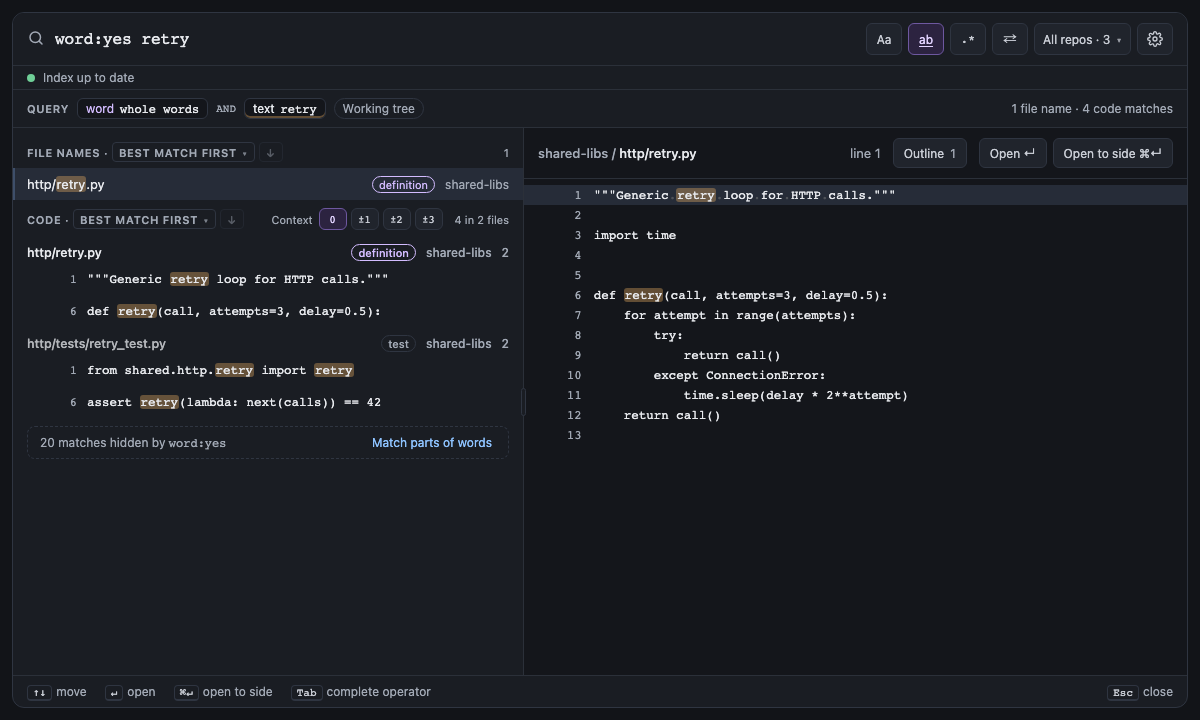
With word:yes, a word, phrase or regex matches only where it is a whole word: retry finds retry() and
(retry) but not retryCount, autoretry or retry_policy. Letters, digits and _ make up words, in any
language. As in VS Code, an end of the term that is itself punctuation needs no boundary, so word:yes foo. finds
foo.bar and word:yes -> finds a->b. It applies to the words of the query wherever they match: code lines, file
names, and a commit's changed lines and message. Operator values such as file:, symbol: and message: are not
affected.
Screen 28: word:yes keeps whole words · Screen id whole-words · milestone 1.1
word:yes keeps only the matches that are whole words: retry() and import retry, but not retry_policy.py,
RetryPolicy or autoretry. ab is pressed, and a note counts the matches that were only parts of words, with
Match parts of words to show them.

The built panel
A word matches its exact text: RetryPolicy finds the files and lines that say RetryPolicy, never
retry_policy.py. Add match:fuzzy and a word also finds file names that have its letters in order, as VS Code's
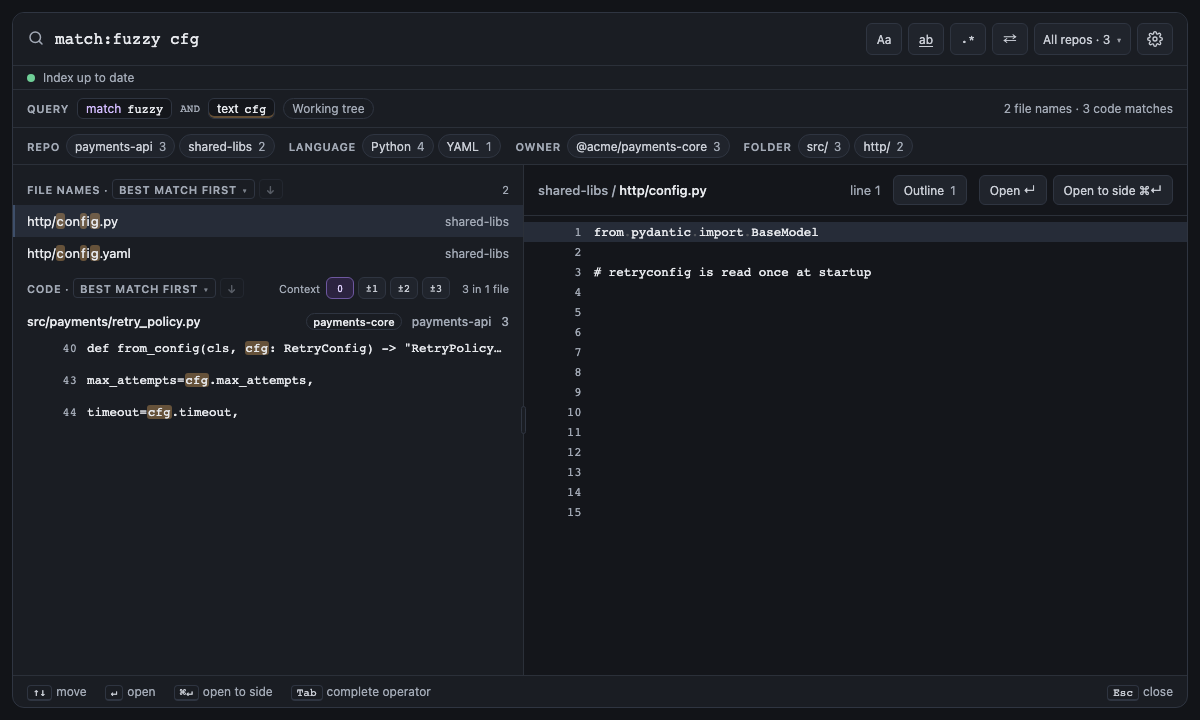
Quick Open does: match:fuzzy usrsvc finds UserService.ts, match:fuzzy rtrypol finds retry_policy.py, and
match:fuzzy cfg finds config.py. The first letter must start a word
of the name (the name's start, after _, - or ., a capital after a lower-case letter, or a digit after a letter),
so letters scattered through unrelated names don't match. A word without a / matches the file's name; one with a
/ matches the whole path, so pay/rtry finds payments/retry_policy.py. The matched letters are highlighted, and
in best-match order such a name comes after the names that contain the word, best fuzzy match first.
Only file names match this way: code lines still need the exact text. A "phrase", a /regex/, a -word and any
word under word:yes match exactly, and case:yes (or smart case) makes the letters match case.
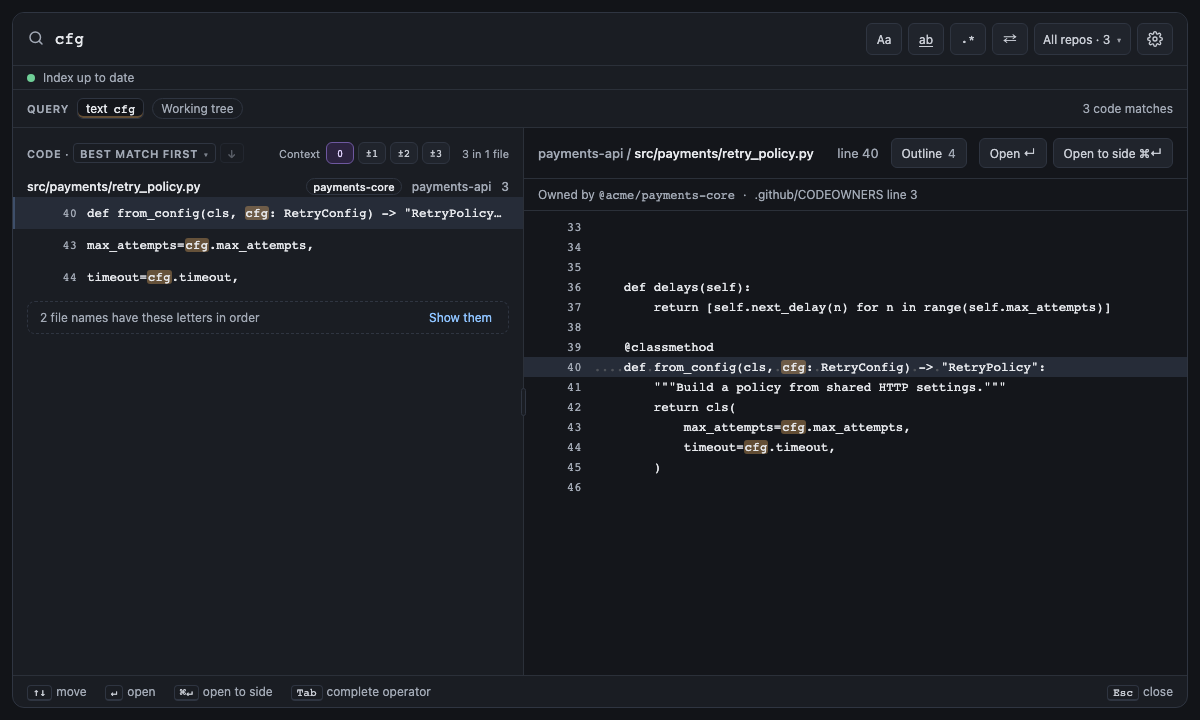
Without match:fuzzy, when a word would have found more file names this way a note under the results counts them,
3 file names have these letters in order, and its Show them adds match:fuzzy to the query (or turns a
match:exact into it). spelunk.search.match set to fuzzy makes every query fuzzy unless it says match:exact.
| Short | Takes | Searches | Example |
|---|---|---|---|
exact (a word matches its text only, the default) or fuzzy (file names by their letters too) |
Current files | match:fuzzy rtrypol |
Screen 33: match:fuzzy finds file names by their letters in order; without it, a note offers them · Screen id fuzzy-file-names · milestone 2.1
match:fuzzy rtrypol finds retry_policy.py, retry_policy.md and retry_policy_test.py, whose names have those
letters in order from the start of a word, the way Quick Open finds files; each matched letter is highlighted. Code
still needs the exact text. Without match:fuzzy, rtrypol finds nothing exactly, and the note under the results
says 3 file names have these letters in order with Show them.

The built panel
| Short | Takes | Searches | Example |
|---|---|---|---|
| none | A word, a "phrase" or a /regex/ matched in file text only, never in file names or commit messages |
Current files and commits | content:retry |
A word matches file names as well as the text inside files, but a file's name and its text are searched apart:
main_test inputGrace finds files whose text has both words, or whose name has both, not a file named main_test
that mentions inputGrace. Say which word is the name with file:: file:main_test inputGrace. content:retry
matches only the text: it lists the lines
that mention retry but not retry.ts as a file name, and in a commit search it matches the changed lines but not
the message. It is a word in every other way: it takes a "phrase" or a /regex/, counts for smart case, gets its
own highlight color, and word:yes applies to it. Its value is searched as written, so content:"type:file" finds
that text instead of reading it as an operator.
| Short | Takes | Searches | Example |
|---|---|---|---|
| none |
comments (inside comments, Python docstrings too), strings (inside quoted text) or code (outside both); -in: leaves that place out |
Current files | in:comments retry |
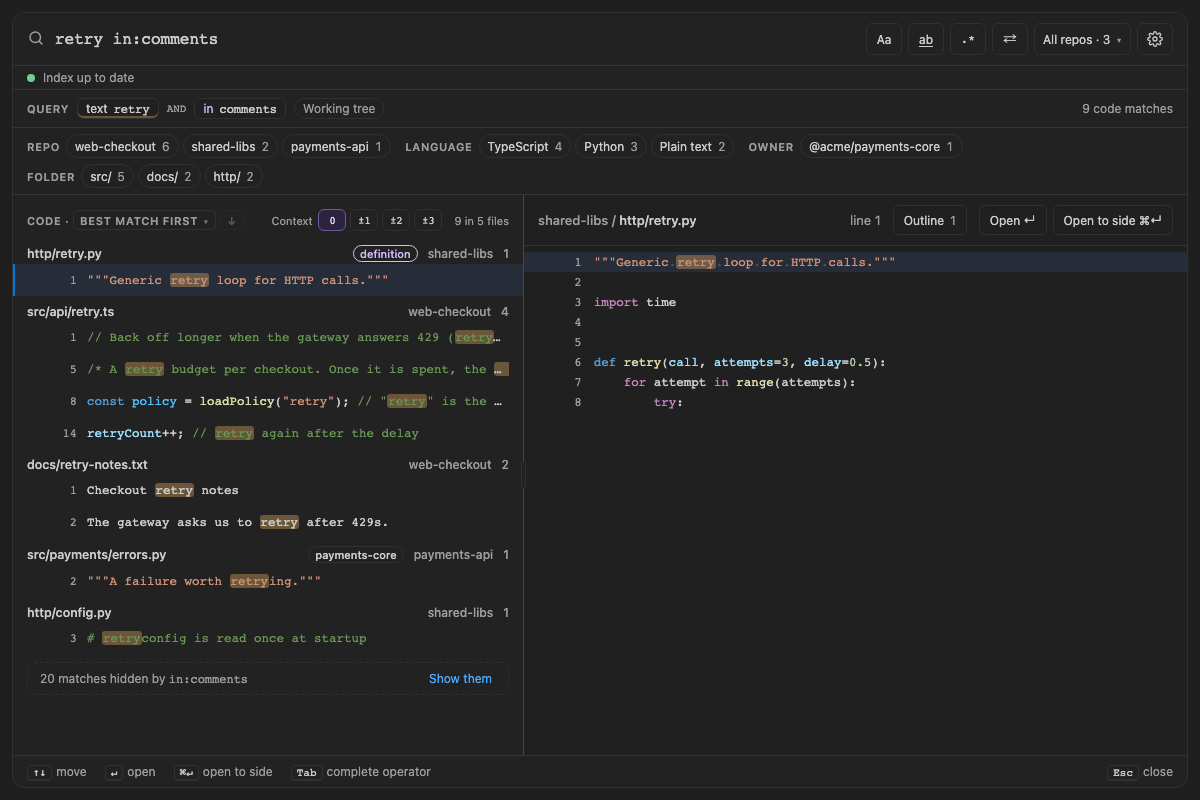
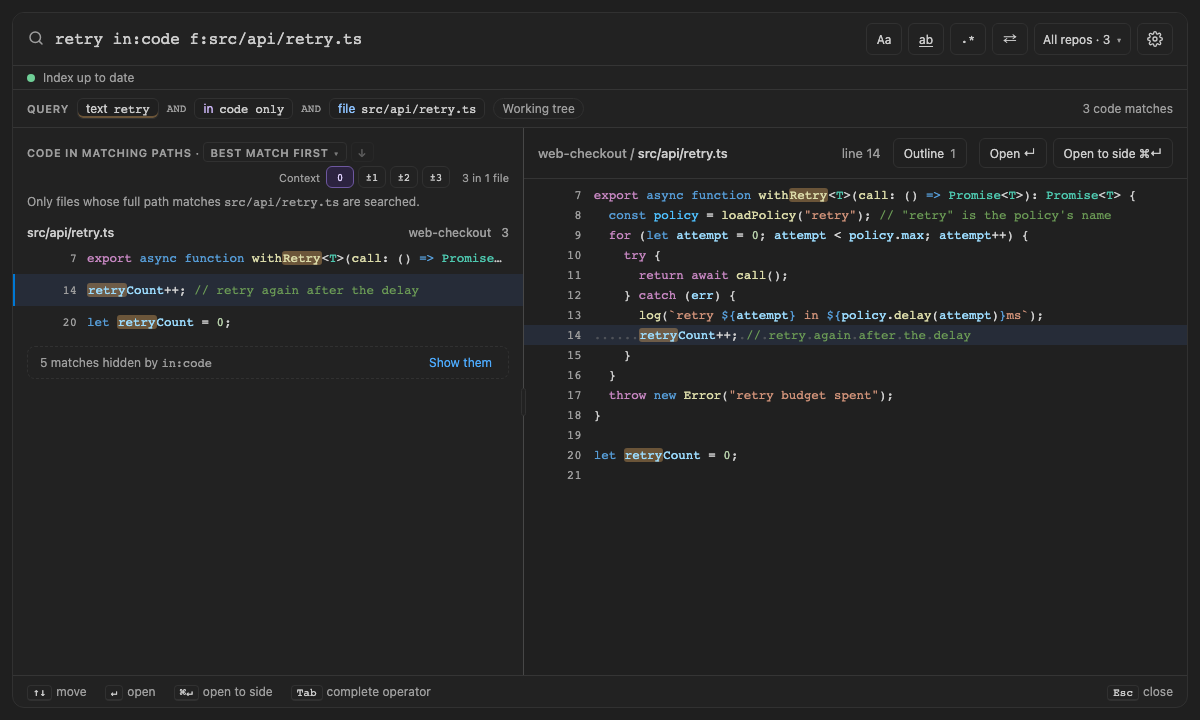
in: says where a match has to be. retry in:comments finds the notes people left about retrying and skips the code;
"budget spent" in:strings lands on the error message itself; retry in:code skips every comment and docstring that
only talks about retrying; retry -in:comments keeps code and quoted text. Each file is read by its language's rules,
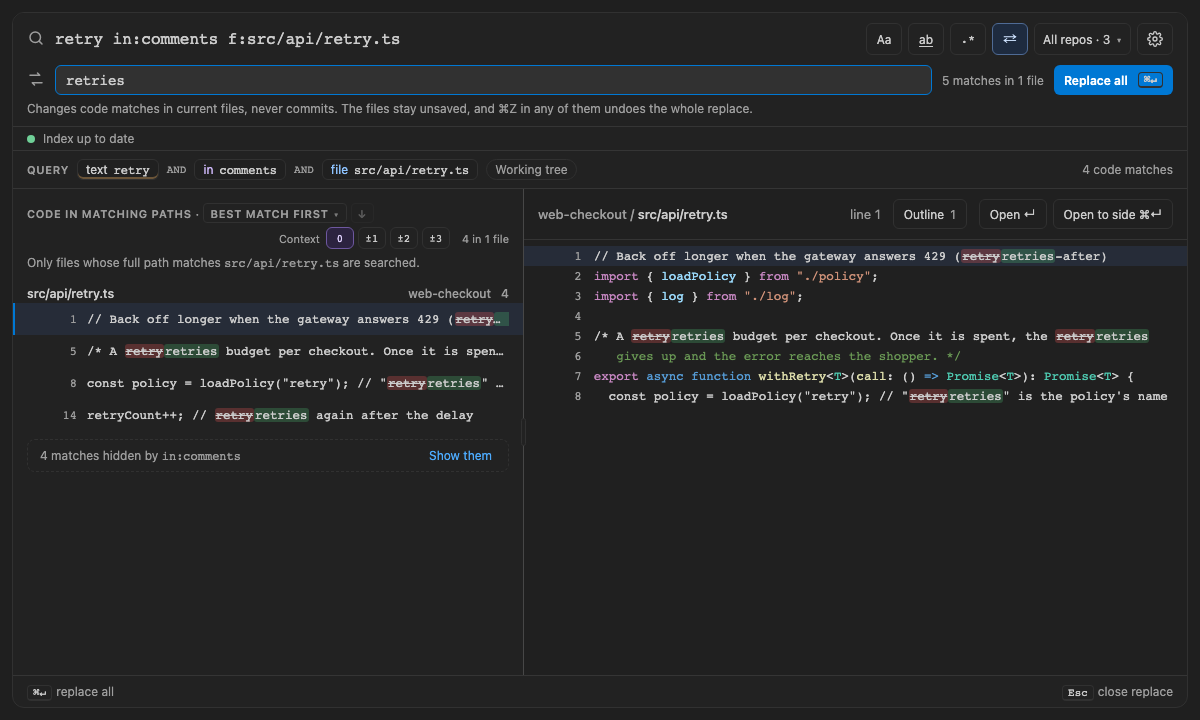
the same ones struct: uses, and each match counts on its own: on retryCount++; // retry again, in:comments
marks only the second retry, and Replace changes only that one. The facets count only what is kept, and a note says
how many matches in: hid ("20 matches hidden by in:comments · Show them").
-
Where it can go. Like
case:, it applies to the whole query: once, at the top level, never inside( )or anORbranch. Unlike the others, it can take a minus:-in:comments. -
A match that crosses places, such as
/retryCount\+\+; \/\/ retry/, which starts in code and ends in a comment, is in neither:in:commentsandin:codeskip it, and-in:commentskeeps it. - A regex across lines counts when the whole match is in the place, such as two lines of one block comment.
-
Plain text and Markdown are people's writing, with no code to tell apart, so every
in:keeps their matches. A notebook's markdown cells are the same; its code cells are read by their language. A file in a language Spelunk has no comment rules for (.xml,.vue) counts as code. -
File names and definitions. A file's name is in no comment, so
in:searches file text only. Definitions are code:symbol:andkind:work within:code, and within:commentsorin:stringsa warning says they can find nothing, as it does forstruct:andtype:file. Looking inside definitions works with any of them:kind:function content:TODO in:commentsfinds the TODO comments inside functions. -
Excluded words follow it too.
retry -budget in:codeleaves out only the files withbudgetin their code. -
Current files only, at any revision
at:names; a commit search says so, with a fix that removesin:.
Screen 57: Comments, quoted text or code: in:comments, in:strings and in:code keep each match by where it is; -in: leaves one place out · Screen id comments-strings · milestone 2.1
retry finds file names and 29 matches across code, comments, docstrings and quoted text. retry in:comments keeps
the 9 in comments, docstrings and plain-text notes, the facets count only those, and a note offers the other 20. On a line with retry in its code
and in its comment, only the comment's is marked, in the list and the preview, and Replace with in:comments changes
5 matches instead of 11.

The built panel
| Write | Means |
|---|---|
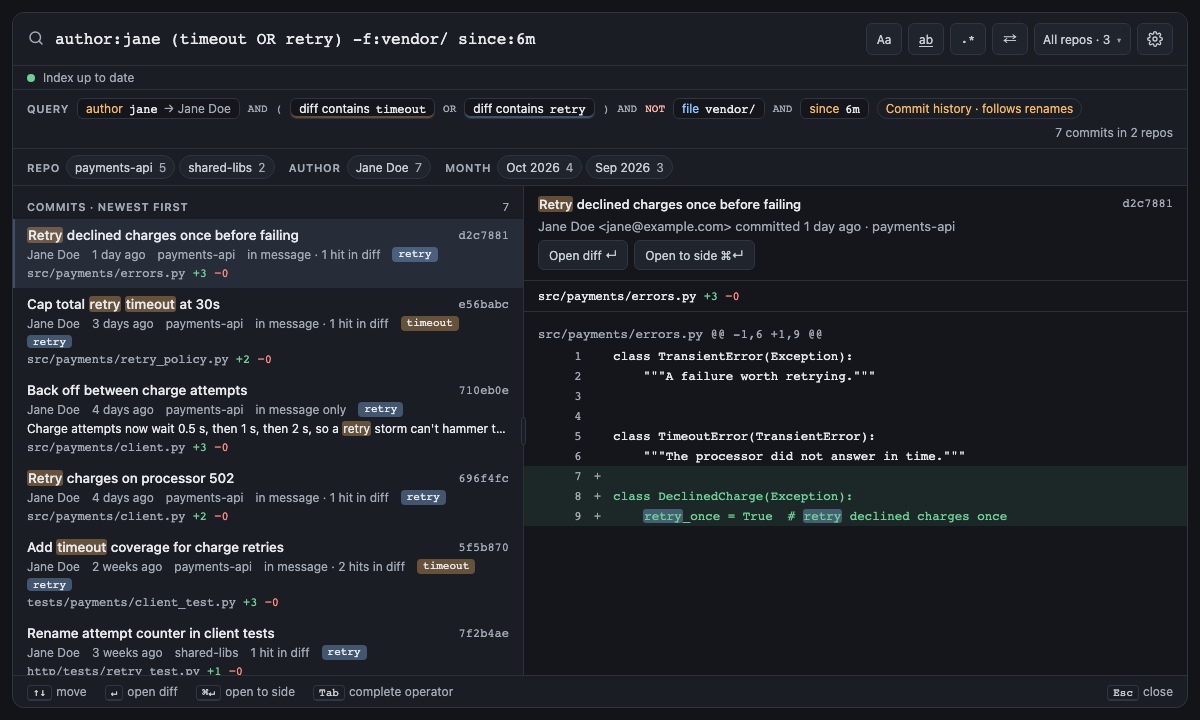
a b or a AND b
|
Both must match |
a OR b |
Either matches |
( … ) |
Group terms |
-word, -"phrase", -file:vendor/
|
Exclude a word, a phrase, or anything an operator matches |
NOT word, NOT file:vendor/
|
The same as -, spelled as GitHub and Sourcegraph do |
AND binds tighter than OR: a b OR c means (a b) OR c. Use parentheses whenever you mix them. A pipe inside a
plain word is just a character, and lowercase and, or and not are words to search for: daemon|search matches the text daemon|search, and the panel warns and offers
daemon OR search or /daemon|search/ instead.
A word left out leaves out every file whose name or text has it: -inputGrace file:daemon/ lists neither the code
lines nor the file names of the files that mention inputGrace.
A - excludes only what starts like a word, a "phrase", a /regex/, an operator or a group. Before punctuation it
is part of the text: ->, -= and --verbose search for themselves.
Screen 7: AND / OR / ( ) / - / since: in history · Screen id boolean-history · milestone M3

The built panel
Next: Files and repos: keep the files, repos and languages you want.