Files and Repos - cruisinme30/spelunk GitHub Wiki
Narrow a search to some files: by path, repo, language, file state (open, uncommitted, tests, generated, vendored) or CODEOWNERS owner. The files VS Code's excludes hide are left out unless you ask for them. Each of these works on current files, and most also keep the commits that changed those files.
| Short | Takes | Searches | Example |
|---|---|---|---|
f: |
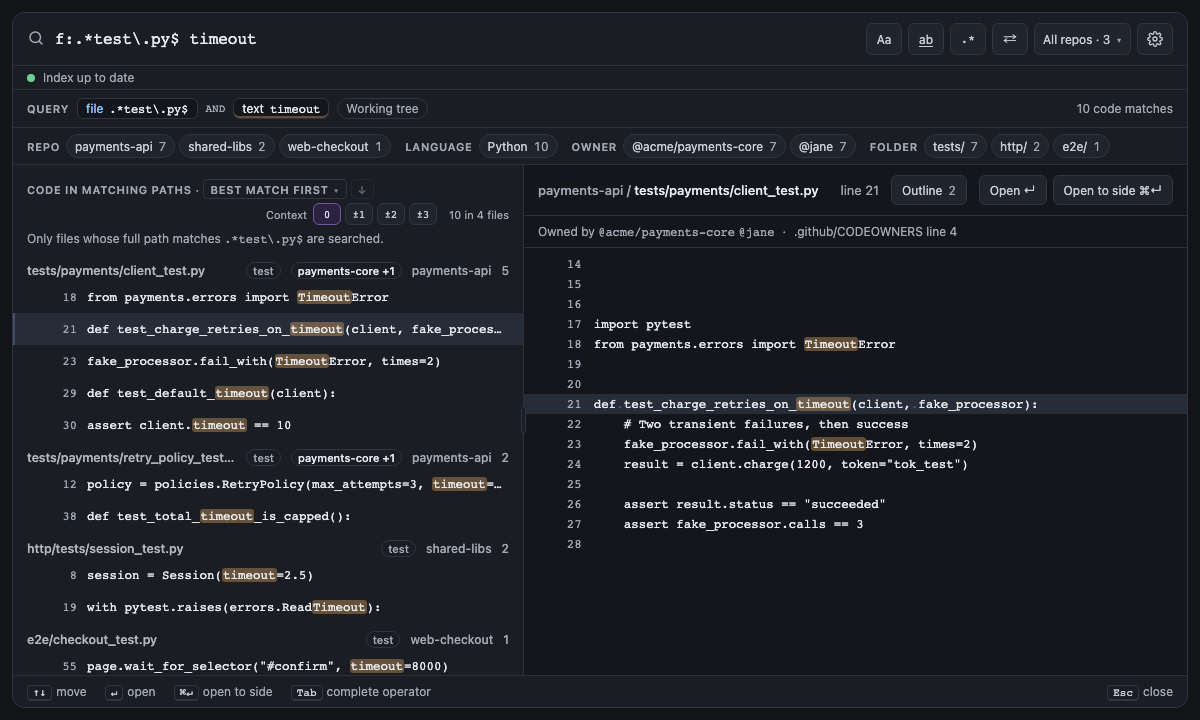
A regex on the path (\.go$) or a glob (*.go, src/**/*.ts) |
Current files and commits | file:_test\.py$ timeout |
A value with * is a glob (src/**/*.ts); anything
else is a regex on the path (_test\.py$). In a commit search file: keeps the commits that
changed a matching path, and the preview hides the other files until Show all. It follows a file through its
renames: file:retry_policy.py also finds the commits made while the file had an older name (see
Renames and merged branches).
Right-click a folder in the Explorer and Search in Folder with Spelunk writes it for you, anchored at its repo's root: see Searching a folder.
Screen 2: f: path regex + text · Screen id path-scoped-search · milestone M1

The built panel
| Short | Takes | Searches | Example |
|---|---|---|---|
| none | A regex (^web) or a glob (web-*) on the repo name |
Current files and commits | repo:payments retry |
The repo menu (All repos · N) and the repo facet write it anchored to the whole name, repo:^api$, so picking
api doesn't also search payments-api. See Using the Panel.
| Short | Takes | Searches | Example |
|---|---|---|---|
lang: |
A language or alias: python, py, ts, golang
|
Current files and commits | language:python retry |
A Jupyter notebook is in its kernel's language: language:python keeps a Python notebook's cells (see
Jupyter notebooks). In a commit search it goes by file names, so it leaves
notebooks out.
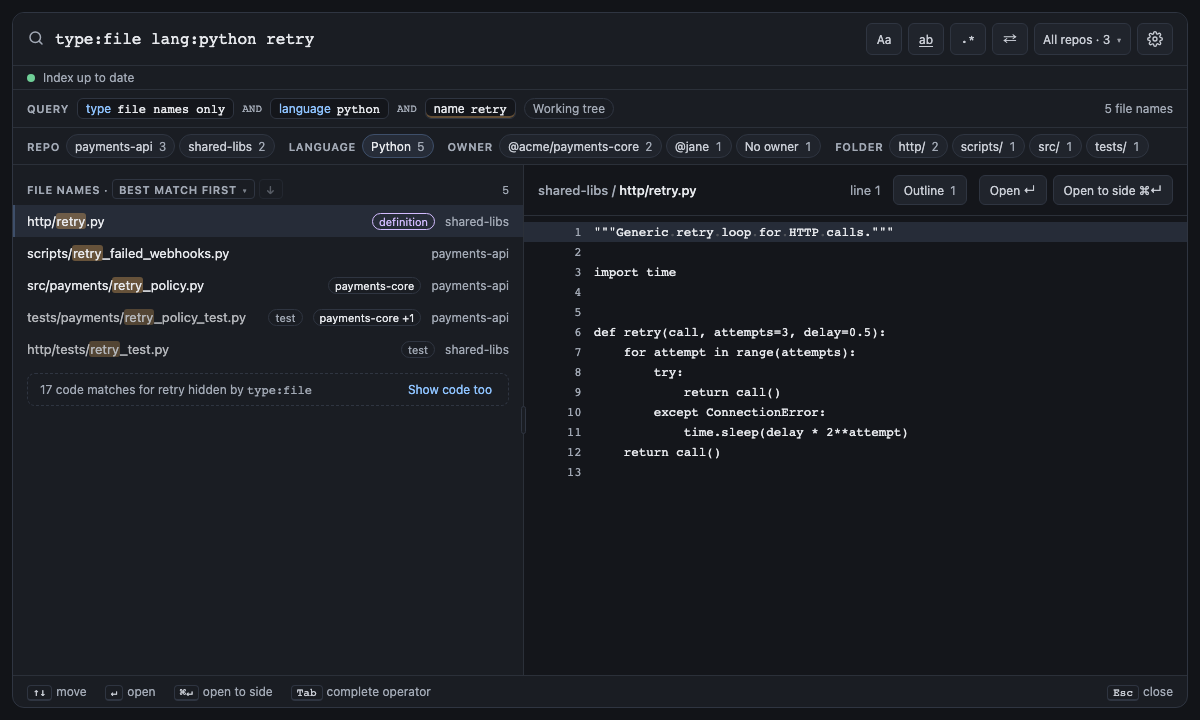
type:file returns file names only, and type:code code lines only. The other values of type:
switch the search to commits.
Screen 12: type:file + lang: · Screen id file-names-only · milestone M2

The built panel
| Short | Takes | Searches | Example |
|---|---|---|---|
| none |
open (open in an editor tab), changed (uncommitted: edited, added or staged), test (a test file), generated (written by a tool) or vendored (someone else's code, or a build's) |
Both (test, generated, vendored); files only (open, changed) |
RetryPolicy -is:generated -is:vendored |
A test file is one in a test/, tests/, __tests__/, spec/, e2e/ or testdata/ folder, or one named the
way its language names tests: client_test.go, test_client.py, client_test.py, conftest.py,
client.test.ts, client.spec.js, client_spec.rb, ClientTest.java, ClientTests.swift. Outside Git nothing
is uncommitted, so is:changed matches no files.
A generated file is one a tool wrote: named like generated code (by default *.pb.go, *_gen.go, *.gen.go,
*.gen.ts, *_pb2.py, *_pb2_grpc.py, *_pb2.pyi, *.min.js, *.min.css; spelunk.index.generatedSuffixes sets
the endings), or with @generated, or DO NOT EDIT beside the
word "generated", in its first kilobyte, as Go's Code generated … DO NOT EDIT. and protoc's header put it. A
commit's files have no header to read, so in a commit search is:generated goes by the name alone. A vendored file
is one in a vendor/, node_modules/, third_party/ or dist/ folder, or the folders spelunk.index.vendoredFolders
names instead; index.exclude leaves the first two out of the index by default. These are the files best-match ranking puts last, so -is:generated -is:vendored keeps a search
or a replace to code people wrote, and a note under the results says how many matches each one left out.
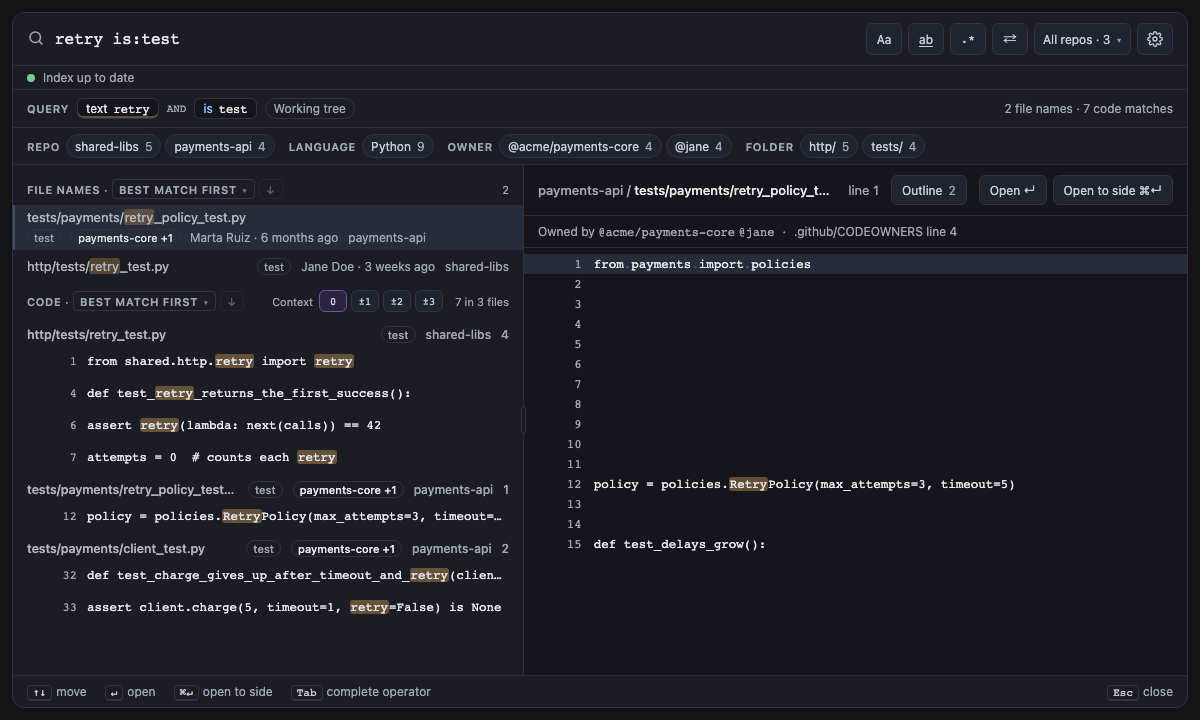
Screen 26: is:test keeps test files · Screen id test-files · milestone 1.1
is:test keeps the test files, here the two that mention retry; -is:test leaves them out instead. is:open
keeps the files open in editor tabs and is:changed the ones with uncommitted changes.

The built panel
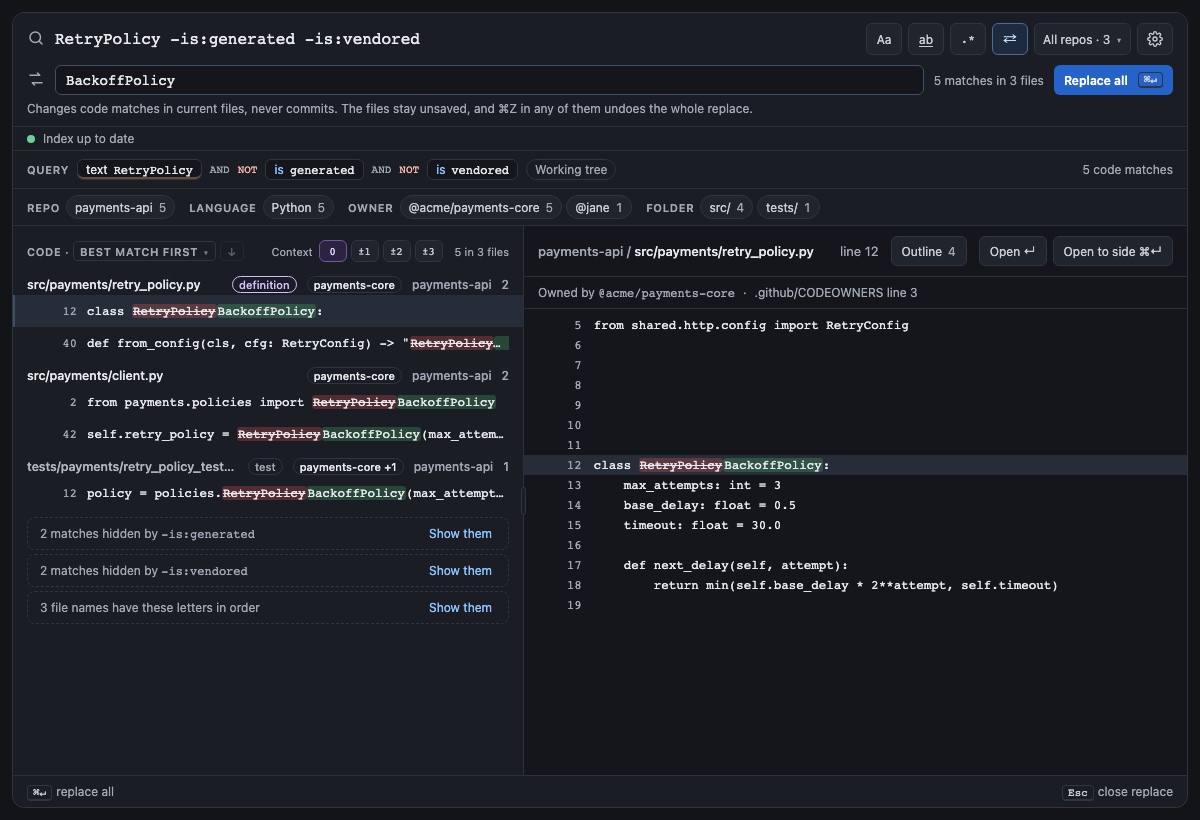
Screen 37: -is:generated / -is:vendored leave tool-written and third-party files out · Screen id generated-vendored · milestone 1.2
Renaming RetryPolicy to BackoffPolicy would also edit protoc's retry_pb2.py, a copy of someone else's code in
third_party/ and a bundle in dist/. -is:generated -is:vendored leaves those files out, so Replace all only
touches the code people wrote, and a note under the code says how many matches each filter left out, with Show
them. is:generated and is:vendored keep only those files instead, and in a commit search they keep the commits'
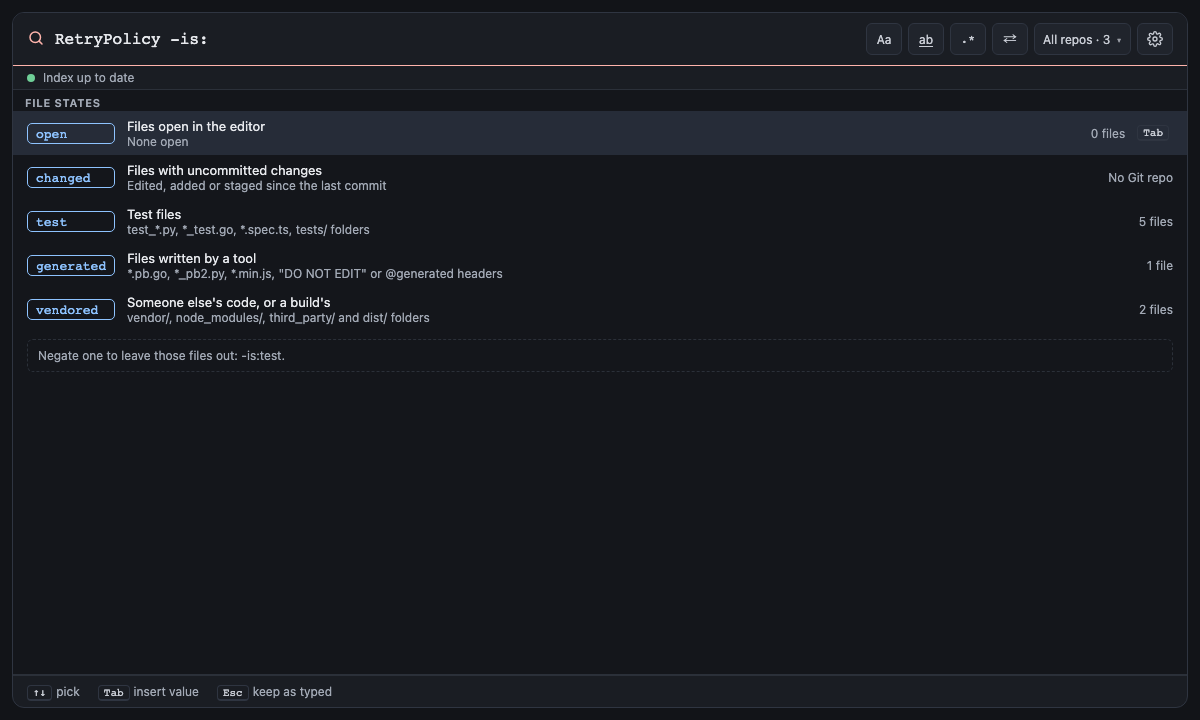
changes to them. Typing is: lists both, with how many files are in each and what counts. The mock's first panel
shows 1.1, before the two filters, when retry_pb2.py wasn't even recognised as generated.

The built panel
| Short | Takes | Searches | Example |
|---|---|---|---|
| none | An owner in the repo's CODEOWNERS file: a team (@acme/payments-core, or payments-core alone), a person (@jane or jane) or an email, matched whole and ignoring case; or none, for files no line gives an owner |
Current files only | owner:payments-core retry |
owner: asks each repo's CODEOWNERS file who owns a file, the way GitHub does: the first of .github/CODEOWNERS,
CODEOWNERS and docs/CODEOWNERS (or the places spelunk.index.codeownersFiles names) that exists counts, and the last line whose pattern matches the file decides. A file reached through a symlink doesn't count, since it could point outside the repo.
Patterns match like .gitignore's: one with a slash at its start or in its middle matches from the repo root, one
without matches at any depth, one ending in / takes a folder's files at every depth, docs/* only the folder's own
files, and ** spans folders. A line with a pattern and no owners leaves its files unowned, which owner:none finds.
Lines GitHub skips are skipped: ! patterns, [ ] ranges, and owners that aren't a @user, an @org/team or an
email. A repo without a CODEOWNERS file matches no owner (so -owner:@acme/platform keeps all its files), and when no
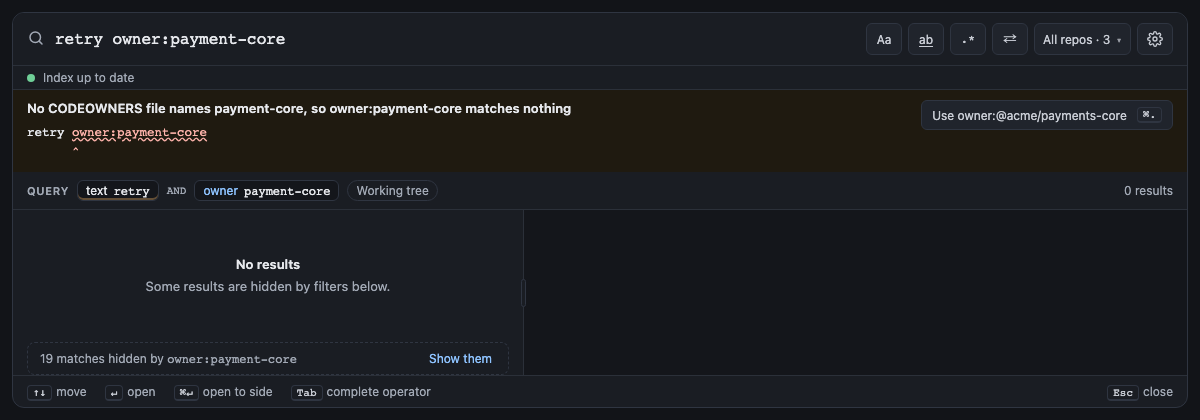
open repo has one, or none names the owner you typed, the panel warns and offers the nearest owners. The file is read
again whenever you save it.
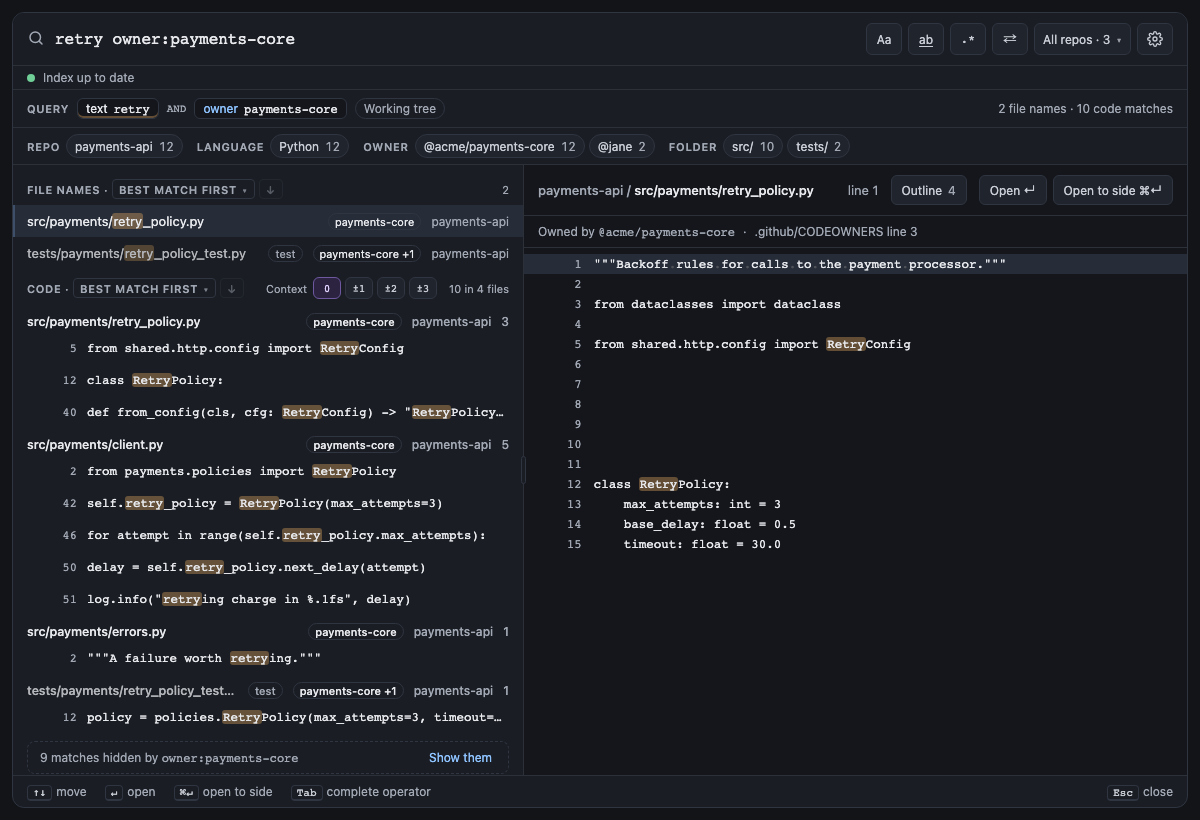
Screen 42: owner: keeps the files a team owns in CODEOWNERS · Screen id owner-filter · milestone 1.2
payments-api's .github/CODEOWNERS gives src/payments/ and tests/ to @acme/payments-core, so
retry owner:payments-core keeps the matches in that team's files and a note under the code says how many it left
out, with Show them. Each result's badge names its file's owner (a team by its name alone, payments-core +1
when there are more; the tooltip names them all), the facet row counts the results by owner, and the preview says
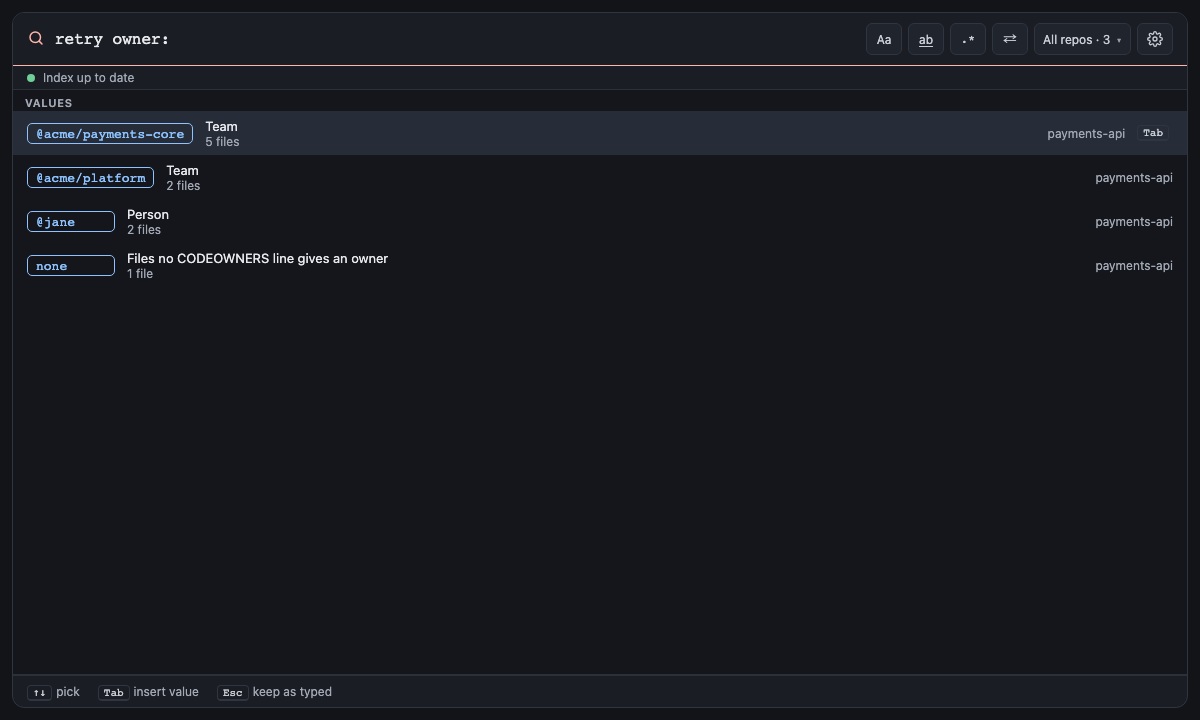
which line of CODEOWNERS decided. Typing owner: lists the owners the CODEOWNERS files name, with how many files each
has, and none; an owner no file names gets a warning that offers the nearest one.

The built panel
| Short | Takes | Searches | Example |
|---|---|---|---|
| none |
yes (leave out what VS Code's excludes hide, the default) or no (show it too) |
Current files and commits | excludes:no retry |
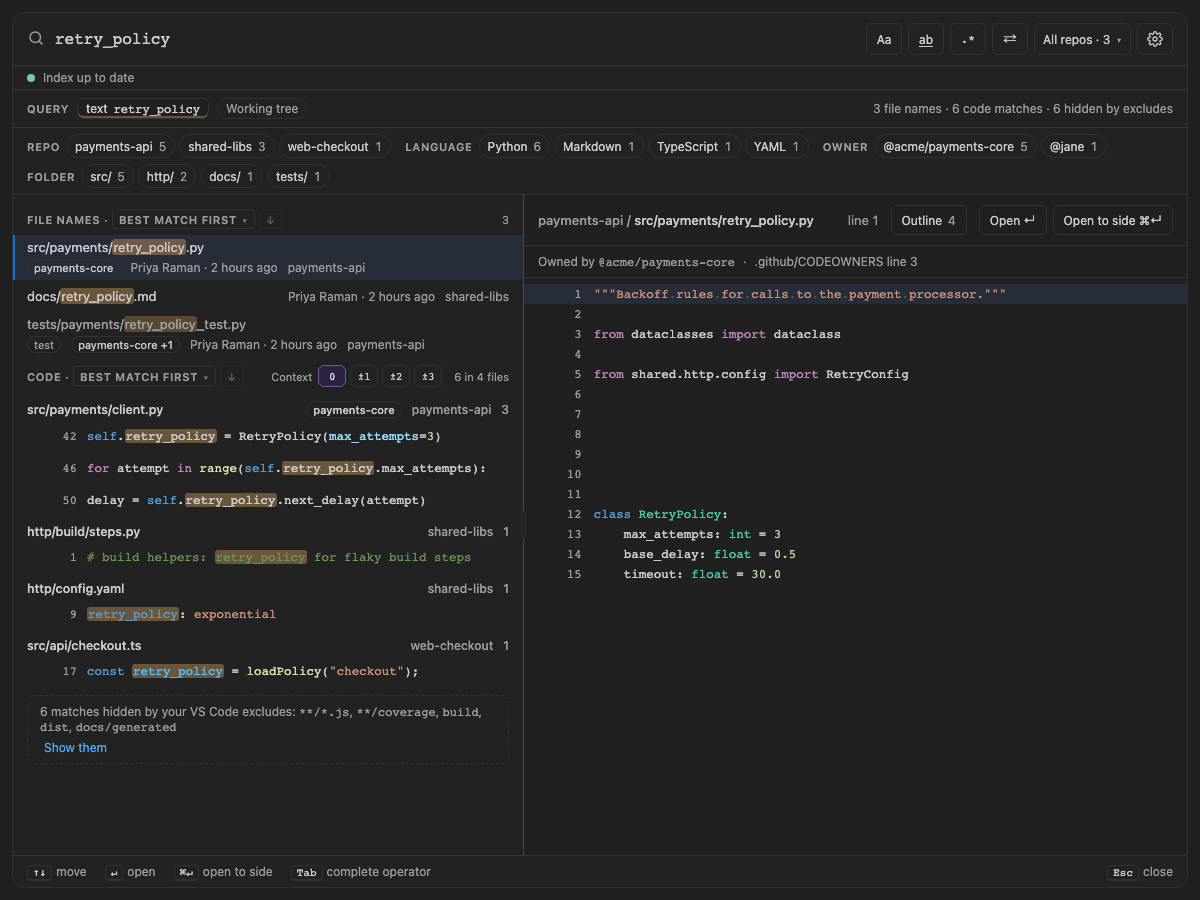
Files you hide from VS Code with files.exclude or search.exclude (a build folder, a coverage report, generated docs,
compiled .js beside its .ts) are left out of every search, as VS Code's own search leaves them out. Each workspace
folder uses its own settings, with your user settings, the workspace's and the folder's merged as VS Code merges them,
and search.exclude can turn off a files.exclude pattern by setting it to false. Patterns read the way VS Code
reads them, which differs from spelunk.index.exclude: one without a slash matches at the top of the folder only
(build hides build/, not http/build/), {dist,out} and [Tt]emp work, and a pattern that matches a folder
hides everything in it. A when clause hides a file only beside its sibling: "**/*.js": { "when": "$(basename).ts" }
hides checkout.js next to checkout.ts and keeps legacy.js.
A note under the results counts what was left out and names the patterns that did it, and the summary at the top
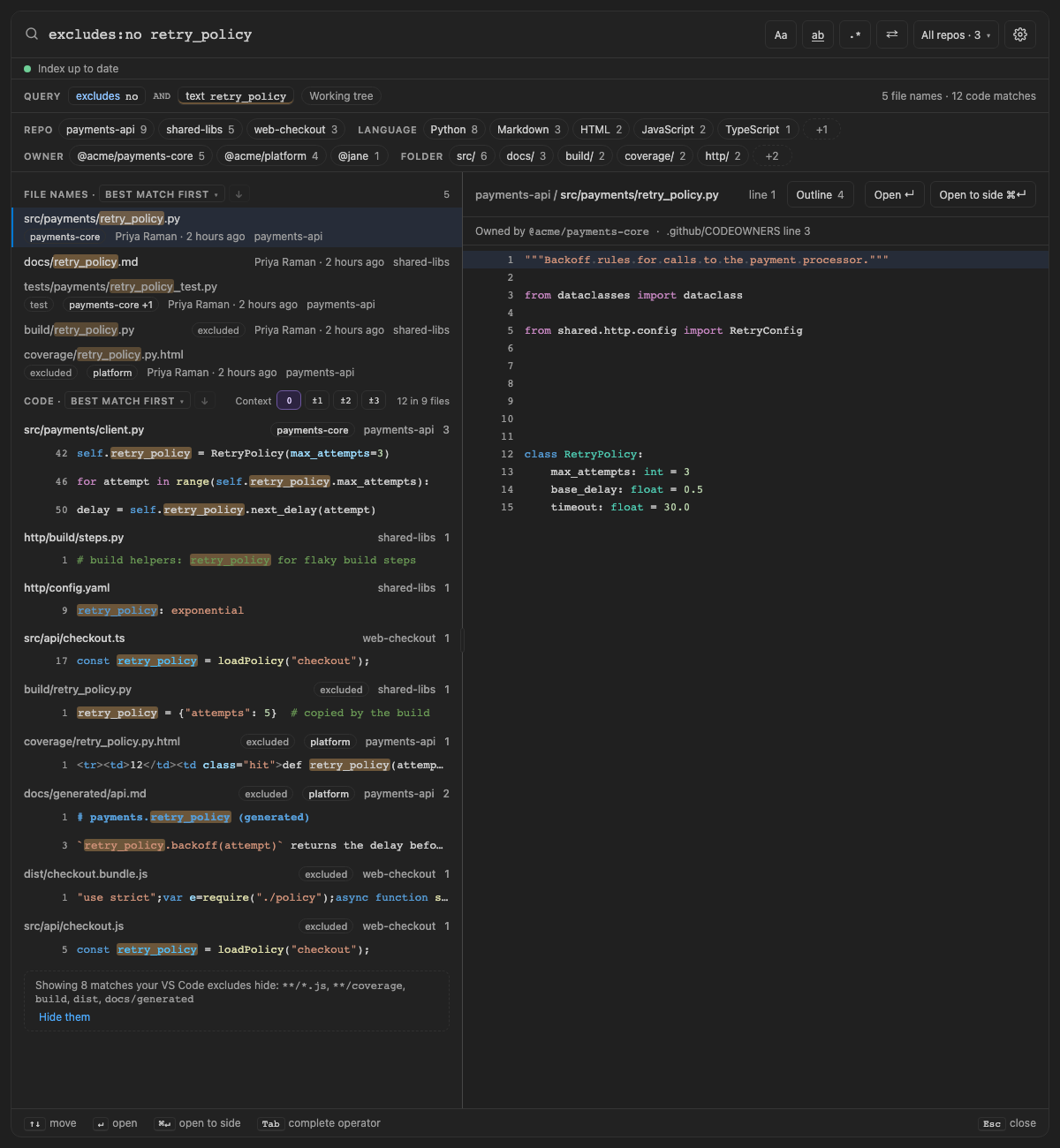
counts it too. Show them adds excludes:no to the query, so the choice shows in the box and stays in a pinned
query: the hidden files come back last, marked excluded, and the note offers Hide them. A search whose every
match is hidden says so, with Show them, even when file: names the hidden folder (VS Code does the same). History
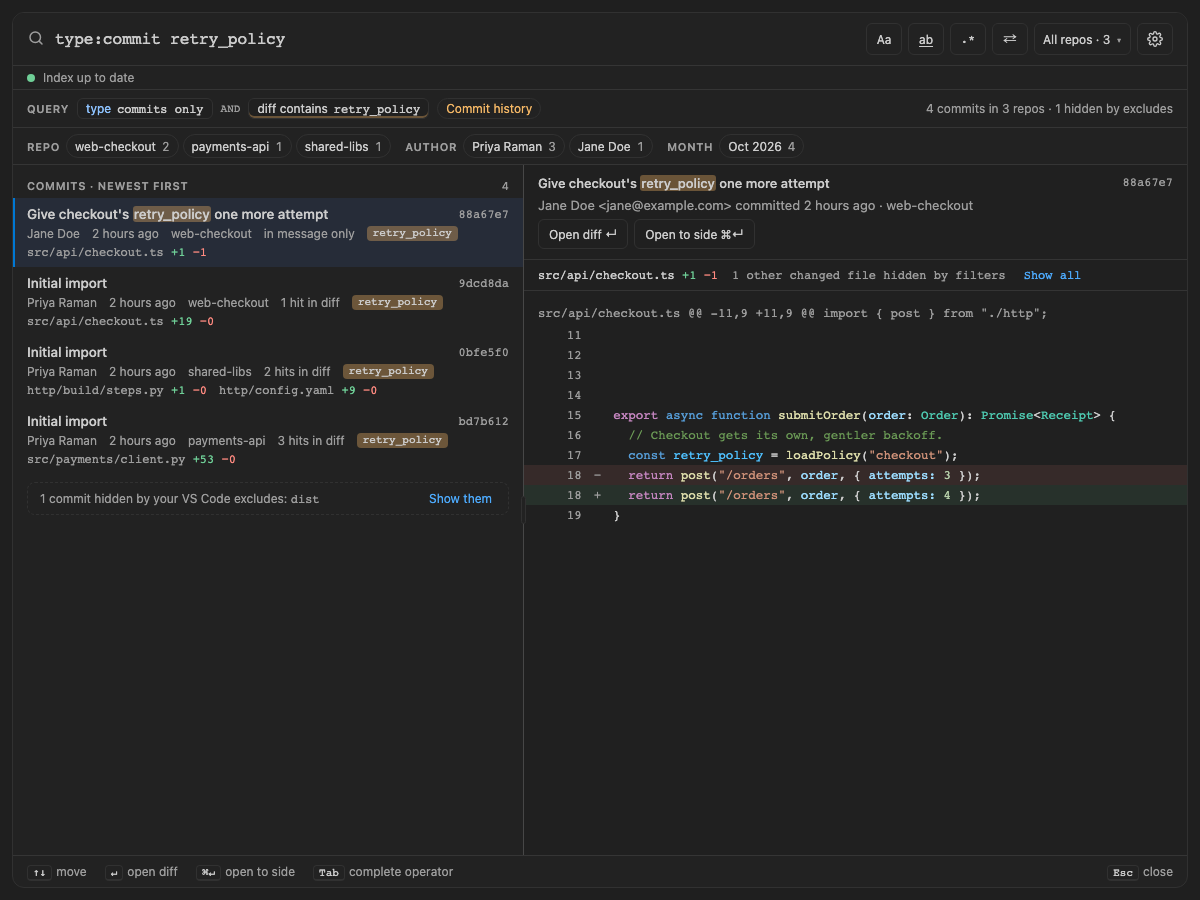
leaves out the commits that only change hidden files, and drops hidden files from the other commits' file lists and
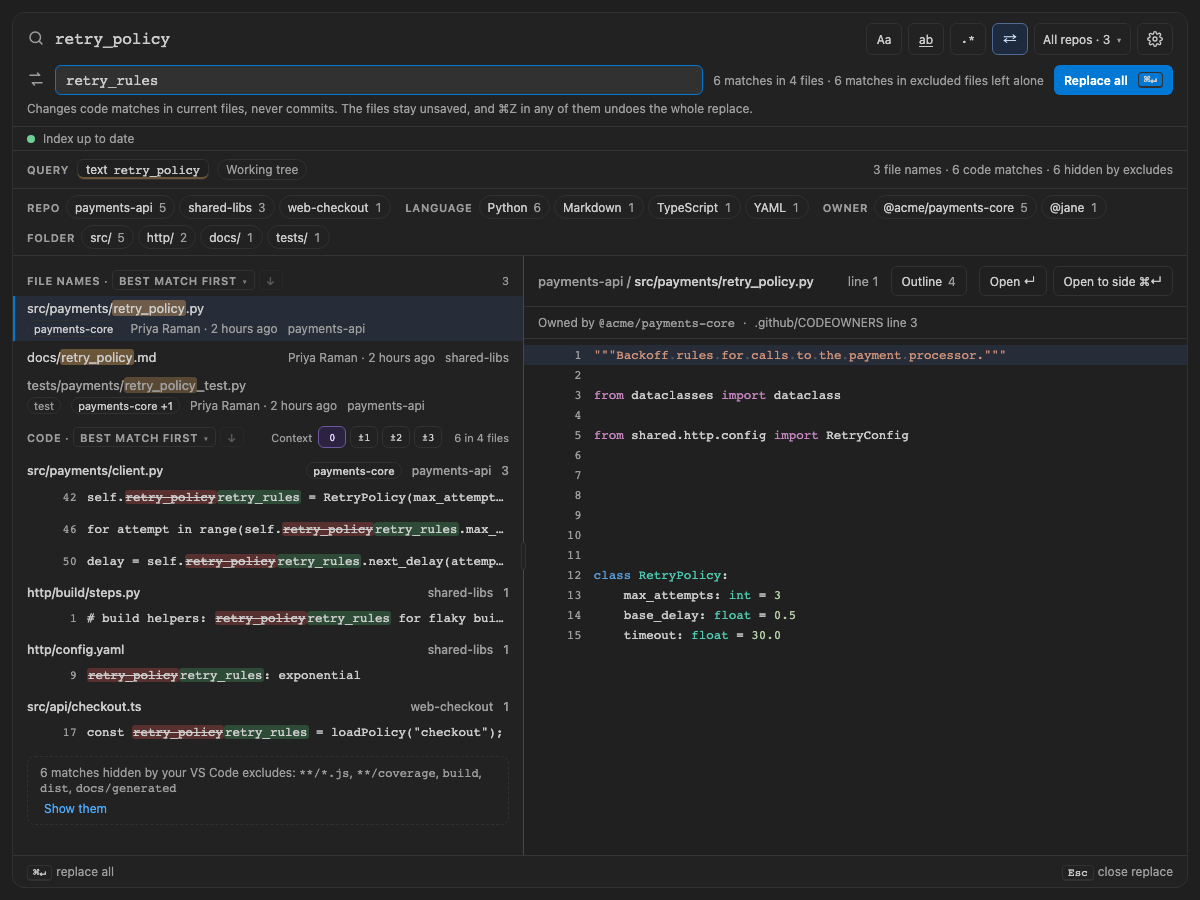
diffs. Replace changes only the files that show and says how many matches in hidden files it left alone.
Excludes apply when searching, not when indexing, so changing them, or turning spelunk.search.useExcludeSettings
off, changes the next search at once and an open panel searches again. spelunk.index.exclude is different: those
files are never indexed, so excludes:no can't show them.
Screen 52: VS Code's files.exclude and search.exclude hide results too; a note counts them, and Show them adds excludes:no · Screen id editor-excludes · milestone 2.1
Three folders hide their build copy (build), coverage report (**/coverage), generated docs (docs/generated),
bundle (dist) and compiled .js beside its .ts. retry_policy shows only the real source files, the facets count
only them, and the note names the patterns that hid 6 matches. excludes:no retry_policy brings them back last,
marked excluded; a history search hides the commit that only rebuilt the bundle; and Replace leaves the hidden
matches alone and counts them.

The built panel
Next: Definitions and code shape: find where things are defined and used.