GitHub Projects - alexherrero/crickets GitHub Wiki
GitHub Projects gives your team a live, human-readable view of what the agent is doing. Your vault holds the real roadmap, plans, and progress, but a vault isn't where colleagues go to check status — a GitHub Project board is. This plugin keeps that board in step with the vault automatically, so anyone can glance at the board and trust it reflects the current state without anyone hand-editing it. The sync runs one way only, from vault to board, and it's deterministic: the same vault state always renders the same board, and re-running never creates duplicates or drift. It enhances Development Lifecycle and needs it installed to run.
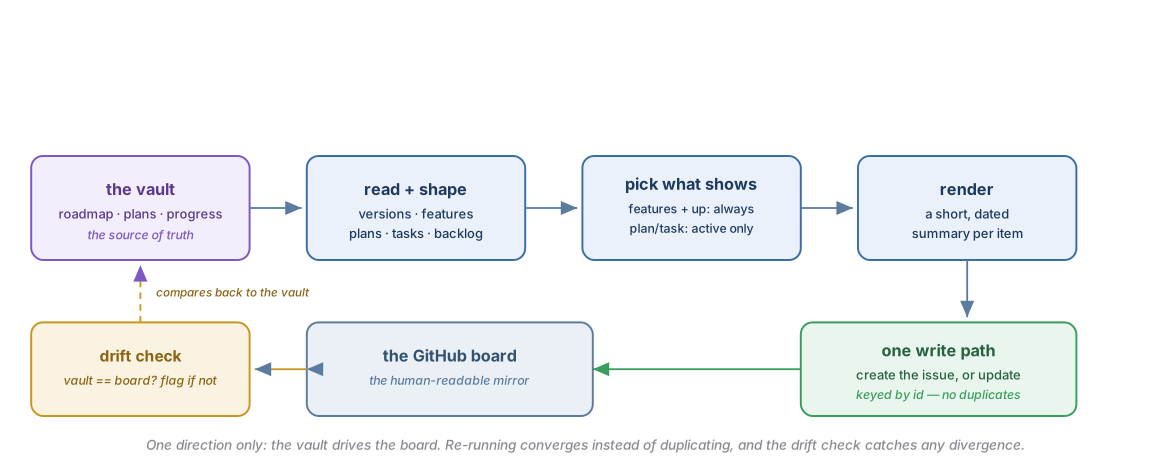
How the sync flows — the vault drives the board one way, and a drift check keeps them honest:
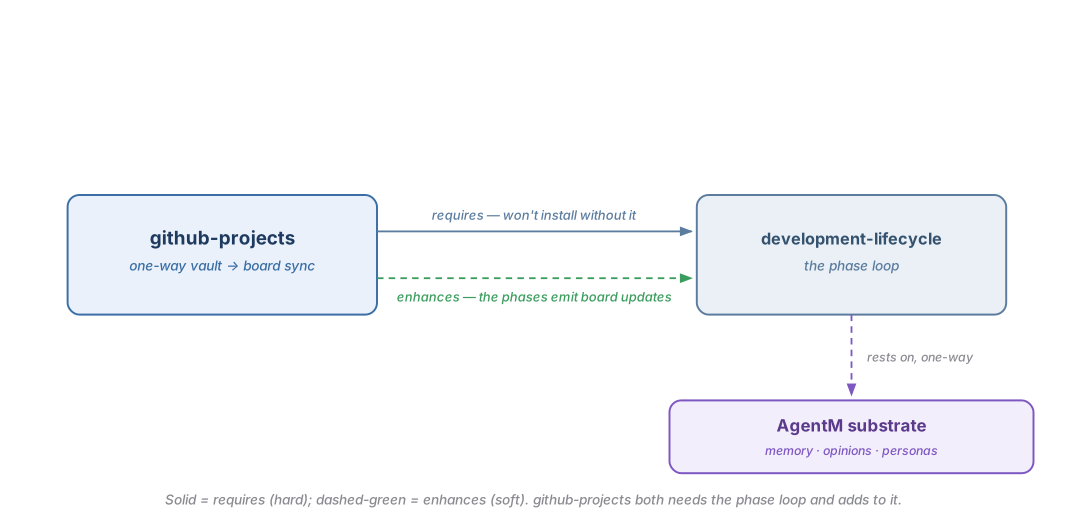
How it composes — github-projects both needs the phase loop and adds to it, resting on the AgentM substrate:
A small config file tells the plugin which vault project maps to which GitHub board. From there it reads the vault's roadmap and progress and builds a picture of the work — versions, features, plans, tasks, and the things still in the backlog. It doesn't mirror all of that onto the board. Features and everything above them always appear, so the board reads as a stable roadmap, but the finer-grained plans and tasks only show up for the plan you're actively working, so the board never fills with breakdowns for work that hasn't started.
Each item gets a short, dated summary from a fixed set of templates, and every write goes through one path that either creates the matching issue or updates the one that's already there — keyed by a stable id, so running the sync again just brings the board back into agreement rather than posting duplicates. A drift check confirms the vault and the board still match and flags it if they've diverged. When Development Lifecycle is installed, the plan, work, release, and bugfix phases each push the matching board update as they run; if this plugin isn't present, those steps simply do nothing.
| Direction | Plugin | How |
|---|---|---|
| Enhances (soft) | Development Lifecycle | Its /plan, /work, /release, and /bugfix phases emit board updates as they run — gated on the board-sync capability, and a no-op when this plugin is absent. |
| Enhanced by (soft) | — | None. |
| Requires (hard) | Development Lifecycle | Declared in group.yaml (requires: [development-lifecycle]); the phases the board sync hangs off live there. |
| Required by (hard) | — | None. |
GitHub Projects is an opinionated, one-way sync, and it will not fit every workflow. Reach for something else if:
- You want to edit the board directly and have those edits flow back. This sync is strictly vault → board; anything you type into the board is overwritten on the next render.
- You already keep your roadmap somewhere other than an Obsidian-style vault, or you prefer a hosted project tool's own automation — this plugin assumes the vault is the source of truth.
- Your project is small enough that a board is overhead. For a handful of tasks the templates, drift gate, and config file are more machinery than the work needs.
This plugin ships no slash commands or skills. It's a set of scripts plus a template library that the development-lifecycle phases drive. Each primitive links to the source that implements it.
| Primitive | Kind | What it does |
|---|---|---|
project_sync.py |
script | The only path that writes to GitHub — renders an item and creates or updates its issue, keyed by a stable id so re-runs never duplicate. |
project_model.py |
script | Builds the typed graph of the work, enforces the parent-chain, and applies the materialization rule (features and up always; plans and tasks only for the active plan). |
check_project_sync.py |
script | The drift gate — checks the board still matches the vault, and skips cleanly when there's no config or no gh. |
project_schema.json |
schema | The documented project.json contract — config keys, field mappings, and the isolation block. |
templates/ |
templates | The one-line body templates, one set per type and lifecycle stage. |
The plugin reads a per-project project.json that maps a vault project to its GitHub Project board. It lives in the repo's gitignored .harness/project.json — never in the public repo, and it carries no PII. A vault-backed project keeps the board mirror it names (items_source) in its desk/. Only two keys are required: vault_project (the vault project whose roadmap and progress drive the board) and github (which itself needs owner and number).
| Key | Type | Required | Role |
|---|---|---|---|
vault_project |
string | yes | the vault project whose roadmap / plan / progress drives the board |
github.owner |
string | yes | the GitHub owner (user or org) that owns the Project |
github.number |
integer | yes | the Project number |
github.url |
string | no | the Project URL; link bases are built from it, and it's derived from owner + number when omitted |
github.repo |
string | no | the repo the Project's issues live under |
project_surface |
enum | no |
github-board (the default) / local-index / none
|
items_source |
path | no | where the board items live; defaults to a board-items.json beside the config |
fields |
object | no | maps the field names (track, type, …) onto the Project's columns |
isolation |
object | no | how worktrees and integration are handled, read by the development-lifecycle loop |
env |
object | no | environment-variable path overrides |
With no project.json and no gh on the PATH, the drift gate and the phase updates skip cleanly rather than failing.
The board models a flat set of seven types, held together by a parent-chain rather than nested containers:
| Type | Class | Parent |
|---|---|---|
| Version | container | — |
| Feature | work | Version |
| Sub-feature | work | Feature |
| Plan | work | Feature or Sub-feature |
| Task | work | Plan |
| Backlog-item | pre-work | — |
| Idea | pre-work | — |
The parent-chain is checked when the graph loads: a type that should be top-level can't declare a parent, a child's parent must exist and be the right type, and cycles are rejected. Version, Backlog-item, and Idea sit at the top level.
Materialization — the board doesn't mirror everything in the vault. What earns a board item depends on whether the work has started:
| Tier | On the board | When |
|---|---|---|
| Versions · Features · Sub-features · Backlog · Ideas | always | whether or not work has started |
| Plans · Tasks | only for the active plan | task breakdowns are never pre-published |
So the board reads as a stable roadmap at the feature level and up, and fills in plan and task detail only once you start a plan.
Every materialized item carries the same six fields, in this order. These are board columns, not body text — the ordinary sync writes the body; the columns are set by a manual edit or an operator-gated backfill.
| Field | Role | Values |
|---|---|---|
| Track | the work stream | free-form (house convention: V4→V7, Backlog, Ideas) |
| Type | one of the seven types | the one value enforced in code |
| Priority | fix-first ordering | free-form (house convention: P0–P3) |
| Start | start date | YYYY-MM-DD |
| Target | target date | YYYY-MM-DD |
| Status | lifecycle state | free-form |
Only Type is checked against a fixed list; Track, Priority, and Status pass through as free-form strings, so treat their vocabularies as house convention rather than validation.
Each type renders from a small set of locked one-line templates with {{placeholders}}. The four work types (Feature, Sub-feature, Plan, Task) each carry a kickoff / progress / closeout triad; the container (Version) and the pre-work types (Backlog-item, Idea) carry a single template, plus a promotion clause for a promoted backlog item.
| Type | Templates | Shape |
|---|---|---|
| Version | one | About: {{about}} |
| Feature / Sub-feature | kickoff · progress · closeout | goal + why; a dated shipped line; outcome + release links + deferred work |
| Plan | kickoff · progress · closeout | goal + done-when; dated progress; outcome + shipped link |
| Task | kickoff · progress · closeout | the ①→②→③ lifecycle thread below |
| Backlog-item | one (+ promotion) | what · why it matters · priority |
| Idea | one | the spark + where it could be promoted |
A Task accretes three stages over its life, joined by blank lines:
**① Goal:** {{goal}}  ·  **Done when:** {{done_when}}

**② {{date}}** ([`{{sha}}`]({{commit_url}})): {{progress}}

**③ Outcome:** {{outcome}}  ·  **Landed:** {{landed_link}} · {{date}}
The template owns the layout and the placeholder names; the values come from the board-items data — the two stay separate.
The render is deterministic: the same item always renders the same body, with a stable field order, YYYY-MM-DD dates, and links built from the Project URL rather than hand-typed. A clause whose optional value is missing is dropped whole; a required value that's withheld is an error, so a half-filled item never renders silently. The public render also strips silent-source attribution — names that appear in the private vault roadmap are kept out of the public board.
project_sync.py is the only path that writes to GitHub, and it's idempotent: for each item it creates the issue if there's none, updates it if the body changed, and does nothing if it already matches — so re-running just brings the board back into agreement. A --dry-run renders without writing, as the preview boundary. Most stages re-render in full from the board-items data; a few progress and closeout stages accept flag values (a commit, a summary, a date) so a phase can push a quick update as it runs.
| Mechanism | Behaviour |
|---|---|
| Drift gate |
check_project_sync.py checks the board still matches the vault; it runs in the local gate battery and in CI |
| Graceful-skip | no project.json or no gh → the gate skips cleanly, never an error |
| Phase updates | the development-lifecycle /plan · /work · /release · /bugfix phases push the matching board update when the plugin is installed, and skip quietly when it isn't |
The gate surfaces four kinds of drift: an item with no issue yet, an issue missing from the board, a body that no longer matches, and an orphan issue no item claims. Closed issues for done features are left as history. It exits clean on a match or a graceful-skip, and non-zero when it finds drift.
- One-way vault-to-board synthesis — the why: one-way deterministic synthesis, the vault-as-source-of-truth, and the meta-loop.
- Sync a project board — the operator recipe for a board sync + the inaugural backfill.
-
Development Lifecycle — the base plugin
github-projectsrequires; the phase commands that emit board updates. -
CI gates — the gate battery
check_project_sync.pyjoins. -
Plugin anatomy — what a crickets plugin's
scripts/payload is. - GitHub Projects design — the locked design calls (the taxonomy, materialization, field schema, silent-source, and surface) and the why-not-the-alternative for each.