msa import congregations pts - ajtruckle/meeting-schedule-assistant-support GitHub Wiki
Use this importer if you maintain congregation and speaker information in Public Talks (PTS). It reads the PTS database directly and imports congregation data and memo labels into Meeting Schedule Assistant.
The importer only available when the Public Talks application is installed.
-
Reads the PTS database directly (no file selection required)
-
Imports all congregation records
-
Retrieves memo labels for:
- Congregations
- Talk Coordinator
- Speaker Coordinator
-
Saves these memo labels into Meeting Schedule Assistant settings (see Labels for where these are stored and customised)
-
Shows a confirmation message when complete
This importer does not provide mapping options, preview screens, or overwrite settings.
The PTS importer begins importing immediately when you select the menu option.
There is no preview, no confirmation step, and no way to undo the changes once the import starts.
Because this importer writes congregation data, speakers, availability, talk outlines, memo fields, and coordinator details directly into your Congregations database, it is strongly recommended that you create a backup first.
You can make a backup using the Backup Settings feature before running this importer.
Import → Congregations → From PTS
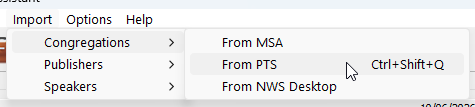
Figure 109. Selecting the PTS importer.
Go to Congregations → Import from PTS.
The importer reads the PTS database and loads all congregation records.
The importer retrieves memo labels from PTS and stores them in Meeting Schedule Assistant using language‑specific settings.
A confirmation message appears when the import is complete.
The PTS importer reads congregation data directly from the Public Talks database. It supports:
- Importing all congregations from the PTS database
- Retrieving memo labels for congregations and coordinators
- Saving memo fields automatically into Meeting Schedule Assistant settings
After processing, the importer displays a confirmation message when the operation is complete.
Back to Congregation Importers