msa import congregations nws - ajtruckle/meeting-schedule-assistant-support GitHub Wiki
From NWS Desktop
This importer allows you to bring congregation information exported from NWS Desktop into Meeting Schedule Assistant. It is available from the Import menu.
Use this importer when you have an NWS Desktop CSV export containing congregation names and want to populate or update your congregation list in Meeting Schedule Assistant.
What This Importer Does
The NWS Desktop Congregation importer reads a CSV file exported from NWS Desktop and imports:
- Congregation names
- Weekend meeting day
- Weekend meeting time
- Talk Coordinator name
- Optional memo fields (if mapped)
It does not import publishers or speakers.
It does not modify assignment history or meeting schedules.
Required Format
The CSV file must contain the following fields:
- Name
- WeekendMeetingDay
- WeekendMeetingTime
- PTCFirstName
- PTCLastName
These must match exactly as written in the CSV header.
Opening the Importer
From the Import Menu
Import → Congregations → From NWS Desktop
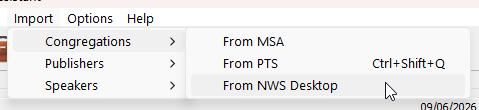
Figure 107. Selecting the NWS Desktop importer.
Import Steps
1. Select the NWS Desktop CSV file
Choose the CSV file exported from NWS Desktop.
The importer immediately reads the header row and validates the required columns.
2. Map optional memo fields (Congregation and Talk Coordinator)
If your CSV contains additional columns, you may map them to memo fields.
The mapping window contains two tabs:
- Congregation Memo Fields
- Talk Coordinator Memo Fields
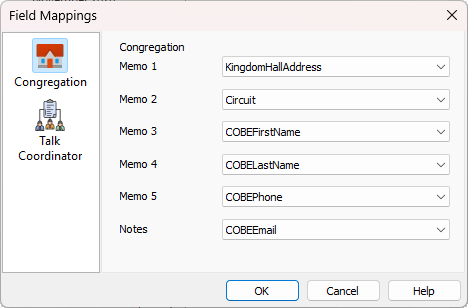
Figure 108. The memo‑field mapping window.
Use these to map CSV columns to the appropriate memo fields.
Mapping is optional — if you do not select anything, memo fields remain empty.
3. Complete the import
A summary is displayed showing how many congregations were added or skipped.
Field Mappings
| Field | How It’s Used in Meeting Schedule Assistant |
|---|---|
| Name | Becomes the congregation name. |
| WeekendMeetingDay | Converted from a day name (e.g., “Sunday”) into an internal day index. |
| WeekendMeetingTime | Parsed as a time value (HH:MM). Invalid times cause the row to be skipped. |
| PTCFirstName + PTCLastName | Combined to create the Public Talk Coordinator’s name. |
| Mapped memo fields | Stored in either the congregation’s or the talk coordinator’s memo record, depending on which tab you mapped them under. |
Troubleshooting
Memo fields did not import
This can happen if:
- The CSV column was not mapped
- The column contains no data
- The field was mapped under the wrong tab (Congregation vs Talk Coordinator)
Duplicate congregations
If two rows contain congregation names that differ only by spacing or punctuation, they may be treated as separate congregations.
Ensure names are consistent in the CSV.
Summary
The NWS Desktop Congregation importer provides a simple way to bring congregation information into Meeting Schedule Assistant. It supports:
- Importing congregation names
- Weekend meeting day and time
- Public Talk Coordinator details
- Optional memo field mapping for both the congregation and the talk coordinator
After processing the file, a summary report shows how many congregations were added or skipped.
Back to Congregation Importers