msa file menu - ajtruckle/meeting-schedule-assistant-support GitHub Wiki

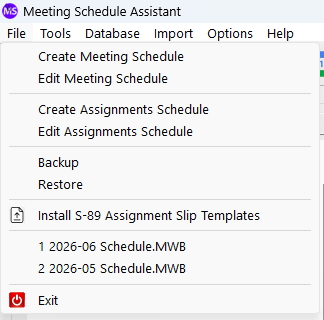
Figure 1: The File menu provides options for managing schedules, templates, and program data, including the Backup, Restore, and Exit commands.
The File menu provides commands for creating and editing schedules, installing templates, and managing your program settings. Each item below includes a brief overview and links to more detailed topics where applicable.
Creates a new Meeting Workbook schedule (MWB). Requires a valid date range in the Calendar. Opens the Meeting Editor with the selected dates pre‑filled. For details on creating and opening schedules from the main window, see Meeting Schedules.
Opens an existing Meeting Workbook schedule (MWB) in the Meeting Editor. After selecting a file, you can review or edit the schedule. For guidance on using the Create/Edit buttons and the recent files list, see Meeting Schedules .
Creates a new Sound Rota Report (SRR). Requires a valid date range in the Calendar. Opens the Assignments Editor with the selected dates pre‑filled. For details on creating and opening assignment schedules from the main window, see Assignment Schedules.
Opens an existing Sound Rota Report (SRR) in the Assignments Editor. After selecting a file, you can review or edit the rota. For guidance on using the Create/Edit buttons and the recent files list, see Assignment Schedules.
Note: Restoring a saved report loads the settings that were in effect when it was created, except for exclusion dates.
Creates a ZIP archive containing all program data, including settings, brother information, templates, schedules, and personal preferences. Regular backups are recommended for disaster recovery, migrating to a new computer, or handing the assignment to another brother. For full instructions, see Backup.
Restores program data from a previously created ZIP archive. You can select a backup from the history list or browse to a file. This is useful for recovery or transferring your data to another computer. For full instructions, see Restore.
Installs the S‑89 assignment slip templates used by the Meeting Editor. These templates are not included with the program; you must request them first. Once you receive the ZIP file, this command installs the templates to the correct location. For full instructions and a video guide, see Install S‑89 Assignment Slip Templates.
Closes Meeting Schedule Assistant. This command shuts down the program in the same way as clicking the standard window Close button.
- Back to: Meeting Schedule Assistant
- Previous: Overview
- Next: Tools Menu