The Daily Brief - TheThinkingHome/device_sentinel GitHub Wiki
The Daily Brief
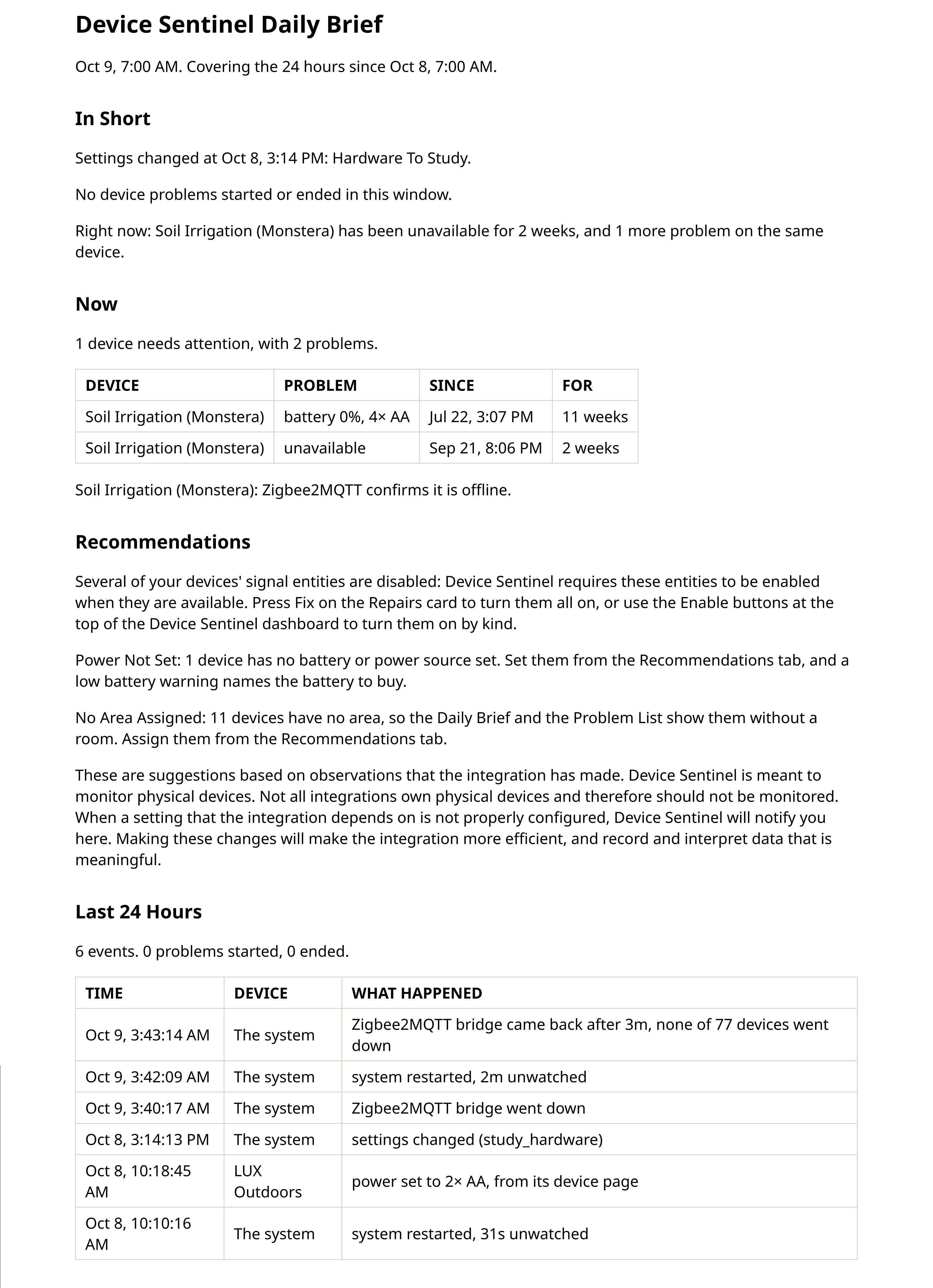
This report outlines the health of your smart home. Where the diagnostic files explain how Device Sentinel reached each decision, the daily brief answers two practical questions in plain language: what is wrong right now, and what happened since yesterday.
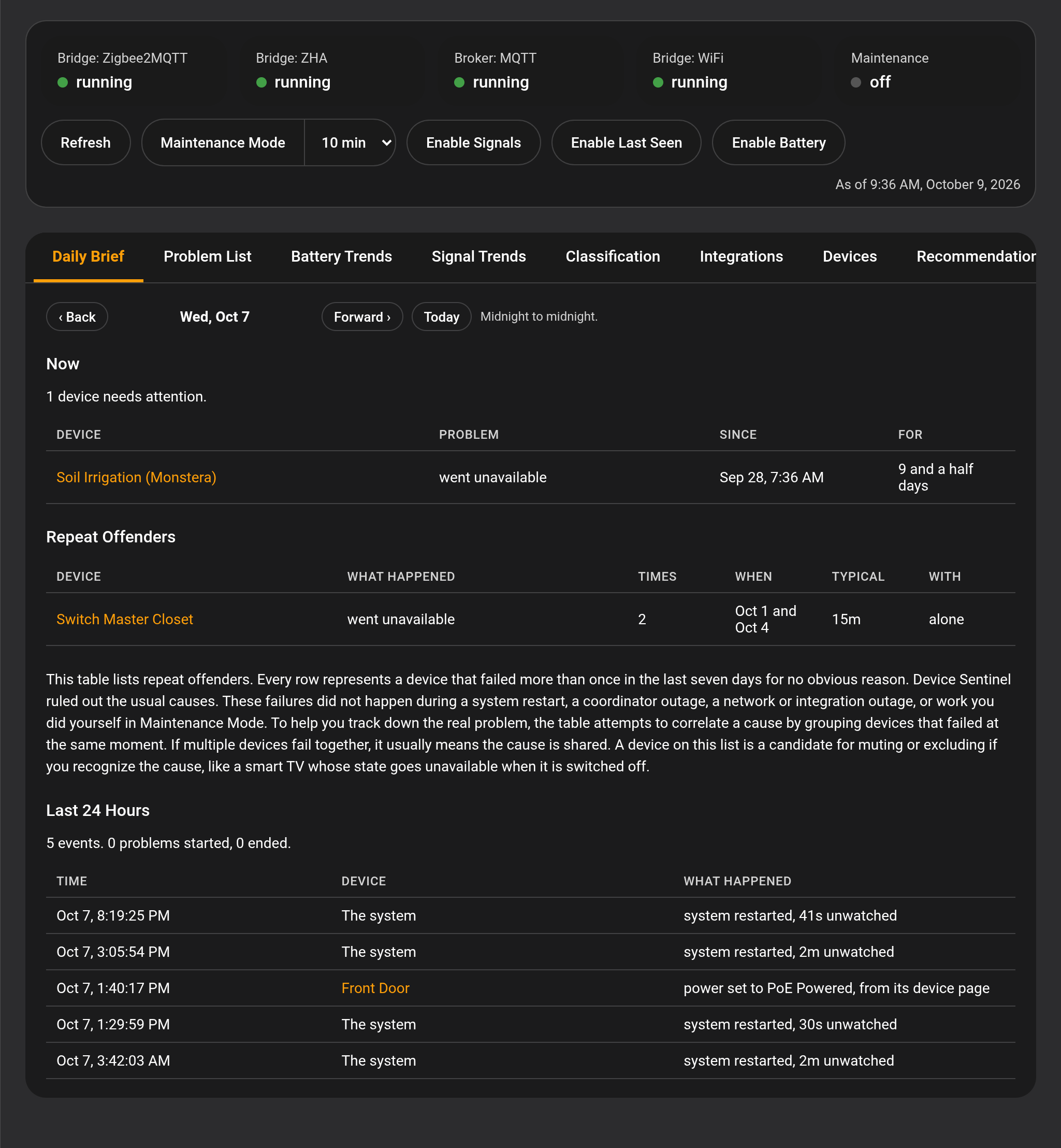
It is an HTML page, daily_brief.html, in your configuration folder at config/device_sentinel/. The dashboard's Daily Brief tab shows the same brief for any of the last fourteen days, and it's emailed on your schedule. On the days the clocks change for daylight saving, it is still sent once: not twice when an hour repeats, and not skipped when an hour is missing.
What It Contains
In Short
The prose at the top, and the part most people will read. It is broken into up to three parts, each present only when it has something to report.
First, what happened to the house itself: system restarts, bridge or broker outages, a WiFi drop, an integration reloading, settings changes, a battery replaced or recharged, a data file Device Sentinel repaired or restored, or devices you fixed by hand. This sits above the device lines because it is the context for them. A reader who sees that the MQTT broker crashed will not misread fifty resulting device failures as fifty dead sensors. When one of these recovers, the report names the number of devices it took with it, for example "56 of its 74 devices went down", so the size of the event is made evident rather than a count taken partway through.
Second, the window's history in the order it happened. A device stopped reporting at 1:02 AM and recovered at 3:03 AM after two hours, or a battery fell to 14% at 3:02 PM. A device that flapped on and off several times is summarized in one sentence with a count and a total duration, rather than one sentence per trip. A device that stayed dead through system restarts is reported with its true, unbroken span, for example "silent since Aug 18, 2 and a half days so far, across 6 restarts", rather than reporting a false recovery for every reboot.
Third, beginning with "Right now:", a summary of standing problems at the moment of writing, listed worst first.
Now
What needs your attention, presented as a table: the device, the problem, when it started, and how long it has been going. Sorted worst first. A battery problem names the battery the device takes, such as "battery 0%, 4× AA".
This section is always current. It is read at the exact moment the file is written, not bounded by the reporting window. A brief generated at 7:00 AM tells you where things stand at exactly 7:00 AM, regardless of the historical period it covers.
Repeat Offenders
A table for the devices whose interruptions have no clear explanation. The integration cannot reliably detect a television that reads unavailable whenever somebody turns it off, or a dying battery crossing its threshold many times a day. Instead of guessing, the brief names the pattern and lets you decide.
An interruption only counts toward this section when it is unexplained: no restart, no outage, no reload, no pairing window, and no maintenance window accounts for it. Each row details what happened, the count, the days it spread over, the typical duration, and most usefully, which devices failed at the exact same moment. Failures that arrive together usually share a cause.
How many unexplained interruptions in a week earn a row is controlled by the Repeat Offender Threshold on the Advanced screen.
Recommendations
Suggestions for settings that cut noise and help Device Sentinel watch your house better. These can be recommendations for a notification target that no longer exists, battery, signal, and last seen entities that are switched off, a Wi-Fi adapter with no network chosen, or an integration that creates false alerts. Each line identifies the problem and gives you the solution. These are suggestions to be made after review. The brief also counts the devices with no battery or power source set, with a Last Seen sensor switched off, with no area, or sharing a name with another device, one line each. If you've chosen an address under Links in Reports, each line ends with Open the list, which opens those devices on the dashboard's Recommendations tab.
Last 24 Hours
The timeline of events, newest first, timed to the second. A change you make on a device's page in the dashboard, a battery replaced or recharged, and a device you fixed by hand each sit on that device's own line, with what was done; the house's own events sit under "The system". If you stage an outage to see how your house behaves, this table is the record of it: every row opening and clearing, and when a Wi-Fi outage started recovering. The prose in the "In Short" section is for reading; this table is for scanning and looking up exactly when something happened. Fragmented rows caused by a dead device surviving a system restart are left out, because the sentence above already explained the single, continuous outage. The event counts at the head of the table count what the table actually shows.
How the File Changes Through the Day
Between one scheduled brief and the next, the file is rewritten as an "in-progress" version whenever reports are generated: by the Regenerate Reports button, at startup, and at midnight. Each version replaces the last and is marked as in progress.
That working copy always covers the last twenty-four hours, wherever in the day you open it, so you see a full day rather than a nearly empty file just hours after your morning brief. The brief sent at your brief time covers exactly your brief window, and past days are on the dashboard's Daily Brief tab.
What Is Deliberately Absent
- Muted devices: This is a report, and muting suppresses reporting.
- Acknowledged problems: Acknowledging an issue is the statement that you know about it and do not want to be reminded.
- How Device Sentinel reached each decision: No learned rhythms, no freeze windows, no lag values, or muting reasoning. Those belong in the diagnostic files and would only get in the way here.
Sending It
The brief is emailed on your schedule to whoever is listed under Send the Full Brief To on the Notifications and Daily Brief screen, most often via Home Assistant's SMTP integration.
What arrives is the HTML page itself, tables and styling included, so the brief in your inbox looks exactly like the one on your dashboard. When batteries are falling, the brief names them and points you to Battery Trends on the dashboard.
Device names in the brief can open their pages on the Device Sentinel dashboard once you choose an address under Links in Reports on the Notifications and Daily Brief screen. The brief can be forwarded, so think before choosing your external address.