Automation Events - TheThinkingHome/device_sentinel GitHub Wiki
Automation Events
Device Sentinel fires events on the Home Assistant bus when something breaks, when it heals, or when a bridge, broker, network or integration drops out. This means your automations can react instantly to real problems without needing to poll sensor states every minute.
Where the Events Come From
These events ride the problem list, not the raw detection engine.
Because the system already waits out each device's natural grace period before adding a line, a sensor that blips offline for thirty seconds and recovers instantly never fires an event. If it didn't make the problem list, it doesn't make noise.
This also means a device with multiple issues (like a frozen sensor with a dying battery) fires one single event carrying both problems, exactly as it takes one line on your to-do list.
The Device Events
device_sentinel_fault
Fires the moment a device lands on the problem list, and again if a new problem is added to a device that is already there.
| Field | What it is |
|---|---|
device_id |
The device's ID in Home Assistant. (Always use this; it survives renames). |
name |
The device's readable name. |
area |
The room or area it belongs to. |
kinds |
Every problem on the line, worst first. |
since |
When the worst problem began. |
renewed |
True if this is a re-announcement after you unticked an acknowledged item. |
battery_level |
Included only if a battery problem is present. |
battery_type |
Included only if a battery problem is present and Device Sentinel knows what powers the device, for example 2× CR2032. |
signal_value |
Included only if a signal problem is present. |
The kinds list puts the headline problem first:
flapping → unavailable → frozen → unknown → never_reported → low_battery → falling_battery → railed_signal
A device that keeps dropping out fires one fault when it starts flapping and one recovery when it settles, never an event for each drop, so an automation isn't triggered over and over by the same device.
device_sentinel_recovered
Fires when the worst problem on a device's line clears.
| Field | What it is |
|---|---|
device_id, name, area |
As above. |
kind |
The specific problem that just cleared. |
down_for |
How long the problem stood in seconds. |
resolved_by |
self, intervention, or unknown. |
Important note: A recovery event does not mean the device is entirely healthy. It simply means the worst thing is no longer wrong. If a sensor comes back online while its battery is still low, it fires a recovery for unavailable and stays on the problem list carrying low_battery. (It will fire its own battery recovery later when you swap the cell).
device_sentinel_acknowledged
Fires when you tick an item off the problem list. It carries the device details and its active faults, allowing you to sync external dashboards if needed.
Unticking has no event of its own. The fault simply fires again with renewed: true, so your automations never need to know about acknowledgment at all.
device_sentinel_withdrawn
Fires when a line leaves the problem list because its device left the watched set (e.g., it was excluded, muted, or set aside). An automation that pairs a fault with a closing event gets its clean close here.
This is not a recovery. The device did not come back; the system just stopped watching it.
The Outage Events
When a broker, bridge, Wi-Fi network, or integration dies, it takes the devices behind it down at once. Instead of firing seventy device faults, Device Sentinel fires a single outage event.
device_sentinel_upstream_down & device_sentinel_upstream_restored
These fire when a broker, bridge, Wi-Fi network or integration goes down or comes back, carrying the kind (broker, bridge, wifi, integration), the name, since for when it went, and devices for how many sat behind it. A Wi-Fi outage adds confirmed, how many of those were already unavailable when it was declared. The restore event also carries for_seconds, how long the outage stood.
What Does Not Fire
Nothing during the startup grace. Everything in your house reports at once after a restart and none of it is news. A problem still true when the startup grace ends is announced then, once.
No device faults during an outage. The devices behind a dead bridge never reach the problem list at all, so the outage pair above is what your automations see.
Quiet hours do not apply. Quiet hours silence phone notifications and nothing else. An automation does not sleep, and an event withheld overnight means a heater that never restarted.
Pro-Tips for Bulletproof Automations
1. Filter by device in the trigger, by kind in a condition.
Matching on device_id or name in the trigger keeps your automation focused on the exact hardware you care about. Because kinds is a list, check for specific problems inside your automation's conditions using templates:
condition:
  - condition: template
    value_template: "{{ 'unavailable' in trigger.event.data.kinds }}"
2. Use device_id for permanent links.
Matching by name is easy to read, but if you rename the device in Home Assistant, the automation stops working. Use device_id for mission-critical automations where silence would be expensive.
A Worked Example
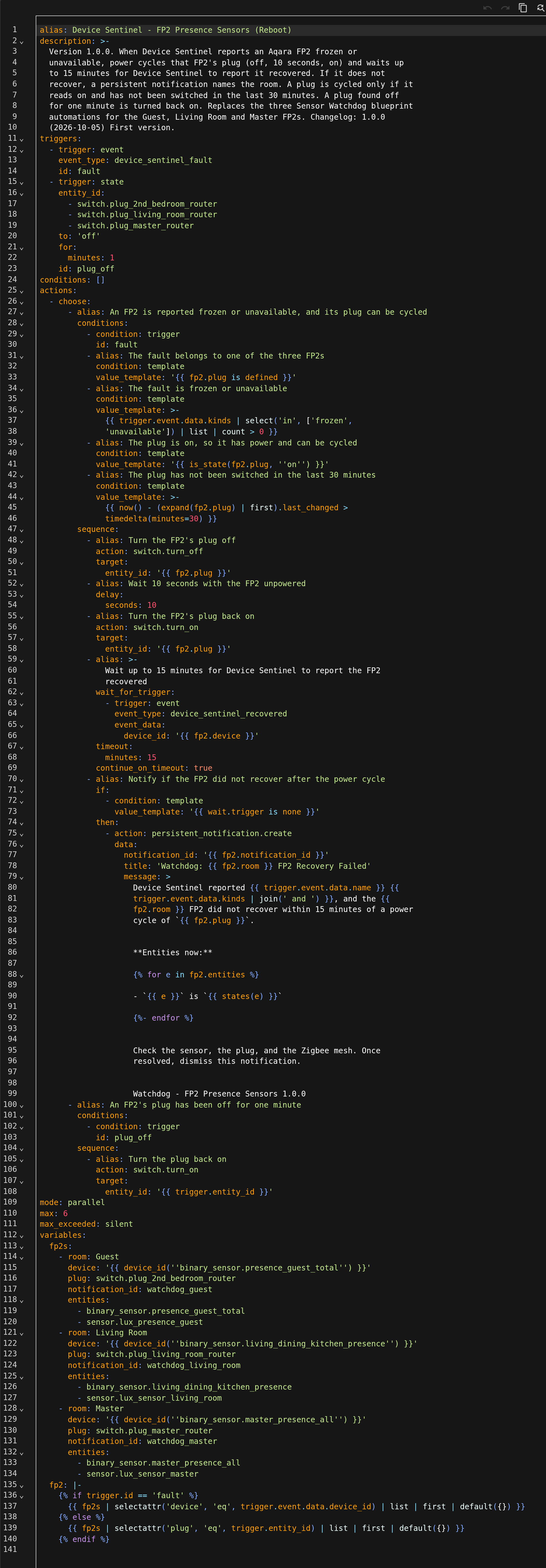
This automation watches the fault event for three Aqara FP2 presence sensors. When Device Sentinel reports one of them frozen or unavailable, the automation switches off the plug that powers it, waits ten seconds, switches it back on, and then waits up to fifteen minutes for device_sentinel_recovered to arrive for the same device_id. If the sensor doesn't recover, a persistent notification names the room and lists the sensor's entities. A second trigger turns a plug back on if it has been off for a minute, so a sensor never stays unpowered by accident. The plug is cycled only if it has been on for thirty minutes, so a sensor that keeps failing isn't power-cycled over and over.
Repairs Are a Separate Thing
Events tell your automations that a device has a problem. Repairs tells you that Device Sentinel itself has a problem under Settings > Repairs. The two never overlap.