Home - KuchiSofts/vlc-redesign GitHub Wiki
VLC 4 with the interface designed by Juxtopposed, for Windows, Linux and macOS. The real VLC engine, the same codecs, the same "plays everything"; only the interface is new, built screen by screen from the design. This wiki explains every screen, every option and every switch of it.
The 56-second tour (animated picture). Watch it in full quality (MP4). Every picture is the real app, with free films and music. Every feature of 0.4.0 in short clips, Windows, Linux, macOS and the Android app: the Feature tour.
Design by Juxtopposed. Every screen comes from the "VLC Redesign (Community)" Figma file by Juxtopposed, licensed under CC BY 4.0. Watch the video: I Redesigned VLC After 25 Years · YouTube channel. Juxtopposed does not endorse this project.
Important
Unofficial. VLC Redesign is not made, affiliated with, or endorsed by VideoLAN. VLC, VLC media player and the cone logo are trademarks of VideoLAN. It is based on the VLC 4.0 development branch: report problems here, not to VideoLAN.

| Current version | 0.7.2, released 2026-11-16 (release page, changelog) |
| Runs on | Windows 10 (version 1809 or later) and Windows 11, 64-bit; Windows 11 on ARM64; Linux (x86_64, ARM64; glibc 2.38 or later); macOS 12 or later (Apple Silicon, Intel); Android 8.0 or later (phones, tablets, TV); Samsung TVs (Tizen 3.0 or later, its own app). Other systems: Platforms |
| Based on | VLC 4.0 (development branch), with fixes from VideoLAN merged in regularly |
| Download | Windows x64: an installer (59.6 MB, no administrator rights) or a portable zip (107.9 MB); the same two for Windows on ARM64. Linux: a .deb, an .rpm, an AppImage or a folder. macOS: a disk image for Apple Silicon or Intel. Android: an APK. All on Install and update |
| Updates | On Windows, in the app, a few megabytes at a time: only the files that changed (small updates). On Linux and macOS, install the new version |
| Languages | English and 72 others, switched live; right-to-left languages laid out right to left (Languages) |
| Privacy | No telemetry, no ads, no account. Two features go online by themselves, and both are asked about first |
| Next to an official VLC | Yes: its own folder, settings, library and history; an installed VLC is never touched |
| License | GNU GPL v2 or later, like VLC; the design is CC BY 4.0 (Credits and license) |
| Page | What it covers |
|---|---|
| Feature tour | Every feature of 0.4.0 in short clips, platform by platform, each linked to the page that explains it |
| Install and update | The installer page by page, silent install switches, the portable zip, small updates, uninstalling; Linux and macOS |
| The player | Every control of the player: seek bar previews, volume up to 200 %, the panels above the bar, speed, sleep timer, A-B loop, picture in picture |
| Library | Home, Videos, Music, Network, Playlists, Recent, media folders, and the library next to the video |
| Live TV | The TV channels of your own IPTV playlist or Xtream Codes account: channel lists with what is on, a programme guide, catch-up, channel up and down; an add-on you can leave out |
| Queue and playlists | The queue card of the player; playlists in the library |
| Subtitles | Tracks and languages that learn, online search, sync, position and size, dual subtitles |
| Effects | Equalizer, compressor, spatializer, stereo widener, video effects, presets |
| Customize the player | Drag buttons into and out of the control bar; profiles |
| Colours and themes | Dark, Light or System, and nine accent colours |
| Languages | The language of the interface, right to left, translating |
| Keyboard shortcuts | The default keys, and how to change them |
| Casting to a TV | Chromecast and DLNA TVs; when a TV does not play; TV compatibility |
| Settings | Every option of the Settings window, page by page |
| Troubleshooting and FAQ | SmartScreen, where settings live, logs, video problems, reporting a bug |
| Platforms | Windows (x64 and ARM64), Linux, macOS and Android released; what is not planned |
| Roadmap | Where each program stands, with its progress, and what comes next |
| Building from source | The Windows build in Docker, the release script, signing |
| Design check | How the app is compared with the 103 frames of the Figma design, and the results |
| Credits and license | Who made what, and the licenses |
-
Download the installer from the latest release
and run it. It needs no administrator rights; a new install goes through Welcome, Options, Languages and
Privacy, then installs in about a minute. Or unzip the portable version anywhere and run
vlc.exe. - The first start shows the welcome steps: a media folder, the theme and accent colour, your subtitle languages, what VLC does online, and the basic keys.
- Play something: drop a file on the window, open one from Explorer, or pick it on Home.
- VLC Redesign checks for a new release once a day and offers a small update when one is out.
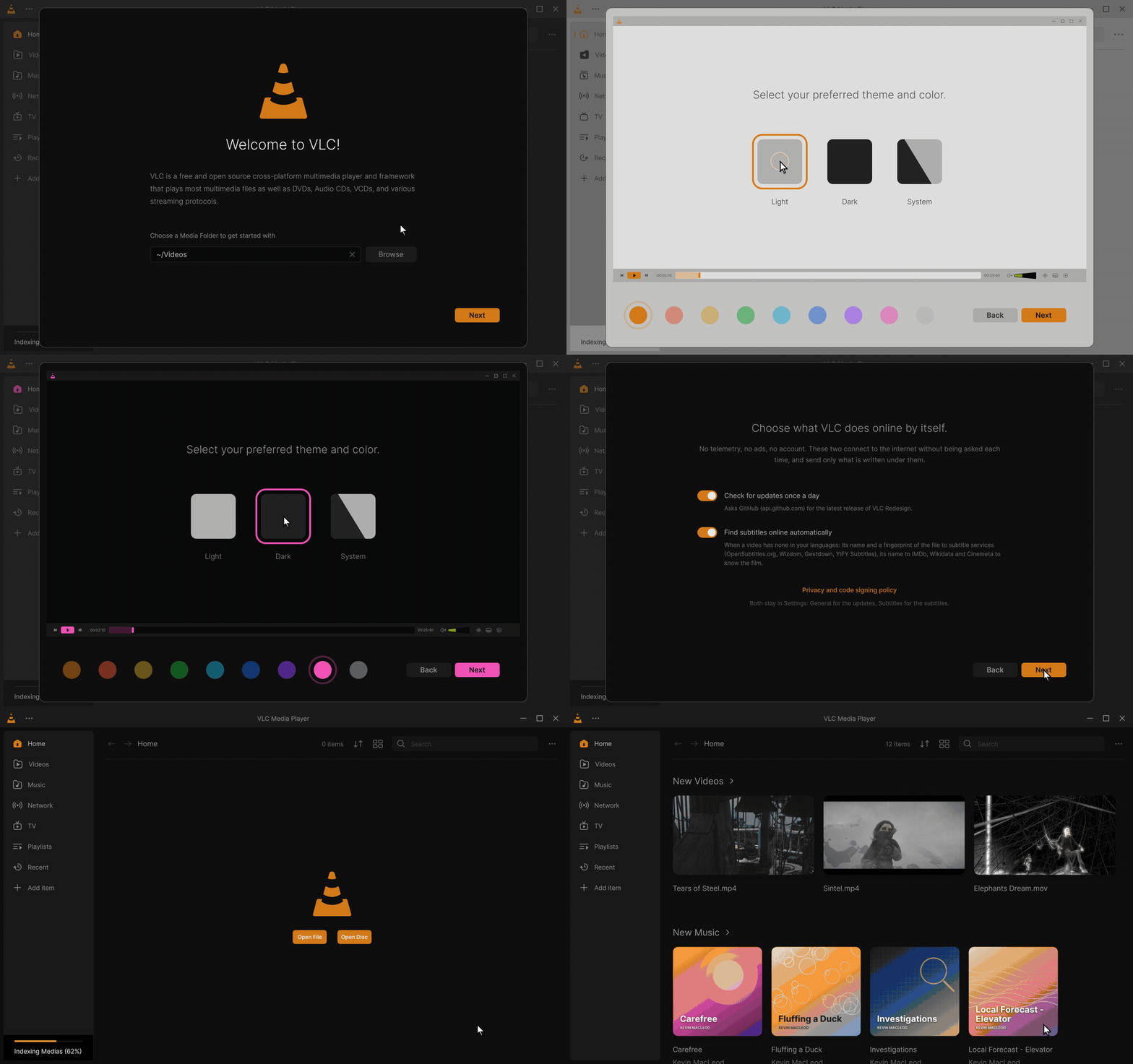
The welcome steps of 0.4.0, from the media folder to Home. Click for the MP4; every clip: Feature tour.
| The first start | What may go online |
|---|---|
 |
 |
Good to know. VLC Redesign keeps its settings, library and history in a
portablefolder next to itsvlc.exe, so it never reads or changes an installed official VLC. See Where are my settings?
| Where | For |
|---|---|
| Discussions | Questions (the Q&A category) and ideas (the Ideas category); talking with other users |
| Issues | Bug reports, design mismatches, suggestions, translations and TV reports, each with its own form (what to include) |
| Troubleshooting and FAQ | The common questions, answered first |
| VideoLAN | Problems with the official VLC only |
Security problems: see SECURITY.md instead of a public issue. To help: CONTRIBUTING.md, and TRANSLATING.md for translations.
The pages are written in the repository, in
docs/wiki, and copied to this wiki by a GitHub
workflow whenever they change. A correction is welcome as a pull request on those files. The pictures are captures
of version 0.3.1; the clips of the Feature tour and at the top of the pages are version 0.4.0.