Platforms - KuchiSofts/vlc-redesign GitHub Wiki
VLC Redesign 0.7.2 is released for five platforms together: Windows 10 (version 1809 or later) and Windows 11, 64-bit (x64), Windows 11 on ARM64, Linux (x86_64 and ARM64), macOS (Apple Silicon and Intel) and Android (phones, tablets and Android TV: a separate app, 0.7.2), and Samsung TVs get Juxto Media Player (0.6.8), a player of its own in the design. This page gives, for each platform, its status, its version, what it needs, its files, what is tested and what is missing.
The status of each platform is kept in one file,
platforms.yml: the platform bar of the
README, the website and the Also on line of About are made from it.
The study behind the order, with the evidence from VideoLAN's build system:
docs/PLATFORMS.md. Clips of each platform:
Feature tour.
| Platform | Status | Latest version | Next | Needs |
|---|---|---|---|---|
| Windows | Released | 0.7.2 (2026-11-16) | 0.7.3 | Windows 10 (1809) or 11, 64-bit |
| Linux | Released | 0.7.2 (2026-11-16) | 0.7.3 | glibc 2.38 (Ubuntu 24.04, Debian 13, Fedora 39 or later), x86_64 or ARM64 |
| macOS | Released | 0.7.2 (2026-11-16) | 0.7.3 | macOS 12 Monterey, Apple Silicon or Intel |
| Windows on ARM64 | Released | 0.7.2 (2026-11-16) | 0.7.3 | Windows 11 on ARM64 |
| Android (phones, tablets, TV) | Released | 0.7.2 (2026-11-16) | 0.7.3 | Android 5.0 or later |
| Samsung Smart TV: Juxto Media Player | Released | 0.6.8 (2026-11-15) | 0.7.3 | Tizen 3.0 (2017 models) or later |
| iPhone, iPad, Apple TV | Later | none yet | iOS, iPadOS, tvOS | |
| Windows 32-bit, Windows 7, 8, XP | Not planned | See below |
Linux, macOS and Windows on ARM64 are the same desktop program as Windows, from the same code, with one version number: 0.4.0 is the first version for Linux and macOS, 0.4.1 the first for Windows on ARM64, 0.5.0 the first for Android. Android, the TV receiver and the Apple apps are separate apps, each with its own repository and its own version from its first published build.
| Status | Released |
| Version | 0.7.2, 2026-11-16 (release page). Next: 0.7.3 |
| Needs | Windows 10 (version 1809, build 17763, or later) or Windows 11, 64-bit. No graphics card needed |
| Files |
vlc-redesign-0.7.2-win64-setup.exe (installer) and vlc-redesign-0.7.2-win64.zip (portable), with small updates in the app: Install and update
|
-
64-bit only, Windows 10 from version 1809: the interface is built on Qt 6.8, which needs it. The installer
refuses an older Windows, and
vlc.exeon one says This version of VLC media player needs Windows 10 version 1809 or later. - No graphics card needed: it also runs in Windows Sandbox, decoding on the processor.
- Updates are signed by the project from 0.4.0 on: the app installs an update only when the signature of the release's checksums by the project's release key is good.
- Tested: a regression suite on every build (playback, pause and seek, Chromecast and DLNA test devices); NVIDIA and integrated AMD graphics, and no graphics card at all (Windows Sandbox, 2 GB); casting to a real Samsung TV (TV compatibility).
- Still to do: tests on Intel graphics, on Windows 10 on real PCs and on screens of different scales; code-signed releases (waiting for SignPath's approval), so that SmartScreen no longer warns.
-
Small updates in the app (only the files that changed) are for Windows; the AppImage on Linux and the app on
macOS update themselves with the whole new file.
SHA256SUMS.txt, signed by the project, covers every platform. - On Windows 11 ARM64, take the native ARM64 build: below. The x64 installer runs there too (it accepts any x64-compatible Windows), but Windows emulates it, which is slower.
The tour of every Windows feature in clips: Feature tour: Windows.
| Status | Released |
| Version | 0.7.2, 2026-11-16 (release page); 0.4.0 was the first for Linux. Next: 0.7.3 |
| Needs | glibc 2.38 or later (Ubuntu 24.04, Debian 13, Fedora 39 or later), x86_64 or ARM64 |
| Files | x86_64: vlc-redesign-0.7.2-x86_64.AppImage (with its .zsync) and vlc-redesign-0.7.2-linux-x86_64.tar.xz; ARM64: vlc-redesign-0.7.2-aarch64.AppImage and vlc-redesign-0.7.2-linux-aarch64.tar.xz. The .deb, .rpm (with the Live TV add-on) and Flatpak packages come with it: 0.7.2 is a full release. Which one and how: Install and update: Linux
|
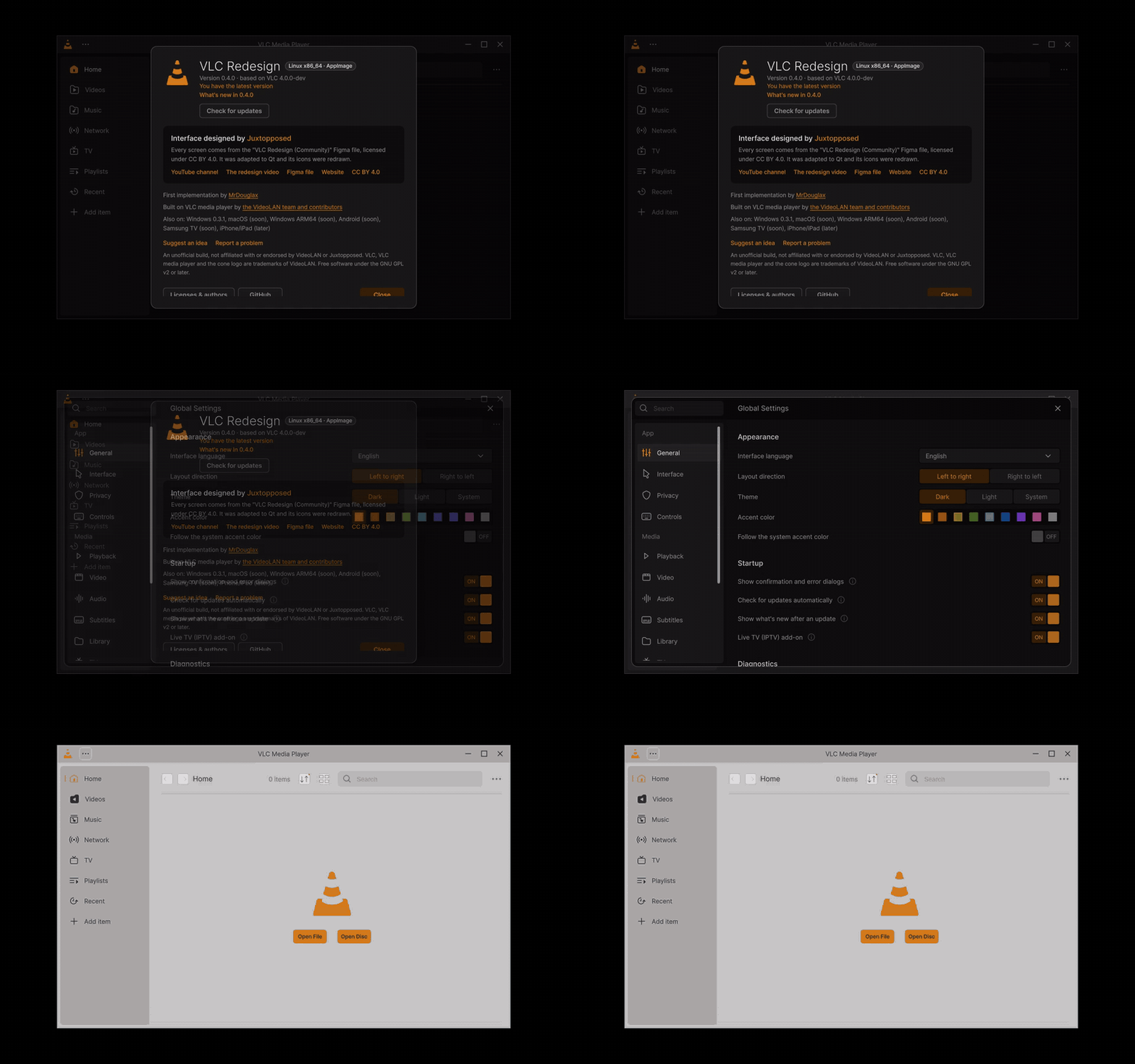
The Linux AppImage on Arch Linux: About with Linux x86_64 · AppImage, Settings in the dark theme, Home in the light theme. Click for the MP4.
-
The packages. A .deb (Ubuntu 24.04 and later, Debian 13), an .rpm (Fedora), an AppImage (any distribution
with glibc 2.38 or later, Arch among them) and a folder to run from, for x86_64 and ARM64. The .deb and .rpm
install VLC in
/opt/vlc-redesignwith the commandvlc-redesign, a desktop entry VLC Redesign with VLC's media types and the logo in every size, so they install next to the distribution'svlcand replace nothing of it. Older systems (Ubuntu 22.04, Debian 12: glibc 2.35 and 2.36) are refused by apt, and the AppImage and the folder say which glibc they need instead of starting. No Flatpak in this release: it comes next. -
Live TV is an add-on you can leave out, as in the Windows installer: with the .deb and .rpm it is the package
vlc-redesign-livetv(leave its file out, or remove it later:sudo apt remove vlc-redesign-livetv,sudo dnf remove vlc-redesign-livetv); the AppImage and the folder carry it, and Settings › General › Live TV (IPTV) add-on turns it off. Building from the source:./configure --disable-iptvleaves it out. - Updates: the AppImage updates itself from the app (the new AppImage put in its place); the .deb, .rpm and the folder are updated with the new version's package (apt and dnf replace the older one).
-
Tested: in clean containers on 7 distributions (
linux-pkg-test.sh: install, files and libraries, a UI tour under Xvfb, removal): Ubuntu 24.04 and 26.04, Debian 13, Fedora 41 and 43, Arch with the AppImage; apt refuses the .deb on Ubuntu 22.04 and Debian 12, as it should. GitHub's x86_64 and ARM64 runners build the packages and test them on a clean runner: the .deb installed with apt next to the system's VLC, the AppImage, the .rpm in Fedora, each playing a clip. Before that: every control of the player bar (59) put in the bar, shown and clicked during playback with no QML warning; VA-API hardware decoding on Intel Iris Xe (H.264, HEVC, VP9); memory near 480 MB while going from file to file; playback on Wayland (Weston) and the title bar on X11. - Fixed in 0.4.0 for Linux: the zoom list, the dialogs with the System theme, the window shadow on X11 that caught clicks, the memory growth while going from file to file, AV1 on Ubuntu 24.04 with a recent Intel GPU (dav1d decodes it), the video on Wayland with Intel or AMD graphics (now centred over black), and Weston 14 and 15 hanging VLC at the end of every video.
- Missing: the Flatpak (built and on Flathub); an updater in the app; tests by hand on real desktops (Ubuntu, Fedora, Debian, Arch), with X11 and Wayland, PipeWire and PulseAudio, Intel, AMD and NVIDIA; Ubuntu 22.04 and Debian 12 (they need a build on an older base); the pixel check of every frame.
| Status | Released |
| Version | 0.7.2, 2026-11-16 (release page); 0.4.0 was the first for macOS. Next: 0.7.3 |
| Needs | macOS 12 Monterey or later, Apple Silicon or Intel |
| Files |
vlc-redesign-0.7.2-macos-arm64.dmg (Apple Silicon) and vlc-redesign-0.7.2-macos-x86_64.dmg (Intel). How to open it the first time: Install and update: macOS
|

The macOS app (Intel), Home, from the launch test of the build.
-
The app.
VLC Redesign.appis built from the same code, with VLC's Qt interface as its only interface, the icon drawn from the designer's logo, the Live TV add-on and the translations. Its settings, library and caches are apart from an official VLC's. About shows macOS Apple Silicon or macOS Intel. - One title bar. The red, yellow and green buttons sit at the start of VLC Redesign's own top bar, as in other Mac apps; full screen in its own Space, tiling and resizing from every edge work. Show window decorations in Settings brings the separate title bar back. A minimal menu bar sits at the top of the screen, and ⌘ reaches VLC's shortcuts.
- The same features as Windows (from 0.6.4): the media keys, the Touch Bar, headphones and Control Center's Now Playing play, pause, go to the previous or next item, jump and seek, and Now Playing shows the title, artist, album, artwork and time (what Windows does with its media keys); the Dock menu has Play / Pause, Stop, Previous, Next and Mute (Windows: the buttons of the taskbar thumbnail); the global hotkeys work from any app; Show in folder opens Finder with the file selected; Process priority, VLC's own HTTP proxy and Add to the playlist instead of replacing it are in Settings; the bug report names the graphics processors and the HDR screens.
- Signing. The app is signed ad hoc, not by Apple, until there is an Apple developer account: the first time, macOS refuses to open it, and you allow it once (System Settings › Privacy & Security › Open Anyway, or right-click › Open on macOS 12 to 14).
-
Updates: from 0.5.5 the app updates itself with the release's disk image for this Mac, checked against the
signed
SHA256SUMS.txt(Install and update: macOS). - Tested: GitHub's Macs build both architectures and run a launch test on each: every binary signed, the icon, 100 translations, the About badge (macOS Apple Silicon / macOS Intel), the designer's credit, the Live TV add-on loaded, headless playback to the end, the Qt interface for 10 seconds playing a clip, one unified title bar (the traffic lights), a clean quit, no QML warning and no crash report. It has not been run by hand on a Mac yet.
- Missing: signing and notarization by Apple; tests by hand on a Mac; the video in the window and VideoToolbox checked on a Mac; small updates (only the files that changed: the whole disk image is downloaded); the pixel check of every frame.
| Status | Released |
| Version | 0.7.2, 2026-11-16 (release page); 0.4.1 was the first for Windows on ARM64. Next: 0.7.3 |
| Needs | Windows 11 on ARM64 (Snapdragon PCs) |
| Files |
vlc-redesign-0.7.2-winarm64-setup.exe (installer) and vlc-redesign-0.7.2-winarm64.zip (portable): Install and update: Windows on ARM64
|
- Native: the redesign builds for ARM64 with VideoLAN's ARM64 toolchain and libraries, unchanged; it is not the x64 build under emulation. Video goes through Direct3D 11 (VideoLAN's ARM64 libraries have no OpenGL).
- Updates: since 0.5.0 the app offers small updates made for ARM64 (4.3 MB from 0.5.0, 9.2 MB from 0.4.1), and an ARM64 copy takes only the updates of its own architecture.
-
Fixed for 0.4.1: the ARM64 build stopped a few seconds after it started (the table of
longjmptargets of Control Flow Guard, see the changelog), and the install test counted Inno Setup's uninstaller, which is always x86, as a binary of the package. - Tested: on GitHub's real ARM64 Windows runner: every binary of the package is ARM64, the plugin cache builds, the window opens, a clip plays to its end and VLC quits cleanly; the installer installs, starts, plays and uninstalls.
- Missing: a run by hand on a real ARM64 PC (Snapdragon), with its graphics driver; code-signed releases (waiting for SignPath's approval), so that SmartScreen no longer warns.
| Status | Released in 0.5.0: an APK on the release page, not on Google Play; how to install: Install and update |
| Version | 0.7.2, 2026-11-16 (release page); 0.5.0 was the first for Android. Next: 0.7.3 |
| Needs | Android 5.0 or later |
| What it is | A separate app: a fork of VLC for Android with its screens redrawn in the design, in its own repository |
| Files |
vlc-redesign-0.7.2-android.apk (ARM64, ARMv7, x86 and x86_64): Install and update: Android
|
The clips below were recorded on the Android emulator, before the first release. All of them, with captions: Feature tour: Android.
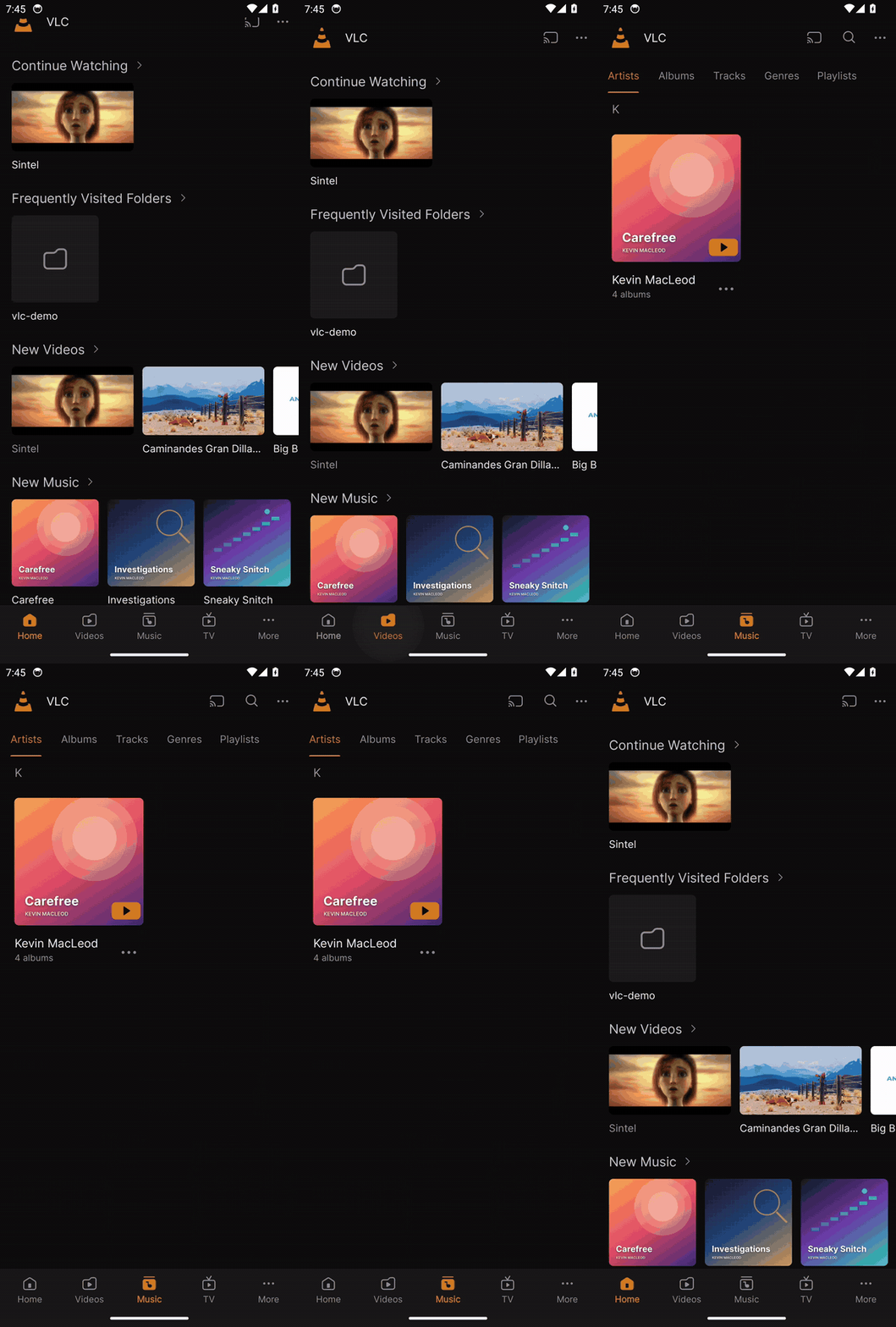 Home and the library on a phone. |
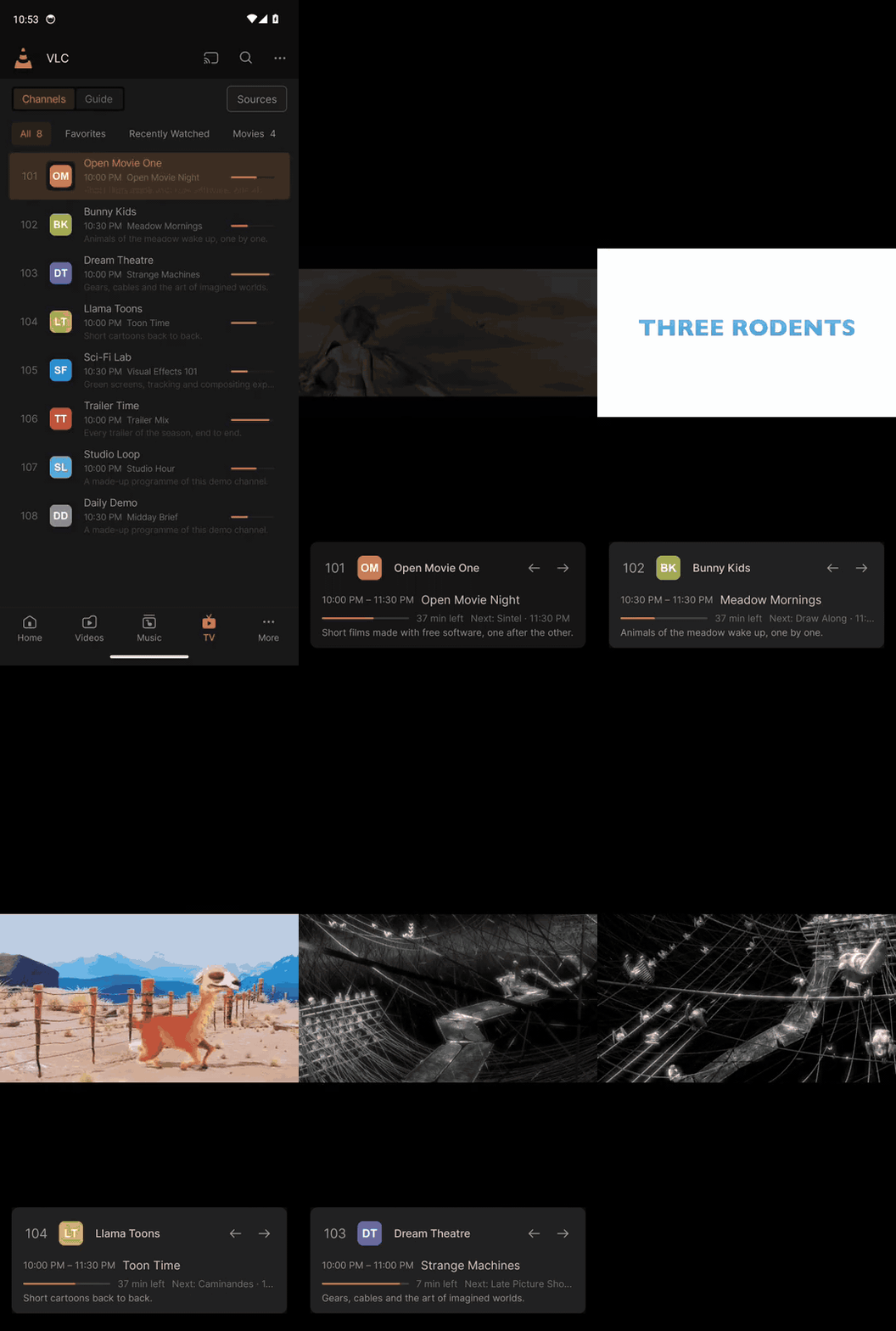 Live TV zapping with the banner. |
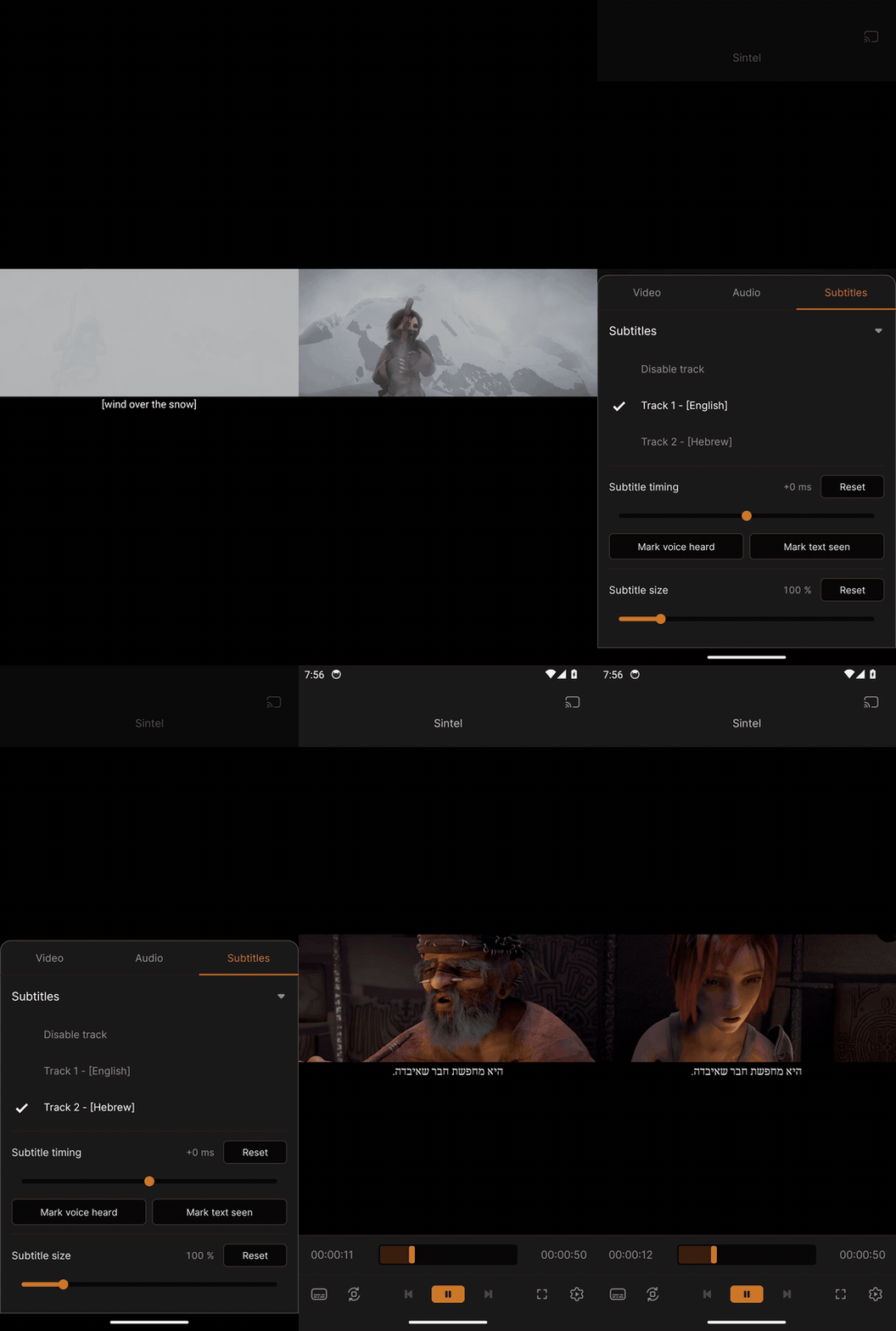 Tracks and subtitles in Hebrew. |
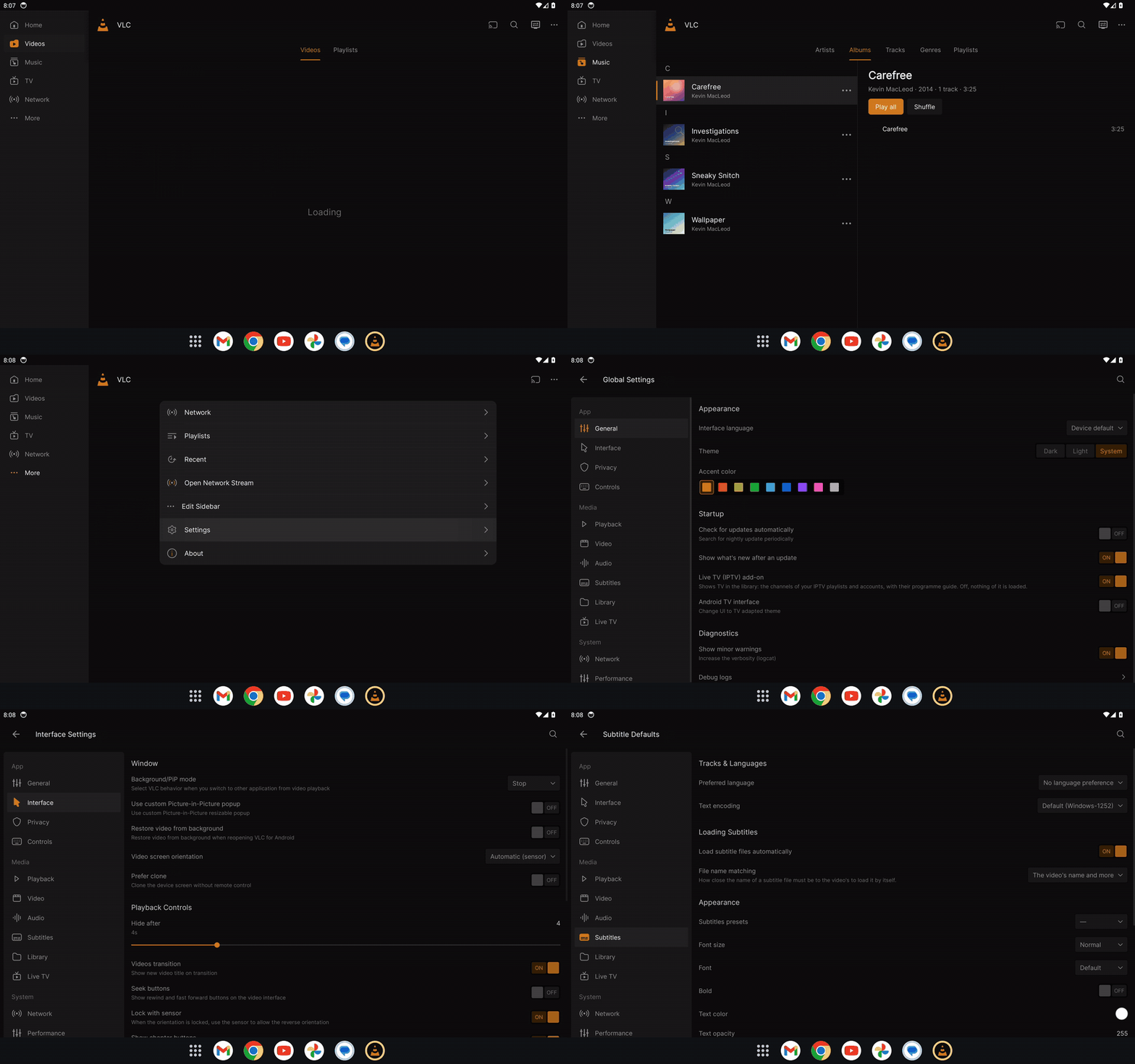
The tablet layout: the sidebar and a list with its detail beside it. Click a clip for its MP4.
- What the clips show: Home and the library, the player bar and Customize Player, a compact context menu, tracks and subtitles in Hebrew, Live TV zapping and its guide, the casting card, the settings, and the tablet layout.
- The same changes as the desktop where they apply: the player's buttons and toggles show when what they open is open, and Ctrl + mouse wheel over the video, Ctrl+0 and a Subtitle size slider with Reset in the subtitles tab change the subtitle size.
- Next: the Android TV layout (remote control) and a test on a real tablet. The APK is published on GitHub only (no Google Play).
| Status | Released in 0.5.3: Juxto Media Player (named so from 0.5.6), the app's source with its install guide on the release page |
| Version | 0.6.8, 2026-11-15 (release page); unchanged since. Next: 0.7.3 |
| Needs | Tizen 3.0 (2017 models) or later, installed from a computer with the TV in developer mode |
| Files |
Juxto-Media-Player-TV-0.6.8-source.zip: Install and update: Samsung TV
|
| What it is | A player of its own for Samsung TVs, inspired by VLC, in the design: the library (USB drives and the TV's storage), the player with subtitles from the internet, Live TV with the guide, 17 languages, right to left. The TV's own player plays the video. |
Casting from the desktop to a Samsung TV works today through DLNA: see Casting to a TV and TV compatibility.
| Status | Later, after Android |
| Needs | iOS, iPadOS, tvOS |
- Windows 32-bit, Windows 7 and 8, and older versions such as Windows XP. Qt 6, which draws the interface, supports only 64-bit Windows 10 and 11, and VLC Redesign relies on Windows features that Windows 7 does not have (DirectComposition, the acrylic blur, the rounded window corners). 32-bit Windows exists only as Windows 10, whose support ended on 2025-10-14, and Windows 11 is 64-bit only. Every extra Windows build would also double the release files, the small updates and the signing. On Windows 7, 8 and 32-bit Windows, VideoLAN's VLC 3 remains the player to use.
Good to know. Interested in a platform? Say so in Discussions (the Ideas category): it helps decide what comes first.
Feature tour · Install and update · Building from source · Troubleshooting and FAQ · Home