Exp Flask Storage and Recovery 1.21.1 - Herbertofury/Advent-of-Ascension GitHub Wiki
Exp Flask: storing and reclaiming experience · Minecraft 1.21.1
AoA 3.7.16.1. This guide explains the inspected item's behavior, including an important mismatch between its tooltip and inventory search. It covers vanilla experience points, not AoA skill XP or skill levels.
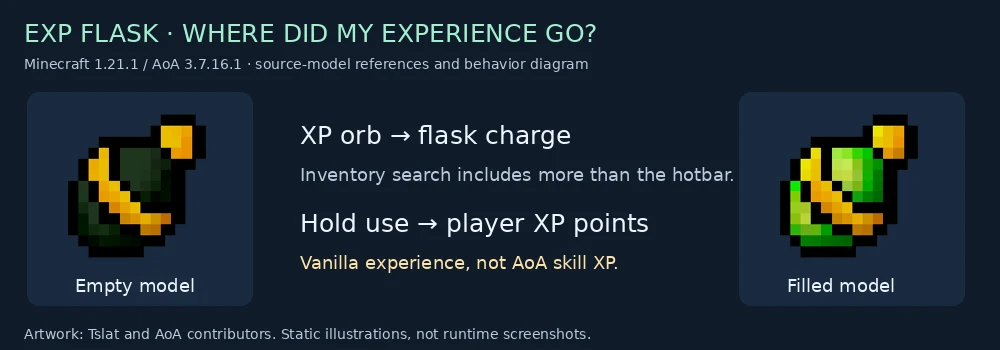
Beginner walkthrough · AoA skill training · Ammunition storage safety
For Minecraft 1.12.2, use the separate historical Exp Flask guide; inventory selection, withdrawal and storage implementations differ by release.
Before following this guide
The Exp Flask is a registered Artifice item in the inspected release. This audit did not establish a survival acquisition recipe: a scan of shipped data JSON found no direct aoa3:exp_flask reference. That does not exclude code-based grants or modpack additions. If your pack supplies one, use that pack's verified acquisition route; do not invent a bottle-and-XP crafting recipe from the picture.
The instructions below describe using a flask you already have. They are based on source and released-class checks, not a live-game acceptance test of the current Enderloom build.
1. Understand why your XP bar stopped increasing
On an eligible server-side XP-orb pickup, the handler searches for an Exp Flask. If it finds one, it adds the orb's value to the flask, cancels the normal pickup event, sets the orb value to zero and discards that orb.
The collected XP therefore goes into stored flask charge instead of immediately reaching your player's XP bar through that pickup path. Check the flask tooltip before assuming the orb disappeared without compensation.
This does not establish what happens to every other source of directly awarded experience, nor does it certify compatibility with other mods' pickup-event handling.
2. Moving it out of the hotbar does not reliably switch it off
The English tooltip says the flask stores experience while in the hotbar. The inspected released handler uses the general inventory helper instead:
- Main hand first
- Offhand next
- The standard player inventory compartments afterward
It selects the first matching flask. With multiple flasks, do not assume equal splitting or simultaneous filling. Holding a particular flask can affect which one is chosen.
For ordinary pickups to reach you directly, remove the flask from the searched player inventory rather than merely moving it to another inventory row. This helper does not recursively inspect the contents of every backpack or external storage mod; those integrations require their own tests.
3. Hold use to reclaim stored XP
Use the flask as a held item. It has a drinking animation and a use duration of 100 game ticks, roughly five seconds at a steady 20 TPS. Experience is transferred during server-side use ticks, not as one guaranteed lump at the end.
The inspected per-tick transfer is:
- Levels 0–14: up to 1 XP point
- Levels 15–29: up to 2 XP points
- Levels 30–44: up to 3 XP points
- Higher levels continue the same level/15 step pattern
The transfer is capped by the stored charge and converted to an integer. The player's level is read again during use, so the rate can change as they gain levels. These are points, not levels. The number of levels gained depends on the player's existing experience.
You can interrupt use after transferring only part of the stored amount. Check both the tooltip and your XP bar afterward; do not assume a fixed five-second batch always drains the flask.
4. Treat it as an item containing value
The flask's charge is item data. The item's presence in your inventory is not automatic insurance against death, lava, despawning or another mod deleting the stack. Preserving the stored XP still requires preserving or recovering the item itself.
The source description mentions sharing and death-related storage, but this is not a promise that the flask is soulbound or that lost item data can be reconstructed. Test valuable-save recovery behavior with a small amount before relying on it.
Troubleshooting
| Symptom | Check |
|---|---|
| XP orbs vanish but the player bar does not increase | Inspect stored flask charge; the pickup handler deliberately redirects eligible orbs |
| Moving the flask off the hotbar does not help | The inspected search includes offhand and standard inventory compartments |
| Only one of several flasks fills | The helper selects the first match rather than distributing XP |
| Drinking does not instantly grant all stored experience | Withdrawal occurs per server use tick and scales with current player level |
| AoA skill XP does not increase | The flask transfers vanilla experience points, not skill progression |
| The tooltip's level estimate differs from levels gained | It is derived from stored points; your current XP position affects actual level gain |
| Very large quantities behave strangely | Storage uses floating-point charge; large-number precision needs explicit validation |
Enderloom validation targets
- Check hotbar, ordinary inventory and offhand capture, including first-match behavior with several flasks.
- Check XP conservation across pickup, partial use, interruption, save/reload and actual item recovery.
- Check levels around 14/15 and 29/30, low charge and empty use.
- Resolve the tooltip/search-scope mismatch deliberately; do not silently change behavior while updating text.
- Test compatibility with other pickup-event consumers before promising equivalent behavior for enchantment repairs or other mods.
- Test large stored values at floating-point precision boundaries. Any numeric-format fix needs a compatible data migration and conservation tests.
The independent arithmetic audit confirms that a float cannot retain every individual point at sufficiently large totals. It does not measure the owner's save or certify a live-game exploit/fix. Avoid describing storage as infinitely precise.
Released class hashes, exact methods, resource search and arithmetic checks · Pinned Exp Flask source · Pickup handler · Inventory search · Illustration provenance.
Source-model artwork by Tslat and the AoA contributors. The illustration is not a runtime screenshot.