Ammunition and Void Pouch 1.21.1 - Herbertofury/Advent-of-Ascension GitHub Wiki
Ammunition and the Ammo Void Pouch · Minecraft 1.21.1
AoA 3.7.16.1. Prepare the right ammunition, understand inventory consumption, and avoid a released pouch rejection bug. This page uses inspected shipped resources and class bytecode. It does not certify the owner's current Enderloom candidate or a live NeoForge game session.
Beginner walkthrough · Weapon reference library · Staff batteries · Exact ammunition recipes
Safety first: rejected ammo can damage the pouch's stored state
Until the target build has been fixed and tested, do not place renamed, potion-modified or otherwise component-customized ammunition into a valuable pouch. Keep unusual ammo in ordinary inventory storage. The stock item also warns that ammunition deposited successfully cannot be retrieved manually.
The inspected release has a concrete null-handling mismatch:
- The pouch's
add(ItemStack)helper returns null when the incoming stack has a nonempty component patch. It can also return null when there is no room to add anything. - The inventory-click caller checks whether the returned object differs from the existing component. A null result differs too, so rejection is incorrectly treated as an update.
- The caller passes that null to the pouch component setter. The normal vanilla component map represents this as component removal; the checked NeoForge supplier overload forwards the value unchanged.
- Removing this component makes its previous stored counts unavailable. Other pouch paths dereference the component without a null check, creating a further failure risk.
This is released-code evidence, not a reproduced current-modpack crash. Do not infer that every older release or the private 1.20.1 conversion has the same implementation. The independent six-case regression model demonstrates the state transition and a candidate guard; it is not an in-game test.
Exact class hashes, bytecode and regression cases.
1. Match ammunition to the weapon
Read the individual weapon's tooltip before leaving your base. The default modern gun-properties builder uses Limonite Bullets, but individual weapons can override that choice or use a dynamic ammunition rule. A bullet working in one weapon does not establish compatibility with another.
The inspected common gun path starts from a base cost of one, passes that cost through the ammunition-enchantment modifier, then searches the player's inventory for compatible ammunition. If that search cannot pay the cost, it tries the Ammo Void Pouch. The base code therefore does not mean every weapon always consumes exactly one physical item under every enchantment or custom firing override.
If no valid ammunition can be paid, the common firing path returns without producing its projectile. Check the actual ammo type and quantity before diagnosing a graphics or keybind problem. Creative/infinite-material behavior follows a separate branch.
Staves, blasters and vulcanes are different systems. The pouch is not a Rune/Spirit/Rage battery, and this guide does not impose the planned optional TaCZ reload mechanic on ordinary AoA guns.
2. Craft a batch of Limonite Bullets
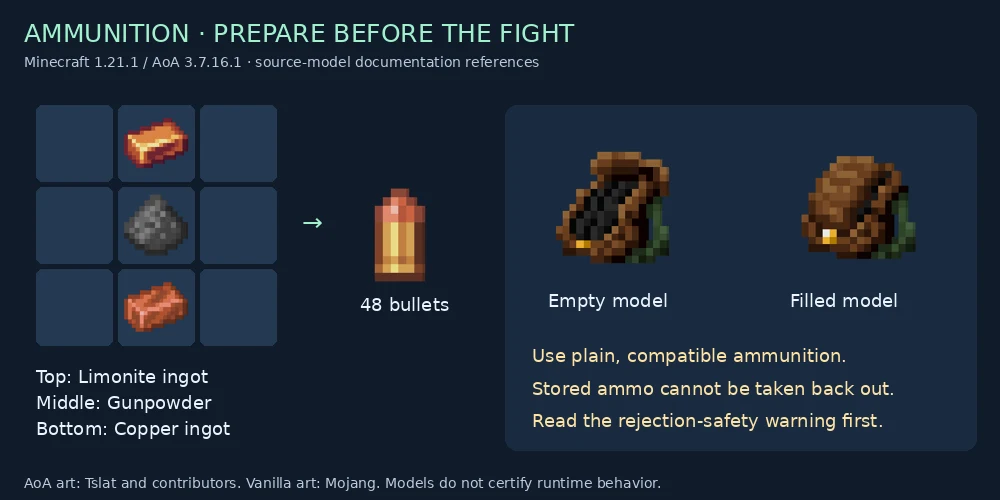
The released shaped recipe uses a vertical three-item column:
| Position | Ingredient tag | Pictured representative |
|---|---|---|
| Top | c:ingots/limonite |
Limonite Ingot |
| Middle | c:gunpowders |
Gunpowder |
| Bottom | c:ingots/copper |
Copper Ingot |
Output: 48 Limonite Bullets. The illustration shows one valid placement of the column inside a crafting table. Tags can accept additional items in a modpack; use the installed recipe viewer to confirm those alternatives instead of assuming a matching display name qualifies.
Keep a small loose-ammo reserve and test your chosen weapon near safety before committing the rest to a pouch.
3. Understand what the pouch accepts
The shipped compatibility tag includes #aoa3:ammo. That ammo tag references:
#minecraft:arrows- Limonite Bullet
- Cannonball
- Metal Slug
- Spreadshot
- Balloon
- Discharge Capsule
- Pop Shot
The shipped list repeats Spreadshot; that does not create an additional ammo type or double its stored count. Tag membership is only the first gate. The component helper also requires an empty component patch, so a customized stack can be rejected even when its base item belongs to the compatible tag.
Do not read the “bottomless” tooltip as mathematically infinite capacity. The helper caps the stored count for each item at the maximum signed 32-bit integer. A partially fitting deposit shrinks only the amount added; a completely full entry takes the rejection path described above.
4. Deposit and use plain ammunition carefully
For a fixed/tested build, the inspected inventory interaction is a secondary/right click with compatible ammunition on the pouch slot. Successfully added ammunition is removed from the cursor stack and recorded by item type. Check the pouch's tooltip and the remaining cursor count after a small deposit before storing a large supply.
The tooltip lists stored item quantities when the component is present and nonempty. The gun fallback retrieves ammunition that matches that weapon's supported projectile predicate, pays the requested quantity, and writes back the reduced component.
There is no promise that the pouch will combine several different ammunition types to pay one requested amount, or that another mod's weapon uses this fallback. A matching-looking projectile is not evidence of integration.
Deposits are not ordinary reversible chest storage. The shipped warning explicitly says stored ammunition is not retrievable. Firing compatible weapons consumes it through the supported path. Do not deposit ammunition you intend to trade, craft with, or preserve in a customized state.
Troubleshooting
| Symptom | What to check |
|---|---|
| Correct-looking ammo will not deposit | Actual compatibility tags and component patch; do not keep retrying customized stacks against stock 3.7.16.1 |
| Gun will not fire despite pouch contents | Weapon-specific ammo predicate, requested cost and whether the weapon uses the common fallback |
| Pouch stops showing its previous contents after a rejected deposit | Preserve the affected save/item for diagnosis; the null-setter defect is a candidate, not proof of recoverable counts |
| You want the ammo back in inventory | The released item deliberately warns that stored ammunition cannot be manually retrieved |
| Recipe gives a different batch size | Confirm exact AoA/Minecraft release and datapack overrides; the inspected recipe yields 48 |
Restoration checklist for Enderloom
- Check the exact target build before applying a port-specific change.
- Reject a null
newComponentbefore calling the setter; preserve both existing pouch counts and the cursor stack. - Handle an already-missing component defensively without claiming to reconstruct lost ammunition.
- Test ordinary, renamed/component-patched, capacity-boundary, partial-capacity and nonmatching ammo cases.
- Verify right/left click semantics, cursor reconciliation, survival versus Creative, enchantment-adjusted costs, save/reload and client/server synchronization.
- Retain item IDs and serialized data compatibility; avoid scanning the whole inventory every tick to solve a click-time issue.
- Keep the ordinary inventory-first/common-gun fallback behavior and all supported ammunition types.
Pinned pouch source · Pinned component source · Pinned gun consumption source · Checked NeoForge supplier bridge · Illustration provenance.
AoA artwork by Tslat and contributors; vanilla artwork by Mojang. These are source-model illustrations, not runtime screenshots.
Check the weapon’s registered defaults
The 78-gun statistics and ammunition reference links each covered weapon to its illustrated item card and expandable released-stat panel. Check explicit ammo overrides, durability and firing mode; configured damage and interval values are not measured DPS. Seed-tag ammunition depends on active tag data.