Backends - wildware-uk/composegl GitHub Wiki
Backends
A backend is the bit that turns "draw a rounded box here" into actual OpenGL, and "how wide is this word?" into a number.
Five ship. None is required: the toolkit names no engine anywhere.
| module | what it is |
|---|---|
composegl-gdx |
LibGDX. Desktop, Android, iOS. The one to ship a game on. |
composegl-lwjgl3 |
Raw OpenGL and stb_truetype. Desktop only. |
composegl-webgl |
WebGL in a browser tab, from WebAssembly. The page's own fonts and input. |
composegl-korge |
KorGE 6. A screen is a view on the stage (Container.composeGl), with KorGE's input. Desktop JVM for now; try ./gradlew :composegl-demo-korge:run. See KorGE. |
composegl-kool |
Kool. A screen is a Kool scene (KoolContext.composeGl), with Kool's pointer. The desktop and Android; not the browser, which Kool 0.19.0 has no WebAssembly build for. Try ./gradlew :composegl-demo-kool:run. See Kool. |
composegl-android |
Not a backend — the things about an Android phone LibGDX cannot answer. |
composegl-robovm |
The same, for an iPhone, through UIKit. |
Which one
LibGDX, unless you have a reason. It has audio, assets, asset loading, a soft keyboard, Android and iOS. A game needs all of those and the toolkit provides none of them.
The LWJGL3 backend is the reference thin wrapper. It draws with the library's own
renderer, composegl-render, and adds only what raw OpenGL needs: a Gl binding, a
glyph rasteriser and a window. The LibGDX backend is a thin wrapper too: GdxGl over
Gdx.gl and Gdx.gl30, FreeType glyphs, and LibGDX's input. So is the KorGE backend:
it binds the KmlGl of the frame KorGE is drawing, rasterises glyphs with KorGE's
TrueType reader, and hands KorGE its cached GL state back after every frame. And so is
the WebGL backend: WebGl over the page's WebGL 2 or WebGL 1 context, glyphs from the
browser's 2D canvas, and the DOM's input. The Kool backend is the thinnest of all: on the
desktop Kool's OpenGL is LWJGL, so it reuses the raw OpenGL backend's binding and glyphs,
draws while Kool renders one of its scenes, and hands Kool its cached GL state back. On
Android it is the same code on an android.opengl binding, with glyphs from Android's own
text drawing. How
they got there is
docs/superpowers/specs/2026-09-15-shared-gl-renderer.md.
Each backend has its own golden images, and CI checks each backend against its own. The LibGDX, WebGL and KorGE backends go one step further: besides their own goldens, their scenes with no text in them must also match the LWJGL3 goldens. The Kool backend has no goldens of its own: on the desktop its glyphs are stb_truetype's too, so every scene, text included, must match the LWJGL3 goldens, and on an Android emulator its scenes with no text in them must. Scenes with text are never compared across backends by a test — FreeType, stb_truetype and the others never agree on a glyph pixel for pixel — so that comparison is one a person makes by looking at the sets.
Setting one up
LibGDX:
val fonts = GdxFonts()
fonts.registerTrueType("default", Gdx.files.internal("fonts/DejaVuSans.ttf"), listOf(13, 16, 20))
// Optional: where characters DejaVu lacks come from. See Widgets → Characters your font does not have.
fonts.registerTrueType("cjk", Gdx.files.internal("fonts/NotoSansCJK.ttf"), listOf(13, 16, 20), onDemand = true)
fonts.fallBackTo(listOf("cjk"))

val sprites = SpriteBatch()
val backend = GdxBackend(fonts, sprites)          // canvas, fonts, clipboard, keyboard, cursor
val canvas = backend.canvas

val host = UiHost()
host.setContent { ProvideFonts(fonts) { ProvideSkin(skin.skin) { Hud(state) } } }
GdxCanvas(sprites, fonts) on its own is still there for a game that wants only the
canvas (GdxCanvas(sprites, fonts.atlas) means the same). Text does not kern: a width
is the sum of the advances, as on every backend. Neither builds anything on the GPU until the first thing is drawn,
so both can be constructed before the interface is ready; canvas.warmUp() — on
UiCanvas, and a no-op on a canvas with nothing to build — pays for the mesh and the
shader on a loading screen, where the player will not see a stutter.
LWJGL3:
val backend = Lwjgl3Backend(window, StbFonts().apply { register("default", ttfBytes, listOf(13, 16, 20)) })
val canvas = backend.canvas
The window asks for desktop OpenGL. GlfwWindow(…, context = GlfwContext.Es3) (or Es2)
asks for OpenGL ES through EGL instead, and the backend draws on it with LwjglGles.
Then the same loop, whichever you chose — one renderer, made once:
val ui = UiRenderer(host, canvas)
// …once a frame:
ui.render(viewport, System.nanoTime())
See Your first screen for the four calls it is made of, and when you would write them out instead.
In a browser
composegl-webgl runs the toolkit in a web page: Kotlin compiled to WebAssembly,
drawn with WebGL (version 2 where the browser has it, 1 where it does not). Every
widget and every screen you already wrote runs unchanged — composegl-ui and
composegl-effects build for wasmJs alongside the JVM, Linux and iOS.
fun main() {
    MainScope().launch {
        val fonts = WebFonts()
        fonts.load("default", "fonts/DejaVuSans.ttf", listOf(13, 16, 20, 28))

        val canvas = document.getElementById("game") as HTMLCanvasElement
        val backend = WebGlBackend(canvas, fonts)
        BrowserUi(backend, Size(960f, 600f)) { MainMenu() }.start()
    }
}
BrowserUi is the one thing a web game needs beyond its screens. It is the loop
(requestAnimationFrame) and the wiring every desktop launcher writes by hand: the
pointer, key and pad routers, focus, the back stack, and the backend's fonts,
clipboard, keyboard and input method provided to the content. frame(nanos) is one
turn of it, for a page with its own loop.
What the page gives you, translated:
| pointer | mouse, touch and pen, each finger its own pointer; captured on a press, so a drag that leaves the canvas still ends |
| keys | named by where the key is (code), so WASD is WASD on any layout; text comes from what the key typed |
| text | an invisible text box takes focus with a field, so Japanese, Chinese and Korean input methods compose into it, and a phone raises its keyboard |
| clipboard | Ctrl+V waits for the browser's paste event, so a field pastes what was really copied; copies go to the system clipboard |
| pads | the Gamepad API's standard layout, polled once a frame; a browser only shows a page a pad after a button is pressed |
| cursor | the canvas's CSS cursor |
| haptics | navigator.vibrate on a phone, the pad's rumble where it has one |
| size | the canvas follows its size on the page times the device pixel ratio, and the viewport letterboxes the design into it |
Drawing is composegl-render's, like every thin wrapper's: the backend is WebGl
(the Gl binding over the page's WebGL 2 or WebGL 1 context), a 2D-canvas glyph
rasteriser, and WebGlTexture. When the browser takes the GPU away and gives it back
(webglcontextlost / webglcontextrestored), the canvas forgets its WebGL objects and
builds them again on the next frame.
Fonts are drawn by the browser. Each glyph is drawn once with the 2D canvas into the
shared glyph atlas and is a quad from then on, so a screen of panels and labels is still
one draw call. Every glyph is drawn on demand the first time a label needs it —
including from fallBackTo fonts and the system's own fallback fonts, which the browser
picks per character from a CSS font list — rather than coming out as ?.
Try it: the showcase, a tour of every
widget, layout, animation, effect and debug tool, published to GitHub Pages from
composegl-demo-web on every push to master. It works with a mouse, a keyboard, a pad and
a phone's touch screen. To run it locally:
./gradlew :composegl-demo-web:wasmJsBrowserDevelopmentRun.
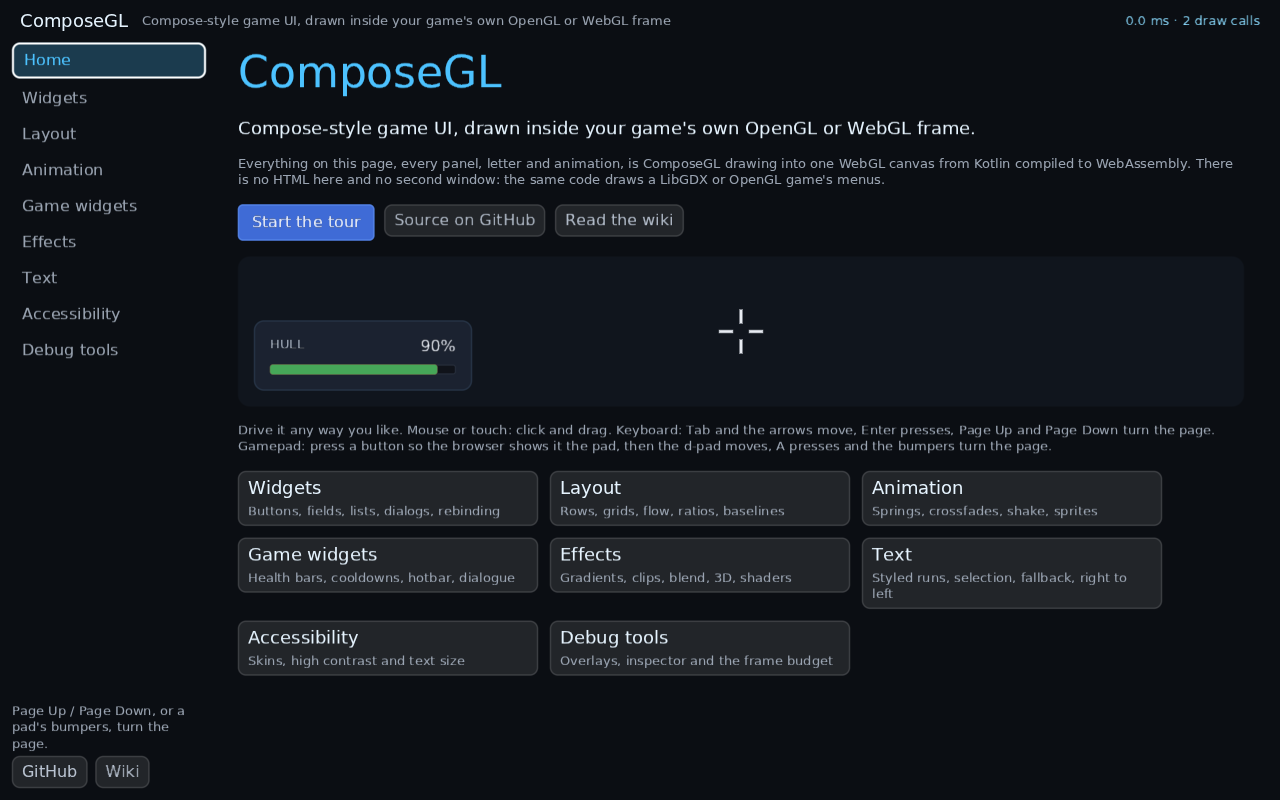
The showcase's screens are common code, so their logic is tested on the JVM with
uiTest; :composegl-demo-web:wasmJsBrowserTest loads the whole thing in headless
Chromium and clicks, taps and pages through every section.
What differs in a browser, today:
- Emoji come from the visitor's system fonts, drawn once into the glyph atlas in their own colours. A machine with no emoji font shows boxes.
- Joined scripts such as Arabic are drawn a character at a time, so letters do not join. Hebrew and other scripts without joining forms are fine.
- Pads appear only after a button is pressed while the page has focus — a browser rule, not the toolkit's.
- Frame times are coarse, because browsers blunt their clocks on purpose.
The backend is held to the same scenes as the other three. Its own goldens are drawn
in headless Chromium with WebGL in software, and the scenes with no text in them are
also compared with the raw OpenGL backend's goldens by the same rule — shapes, clips,
layers and effects have no reason to differ between OpenGL and WebGL. The tests are
./gradlew :composegl-webgl:wasmJsBrowserTest, and wasmJsBrowserWebGl1Test runs them
again with WebGL 2 switched off in the browser; set CHROME_BIN, or have Playwright's
Chromium installed.
Hold the interface, not the backend
Whatever class of yours owns the interface — the one with the host, the renderer, the
focus manager and the canvas in it — should name UiCanvas, or UiBackend for the
whole lot. Never GdxCanvas or GlCanvas.
class Hud(backend: UiBackend)     // yes
class Hud(canvas: GdxCanvas)      // no
The difference is not tidiness. A class that names a backend can only ever be built
with that backend running, so every test of your focus, your input routing and your
lifecycle needs a window and a GPU — for code that has nothing to do with either.
Name the interface and the same class takes HeadlessBackend in a test: a recording
canvas, a monospace font, an in-memory clipboard, no machine. See Testing for the
worked example.
Four backends implement it, so the swap is real:
GdxBackend(fonts, spriteBatch) |
LibGDX |
Lwjgl3Backend(window, fonts) |
raw OpenGL |
WebGlBackend(canvas, fonts) |
a browser tab |
KorgeBackend(fonts) |
KorGE |
HeadlessBackend() |
no window at all, in composegl-ui |
SnakeApp in composegl-demo-snake-core is the shape to copy: it takes fonts and a
UiCanvas per frame, and its desktop, LibGDX and Android launchers are the only
things that have ever heard of an engine.
One thing that is not in UiBackend, on any of them: input. Translating a key, a
pointer or a pad into the toolkit's events is per-platform and stays with the
launcher — see Input. The cursor's shape is in it, because that goes the other
way: the toolkit asks for an I-beam, and the backend shows one.
The viewport
You design against one fixed size and the viewport scales it:
Viewport(
    design = Size(1280f, 720f),
    physical = Size(backBufferWidth.toFloat(), backBufferHeight.toFloat()),
    policy = ScalePolicy.Fit,
    safeArea = Padding(bottom = keyboard.heightPixels),
)
| policy | |
|---|---|
Fit |
scale until it just fits, keeping the shape. Bars on two sides. The safe default. |
Fill |
scale until it covers. Nothing is barred; edges are lost. |
Stretch |
each axis on its own. Nothing lost, nothing barred, circles go oval. |
safeArea is what you take off for a notch, a rounded corner, a gesture bar, or a
keyboard covering the bottom third of the screen.
Hand the same viewport to your pointer translator, or clicks land in the wrong place on a letterboxed screen.
Android
LibGDX runs the game. Two things it cannot answer, because they are window questions rather than engine ones: how tall is the keyboard, and did the player dismiss it themselves. Both matter — a field near the bottom of the screen ends up behind the keyboard without the first, and a swiped-away keyboard leaves a caret blinking with nothing to type into without the second.
val keyboard = AndroidSoftKeyboard(activity.window, view) { focus.clearFocus() }

// …then every frame
Viewport(design, physical, Fit, safeArea = Padding(bottom = keyboard.heightPixels))
And the phone's own feel for a tap, which needs no permission and follows the player's touch-feedback setting:
ProvideHaptics(AndroidHaptics(view)) { Hud() }
That is the whole of composegl-android. composegl-robovm has the same three for
an iPhone: UiKitSoftKeyboard, UiKitTextInput and UiKitHaptics.
Writing your own
The library draws; a backend is a thin wrapper. composegl-render holds the one
renderer: the canvas, the batch, the shape shader, layers, render targets, shader
effects, the glyph atlas, fallback fonts, emoji and draw-call tracing. On OpenGL a
backend supplies four small things and nothing that draws:
| piece | what it is | lwjgl3's | webgl's |
|---|---|---|---|
a Gl binding |
about seventy-five calls, each a one-liner onto your GL (glDrawElements, glUniform4f, glRenderbufferStorage, …) |
LwjglGl.kt |
WebGl.kt |
a GlyphRasteriser |
one font at one size, one glyph at a time: metrics, advance, a coverage or colour bitmap | StbRasteriser in StbFonts.kt |
CanvasRasteriser in WebFonts.kt |
a TextureResolver |
your texture type as a GL name and texture coordinates | GlTexture.Resolver |
WebGlTexture.Resolver |
| the engine handoff | what raw { } hands a game, and HostState.Leave or Restore |
GlCanvas |
WebGlCanvas |
LibGDX's are GdxGl.kt, FreeTypeRasteriser in GdxFonts.kt, GdxTexture.Resolver and
GdxCanvas, whose raw { } opens the game's SpriteBatch on the frame's projection. On
Android, GdxCanvas notices a lost context by itself when the next frame begins.
class MyCanvas(fonts: MyFonts) : RenderCanvas(GlDevice(MyGl, HostState.Leave), fonts, MyTextures) {
    override fun handOver(projection: FloatArray, viewport: Viewport): Any = MyFrame(projection, viewport)
}
class MyFonts : AtlasFonts(MyRasteriser, MyImageDecoder)
KorGE's pieces are KorgeKmlGl.kt, KorgeRasteriser in KorgeFonts.kt,
KorgeTexture.bind (which binds through KorGE, so KorGE uploads a changed bitmap), and
KorgeCanvas. A render texture KorGE reads back top row first is drawn with
begin(viewport, target, clear, topRowFirst = true).
Inside a frame, touch nothing but textures. The device remembers the GL state it set —
the program, the vertex array, the array and element buffers, blending, the scissor and the
vertex attributes — and sends only what changed, so it never sets them again on its own.
Whatever your backend runs while a frame is open, outside raw { }, may bind and upload
textures and set their parameters, and nothing else: a TextureResolver resolving a picture
for the first time, and the bind you can pass to GlDeviceTexture.adopt. A resolver that
bound a buffer of its own would leave the next draw writing its vertices into that buffer.
The device binds a picture's texture for every draw, so a resolver or a bind that
changes which texture is bound is fine. Your engine's own drawing belongs in raw { }:
the device takes everything again after it.
The binding also makes the memory uploads come from: floats, shorts and bytes. The
renderer fills plain Kotlin arrays and copies them in with put (a whole batch of
vertices in one call), so make put one bulk copy, never a loop of single writes:
override fun put(at: Int, from: FloatArray, offset: Int, count: Int) {
    buffer.clear().position(at)
    buffer.put(from, offset, count)
    buffer.clear()
}
Copy the bits, not the numbers. A vertex is 22 four-byte slots (ShapeVertex), and three of
them, the fill, the border and the shadow, are a colour's four bytes, red first, riding in a float's place.
Their bits often look like a NaN (opaque white is one), so a copy that reads each float as a
number and writes it back, through a JavaScript number say, can change the colour. A bulk
put, copyInto or toRawBits keeps them. Make the buffer native byte order, as it already
must be for the floats.
A SceneView needs nothing more from most backends: RenderCanvas.scene renders into
the device's own picture and hands over what handOver makes. An engine whose own
drawing only lands in a framebuffer it made itself — KorGE's batch, for one — makes
that framebuffer with depth, adopts it with GlDeviceTarget.adopt(framebuffer, texture, width, height, depth = true), and passes it to the protected renderScene(into, draw),
which does the rest. KorgeCanvas.scene is the example.
Pick HostState.Leave when your engine sets the GL state it needs before it draws;
Restore when it caches GL state and believes the cache (KorGE, three.js).
Leave asks the driver which framebuffer is yours once, on the first frame, and
remembers it. A query makes the CPU wait for the driver: in one game on NVIDIA, asking
every frame was 71% of the render thread's time in native code. So to draw a frame
into a framebuffer of your own, name it rather than binding it first:
canvas.begin(viewport, framebuffer) on GlCanvas, GdxCanvas and WebGlCanvas, or
begin(viewport, GlDeviceTarget.adopt(framebuffer, texture, width, height)) on your
own canvas. Where you cannot name it, because a framebuffer you bind wraps the whole
frame, call canvas.hostTargetChanged() when that changes (see
Render targets). A device of your own that remembers nothing can
leave GpuDevice.hostTargetChanged alone.
Inside a scene the picture's framebuffer, viewport and scissor are not the ones the engine
remembers, so an engine you can tell to forget should be told to, round a scene's
raw block. KorgeCanvas is the example. If your
context can be lost (Android, the browser), call canvas.contextLost() when it is.
Then implement UiBackend round them — canvas, fonts, clipboard,
softKeyboard, textures, and optionally cursor and haptics — and translate your
platform's input into the four InputSink calls.
RendererConfinementCheck keeps it thin. One line in your build file,
confineRenderer("MyGl.kt"), fails the build if shader text appears anywhere in your
module, if a draw, shader, blend or framebuffer call appears outside the binding file,
or if the binding grows past 400 lines.
A graphics API that is not OpenGL implements GpuDevice instead of Gl — about
twenty members — and ships its own port of the shape shader. Its vertex input follows
ShapeVertex.Attributes: an attribute marked packed is four unsigned bytes in one slot,
read as fractions of 255, and every other one is floats. Nothing above the device
knows OpenGL exists. Rounded clips are drawn in place only on a device that answers
masks = true and keeps each draw inside the ClipMask handed to drawShapes; on any
other they are cut pictures, as before.
The shape shader is three programs on OpenGL, and the batch says which one each draw needs:
ShapeProgram.Common: letters, pictures, boxes, borders, shadows and two-colour gradients. It needs fewer registers, so a phone's GPU keeps twice the pixels in flight.ShapeProgram.Held: the same, for a picture held inside the corner of a bigger pooled picture. Holding it reads one more value, which every letter would otherwise pay for.ShapeProgram.Full: everything, including the three heavy paths: a lit surface, a gradient of more than two colours, and a shade inside a shape.
override fun drawShapes(
    vertices: VertexStream, quads: Int, texture: DeviceTexture, blend: Blend,
    projection: FloatArray, mask: ClipMask?, program: ShapeProgram,
) {
    // Every quad in vertices is one `program` draws; ShapeProgram.Full draws them all.
}
A device with one program that draws everything can leave it alone: the default body
calls the drawShapes without it.
If you really must draw yourself
UiCanvas is the interface RenderCanvas implements, and it is deliberately short: rect,
border, shadow, text, image, fan, a clip stack, an alpha stack, a blend stack,
a transform stack and raw. The richer calls — layer, cutLayer, roundClip,
textRing, turned and tilted layers, drawCalls, traceDrawCalls — each have a capability
flag and a default that degrades rather than fails. The rule for raw and for layer: leave your own state
as you found it.
A canvas that rounds clips and runs raw counts each raw in rawDrawings. The draw pass
reads it round a rounded clip, and one that held a raw drawing is cut as a picture from
its next frame, since only a picture can trim drawing the canvas did not do itself.
A backend that snaps letters to pixels overrides the six-argument
textRing(layout, x, y, dx, dy, colour): it gets the letters' place and the ring copy's offset
apart, so it can snap the letters once and move every copy by the same exact offset. Its default
adds the two and calls the four-argument textRing, which is right for a backend that does not
snap.
The escape hatch, in detail
raw is the one optional thing with no sensible degrade: the toolkit cannot
approximate a block it knows nothing about. So it is a question instead.
pushTransform(scale, translateX, translateY) is the camera a
pan-and-zoom canvas is drawn through: everything until popTransform is
placed and sized where the transform puts it, thicknesses included, and a clip pushed
inside it is the transformed box. RenderCanvas does the multiply as each quad is
queued, so a plane of a thousand nodes is still one draw call. A backend that inherits
the default draws everything unmoved and answers transforms = false, and then the
toolkit pans the plane by moving where its children are drawn from and leaves the zoom
out — the pointer agrees with it, so a canvas that cannot zoom is still usable.
handsOverRaw— whether there is a backend object to hand over at all. Answer honestly and a widget can pick a composed fallback at construction, instead of finding out at the first frame. This is the one capability that can vary within a backend:GdxCanvasanswers yes or no depending on whether aSpriteBatchwas passed to its constructor.rawX(x)/rawY(y)— a coordinate this interface would take, as the one your drawing object wants. Once the object is handed over the block is writing your coordinates, so only you can convert them. Both default to the identity; overriderawYif you measure y upwards, asRenderCanvasdoes. (KorgeCanvasmeasures down, like KorGE, so it keeps the identity.)raw(destination) { }— the same hatch with the origin moved to the node, so a block that draws at0, 0, width, heightfills it. Say so inmovesRawOrigin. Override both or neither: an unmoved origin is not a lesser picture, it is the same drawing in the wrong place.
Each backend here is about 1,600 to 2,000 lines all in, and most of that is the window and its input rather than drawing. The OpenGL binding is 160 to 270 lines of one-liners.
Testing a backend
composegl-testing draws a set of scenes and compares them to per-backend golden
PNGs. Add yours and the same scenes prove your backend agrees with the four here:
COMPOSEGL_UPDATE_GOLDENS=1 ./gradlew :your-backend:test
The comparison has tolerance in it — a channel or two, on under 1% of pixels — because two glyph rasterisers will never agree exactly, and nothing else about a frame should differ at all.
Which OpenGL is tested for real
One device, GlDevice, draws on every OpenGL. Each kind of context it meets has a
real run in CI, with Mesa's llvmpipe or Chrome's SwiftShader doing the drawing:
| context | shaders | tested by |
|---|---|---|
| GL 2.1 | GLSL 1.10, as written | :composegl-lwjgl3:test, :composegl-gdx:test |
| GL 3.2 core | #version 150 |
:composegl-lwjgl3:testGl30, :composegl-gdx:testGl30 |
| OpenGL ES 3 | #version 300 es |
:composegl-lwjgl3:testGles3 (EGL) |
| OpenGL ES 2 | #version 100 |
:composegl-lwjgl3:testGles2 (EGL, held to 2.0 with MESA_GLES_VERSION_OVERRIDE) |
| WebGL 2 | #version 300 es |
:composegl-webgl:wasmJsBrowserTest |
| WebGL 1 | #version 100 |
:composegl-webgl:wasmJsBrowserWebGl1Test (WebGL 2 switched off in Chrome) |
Every one runs the whole suite, goldens included, against the same golden images.
Each run checks it really got the context it asked for and fails if the driver
handed back another. The ES runs need libgles2 and libegl-mesa0 and a display
(CI uses Xvfb).
What next
- Your first screen — the whole of a LibGDX integration in one file
- KorGE — the whole of a KorGE integration, and its limits
- Input — the four calls your translator has to make
- Testing — including how to test without a backend at all