Themes - ram290476/investor-dashboard GitHub Wiki
Application color themes for the Investor Dashboard. Implementation status has been refreshed for #64 / PR #65 and #71. The earlier design proposals and source-issue notes below are retained as historical context; the current implementation and Done vs open sections supersede them.
Screenshots are from docs/design-roadmap/ on main. The theme renders show design sample data recolored at render time; they are not production theme support.
Related: Dashboard features, Continuous deployment, Deployment issues, Dashboard roadmap.
Goal (#64): one consistent, accessible visual theme system across the whole dashboard, selectable per user in Account settings → Theme & display, with matching branding on the Cognito-hosted login.
-
Six themes, reusing the existing designs in
docs/design-roadmap/themes/themes.jsonrather than inventing new palettes: Industrial Dark (default), Terminal Amber, Charting Navy, Clean Light, Colorblind-safe High Contrast, Midnight Slate. - Industrial Dark stays the application default. Each theme is "inspired by" a familiar financial-dashboard look; none copies a brand palette.
- The up/down palette stays a separate preference (green/red, red/green, blue/orange) with defined precedence over the theme's positive/negative colors.
- Theming changes colors only. It does not change financial calculations, data collection, chart behavior, typography, density, or layout.
- Cognito login gets a fixed dark brand that matches Industrial Dark. A signed-in user's chosen theme is not carried into Cognito.
Today: PR #65 implemented all six persistent application themes, the selector, semantic panel/chart colors and classic Cognito branding. Managed Login v2 remains opt-in. Issue #71 extends categorical colors to every overlay and tokenizes light/dark shadows and the backdrop. The original design screenshots below are still design references, not production sessions. Issue #76 / PR #77 reorganizes chart controls consistently across all six themes and renames the header to Signed In (the Account menu/settings names do not change). Its four Industrial Dark/Clean Light desktop/mobile captures use captured live market data with mock authentication/preferences. Older Account labels and always-visible unavailable Fundamentals chips below are historical, superseded references.
All values come from themes.json, the token source of truth. render-themes.js generates the per-theme <id>.css (:root[data-theme="<id>"] { --token: … }, plus derived *-subtle tints) and contrast.md.
Token set (23 + 4 derived): bg, surface, surface-2, border, border-strong, grid, text, text-2, text-muted, text-faint, accent, accent-text, up, down, neutral, warning, series-1…6, heat, plus derived accent-subtle, up-subtle, down-subtle, warning-subtle.
| Theme | Id | Inspired by | bg · surface · text · accent · up / down |
|---|---|---|---|
| Industrial Dark (default) | industrial-dark |
Current dashboard design |
#0B0E13 · #12161D · #E6EAF0 · #6CA6FF · #3FB950 / #F85149
|
| Terminal Amber | terminal-amber |
Bloomberg-style market terminals |
#000000 · #080706 · #FFA028 · #FFD23F · #22D65F / #FF4136
|
| Charting Navy | charting-navy |
Dark mode of popular charting platforms |
#0A1120 · #111A2E · #D9E1EE · #4C8DFF · #26A69A / #EF5350
|
| Clean Light | clean-light |
Mainstream finance portals (light) |
#F3F5F8 · #FFFFFF · #111827 · #1A62D6 · #0B7A3B / #C62828
|
| Colorblind-safe High Contrast | colorblind-hc |
Accessibility-first dashboards (Okabe-Ito) |
#000000 · #0B0D10 · #FFFFFF · #FFFFFF · #56B4E9 / #E69F00
|
| Midnight Slate | midnight-slate |
Modern fintech / crypto dashboards |
#0F172A · #162036 · #F1F5F9 · #818CF8 · #34D399 / #FB7185
|
Every body-text pair is at least 4.5:1 (WCAG AA) on its surface, and chart series are at least 3:1. The full tables are in contrast.md.
apps/web/styles.css defines one dark palette on :root. Its names and several values differ from the Industrial Dark design tokens:
| Production variable | Value | Closest design token | Design value |
|---|---|---|---|
--page |
#0b0e13 |
bg |
#0B0E13 |
--surface |
#12161d |
surface |
#12161D |
--surface-raised |
#171d26 |
surface-2 |
#1A2029 |
--line |
#27303c |
border |
#2A323E |
--text |
#e6eaf0 |
text |
#E6EAF0 |
--muted |
#9ba6b5 |
text-muted |
#9BA6B5 |
--subtle |
#728094 |
text-faint |
#8B96A6 |
--blue |
#7db4ff |
accent |
#6CA6FF |
--green |
#48c79b |
up |
#3FB950 |
--red |
#f07a7a |
down |
#F85149 |
--amber |
#f2b24e |
warning |
#E3B341 |
Up/down overrides today: [data-palette="blue-orange"] sets --green: #7db4ff; --red: #f2a33a, and [data-palette="red-green"] swaps green and red.
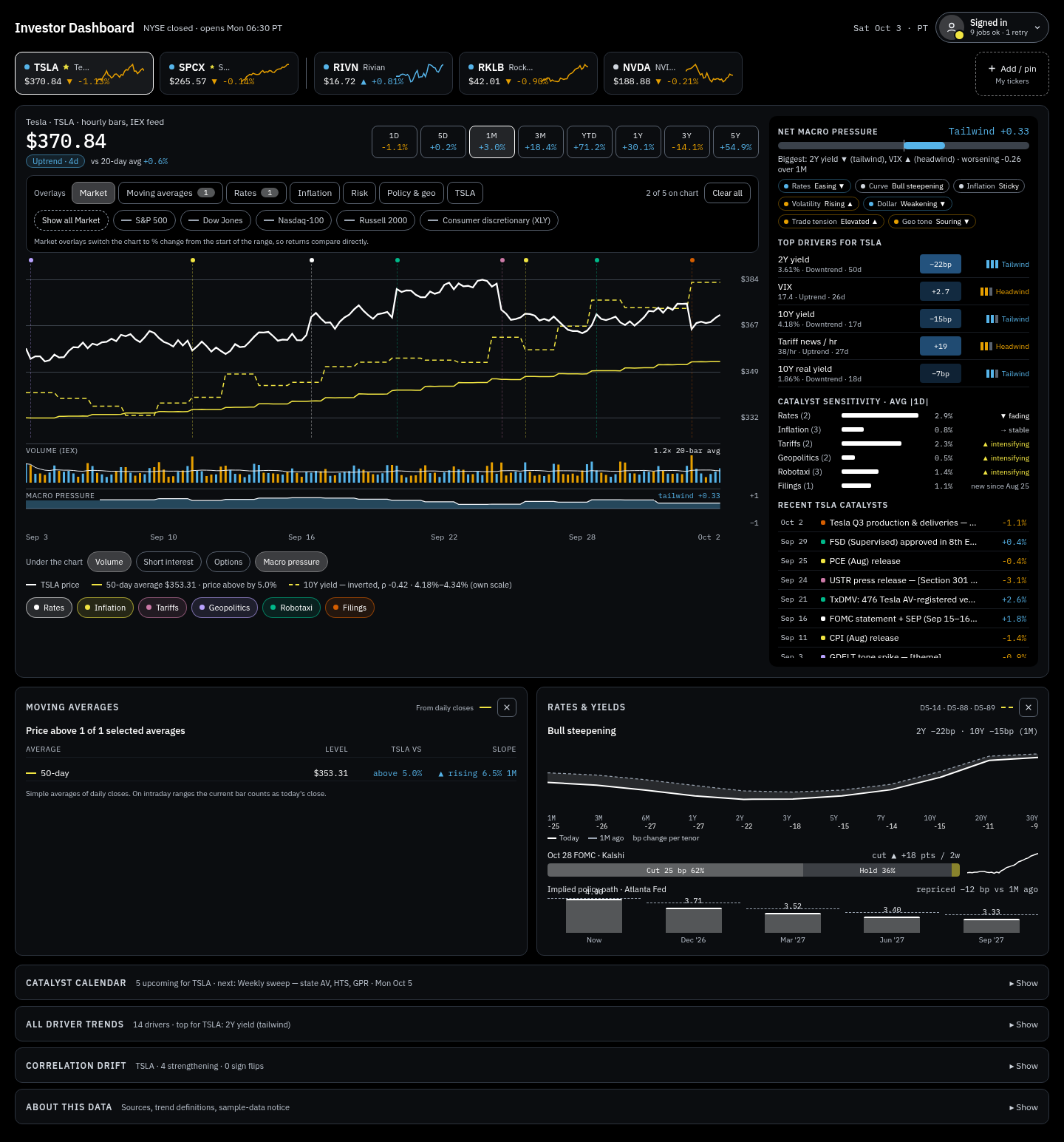
Token values from themes.json; derived tints from the generated <id>.css. Screenshots are 1440px renders of design/ai-generated/Main.dc.html with sample data.
Inspired by: The current Investor Dashboard design: cool charcoal panels, blue accent, GitHub-style green/red. · color-scheme: dark
Written-as-tokens version of the current design. One deliberate change from the mockup: the driver heat-chip color moves from #8B9CFF to #5B6BD6 so white text on the strongest chip goes from 2.9:1 to 5.0:1.
Contrast (from contrast.md / #31): text/bg 16.0:1 · muted/surface 7.4:1 · faint/surface 6.1:1 · up/surface 7.1:1 · down/surface 5.4:1 · text on strongest heat chip 5.0:1
| Group | Tokens |
|---|---|
| Surfaces |
bg #0B0E13 · surface #12161D · surface-2 #1A2029 · border #2A323E · border-strong #4A5361 · grid #222A35
|
| Text |
text #E6EAF0 · text-2 #C5CDD8 · text-muted #9BA6B5 · text-faint #8B96A6
|
| Accent & semantic |
accent #6CA6FF · accent-text #8EBBFF · up #3FB950 · down #F85149 · neutral #9BA6B5 · warning #E3B341 · heat #5B6BD6
|
| Chart series |
series-1 #6CA6FF · series-2 #F2A33A · series-3 #EC7BA6 · series-4 #B392F0 · series-5 #39C5B0 · series-6 #E3C05C
|
Derived tints (<id>.css) |
accent-subtle #24334A · up-subtle #192E25 · down-subtle #341F24 · warning-subtle #3C3524
|
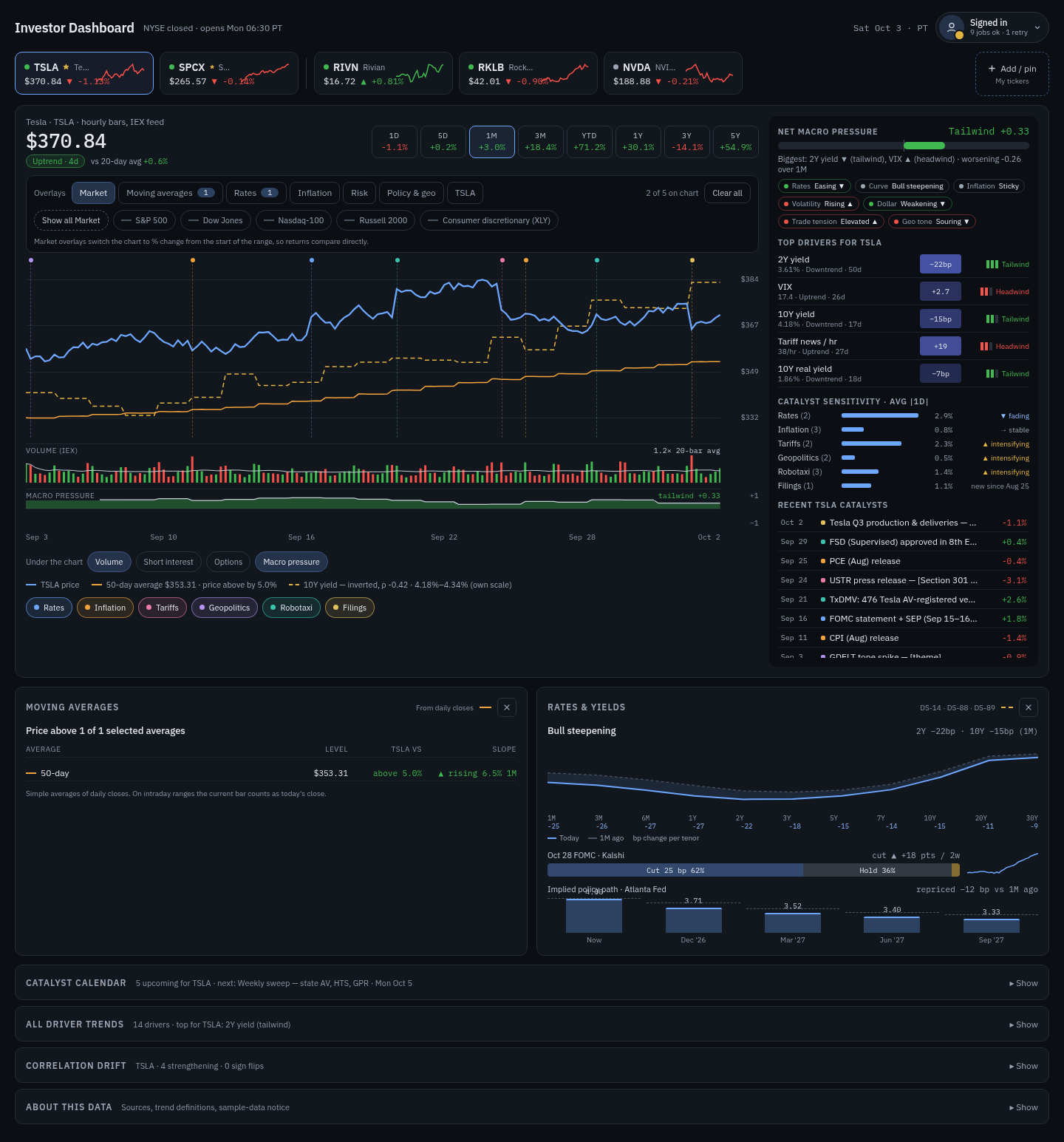
Inspired by: Classic professional market terminals (Bloomberg-style): pure black, amber/orange text, bright green/red ticks, dense high-signal look. · color-scheme: dark
Dense and high-signal: amber body text, yellow accent and price line. Heat chips use dark amber so amber text stays readable.
Contrast (from contrast.md / #31): text/bg 10.3:1 · muted/surface 6.9:1 · faint/surface 5.4:1 · up/surface 10.4:1 · down/surface 5.8:1 · text on strongest heat chip 4.7:1
| Group | Tokens |
|---|---|
| Surfaces |
bg #000000 · surface #080706 · surface-2 #15110A · border #3D2E14 · border-strong #6E5222 · grid #261D0E
|
| Text |
text #FFA028 · text-2 #F2C46D · text-muted #CC8A2E · text-faint #B07A30
|
| Accent & semantic |
accent #FFD23F · accent-text #FFE08A · up #22D65F · down #FF4136 · neutral #CC8A2E · warning #FFE600 · heat #7A4A00
|
| Chart series |
series-1 #FFD23F · series-2 #FF6F00 · series-3 #FF5FA2 · series-4 #B48CFF · series-5 #00D8FF · series-6 #F5F5F5
|
Derived tints (<id>.css) |
accent-subtle #393011 · up-subtle #0C2613 · down-subtle #2D100D · warning-subtle #393405
|
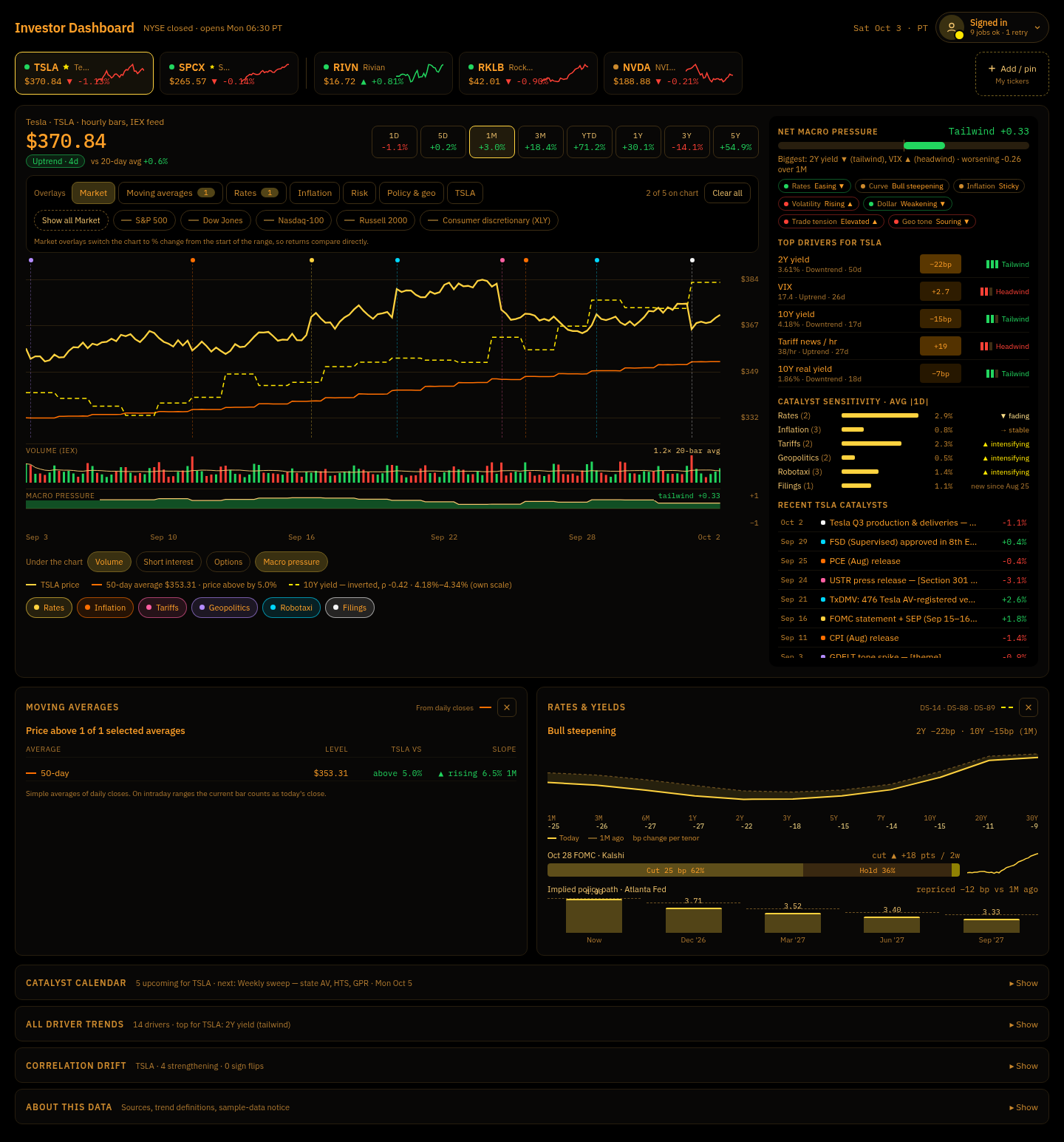
Inspired by: Dark mode of popular web charting platforms: deep navy canvas, teal-green up / coral-red down candles, vivid blue accent. · color-scheme: dark
Deep navy canvas, teal-green up / coral-red down, blue accent.
Contrast (from contrast.md / #31): text/bg 14.3:1 · muted/surface 6.6:1 · faint/surface 5.5:1 · up/surface 5.8:1 · down/surface 5.0:1 · text on strongest heat chip 4.6:1
| Group | Tokens |
|---|---|
| Surfaces |
bg #0A1120 · surface #111A2E · surface-2 #18233A · border #27344F · border-strong #3E4E70 · grid #1C2842
|
| Text |
text #D9E1EE · text-2 #B6C1D4 · text-muted #93A0B8 · text-faint #8592AB
|
| Accent & semantic |
accent #4C8DFF · accent-text #8DB6FF · up #26A69A · down #EF5350 · neutral #93A0B8 · warning #F7B32B · heat #3D6FD6
|
| Chart series |
series-1 #4C8DFF · series-2 #FF9800 · series-3 #F06292 · series-4 #A98BF5 · series-5 #26C6DA · series-6 #FFD54F
|
Derived tints (<id>.css) |
accent-subtle #1D3158 · up-subtle #142F3E · down-subtle #322333 · warning-subtle #3F392D
|
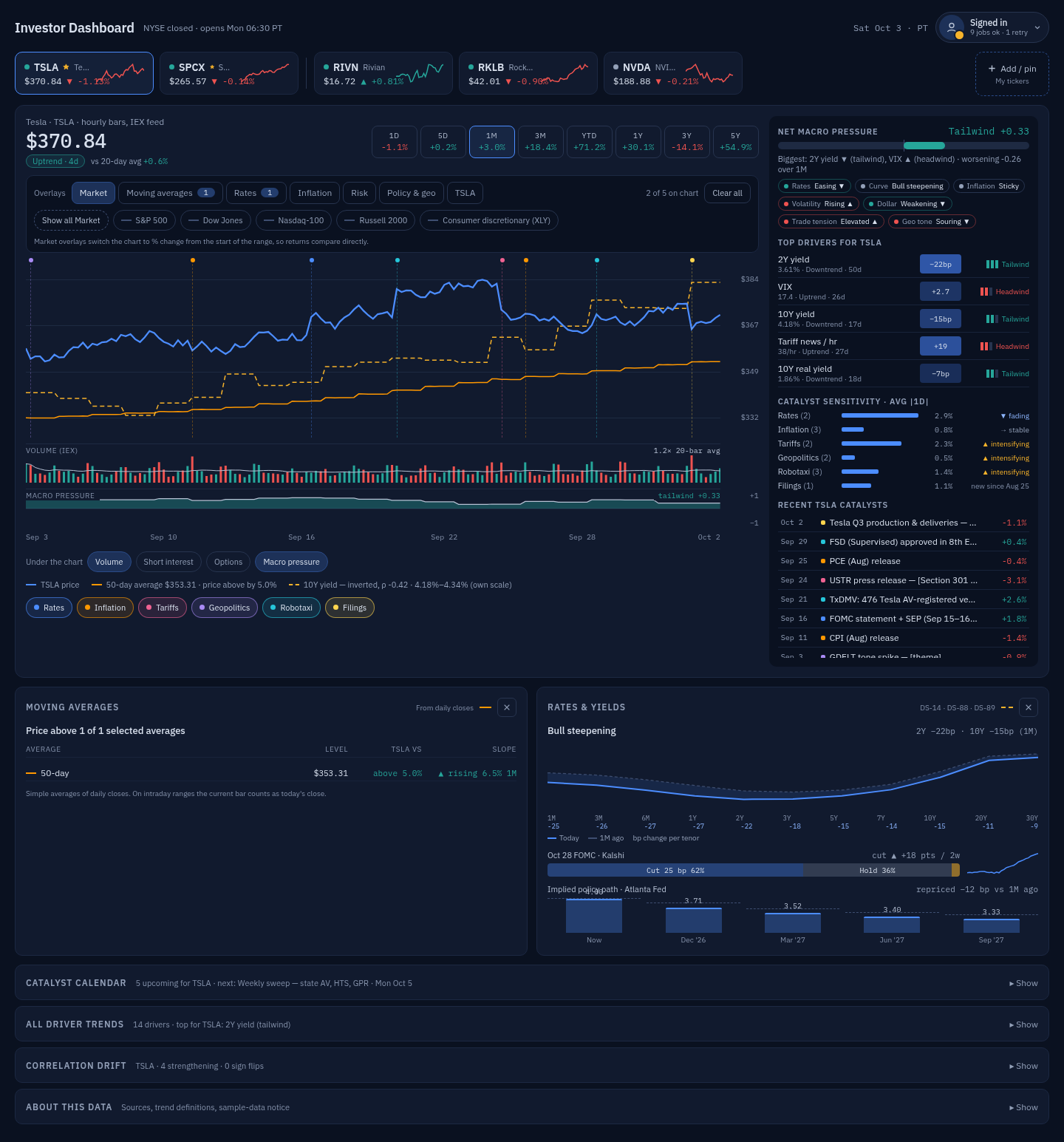
Inspired by: Mainstream finance portals and brokerage web apps in light mode: white cards on soft gray, dark ink, restrained green/red. · color-scheme: light
The only light theme. Darker green/red so up/down text passes AA on white. Per #31 it is what Auto would pick for prefers-color-scheme: light.
Contrast (from contrast.md / #31): text/bg 16.2:1 · muted/surface 7.6:1 · faint/surface 5.7:1 · up/surface 5.4:1 · down/surface 5.6:1 · text on strongest heat chip 8.8:1
| Group | Tokens |
|---|---|
| Surfaces |
bg #F3F5F8 · surface #FFFFFF · surface-2 #F1F3F6 · border #D9DEE5 · border-strong #AAB3C0 · grid #E7EBF0
|
| Text |
text #111827 · text-2 #2F3A4A · text-muted #4B5563 · text-faint #5D6877
|
| Accent & semantic |
accent #1A62D6 · accent-text #1554BD · up #0B7A3B · down #C62828 · neutral #5D6877 · warning #A15C00 · heat #7FA6F0
|
| Chart series |
series-1 #1A62D6 · series-2 #E06C00 · series-3 #C2185B · series-4 #7047D1 · series-5 #00897B · series-6 #A77B00
|
Derived tints (<id>.css) |
accent-subtle #D1E0F7 · up-subtle #DAEBE2 · down-subtle #F6DFDF · warning-subtle #ECDECC
|
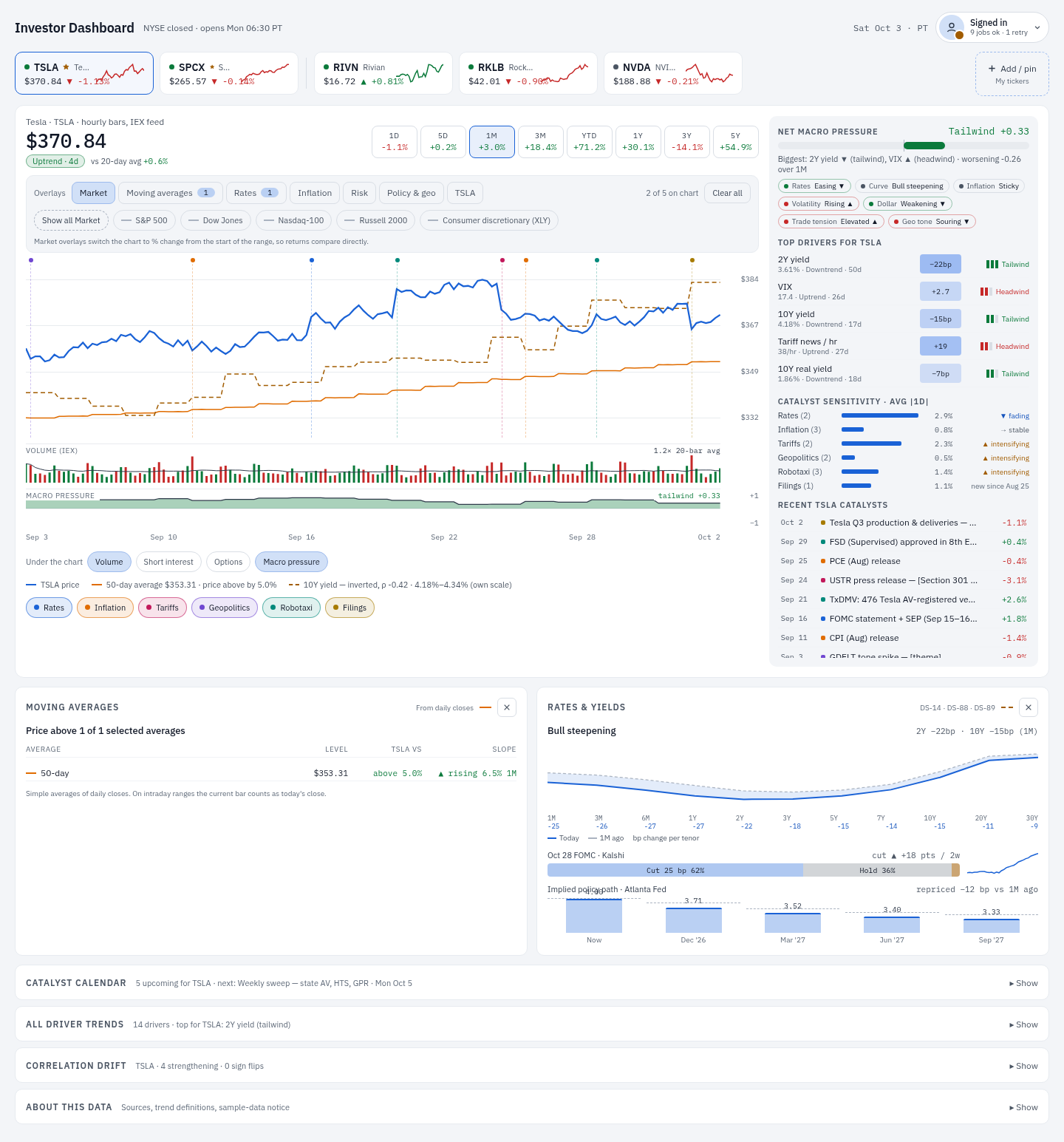
Inspired by: Accessibility-first dashboards: near-black canvas, white text, stronger borders, Okabe-Ito blue/orange up/down so direction never relies on red vs green. · color-scheme: dark
Okabe-Ito sky-blue up / orange down so direction never depends on red vs green; white price line and accent; every text pair is AAA. Per #31 it defaults to the blue/orange up/down pair (picking green/red is allowed but should show a hint).
Contrast (from contrast.md / #31): text/bg 21.0:1 · muted/surface 13.3:1 · faint/surface 10.8:1 · up/surface 8.4:1 · down/surface 8.6:1 · text on strongest heat chip 7.0:1
| Group | Tokens |
|---|---|
| Surfaces |
bg #000000 · surface #0B0D10 · surface-2 #171B21 · border #5A6370 · border-strong #9AA4B1 · grid #2C333D
|
| Text |
text #FFFFFF · text-2 #EEF1F5 · text-muted #D0D6DE · text-faint #BAC2CD
|
| Accent & semantic |
accent #FFFFFF · accent-text #FFFFFF · up #56B4E9 · down #E69F00 · neutral #BAC2CD · warning #F0E442 · heat #2F6FA8
|
| Chart series |
series-1 #FFFFFF · series-2 #F0E442 · series-3 #CC79A7 · series-4 #B9A3FF · series-5 #00B98A · series-6 #D55E00
|
Derived tints (<id>.css) |
accent-subtle #3C3D40 · up-subtle #162631 · down-subtle #2C230E · warning-subtle #39381A
|
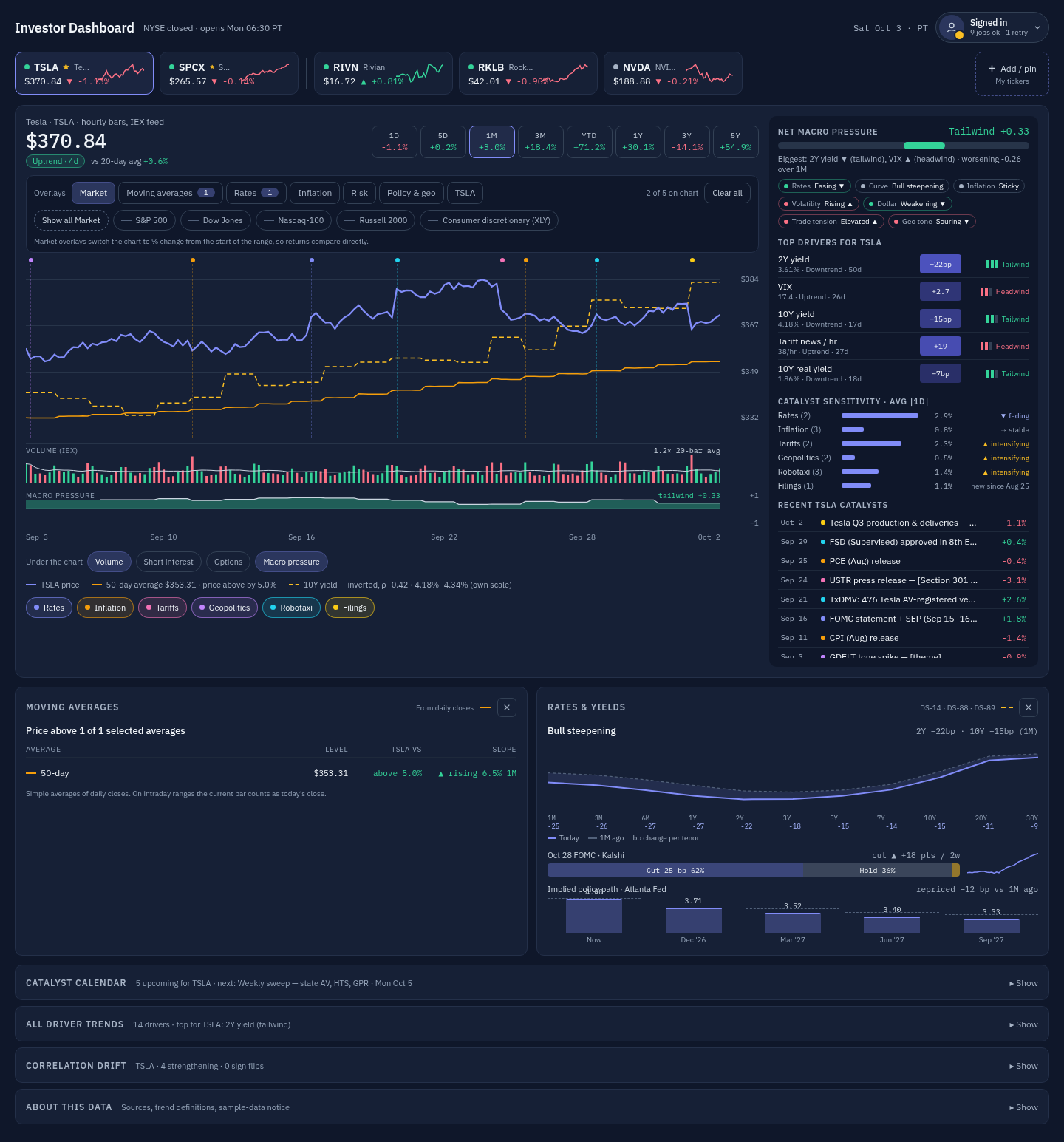
Inspired by: Modern fintech / crypto dashboards: blue-slate surfaces a step lighter than the default, indigo accent, mint up / rose down. · color-scheme: dark
Blue-slate surfaces a step lighter than the default, indigo accent, mint up / rose down — a softer dark option.
Contrast (from contrast.md / #31): text/bg 16.3:1 · muted/surface 7.6:1 · faint/surface 6.3:1 · up/surface 8.4:1 · down/surface 6.0:1 · text on strongest heat chip 5.2:1
| Group | Tokens |
|---|---|
| Surfaces |
bg #0F172A · surface #162036 · surface-2 #1E293B · border #334155 · border-strong #52617A · grid #243049
|
| Text |
text #F1F5F9 · text-2 #CBD5E1 · text-muted #A7B3C5 · text-faint #94A3B8
|
| Accent & semantic |
accent #818CF8 · accent-text #A5B4FC · up #34D399 · down #FB7185 · neutral #A7B3C5 · warning #FBBF24 · heat #6366F1
|
| Chart series |
series-1 #818CF8 · series-2 #F59E0B · series-3 #F472B6 · series-4 #C084FC · series-5 #22D3EE · series-6 #FACC15
|
Derived tints (<id>.css) |
accent-subtle #2B365D · up-subtle #1B3B45 · down-subtle #382C42 · warning-subtle #444032
|
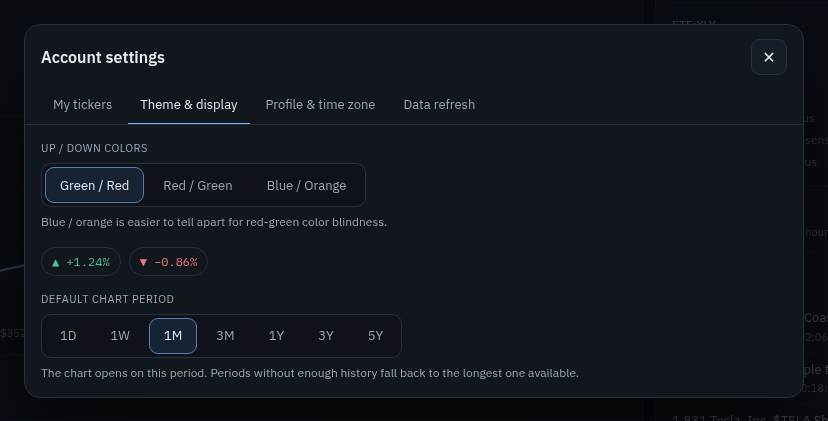
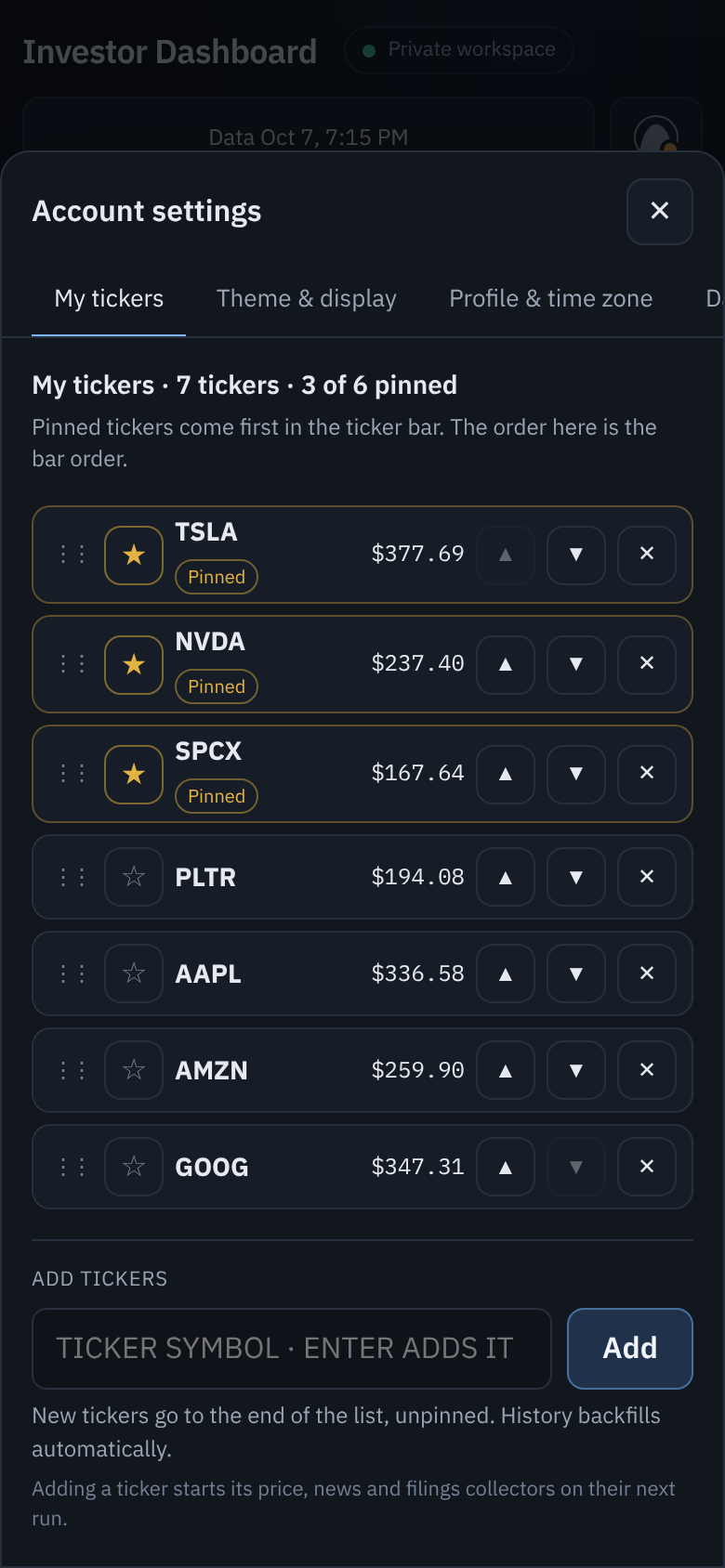
The header Account button opens the account menu. Its Theme & display item opens the tabbed Account settings dialog on the #settings/theme tab. The dialog was built in #36 / PR #49. Its tabs are My tickers · Theme & display · Profile & time zone · Data refresh.
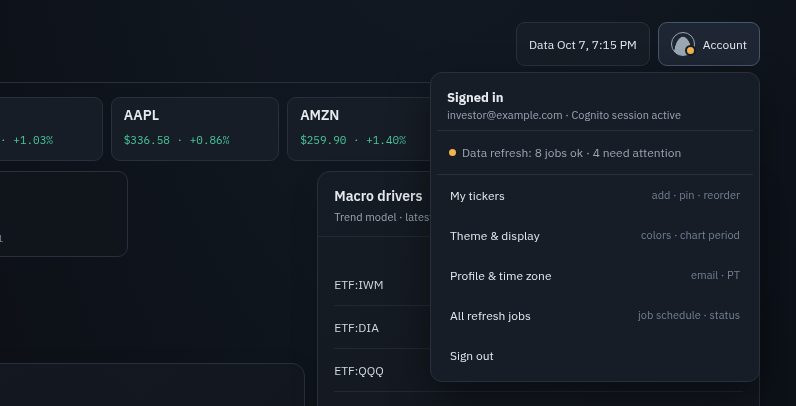
Account menu today. The Theme & display hint reads "colors · chart period".
Shipped today (current apps/web): Up / down colors (Green / Red · Red / Green · Blue / Orange) with a ▲/▼ preview chip pair, and Default chart period (1D … 5Y). There is no theme selector yet.
Planned (#64, with detail from #31 and #36):
- Picker: a full theme selector with previews in this tab. #31 and #36 describe a radio group of cards. Each card has a live swatch: a bg/surface split, a text line, the accent, an up/down pair, and a 6-dot series strip.
-
Applying a theme: the change applies immediately to the whole page behind the dialog, via
data-themeon the document root. #36 also wants a small in-tab preview (mini price line, up/down chips, status dot). - Up/down colors: stay a separate control in the same tab.
- Account menu label: #36 planned the hint "theme · colors" once the picker ships.
- Dialog today: the Account settings dialog already fits at 390px (see below). There is no 390px capture of the Theme & display tab yet.
- Mobile picker: #31 and #36 made a mobile theme picker and a bottom-sheet dialog a follow-up tied to the four-tab glance view, #25. Tokens are shared, so the mobile view consumes the same themes.
- #25 and the account button: #25 now routes Data refresh through the account button rather than a separate card. It says nothing about themes.
- Verification: #64's acceptance criteria require desktop and mobile layouts, keyboard focus, and loading/empty/error states to be verified for themes.
| Topic | #64 (primary) | Earlier spec (#31 / #36) |
|---|---|---|
| Default |
Industrial Dark is the application default. Accounts with no theme field use Industrial Dark. |
Auto (match system) is the default for new users. |
| System preference | Not mentioned. |
auto follows prefers-color-scheme (light → Clean Light, dark → Industrial Dark) and reacts to OS changes live. Under prefers-contrast: more, suggest Colorblind-safe HC without switching automatically. |
| Persistence | Save a validated theme ID through the existing /prefs path, with backend schema, defaults, and tests. |
display.theme in /prefs, allow-listed: auto, industrial-dark, terminal-amber, charting-navy, clean-light, colorblind-hc, midnight-slate. |
| Invalid IDs | Reject them through the existing preference validation and error handling. | Reject them on write; unknown stored values fall back to auto on read. |
| Apply / failure | Apply immediately and keep the existing save-failure notice and recovery. | Apply instantly, save in the background, and roll back with an inline error if the save fails. |
| Up/down palette | Separate preference with clearly defined precedence over the theme's positive/negative colors. Don't confuse it with categorical overlay colors. |
updown_palette overrides the theme's pair. Add a theme value (use the theme's own pair) as the default for new users. Per-theme AA shades, e.g. darker blue/orange on Clean Light. |
| Load flash | Optional pre-login cache that stores only a validated, non-sensitive theme ID, never auth material. | Inline <head> script sets data-theme / data-palette from a localStorage cache (or the system preference) before first paint. /prefs wins after sign-in. |
| Survives | Redraws, ticker/period changes, refreshes, and later authenticated visits. | Reloads and sign-in on another browser (server-side pref). |
| Non-color cues | Meaning is also conveyed by text and signs. | Keep ▲/▼ glyphs and +/− signs. The picker is a keyboard-navigable radio group with text labels. |
| File | What it does today | Remaining limitation |
|---|---|---|
apps/web/styles.css, theme.js
|
Semantic properties are applied on <html>; panel surfaces, text, focus, shadows, backdrop and SVG styling follow the theme. Direction palettes remain separate overrides. |
Static fallback before JavaScript is Industrial Dark. |
apps/web/index.html |
Metadata is updated by applyTheme() after configuration/preferences load. |
No optional pre-paint theme cache yet. |
apps/web/app.js |
renderDashboard() applies the document theme. Paths, chips and legend swatches all use overlayColor(); fundamentals are release-date step lines. |
Financial missing values remain missing regardless of theme. |
apps/web/chart-overlays.js, theme.js
|
33 stable overlay slots (including news sentiment from #74) use the six theme series tokens; later cycles blend adjacent tokens in 13% increments. Tests require distinct colors and at least 3:1 chart contrast in every theme. | Five simultaneous overlays remain the limit. |
apps/web/account-settings.js, settings-model.js
|
Six-theme selector with previews, immediate apply, persisted display.theme; desktop and mobile supported. |
None for theme selection. |
services/data-jobs/src/functions/prefs_api/prefs_api.py |
Allowlists theme IDs, persists them and defaults absent legacy values to Industrial Dark. | Invalid values are rejected explicitly. |
infra/terraform/modules/site_auth/main.tf |
Classic Hosted UI logo/CSS branding; optional Managed Login v2. | Real login/MFA/reset flows need user verification; v2 is not enabled automatically. |
docs/design-roadmap/themes/ |
themes.json, <id>.css, mockup-color-roles.json, render-themes.js, contrast.md, six *-desktop-full.png. |
Design references only. render-themes.js recolors the mockup DOM at render time; per its README, this is not how apps/web should implement themes. |
The wt-themes worktree (branch design/color-themes) holds only the design commit e94b8e9 from PR #30. Its docs/design-roadmap/themes/ content is identical to main, and it contains no implementation work.
Planned approach (#64)
Order of work (suggested sequence in #64):
- Normalize the production semantic tokens and establish Industrial Dark as the unchanged baseline.
- Add the theme definitions, selector, persistence, and validation.
- Wire all panels and SVG/chart-series styling, keeping the accessibility palette overrides.
- Configure and verify Cognito branding with safe deployment and rollback sequencing.
- Add regression coverage and desktop/mobile visual checks, and update directly related docs.
Token roles to map (#64): page/surface backgrounds, raised surfaces, borders, primary/secondary/muted text, accents, positive/negative/neutral, warning/error, chart grids/axes, and categorical series.
Detail from #31 (earlier spec):
-
Token names: use the
themes.jsonnames as CSS variables, with one:root[data-theme="<id>"]block per theme. -
No hard-coded hex in components. Chart code reads its colors via
getComputedStyle(document.documentElement)and re-reads them when the theme changes. -
Tints come from
color-mix(in srgb, var(--accent) 20%, var(--surface)). -
Catalyst marker categories (Rates, Inflation, Tariffs, Geopolitics, Robotaxi, Filings) map to
--series-1…6. -
Driver heat chips use
--heatwith alpha. -
Status dots: ok →
--up, retry →--warning. -
CI contrast check: a script over
themes.jsonthat fails when contrast drops below the thresholds.
Surfaces to cover (#64): price chart and overlays; volume and under-chart lanes; macro trends and drivers; news and sentiment; filings and events; company fundamentals; government contracts, watchlist, header/footer, buttons, inputs, account settings, notifications, data freshness, and sign-in/loading gates.
Cognito login branding (#64 Scope B):
- Approach: Managed Login v2 branding through its editor or API, keeping the current public-client authorization-code + PKCE flow. It is a fixed dark brand, not synced with the user's chosen theme.
-
Starting colors (from the current app): page
#0B0E13, surface#12161D, raised/input#171D26, border#27303C, text#E6EAF0, secondary text#9BA6B5, accent#7DB4FF. #64 says to align these with the final Industrial Dark tokens. - Screens to cover: login, password reset, first-login password change, error, and code/MFA prompts.
- Must not change: callbacks, scopes, client secret, tokens, invite-only behavior, or the user pool and app client (no recreation).
- Management: use Terraform where the pinned provider supports it. Otherwise use a documented, repeatable step with failure handling and rollback.
- Fallback: if v2 can't be used, use the classic Hosted UI (logo plus restricted CSS only) and document the limitation.
| Item | Status | Source |
|---|---|---|
| Six theme designs, tokens, generated CSS, contrast report, screenshots | Done (design only) | PR #30, merged Oct 6, 2026 |
| Account settings dialog with a Theme & display tab (up/down colors, default chart period) | Done | #36 / PR #49, merged Oct 7, 2026 |
Up/down palette preference (updown_palette) |
Done (pre-existing) |
prefs_api.py, styles.css
|
Production semantic tokens / data-theme on <html>
|
Done | PR #65 / #64 |
Theme selector with previews, display.theme persistence, validation, tests |
Done | PR #65 / #64 |
| Token-based chart, overlay, lane, and panel colors; light-theme-safe backgrounds and meta tags | Done, overlay palette and shadow extension in #71 | #64 and #71 |
| No-flash pre-paint theme cache | Open (optional in #64) | #64, #31 |
| Cognito login branding | Classic branding done; v2 opt-in; real authentication flows unverified | PR #65 / #64 |
| Mobile theme picker parity | Done | PR #65 / #64 |
| WCAG application validation and screenshots | Unit contrast checks and local app browser checks done; real branded-login flows still unverified | #64 and #71 |
| Issue | State | How it relates |
|---|---|---|
| #64 Unify dashboard themes and Cognito login branding | Open, no linked PRs (opened Oct 8, 2026) | Primary spec. Full app theme system (six themes, Industrial Dark default, selector in Account settings → Theme & display, persistence, token-based charts and panels) plus Cognito Managed Login branding. All acceptance criteria are unchecked. |
| #19 Catalyst markers on chart and catalyst calendar drawer | Open, no linked PRs | Not a theming issue. #31 maps its catalyst marker categories to --series-1…6 so markers, chips, and the calendar drawer recolor consistently. Nothing is built yet. |
| #21 Company theme panels (TSLA robotaxi / fundamentals deep-dive, SPCX ops & contracts) | Open, no linked PRs | "Theme" here means investment/company themes (content panels), not color themes. It is related only because #64 requires company fundamentals and panels to be theme-aware. |
| #23 Drawers: all driver trends, correlation drift, about this data, schedule/data refresh UX | Open, no closing PRs (cross-referenced by #36 / PR #49 and #51–#52) | Lists "Display prefs (palette / timezone)" as already shipped. Its schedule/data-refresh part became the Account settings Data refresh tab (#52 / PR #54). Future drawers must use theme tokens (#31 lists drawers in its apply-everywhere criterion). |
| #25 Mobile four-tab glance view | Open, no closing PRs (related #51–#53 closed) | Mobile token consumer. #31 and #36 defer the mobile theme picker and the bottom-sheet dialog to this issue. Its Oct 7 addition routes Data refresh through the account button / Account pop-up on mobile; a comment points to #53. It does not mention themes directly. |
Additional context (not in the requested set, but directly theme-related):
-
#31 Color theme switcher — closed. The original detailed theme spec: token names,
autodefault,updown_palette: theme, no-flash script, CI contrast check. It was closed on Oct 7, 2026 6:29 PM PT by project-board automation, not by a PR. None of its acceptance criteria are checked, and only the design PR #30 landed. -
#36 Account settings pop-up — closed via PR #49. Defines the Theme & display tab, the
#settings/themedeep link, live preview, and the theme cache. Its theme-picker criterion was not delivered; the shipped tab has up/down colors and chart period only.
-
Default: should it be Auto/system or Industrial Dark? #31 and #36 specify
auto(followprefers-color-scheme) as the default for new users. #64 makes Industrial Dark the default and doesn't mention system preference. -
Invalid stored values: #31 says reads fall back to
auto. #64 says to reject invalid IDs through validation, but doesn't define read-time behavior for already-stored bad values. -
Up/down precedence: does
updown_palettegain athemevalue (the theme's own pair) as the new default, as in #31? Or does the currentgreen-reddefault keep overriding every theme? #64 only asks for "clearly defined precedence". -
Industrial Dark baseline: production and the design tokens differ (
--green #48c79bvsup #3FB950,--red #f07a7avsdown #F85149,--blue #7db4ffvsaccent #6CA6FF,--line #27303cvsborder #2A323E,--subtle #728094vstext-faint #8B96A6). #64 says to keep Industrial Dark "unchanged" and also to "align with the production Industrial Dark token set". Decide which values win; the Cognito colors depend on this. -
Token naming: keep production names (
--page,--line,--green…) or adopt thethemes.jsonnames (--bg,--border,--up…)? #31 says adopt; #64 says map to "a consistent production naming scheme". -
Overlay colors per theme: overlays have 30 fixed colors but themes define only 6
series-*tokens. Decide how overlay identities stay distinct in every theme, and fix the current duplicate colors (SOFR/VIX, 10Y real yield/dollar index). - Mobile: ship the theme picker on mobile now or after #25? Capture Theme & display at 390px for verification.
- Cognito: inspect the deployed domain's managed-login version and existing branding, and check whether the pinned AWS provider supports managed-login branding resources. Then document deploy and rollback before changing the live domain.
- Contrast in production: run the WCAG AA check (4.5:1 text, 3:1 non-text) against production rendering, not just the design renders, and add the scripted CI check from #31.