Using Multiple Roots - ianharrigan/haxeui GitHub Wiki
As previously shown, a root is a core component that HaxeUI uses for the drawing and layout of UI components. This is usually achieved by Toolkit.openFullscreen. There are, however, times when it is more advantageous to have either a non-fullscreen root as an overlay for another application, or simply to have multiple non fullscreen roots exist inside the same application. HaxeUI supports this with the use of the Toolkit.openPopup call.
The basic steps for creating an application are the same - with the exception of a single step/call. The rest are repeated below for completeness:
- Clean up the Main class (optional)
- Add styles (optional)
- Initialize the toolkit
- Create a non-fullscreen root
- Add UI components
Create a non-fullscreen root
The main difference with creating non-fullscreen roots is the new call to Toolkit.openPopup. This function takes in, as a first parameter, an object that contains properties about the popup root you would like to create. The function still requires a callback to be invoked once the root has been setup correctly. A basic example of this would be:
Toolkit.openPopup({width: 370, height: 270}, function(root:Root) {
    // add to root here
});
This would simply create a non-fullscreen root with a size of 370 x 270. There are various properties that can passed into root creation, these include:
parent- where this root will be added, defaults toLib.current.stageid- identifier of the root, useful for styling, defaults torootstyleName- the style name of the root, defaults topopupx- The left position of the root (relative to the parent)y- The top position of the root (relative to the parent)width- The width of the rootheight- The height of the rootpercentWidth- The percentage of the parent width to usepercentHeight- The percentage of the parent height to use
Creating multiple roots
To create multiple roots simply repeat the same procedure above with different position parameters - as, if the roots are in the same position, they will simply draw over each other and will not be seen - this is the same with normal fullscreen roots, you can create multiple fullscreen roots also, however, since they take up all of the screen only the last ever root will be effectively visible. In fact creating a fullscreen root would be similar to creating a popup root with the following properties:
{
    x: 0,
    y: 0,
    percentWidth: 100,
    percentHeight: 100,
    styleName: null
}
Full example
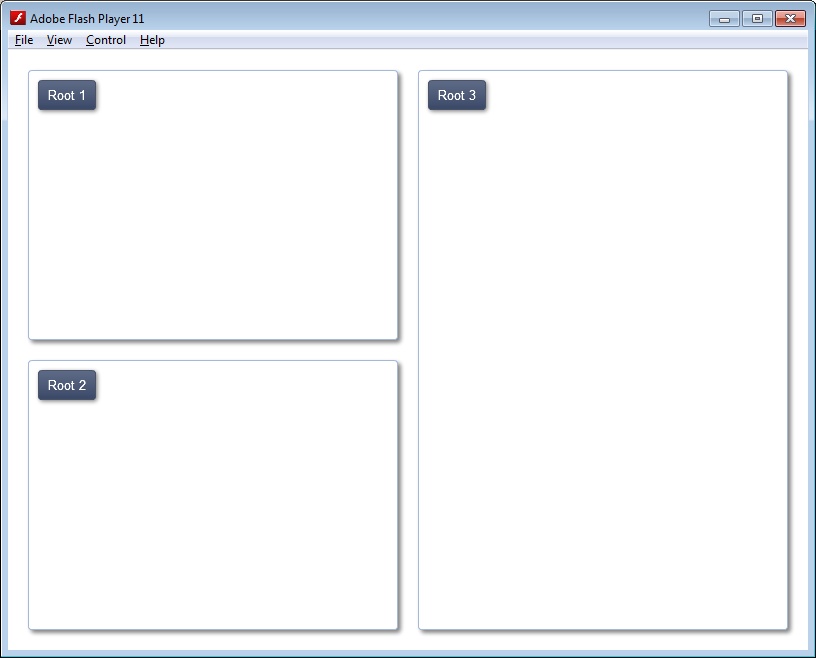
Below is a full example that creates three separate popup roots and positions them at different locations on the screen. Other non HaxeUI objects (images, games, etc) could be under the roots in the background application. Changing the roots alpha property could also yield interesting results.
import haxe.ui.toolkit.controls.Button;
import haxe.ui.toolkit.core.Macros;
import haxe.ui.toolkit.core.Root;
import haxe.ui.toolkit.core.Toolkit;

class Main {
    public static function main() {
        Macros.addStyleSheet("styles/gradient/gradient.css");
        Toolkit.init();

        Toolkit.openPopup({width: 370, height: 270}, function(root:Root) {
            var button:Button = new Button();
            button.text = "Root 1";
            button.x = 10;
            button.y = 10;
            root.addChild(button);
        });

        Toolkit.openPopup({y: 310, width: 370, height: 270}, function(root:Root) {
            var button:Button = new Button();
            button.text = "Root 2";
            button.x = 10;
            button.y = 10;
            root.addChild(button);
        });

        Toolkit.openPopup({x: 410, width: 370, height: 560}, function(root:Root) {
            var button:Button = new Button();
            button.text = "Root 3";
            button.x = 10;
            button.y = 10;
            root.addChild(button);
        });
    }
}