Step 10 - gunjandatta/sp-dashboard-vue GitHub Wiki
The datatables.net library will need to be added to the main source file, in order to include it in the application bundle.
import Vue from "vue";
import App from "./app.vue";
import { Configuration } from "./cfg";
import router from "./router";
import store from "./store";
import Strings from "./strings";

// DataTables.net
import "jquery";
import "datatables.net";
import "datatables.net-bs4";

// Create the global variable for this solution
window[Strings.GlobalVariable] = {
    Configuration
}

// Render the app
new Vue({
    router,
    store,
    el: "#" + Strings.AppElementId,
    render: h => h(App)
});Import the bootstrap styling for datatables.net.
<style scoped>
/** Datatables Bootstrap Plugin */
@import "datatables.net-bs4";
</style>- No Data
- We will render a progress bar until data exists
- You won't see this in the dev environment, but will in SharePoint
- Data Exists
- We will render the table if data exists
- Styling
- We will add some styling to hide the datatables.net search box and push the pagination to the right
<template>
  <div>
    <Progress v-if="rows == null" v-bind="progressProps" />
    <Table v-if="rows != null" v-bind="tableProps" />
  </div>
</template>

<script src="./table.ts"></script>

<style>
/** Hide the datatable search box */
.dataTables_filter {
  display: none;
}

/** Push the pagination to the right */
.dataTables_wrapper .pagination {
  justify-content: flex-end;
}
</style>- Computed Properties
- We will create computed properties for values that reference the store
- Watched Properties
- The searchText property will be watched, in order to apply it to the datatable
- Events
import * as $ from "jquery";
import Vue from "vue";
import { Components, Types } from "gd-sprest-bs";
import { pencilSquare } from "gd-sprest-bs/build/icons/svgs/pencilSquare";
import { Progress, Table } from "gd-sprest-bs-vue";
import { Views } from "../router";

export default Vue.extend({
    components: { Progress, Table },
    computed: {
        items() { return this.$store.state.items; },
        rows() { return this.$store.getters.getRows; },
        searchText() { return this.$store.state.searchText; },
        tableProps() {
            return {
                assignTo: table => {
                    // Save a reference to the table
                    this.table = table;

                    // Render the datatable if items exist
                    if (this.rows.length > 0) {
                        // You must initialize the datatable in a different thread
                        setTimeout.apply(null, [() => {
                            // Render the datatable
                            this.datatable = $(table.el).DataTable({
                                dom: 'rt<"row"<"col-sm-4"l><"col-sm-4"i><"col-sm-4"p>>'
                            });

                            // See if a search result exist
                            if (this.$store.state.searchText) {
                                // Search the table
                                this.datatable.search(this.$store.state.searchText).draw();
                            }

                            // Show the table
                            table.el.classList.remove("d-none");
                        }, 100]);
                    }
                },
                className: "d-none",
                rows: this.$store.getters.getRows,
                columns: [
                    {
                        name: "",
                        title: "",
                        onRenderCell: (el, column, item: Types.SP.ListItem) => {
                            // Render a button
                            Components.Button({
                                el,
                                iconType: pencilSquare,
                                type: Components.ButtonTypes.Secondary,
                                onClick: () => {
                                    // View the item
                                    Views.ViewItem(item.Id);
                                }
                            });
                        }
                    },
                    {
                        name: "Title",
                        title: "Title"
                    },
                    {
                        name: "ItemType",
                        title: "Item Type"
                    },
                    {
                        name: "Status",
                        title: "Status"
                    }
                ]
            } as Components.ITableProps;
        }
    },
    data() {
        return {
            progressProps: {
                min: 0,
                max: 100,
                size: 100,
                isAnimated: true,
                isStriped: true
            } as Components.IProgressProps,
            table: null
        };
    },
    watch: {
        // Search the table
        searchText() { this.datatable.search(this.$store.state.searchText).draw(); }
    },
    mounted() {
        // Get the items
        this.$store.dispatch("loadItems");
    }
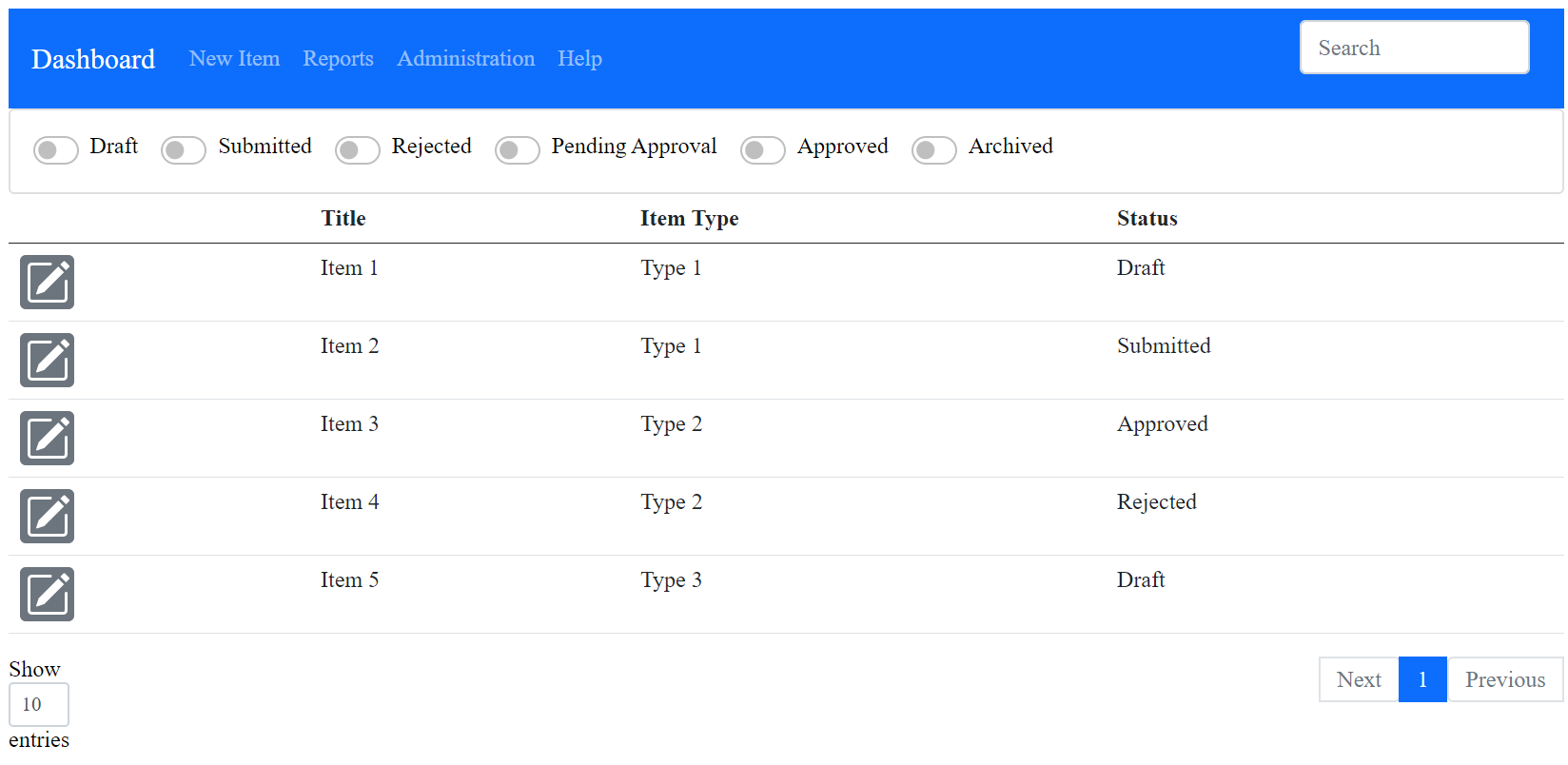
});Since we are still in the local dev environment, the "dummy" data will be displayed.