Use Cases - bparlaker/cmpe-git-practice GitHub Wiki
Use Cases
This page shows the use cases as a drawing and as text, and then the user stories.
- Actors: Visitor, Registered user, Admin.
- Every use case lists its related requirement IDs (see Requirements).
- Text structure for each use case: Actor, Trigger, Preconditions, Main flow, Alternative flows, Postconditions.
1. Use case diagram
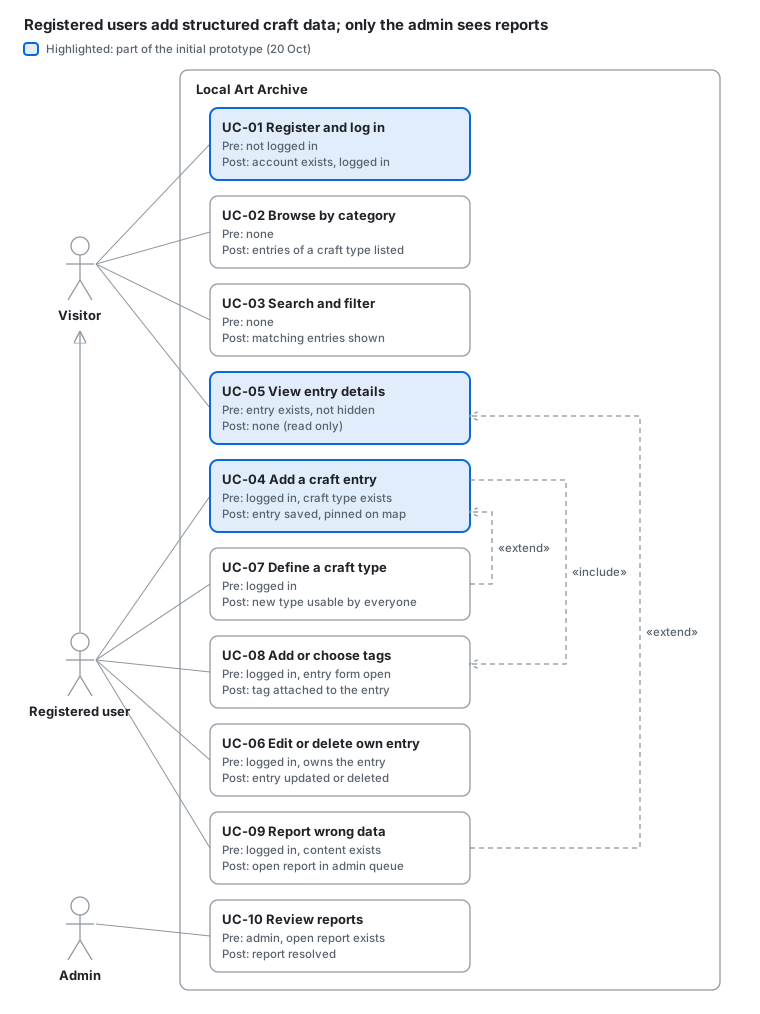
How to read it
- Each actor is linked to the use cases they can do. A registered user can also do everything a visitor can (arrow with an empty triangle).
- Every box shows its precondition (Pre) and postcondition (Post).
- Dashed arrows: UC-04 always includes UC-08 (tags). UC-07 (define a type) and UC-09 (report) are extra flows that start only when needed (extend).
- Highlighted boxes are part of the initial prototype (20 Oct).
2. UC-04 flow: how category and craft type are chosen
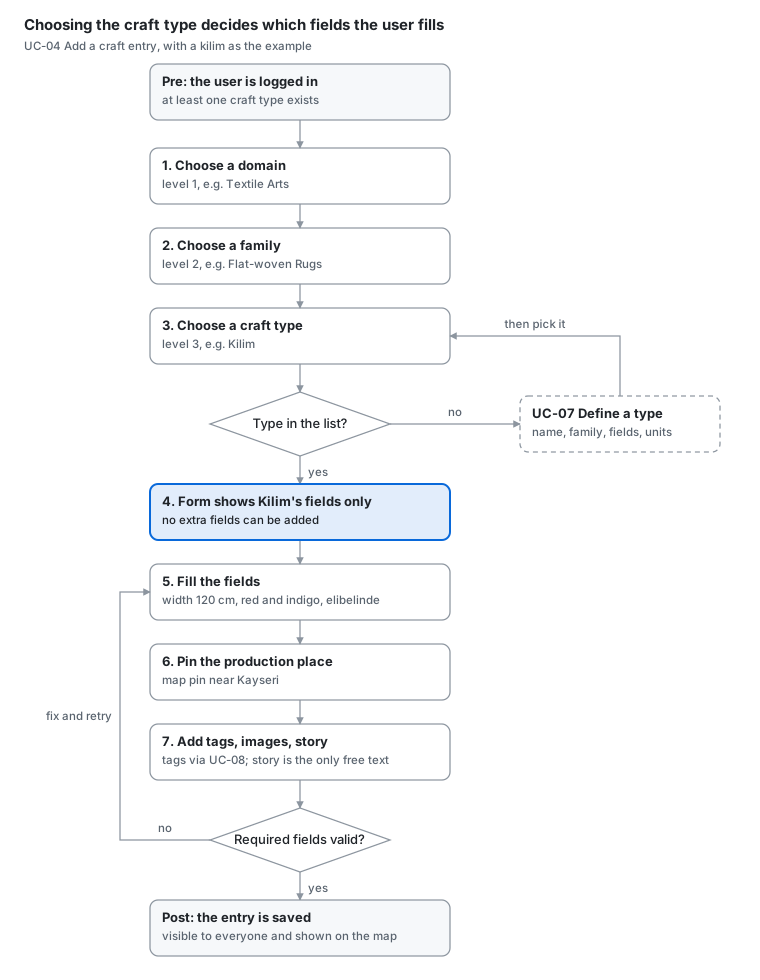
- Precondition at the top, postcondition at the bottom.
- Steps 1 to 3 go down the category tree (Domain > Family > Craft Type).
- Step 4: the chosen craft type decides which fields are shown.
- If the type is not in the list, the user goes to UC-07. If a required field is missing, the user goes back to step 5.
3. Use cases (text)
UC-01 Register and log in (FR-1.1, FR-1.2)
- Actor: Visitor
- Trigger: The visitor clicks "Sign up" or "Log in".
- Preconditions: The visitor is not logged in.
Main flow
- The visitor enters a username, an e-mail address and a password.
- The system checks that the username and e-mail are not used.
- The system creates the account and logs the user in.
Alternative flows
- 2a. The username or e-mail is already used: the system shows an error and asks for another one.
- 1b. Log in: the user enters username and password; wrong password shows an error.
Postconditions: The user is logged in and sees their profile menu.
UC-02 Browse entries by category (FR-6.1, FR-3.9)
- Actor: Visitor or registered user
- Trigger: The user opens the "Browse" page.
- Preconditions: None.
Main flow
- The system shows level 1 categories (domains).
- The user selects a domain, then a family, then a craft type.
- The system lists the entries of that craft type.
Alternative flows
- 3a. The craft type has no entries: the system shows an empty message and an "Add an entry" link.
Postconditions: The user sees a list of entries.
UC-03 Search and filter entries (FR-6.2, FR-6.3)
- Actor: Visitor or registered user
- Trigger: The user types in the search box or opens the filter panel.
- Preconditions: None.
Main flow
- The user enters a keyword.
- The user optionally picks filters: craft type, colors, patterns, material, size range with unit.
- The system shows matching entries.
Alternative flows
- 3a. No match: the system suggests similar keywords or tags.
Postconditions: The user sees filtered results and can open one (UC-05).
UC-04 Add a craft entry (FR-3.1 to FR-3.7, FR-4.1 to FR-4.3, FR-5.1)
- Actor: Registered user
- Trigger: The user clicks "Add an entry".
- Preconditions: The user is logged in. At least one craft type exists.
Main flow
- The user chooses a category and a craft type.
- The system shows only that craft type's attributes, with units and allowed values.
- The user fills in measurements (with units), colors, patterns, materials and the other attributes.
- The user places a pin on the map for the production place.
- The user adds tags (UC-08), images and an optional personal story.
- The system checks required fields and saves the entry.
Alternative flows
- 1a. The craft type does not exist: the user defines it first (UC-07).
- 6a. A required field is empty or a value is out of range: the system highlights it and does not save.
Postconditions: The entry is saved, visible to everyone and shown on the map.
UC-05 View a craft entry's details (FR-3.7, FR-3.9, FR-5.2)
- Actor: Visitor or registered user
- Trigger: The user opens an entry from a list, a search result or a map pin.
- Preconditions: The entry exists and is not hidden.
Main flow
- The system shows images with a caption of key attributes (size, colors, material, place).
- The system shows all structured attributes grouped by type, tags, the map pin and the personal story.
Alternative flows
- 1a. The entry was hidden by the admin: the system shows "not available".
Postconditions: None (read only). A logged-in user can report the entry (UC-09).
UC-06 Edit or delete own entry (FR-3.8)
- Actor: Registered user (owner)
- Trigger: The owner clicks "Edit" or "Delete" on their entry.
- Preconditions: The user is logged in and owns the entry.
Main flow
- The system shows the entry form with current values.
- The owner changes values and saves, or confirms deletion.
Alternative flows
- 1a. The user is not the owner: the buttons are not shown.
Postconditions: The entry is updated or removed.
UC-07 Define a new craft type (FR-2.3 to FR-2.5)
- Actor: Registered user
- Trigger: The user clicks "Define a new craft type".
- Preconditions: The user is logged in.
Main flow
- The user types a name; the system suggests existing similar types.
- The user selects a level 2 category (family).
- The user adds attributes: name, data type, unit (for measurements), allowed values (for choices), required or not.
- The system checks that names are unique and saves the type.
Alternative flows
- 1a. A suggested type matches: the user picks it instead and goes to UC-04.
- 3a. A measurement has no unit: the system asks for one.
Postconditions: The new craft type can be used for entries by all users.
UC-08 Add or choose tags (FR-4.1 to FR-4.3)
- Actor: Registered user
- Trigger: The user types in the tag field (inside UC-04 or UC-06).
- Preconditions: The user is logged in.
Main flow
- The system suggests matching predefined and existing tags.
- The user selects a suggested tag.
Alternative flows
- 2a. The text looks like a misspelling: the system asks "Did you mean ...?".
- 2b. No tag fits: the user creates a new tag.
Postconditions: The tag is attached to the entry.
UC-09 Report wrong data (FR-7.1, FR-7.2)
- Actor: Registered user
- Trigger: The user clicks "Report" on an entry, a craft type or a tag.
- Preconditions: The user is logged in. The content exists.
Main flow
- The user chooses a reason (wrong value, meaningless data, duplicate, inappropriate).
- The system sends the report to the admin queue.
- The system thanks the user.
Alternative flows
- 2a. The user already reported this content: the system says so.
Postconditions: A report with status "open" exists. The content does not change.
UC-10 Review reports (FR-7.3)
- Actor: Admin
- Trigger: The admin opens the report queue.
- Preconditions: The admin is logged in. At least one open report exists.
Main flow
- The system lists open reports.
- The admin opens one and sees the content and the reason.
- The admin edits, hides or deletes the content, or dismisses the report.
Alternative flows
- 3a. Several reports point to the same content: the admin resolves them together.
Postconditions: The report is "resolved"; the content is changed or left as it was.
4. User stories
Each story uses the form As a ..., I want ..., so that ..., with acceptance criteria, an estimate and an SLA (how fast the system must answer). US-01 to US-04 are the initial prototype and are also GitHub issues.
US-01 Sign up (UC-01)
As a visitor, I want to create an account, so that I can add craft entries.
- Acceptance criteria: Given a free username and e-mail, when I submit the form, then my account is created and I am logged in. A used username shows an error.
- Estimate: 4 hours
- SLA: response under 2 seconds
US-02 Add a kilim entry (UC-04)
As a registered user, I want to add a kilim with its size, colors, patterns and place, so that it is recorded in a structured way.
- Acceptance criteria: When I choose "Kilim", only Kilim attributes are shown. Width and length need a unit. I can pick several colors and patterns. I cannot add my own field. Without required fields the entry is not saved.
- Estimate: 12 hours
- SLA: save under 3 seconds (without image upload time)
US-03 Pin the production place (UC-04)
As a registered user, I want to drop a pin on a map, so that others know where the craft was made.
- Acceptance criteria: I can click the map or search a place name; latitude and longitude are saved; the pin appears on the detail page.
- Estimate: 6 hours
- SLA: map loads under 3 seconds
US-04 View entry details (UC-05)
As a visitor, I want to see an entry with its photo and caption, so that I learn about the craft.
- Acceptance criteria: The photo has a caption with size, colors, material and place. All attributes are shown with units. The personal story is shown separately.
- Estimate: 5 hours
- SLA: page loads under 2 seconds
US-05 Define a craft type (UC-07)
As a registered user, I want to define a new craft type with its attributes, so that crafts not in the list can be added.
- Acceptance criteria: I give a name, a family and at least one attribute. Each measurement attribute has a unit. Similar existing names are suggested while I type.
- Estimate: 10 hours
- SLA: suggestions appear under 1 second
US-06 Tag suggestions (UC-08)
As a registered user, I want tag suggestions and spelling help, so that I do not create duplicate tags.
- Acceptance criteria: Typing 2 letters shows matching tags. A close misspelling shows "Did you mean ...?". I can still create a new tag.
- Estimate: 5 hours
- SLA: suggestions appear under 1 second
US-07 Browse by category (UC-02)
As a visitor, I want to browse Domain > Family > Craft Type, so that I can explore crafts I do not know.
- Acceptance criteria: All 3 levels can be opened. Each craft type shows its entry count.
- Estimate: 4 hours
- SLA: page loads under 2 seconds
US-08 Filter by attributes (UC-03)
As a visitor, I want to filter by color, pattern or size, so that I find specific crafts.
- Acceptance criteria: I can combine filters. Size filters work across units (100 cm = 1 m).
- Estimate: 8 hours
- SLA: results under 2 seconds
US-09 Report wrong data (UC-09)
As a registered user, I want to report wrong or meaningless data, so that the admin can fix it.
- Acceptance criteria: I choose a reason. Only the admin sees the report. The content does not change by itself.
- Estimate: 3 hours
- SLA: report saved under 2 seconds
US-10 Review reports (UC-10)
As the admin, I want a list of open reports, so that I can fix or hide bad content.
- Acceptance criteria: I see open reports with content and reason. I can edit, hide or delete the content, or dismiss the report; the report becomes "resolved".
- Estimate: 4 hours
- SLA: queue loads under 2 seconds
Total estimate: about 61 hours. Initial prototype (US-01 to US-04): 27 hours.