msa talkdb report viewer setup - ajtruckle/meeting-schedule-assistant-support GitHub Wiki
Setup - Public Talks
This window lets you configure how the Public Talks Database Report is generated. Your selections determine which talks are included and how the report is presented.
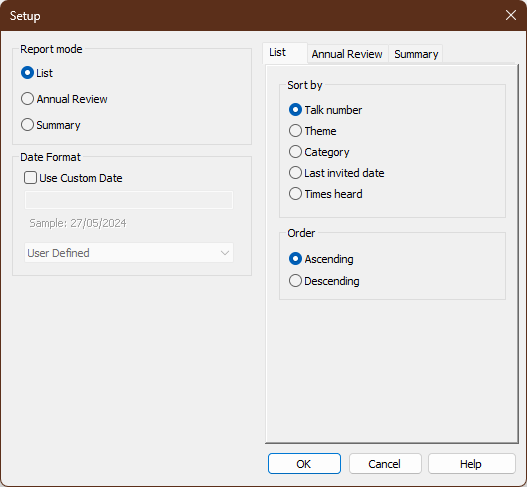
Figure 30. Public Talks Database Report Setup window
⚠️ Important: Click OK to save and apply your changes. Clicking Cancel discards them.
How to Access
You can open the Setup - Public Talks window from:
- Report Viewer → Setup (when the Public Talks tab is selected)
Report Mode
Three report modes are available:
List
The List report produces a complete list of all public talks. Options allow you to choose how the talks are sorted.
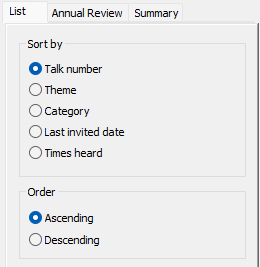
Figure 31. List options tab.
Each entry includes:
- Talk number
- Theme
- Category
- Media classification
- Outline date
- Last delivered date at your Kingdom Hall
- Next scheduled date
- Number of times delivered at your Kingdom Hall
💡 Tip: This report helps you decide which talks to schedule next.
Annual Review
The Annual Review report lists public talks delivered in selected years. Options allow you to choose how much detail is included.
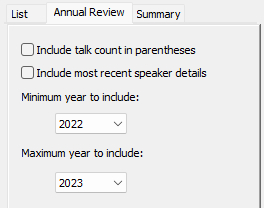
Figure 32. Annual Review options tab.
Each talk includes:
- Talk number
- Theme
For each selected year, the report can also include:
- Date delivered
- Number of occasions delivered (optional)
- Speaker name and congregation (optional)
ℹ️ Note: This report corresponds in purpose and layout to the S‑99 Public Meeting Talk Titles form. It is intended as a helpful companion, not a replacement.
Summary
The Summary report produces a combined list of home and away talks for the selected date range.
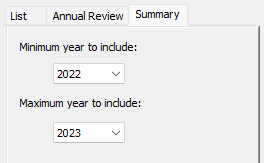
Figure 33. Summary options tab.
This report is useful for:
- Keeping annual records up to date
- Planning future talks, including dates not yet assigned (blank entries allow you to write in details before adding them to the program)
💡 Tip: This report lists talk numbers only, allowing it to fit neatly on a portrait A4 page.
Date Format
These options control how dates are displayed on your reports.
- Use Custom Date — Enable custom formatting.
- Sample — Shows a live preview of the current format.
- User Defined — Enter a custom date format when Use Custom Date is enabled.
💡 Tip: See Custom Date Formats for the available formatting codes.
Navigation
- Parent topic: Report Viewer
- Previous topic: Setup - Publishers
- Next topic: Setup - Meeting Attendance