msa options calendars common - ajtruckle/meeting-schedule-assistant-support GitHub Wiki
Common
Use the Common tab to control the shared calendar behaviour used by all three calendar workflows in Meeting Schedule Assistant:
- Google Calendar
- Outlook Calendar
- iCalendar (ICS) Export — see <https://icalendar.org/> for details about the ICS standard
These settings determine the default location, reminder behaviour, and event descriptions that are applied whenever Meeting Schedule Assistant creates calendar entries.

Figure 150. The Calendars window showing the Common tab.
💡 Remember to press OK to save your changes.
They remain in effect until you modify your application settings again.
How to Access
You can access this feature in two ways:
- Options — Calendars
- Toolbar — Calendars
Default Location
You can specify a default location for each calendar event. This is usually the address of your Kingdom Hall and will appear automatically in all calendar entries created by Meeting Schedule Assistant.
Each environment — Congregation or Foreign‑Language Group — keeps its own Default Location, so you don’t need to change the setting when switching between them.
Reminders

Figure 151. Reminders section with “Set Reminder” enabled.
You can set reminder alerts for the events added to your calendar.
- Choose the time unit: Minutes, Hours, Days, or Weeks
- Enter your desired reminder interval
The OK button is disabled if the value is too large
💡 Note: Meeting Schedule Assistant does not currently support all reminder alert features available in some calendar systems.
Event Descriptions
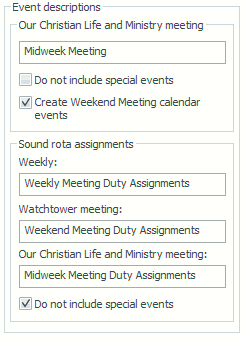
Figure 152. Event Descriptions section in the Common tab.
You can customise how events are described when added to your calendar.
Duty assignment descriptions are unique to each schedule type, so adjusting them in one schedule type will not affect others.
Event Descriptions
Controls the text used for calendar entries.
Duty assignment descriptions are unique to each schedule type.
See Schedule types for details.
Do not include special events
Choose whether to exclude special events from your calendar.
Create Weekend Meeting calendar events (Outlook & ICS only)
Adds Public Talk and Watchtower Study details to your calendar.
Create individual events for each assignment (Google only)
Creates separate events for each assignment.
This is intended for users who apply Google Calendar filters.
See the video: Setting up filters in Google Calendar
Sample Calendar View

Figure 153. Sample calendar view in Thunderbird showing exported meeting and duty assignment events.
Navigation
- Parent topic: Calendars
- Next topic: Outlook Calendar