msa database specialevents bspkr - ajtruckle/meeting-schedule-assistant-support GitHub Wiki
From time to time, congregations receive a Bethel Speaker visit. The speaker may join the congregation for ministry and weekend meetings, or occasionally by videoconference. The Bethel Speaker Service Talk window lets you enter speaker information, assignments, and song details for these visits.
The window is divided into two parts: the upper section lists the assignments, and the lower section contains the Bethel Speaker details.

Figure 87. Bethel Speaker Service Talk window
You can access this feature from:
- Special Events → Bethel Speaker Service Talk
- Meeting Editor → Special Events → Edit Bethel Speaker Service Talk Info
| Field | Description |
|---|---|
| Chairman | Select the brother assigned as Chairman. This list matches the Weekend Meeting Information window. |
| Opening Prayer | Select the brother assigned for the Opening Prayer. Dynamic list behaviour applies. |
| Host | Select the assigned Host. Names come from the Publishers Database. |
| Co-host | Select the assigned Co-host. Names come from the Publishers Database. |
💡 Tip: The Chairman and Opening Prayer lists are dynamic.
Typing a new name and closing with OK adds it permanently.
Hovering over a name and pressing DEL removes it (again, only when closing with OK).
| Field | Description |
|---|---|
| Speaker | Enter the name of the Bethel Speaker. |
| Theme | Enter the theme of the service talk provided by the speaker. |
| Opening Song | Select the opening song. Type the first three digits to jump quickly (e.g., 001, 010, 100). Choose the blank entry to omit song information. |
| Closing Song | Select the closing song using the same method as above. |
You can also edit Bethel Speaker details directly in the Meeting Editor.
Click the Calendar button and choose Edit Bethel Speaker Service Talk Info from the context menu.

Figure 88. Calendar menu showing the Bethel Speaker option.
This makes fine-tuning easier because you can see the results immediately on the schedule.
Here is an example of how Bethel Speaker events appear when using the supplied Workbook‑S‑140‑PublicTalk‑WatchtowerStudy‑ServiceTalk‑Videoconference template:
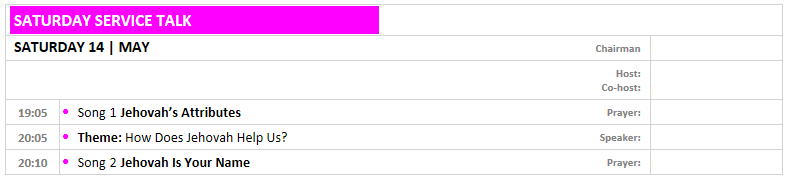
Figure 89. Sample Bethel Speaker Service Talk layout.
You may copy and customise the template to suit your preferred layout. See the Customization section for more details.
- Parent topic: Special Events
- Next topic: Memorial