msa database publictalks - ajtruckle/meeting-schedule-assistant-support GitHub Wiki
Public Talks
The Public Talks menu provides access to tools for managing and updating the Public Talks database.
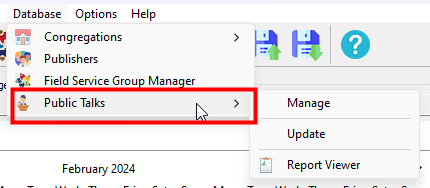
Figure 70. Public Talks menu
How to Access
You can access the Public Talks menu by selecting Database > Public Talks.
Manage
Opens the Public Talk Manager, where you can view and manage information for each talk outline.
You can see:
- Dates when the talk has been given in your congregation
- Speakers who can give the talk
- How many times the talk has been assigned locally
You can also manage additional details, such as whether an outline is excluded.
See also: Public Talk Manager
Update
Downloads and applies the latest updates to the Public Talks database..
The following information is refreshed:
- Theme
- Outline Date
- Media Classification
[!NOTE] An internet connection is required for this feature.
Navigation
- Parent topic: Database Menu
- Previous topic: Meeting Attendance
- Next topic: Reminders