Pulling Changes From Git Repository - SmartBear/ready-git-plugin GitHub Wiki
If your test project was updated, you need to pull the change from the Git repository to your computer. To do this:
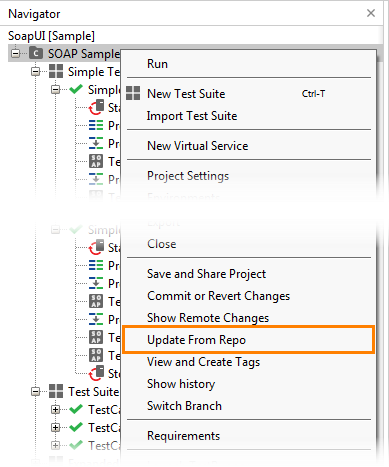
- In ReadyAPI, right-click the project in the Navigator panel and select Update From Repo from the context menu:
- The Git plugin will ask you what changes to use to resolve possible merge conflicts. Select theirs to overwrite your changes with the data from the repository, ours to save your changes and discard the changes from the repository, or recursive to try merging the changes in both versions. Click OK.
The Git plugin will pull the changes from the current branch and resolve merge conflicts by using the selected merge strategy. Note: If conflicts that cannot be resolved automatically happen during a recursive merge, the Git plugin will warn you about them. If you choose to continue automatic merging, the affected file will no longer be valid and ReadyAPI will ignore it. This may cause your project to become invalid. Use external merging tools to resolve the conflicts, or cancel the pull and select a different strategy.