Units and buildings - Pfadfinder-Adam/RTW-M2TW-Campaign-Editor GitHub Wiki
Every line of a unit (export_descr_unit.txt) or a building chain (export_descr_buildings.txt) as a field,
with its pictures. The pictures, the battle model and the voice stay in view - on a unit four alike frames in one
row (card, description picture, battle model, voice; a second row on a narrow window), the explanations on a
? beside each title; the lines fold away behind
Stats - every line of the block (open it to change them; it stays open or closed as you left it). On a unit, the
? beside a line's name says what each of its values means - stat_pri's attack, charge bonus, missile, range,
ammunition..., stat_cost's turns, price, upkeep..., every word of attributes - from the game's own notes. The lists filter (Show: a faction or a culture - the units naming it; a mod's units anyone may hire, ownership all, under everyone's units - a category, mercenaries apart) and sort; drag the line between the list and the rest (its grip drawn in the text's colour) to make the list wider - the width is kept. On a building chain, Only the lines for ... in the Stats window shows the lines for the faction or culture picked in Show alone - the levels it may not build and the lines its factions lists keep out are left out.
-
Texts players read (under the pictures): on a unit, its name, short and long description (
export_units.txt); on a building, a level's name, short description and description for a culture or a faction (Texts for; * = it has texts of its own - the game shows the faction's texts first, else its culture's, else the plain ones;export_buildings.txt). Written on Apply, with a backup. Both games. -
The lines as text: in the Stats window, Fields, Text: this block or Text: the whole file - the lines as written in the file (line numbers, colours, Undo, Find, a wrong line underlined red); both views show the same changes and Apply writes them. Open in Notepad++... opens the file at the block's line. A right click on a line says what it means, its form and the words it takes.
-
Pictures as the game shows them: a unit's card and its description picture come from a faction that owns it (or the mercenaries' folder) - when there is none, the box says so; a building level opens on a Culture that builds it, and a culture that never builds it is marked (never builds it) (the game has only stand-in texts for it). The hover cards in every list show the same pictures.
-
Click any picture (a card, a building's picture, a texture beside the battle model) to look at it closely, big in a window of its own. View in 3D... pressed again brings its open window forward; another model opens beside it, to compare.
-
Import... puts a picture in the right size and format in the right place.
-
New unit / New building step by step... makes a new one from an existing one that surely works in the game, in steps you can go back and forth between: names and the texts players read, who owns the unit (or may build the chain), its main numbers (men, attack, armour, cost...), pictures of your own, and last everything it will change, file by file, before it is added. Written on Apply with a backup. Under How it looks a new unit takes your own files at once - a texture, Medieval II's weapons and shields texture, the model file itself (
.cas/.mesh): it gets a model of its own, the units of the old model keep their look (as Your own files... below). The Pictures step shows the card and description picture the new unit will have (yours, else the copied unit's) and View in 3D... of its soldiers with Make a card... / Make a picture..., as in the editor. -
A unit can also start from nothing (New unit step by step > Start from: Nothing): say what it is - foot soldiers who fight hand to hand, with spears, or who shoot / throw; horsemen who charge or who shoot - and the editor writes every line itself, in the form this mod's units of that kind have. Each number starts at what is usual for such a unit in this mod (the middle of them all) and is shown with the mod's lowest and highest; pick its battle model (and what it rides), its owners, the building levels that train it (the first guess: where this mod trains such units most) and its pictures - without pictures the editor draws plain cards with the unit's initials. A siege crew, a ship, an elephant or a chariot is still made as a copy.
-
A building chain can start from nothing too (New building step by step > Start from: Nothing): say what it is for - soldiers, money or food, order and learning, a temple, something else - and how many levels (Medieval II: for cities or castles). Each level's town size, cost and turns start at what is usual for such buildings in this mod, with the effects most of them have. The Levels step shows every level side by side: change any number, add any effect this mod's buildings use (named in plain words), right click an effect's name to take it out. Then the units it trains (from the level you pick, at every level after it - only units someone who builds it may own), its names and texts, and its pictures: yours, or plain ones the editor draws with the level's initials for every culture that builds it (Medieval II also the small picture of the construction queue).
-
Delete this unit... (beside New unit step by step) takes the unit out on Apply with its recruit lines, its men in every army and garrison, the mercenary pools, the rebels' lists and its cards (a backup first; Restore puts it back).
-
Bring from another mod... copies units or building chains from another mod of the same game, step by step, with everything they need - see Move units and buildings between mods.
-
Where it can be built... (a building) / Where it is recruited... (a unit): a window of its own - the regions whose land lets each level be built (from the goods and region tags its requirement asks for; NOWHERE in red), and every building level that recruits the unit, its pool in plain words, its requirement and a button that opens that building.
-
Add line... / x: add or remove lines (never beyond what the mod already does, never the lines every unit or level has).
-
Tied to it (a button beside Stats, folds away again) shows who owns and recruits a unit, what requires a building.
-
REX... (next to a unit's attributes and weapon lines): tick the abilities REX adds, each with its effect in plain words - morale (expendable, steadfast, immune_to_psychology...), fatigue (relentless, inexhaustible...), charge (brace_for_charge, aggressive_push...), terrain (desert_raider, forest_ambusher), garrison (troublemaker, police), unit size (no_scale, single_entity),
spshield piercing. They work only under REX. The morale and terrain words go onattributestoo - on stat_mental / stat_ground the game takes them but they do nothing there (tested in the game); Check mod files names such units. A word the engine does not know onattributesstops Rome (with REX) while loading.recruit_priority_offset(how much the AI recruits the unit) may be added too. -
Recruit a unit writes the file's own form: Rome
recruit "unit" 0, Medieval IIrecruit_pool "unit" 1 0.5 4 0(units at the start, new units a turn, most units waiting, experience); tick "only retraining" for REX'sretrain/retrain_pool. -
REX's bracket requirements - several
factions { }groups on one line, each with its own conditions - are read in full; Give joins the first group (Preview says so), Take removes the faction from every group. -
A rename drags along what is tied to it: recruit lines, the armies of every campaign, mercenary pools, rebels, requirements.
-
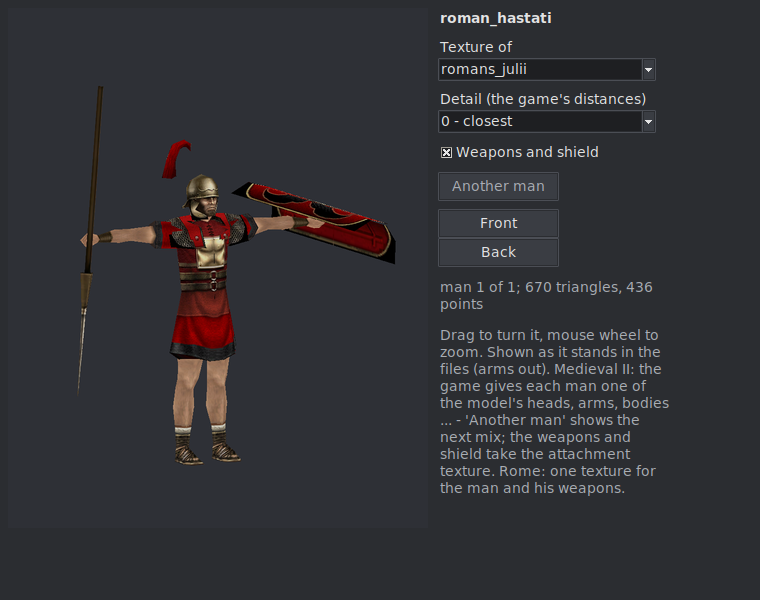
Battle model (units): each soldier and officer model with an owner's texture and how it sits (foot, horse, camel, elephant, chariot); the mount or chariot, the siege engine and the war dogs or pigs a handler unit brings, each with its own texture and View in 3D; Replace model... takes another model of this mod or of another mod of the same game (with every file it names; the unit's factions get textures on it), View in 3D... (drawn by the graphics card where it gives OpenGL 3.3, else as before) turns the model with the mouse - Medieval II's
.meshand Rome's.cas- with each faction's texture, the game's detail levels and weapons on or off. Rome: in the T pose (arms out) or as the file stands (Pose); a chariot unit on its chariot with its horses and crew in the placesdescr_mount.txtgives; a siege engine unit's engine (descr_engines.txt) whole, with its own texture and its crew (Its crew) standing at the engine'sengine_stationplaces. An elephant unit (both games) carries its whole crew - On its elephant, the whole crew: one man at eachrider_offsetplace ofdescr_mount.txt(the driver on the neck, the rest in the tower). Animation: any move of the model's skeleton (stand, walk, run, attacks, shooting, dying... - the listdescr_skeleton.txtgives it), read from the game's own animation packs (data/animations/pack.idx+pack.dat- Rome, Barbarian Invasion, Medieval II): Play / Pause, or drag the frame; a unit with two skeletons (a spear and a sword) picks one first. It plays at the game's speed and smoothly - the moments between two frames are drawn between them, in the whole texture (the 3D view works on NumPy: a frame of a knight on his horse is drawn about five times quicker than before). Medieval II's horsemen: with no animation the rider stands in the T pose beside his horse (the horse in its standing pose); pick any animation and he sits in the saddle (wheredescr_mount.txt'srider_offsetputs him) and the horse plays the same move, as in the game - a horse's own View in 3D plays its moves on its own bones. The weapons and the shield take their own moves in the hand (a javelin turns point first for the throw). Rome's horsemen ride too (the horse plays the move of the same name when it has one, else stands). A siege engine unit's engine opens in 3D in both games. Medieval II: a unit with armour upgrades (armour_ug_models) picks each level's model under Armour (each upgrade's model is also listed under the soldiers with its own View in 3D...); Face and parts picks each head, body ... the model has several of by hand (else Another man mixes them); Mount's colour shows each of the mount's own textures; a shield worn on the back and in the hand shows once - on the back with the first weapon (a crossbow), in the hand with the second. Medieval II's siege engines play their own moves - standing, moving (pushed), loading, shooting (descr_engine_skeleton.txt, the loose files indata/animations/engine) - with their crew (Its crew, ticked) at the places the engine's reference points give, each man playing his moves for that state (crew_animationsindescr_engines.txt): the catapult's arm comes down while one man winds and the other loads, the shot leaves, the gunners load and cover their ears. Make a card... / Make a picture... (the unit's soldier model): the view as it stands - turned, zoomed, in the frame picked - made into the unit's card or description picture, framed as the game's own (the card from the head to the thighs, the picture the whole man; to the knees / waist; nearer, up / down, right / left), on a see-through ground as the game's cards, a colour, a picture of your own, or the game's own card ground (the campaign's or the battle's, of the faction's culture; for a picture the game's scroll paper it is shown on in the unit's details); a Medieval II picture can take the game's frame round it. Size beside the title: the mod's own size, or x2, x3, x4 for sharper cards and pictures (kept for the next unit; look at them in the game). Cards and pictures each keep their own ground and size. Painted look turns the 3D view into flat brush areas with a thin dark line, so the card looks painted. Use it waits for Preview / Apply like Import... (the faction Pictures for names, a backup first); Save a copy... keeps a PNG. Pictures for (a unit with more than one owner): the faction whose card / description picture is shown and put in - each faction has its own (the game reads ui/units/ and ui/unit_info/); the other owners keep theirs. Pick all owners (the same picture) to put one card / description picture in for every owner at once. The window stands beside the 3D view and follows it: turn the man or pick another frame there and the card is taken again by itself (Take the 3D view again does it at once and says what it took). How much of him and nearer / up / right are kept for the next unit (cards and pictures apart). -
Recolour... under a texture: that one texture moved into the faction's colours (the recolour window, its list only this texture; the faction wearing it - the one picked in Show first). Where other factions wear the same file the faction gets a copy of its own. It waits for Apply changes by itself.
-
Your own files... (beside Replace model) puts files you made in another program in place of the model's: a texture for every faction or one faction (PNG, TGA, DDS, JPG - converted to the game's form, Rome
.tga.dds, Medieval II.texture; sides of 64, 128, 256...), Medieval II's weapons and shields texture, and the model file itself (Rome.cas, Medieval II.mesh- several files are its detail levels, closest first; it keeps the old model's skeleton). Every file gets a name of its own beside the old ones and the lines are written; when other units use the same model, this unit gets a model of its own (a copy), so they keep their look. Far away the game still draws the old model's sprites. Preview, a backup, Undo this write.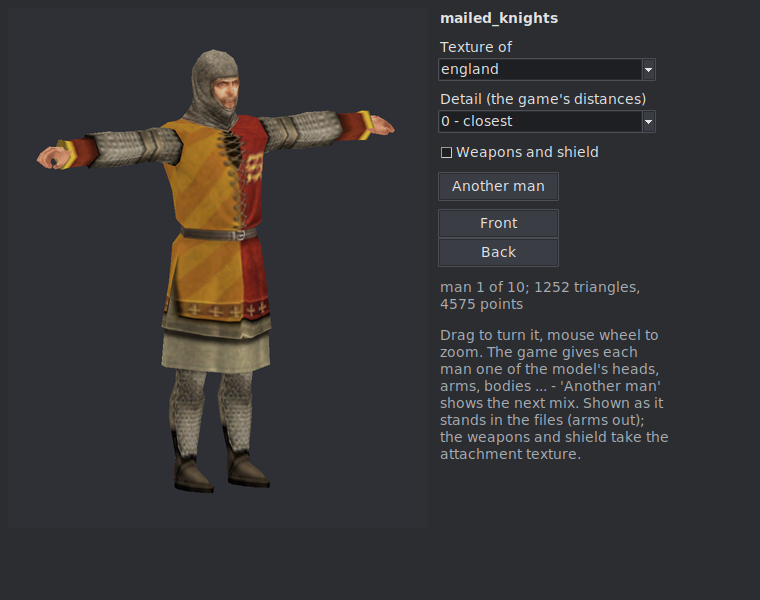
-
Voice in battle (units, both games): what the unit says, for each accent (Medieval II,
descr_sounds_accents.txt) or culture (Rome) of its owners. Play plays its own name call ("Khan's Guard!") or any of its orders, straight from the game's sound packs (data/sounds/*.idx/.dat; a loose file of the same name wins, as in the game). Put in my own... makes your.wavfiles its name call: they are copied in under new names,export_descr_sounds_units_voice.txtgets the unit its own block (taken out of a line it shares with other units; a new unit gets one), anddata/sounds/events.dat/events.idxare removed with a backup - the game builds them again from the texts on the next start. The voice class is thevoice_typeline.
The Buildings work has two tabs: Lines (every line of a chain, above) and By faction - a faction's buildings
as the game shows them. Pick the Faction: on the left the building chains it may build, as the game's pictures
of its culture, grouped by type (core and walls, military, economy, temples, culture, guilds; Medieval II's castle
chains marked (castle)); also what it cannot build shows the rest in grey. A click on a chain opens it in the
middle: its levels side by side, each with its picture, cost, turns to build and the smallest town it needs (a level
the faction may not build is grey), and under the picked level the units the faction recruits there, as cards. The
hover on a card tells how it is recruited there - Medieval II's pool (how many at the start, how many a turn, the
most), the experience, the conditions (a resource, another building, an event) - and warns about a recruit line
for a unit export_descr_unit.txt lacks (the game stops at the start). A click on a card shows the unit on the
right - its card, description picture, numbers, 3D - and every building where the faction recruits it (a click goes
there). Lines of this building and Open in Units go to the lines to change them; the tab reads the file as
the Lines tab has it. Both games.
The game sorts a town's recruitment panel itself, by each unit's custom-battle price (the 6th number of stat_cost),
the smallest first - the order of the recruit lines in export_descr_buildings.txt does not decide it. For the panel
in the order infantry, missiles, cavalry, missile cavalry, siege, ships (the dearest first in each), put in the add-on Recruitment
Order (Rome with REX, Medieval II with M2EX - Rules and scripts > Add-ons).
A building level for many towns of any owner, or random garrisons under an upkeep limit: the Map's Select, a box, then a right click (or Many towns at once... on Edit faction's Buildings tab) - see Campaign map: Select.
One temple per town: the games take one temple chain (a name starting with temple_) per town - two in
descr_strat.txt stop the game ("Settlement specified with multiple temple buildings"). The Buildings tab swaps the
old temple for the one you pick, the many-towns window skips a town that has another temple, Check mod files names a
town holding two. A mod that wants more temples names the extra chains without "temple".
Two tabs. Units and levels: every unit and building level of the mod and whether the faction has it.
Give / Take away. A unit is the faction's only when three places agree, and Apply keeps them in step:
its ownership, the recruit lines that let the faction train it, and its cards.
By buildings: the faction's buildings as the game shows them. Pick a building on the left, a level of it in the middle - the units it recruits there are cards. On the right, All units lists every unit of the mod: a click adds it to the picked level and every level above it in that building. The game trains only what the town's building has at its current level, so a unit written into one level alone disappears once the building grows - this tab never leaves it like that. A level that has no line for the unit gets one for this faction alone (with the pool numbers of the unit's line one level lower, if it has one); a line for other factions takes this faction in. A unit that is not the faction's yet becomes its own (ownership, cards).
- the x on a card takes the unit from that level and the levels above (the ones below keep it);
- + Building lists the buildings the faction may not build yet: a click lets it build every level;
- the x on a building takes it away; the + / x on a level gives it with the levels below / takes it with the levels above (the game builds a chain level by level - a gap stops it).
Green = added, red = taken away; nothing is written before Preview changes / Apply changes, and Undo works. Both tabs share the same changes.
Export pack... in Units puts a unit (or every unit the list shows) into one .zip with
everything it needs: models, textures, mount, engine or animal, cards, names and descriptions, recruit places.
Import pack... in another mod of the same game shows the units with their names there (taken names get
a free one), asks who owns them, and writes them with a backup. Nothing of the target mod is overwritten.
In Medieval II a unit's battle models live in two places kept in step: descr_model_battle.txt (the text the
game reads under M2EX's model_battle_source text) and unit_models/battle_models.modeldb (what the game reads
otherwise). A pack carries both, with every mesh, texture and sprite the model names. On import, a model the
target mod has with other content is added under a free name in both files, and the unit follows it; every
faction the units go to gets a texture entry in both (copied from the model's mercenary texture, else its first),
so no owner sees an untextured unit. Rome packs get the same texture lines for new owners.