Move units and buildings between mods - Pfadfinder-Adam/RTW-M2TW-Campaign-Editor GitHub Wiki
You like a unit or a building in another mod and want it in yours. The editor copies it over with everything it needs and tells you what you still have to finish by hand. The other mod is only read - nothing in it changes.
Both games work the same way: Rome to Rome (with REX, Barbarian Invasion, HLR...) and Medieval II to Medieval II. Between the two games it is not possible - their models and files differ.
- Load your mod (the one that gets the units). Open Units (top bar).
- Press Bring from another mod... (top right of the editor).
-
From which mod: pick it in the list of mods in your game folder, or Browse... to its
datafolder. - Which units: tick them (Ctrl / Shift for more). Sort (by name, kind, owner or cost), Faction (only the units that faction or culture may own), Find and only those this mod has not help on a long list. The unit under the mouse - or the one clicked last - shows on the right as the game shows it: its card, name, description and numbers, and buttons that show its men and each officer in 3D. A faction picked in Faction is also the look the units bring (their textures and cards): Gallic units picked under gauls come in the gauls' colours, not in the colours of the first faction on their ownership line.
-
Names here: the name each unit gets in your mod. A name your mod already has gets a free one (
... 2). Card / text name is the unit'sdictionary: it names its card pictures and its texts (letters, digits,_). - Who has them: the factions - or whole cultures - of your mod that may recruit them. The other mod's owners your mod has too are picked already.
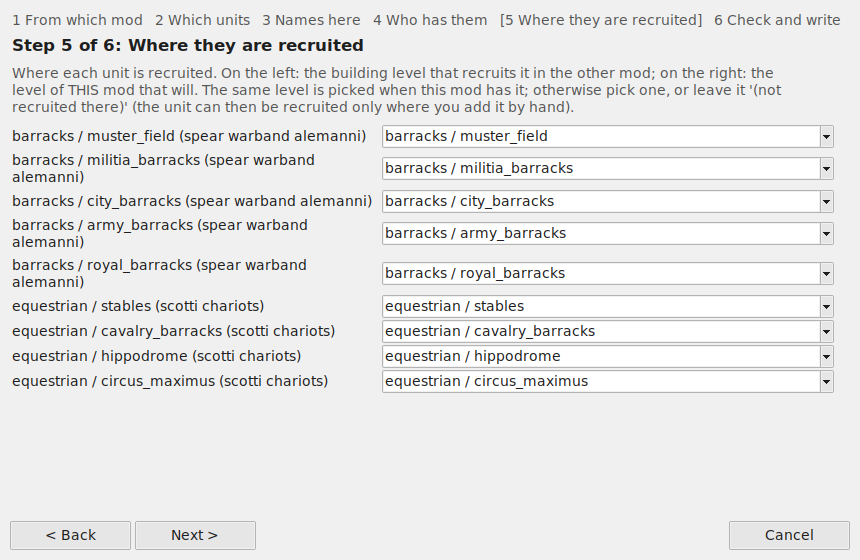
- Where they are recruited: one line per unit: the same buildings as in the other mod (the levels your mod has under the same names - listed under it), any building level of your mod (e.g. your own barracks), not recruited there, or - when your mod has no such building at all - bring its building too: the whole chain comes along (its levels, names, descriptions and pictures), built by the same owners, recruiting the units you bring (its lines for units your mod lacks are left out, said in Check and write).
- Check and write: every file and line it will write. Read the WARNINGS at the end - they say what to finish by hand. Write it into this mod makes one backup first; Tools > Restore a backup... undoes it.
What comes along: the unit's lines, its battle models (Medieval II: in descr_model_battle.txt and
battle_models.modeldb), mount, engine (with its own skeleton and animation files) or animal, its ship type, Medieval II's mounted engine, the projectiles it fires (descr_projectile_new.txt in Rome,
descr_projectile.txt in Medieval II), every mesh / texture / sprite they name, its cards and info
pictures for each new owner, its name and descriptions, the recruit lines, and its own name call in battle (the
voice file's lines naming it, with their sound files - new files of their own). The voices of its class (its
voice_type) come along too where your mod's voice file lacks that class for the new owners' culture / accent: the
class's lines with their sound files (other units' name calls in it left out), so the unit is never silent. Its fire
arrows (or any burning shot) come with their projectile, and the effects its projectiles show - fire trails,
explosions, the effects those are made of and their textures - go into your mod's effect files where it lacks them
(an effect of yours with that name is kept). A file your mod (or the game under
it) already has under the same name but with other content - a chariot's texture, say - comes in under a name of its
own (..._2), with a model of its own pointing at it (an engine's skeleton too, when your mod has one of that name with other lines or other animation files): the brought unit keeps the other mod's look and nothing of
yours changes. A chariot's body (Rome) names its texture inside its .cas, and the game gives a faction its own
<name>_<faction> texture when there is one: the brought chariot's look goes in under that name for each new owner
(your other factions' chariots keep theirs; a faction that already has its own keeps it).
Skeletons (how the men move): a big mod (HLR, for one) has skeletons of its own in its own animation files
(data/animations: pack.idx, pack.dat, skeletons.idx, skeletons.dat - the game loads one such set, the mod's own or
the game's). In both games (Rome, Barbarian Invasion, REX; Medieval II, M2EX) a brought unit's own skeletons come along with every animation they
move by: your mod gets its own set - the one the game loaded for it, with them added, and their lines in descr_skeleton.txt (so a rebuild of the animation files keeps them) (REX's aninterp.cache beside it
is taken away; REX makes it again). Its men move as in their own mod. A skeleton that cannot come along (a source with no
set of its own) becomes your mod's nearest one (fs_hc_spearman_classic -> fs_hc_spearman),
said in the WARNINGS - without it the game stops at start ("Unable to find skeleton"). Check mod files names any
model whose skeleton the mod lacks.
Not brought yet: Medieval II's town plans (a building's look in the town on the battle map is brought in Rome, Barbarian Invasion and REX).
The same window from the Buildings: Bring from another mod...
- From which mod, then Which buildings: tick the building chains. The chain clicked shows on the right: pick a level and a culture to see its pictures (in the town, when built), the name and description players read, who may build it, what it needs and what it does in plain words.
-
Names here: the chain and each of its levels. The game needs every chain and level name once, so a taken
name gets a free one (
barracks_2,town_watch_2...). - Who may build them: factions or whole cultures. Every level and every recruit line in them gets this list.
- The units they recruit: each unit the building recruits goes to a unit of your mod - the same one when your mod has it; otherwise pick one, or leave the line out. To keep a unit your mod lacks, bring it first (Units, above), then the building.
- Check and write, as for units.
Conditions the other mod has and yours does not are taken out and said in the WARNINGS: a hidden resource
(Barbarian Invasion's britain), a resource, a religion (religious_belief lines where your game has no religions).
Left in, the game stops at start ("unrecognised hidden resource"); Check mod files finds such lines too.
What comes along: the whole chain (levels, upgrades, capabilities, recruit lines), the names and descriptions of
its levels for every culture, and the level pictures (ui/<culture>/buildings/#<culture>_<level>.tga and the
_constructed ones), and - Rome, Barbarian Invasion, REX - its look in a town on the battle map: its places in
descr_settlement_plan.txt (each into the slot of the same name in your plan), its battle buildings
(descr_building_battle/dbb_campaign_editor.txt), their items and models (descr_items/di_campaign_editor.txt;
descr_items.db is removed, the game writes it again). The warnings name a requires line or a city / castle partner (convert_to, Medieval II)
that points at a building your mod has not - change those lines in Buildings.
- Not tested in the game for every mod: a building or unit that depends on scripts, traits or resources of its own mod needs those too - the warnings name what the editor can see.
-
To share units with other people, use Units' Export pack... (one
.zip) and Import pack... on their side. Tools > Check and install a pack is something else: it checks a mod that says "copy this data folder over the game" before anything is copied. - A mistake? Tools > Restore a backup... gives every file back, byte for byte.