Mending Table and Repair Materials 1.21.1 - Herbertofury/Advent-of-Ascension GitHub Wiki
Mending Table and repair materials · 1.21.1
Minecraft 1.21.1 / AoA 3.7.16.1. The Mending Table repairs a damaged, repairable item using Magic Repair Dust or Magic Mending Compound. Magic Mending Solution is an intermediate material that becomes Compound while carried; it is not the same thing as the vanilla Mending enchantment.
Crafting overview · Reward-box materials · Imbuing Chamber enchantments
Preview precaution: the checked release has an unsupported-material update path that can leave a previous output intact. Use only the intended repair material, check the target and output, and remove an input to clear the preview if anything looks wrong. The static finding and repair acceptance tests are explained below.
1. Build the Mending Table
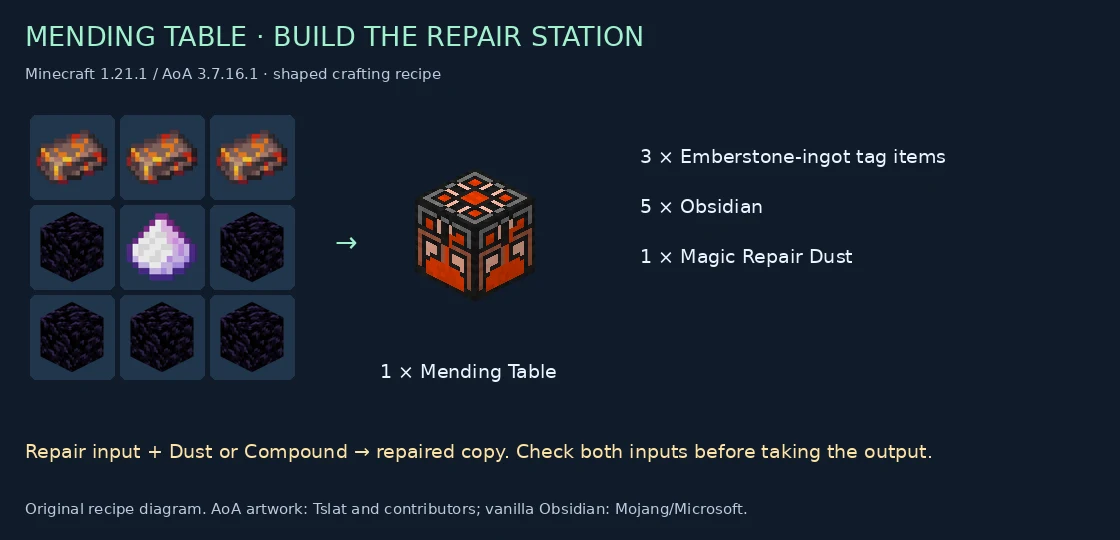
| Emberstone ingot | Emberstone ingot | Emberstone ingot |
|---|---|---|
| Obsidian | Magic Repair Dust | Obsidian |
| Obsidian | Obsidian | Obsidian |
The top row accepts c:ingots/emberstone. Total: 3 tagged ingots, 5 Obsidian and 1 Magic Repair Dust, producing one table.
The Treasure Box base table includes Repair Dust and Mending Compound as possible rewards. This is a checked source route, not a guaranteed supply. Use the item/loot tools to inspect other release-specific references before assuming a historical acquisition method still applies.
2. Choose Dust or Compound
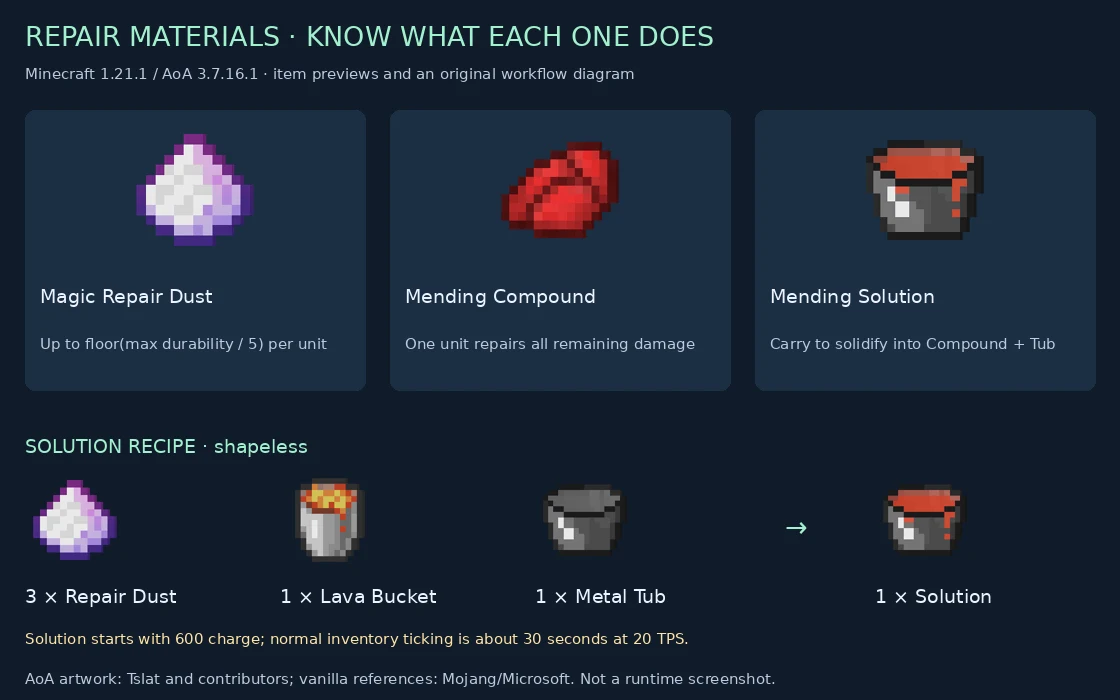
| Material | Inspected table behavior |
|---|---|
| Magic Repair Dust | Each consumed unit repairs up to floor(maximum durability / 5) damage, limited by remaining damage. |
| Magic Mending Compound | One consumed unit repairs all remaining damage. |
| Magic Mending Solution | Not an accepted repair material in this table. Carry it to produce Compound and recover its Metal Tub. |
| Ordinary ingot, gem or other item | Not accepted by the checked repair-material branch, even if another workstation accepts it. |
Dust's fifth-of-maximum calculation uses integer division. It is not 20% of the damage currently missing, and a tiny maximum durability can round the amount down to zero.
Worked examples
| Maximum durability | Current damage | Material supplied | Resulting damage | Material cost |
|---|---|---|---|---|
| 100 | 87 | 2 Dust | 47 | 2 |
| 100 | 87 | 5 Dust | 0 | 5 |
| 100 | 87 | 1 Compound | 0 | 1 |
| 5 | 3 | 2 Dust | 1 | 2 |
| 4 | 3 | 1 Dust | No repair output from this branch | 0 |
These are independent arithmetic checks of the source rule, not live-game measurements. The table uses only as many repair-material units as its repair loop needs, up to the supplied count. For a sufficiently damaged item, converting three Dust into a Compound can be material-efficient if you also have the other ingredients and time.
3. Make Mending Compound through Solution
Craft a Metal Tub
Use this shaped pattern:
| Iron ingot | Empty | Iron ingot |
|---|---|---|
| Clay Ball | Emberstone ingot | Clay Ball |
The ingredients are 2 c:ingots/iron, 2 vanilla Clay Balls and 1 c:ingots/emberstone, producing one Metal Tub. The recipe is two rows high and three columns wide, so use a crafting table.
Mix the Solution
Combine shapelessly:
- 3 Magic Repair Dust, in separate ingredient slots
- 1 Lava Bucket
- 1 Metal Tub
This produces 1 Magic Mending Solution. The five ingredients require the larger crafting grid.
Carry it while it sets
The item starts with 600 charge. Each inventoryTick call subtracts one charge; when it reaches zero on the server, the Solution stack is consumed. For a ServerPlayer carrier, the code gives back 1 Metal Tub and 1 Magic Mending Compound.
At normal one-call-per-tick inventory behavior and 20 TPS, 600 ticks is about 30 seconds. This is a ticking requirement, not an unconditional wall-clock timer. Storage, paused simulation, lag or modded inventory handling can change how often that callback runs. The method does not require the Solution to be the selected hotbar item. Keep inventory space for the returned items.
The Solution's class does not implement a drinking-to-repair action. Wait for the item conversion, then use the resulting Compound at the table.
4. Repair the item
The menu has two input slots and one output slot:
- Put the damaged, repairable item into the left input.
- Put Magic Repair Dust or Magic Mending Compound into the middle input.
- Check the right output. Confirm its identity, damage and expected material cost before taking it.
- Take the repaired output. The menu's output-removal callback clears the target input and consumes the calculated amount of repair material.
The computation starts from repairingStack.copy() and changes damage. That preserves the copied item's other components through this calculation, unlike a recipe that constructs a fresh preset item. This is not blanket certification for every modded item's custom behavior.
The inspected repair callback does not charge vanilla XP levels; its cost is the repair material. Undamaged or empty targets produce no output. The left slot also requires the item's isRepairable predicate, so a non-repairable item is not made repairable merely by supplying Compound.
5. Distinguish the Mending enchantment
The vanilla Mending enchantment is a separate system. In the inspected AoA Imbuing recipe, Mending I requires:
- Imbuing level 97
- Radiant Power Stone
- Resource, Change, Durability and Magic foci
Use the Imbuing Chamber guide for equipment compatibility, focus wear and when that workstation commits an enchantment. A Mending Table repair does not automatically add the Mending enchantment.
Known stale-preview path and safe handling
The released menu explicitly clears output for an empty target, an undamaged target, an empty material slot, or a non-positive repair portion. However, after both supported-material identity checks fail, it can return without resetting the previous output or totalRepairCost.
That means an update receiving an unsupported non-empty material while an old result exists has a static stale-preview risk. Whether a particular mouse action first passes through an empty-slot update matters; this is not a claim that every material swap reproduces it.
- Do not trust a leftover result after replacing the repair material with something unsupported.
- Remove the target or empty the material slot to force one of the explicit output-clearing branches, then reinsert the correct inputs.
- Avoid using valuable equipment to explore unusual slot-swap behavior until the exact build has been tested.
Restoration target: reset output and cost before validation, or clear both on every invalid branch; revalidate the target, material and cost when taking output. Test normal click, swap, quick move, target replacement, exhausted material and close/reopen. No game-code patch is applied by this documentation.
Evidence and scope
Released recipes and method evidence includes four recipes, the exact unsupported-material branch, selected parent/output-slot paths, Solution's 600-charge constant and eight independent repair cases. Image provenance records the item-model inputs.
Primary pinned source: MendingTableMenu and MagicMendingSolution. This is static release analysis and independent arithmetic, not live-game reproduction or private Enderloom certification. AoA artwork and systems: Tslat and contributors; vanilla references: Mojang/Microsoft.