Controls HUD and Client Settings 1.21.1 - Herbertofury/Advent-of-Ascension GitHub Wiki
Controls, HUD and client settings · 1.21.1
Minecraft 1.21.1 · AoA 3.7.16.1. This guide records four released key defaults and all 15 client-config definitions. Your modpack or saved options can override defaults. No settings were changed on your computer.
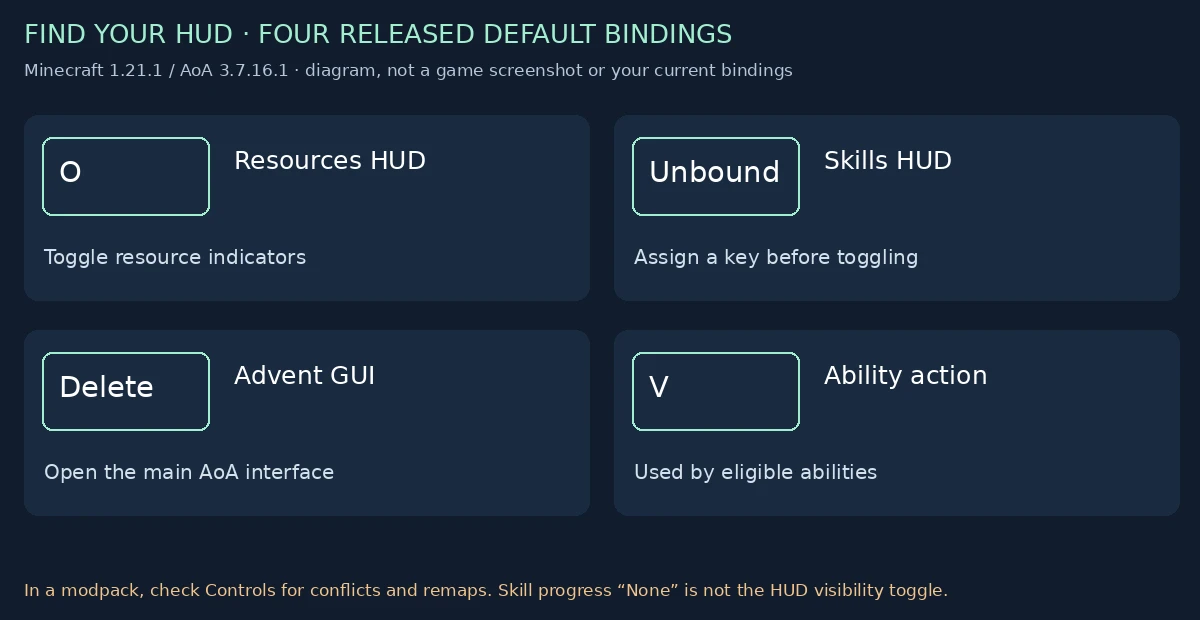
Start with the controls
| Action | Released default | What to check |
|---|---|---|
| Resource HUD | O | Toggles the resource display state |
| Skill HUD | Unbound | Assign a key in Controls first |
| Advent GUI | Delete | Opens/closes the main AoA screen when its input conditions permit |
| Ability action | V | Does not grant an ability; eligible ability handling must exist |
Open Minecraft’s Controls/key-binding settings and find the AoA category. Resolve conflicts before assuming an action is missing. The key registrations use the in-game conflict context. Existing saved bindings take precedence over these defaults.
The Advent GUI key does not force-close an arbitrary unrelated screen: its handler closes an existing AdventMainGui or opens one when no screen is active and a player exists.
Why the HUD may be missing
- The resource and skill display states initialize false in the checked keybinding class. Toggle the relevant HUD; the skill toggle has no default key assigned.
- The renderers return when no player exists, the player is a spectator, or the global GUI is hidden.
- Check the layout setting and potion offset if indicators appear in a different place.
- Do not confuse hudSkillProgressRenderType=None with hiding the entire skill HUD. The default renderer can still draw icons and levels.
- Check for another mod replacing or covering the overlay. This guide does not certify compatibility with every HUD mod.
Client config location and safe editing
AoA registers the client file as aoa3/client_config.toml under the instance’s config directory. The regular options are in general_settings; partyDeaths is in fun_options.
Use a supported config editor where available. For a manual edit, close the game first, change only the intended key, preserve the TOML section and value type, then relaunch and verify the result. Do not paste this table over the whole file or overwrite unrelated options. Existing installations can retain values different from the released defaults.
This client file is separate from aoa3_server_config.toml and aoa3/integrations_config.toml. Client presentation settings do not replace server gameplay controls.
All 15 released client settings
| Section / key | Type | Released default | Purpose and limits | |---|---|---| | general_settings.showXpParticles | boolean | true | Show scrolling skill-XP feedback. False hides this feedback; it does not turn off skill XP. | | general_settings.showWelcomeMessage | boolean | true | Show the AoA login welcome message. | | general_settings.showPlayerHalos | boolean | true | Draw eligible player halos. This setting does not grant a halo. | | general_settings.personalHaloPreference | enum | DONATOR | Choose a preferred eligible halo. Enum selection is not an entitlement unlock. | | general_settings.adventGuiTheme | string | Default | Select the Advent GUI theme key. A string value does not prove a matching theme resource exists. | | general_settings.thirdPartyBestiary | boolean | true | Include vanilla and third-party entities in the in-game bestiary. This is display scope, not a spawn toggle. | | general_settings.hudResourcesPosition | enum | Top_Right | Choose the resource HUD’s supported upper corner. Skills have their own top-right positioning code. | | general_settings.hudResourcesHorizontal | boolean | true | Arrange resource indicators horizontally; false selects a vertical layout. | | general_settings.disableHudPotionOffset | boolean | false | Stop the normal potion-icon offset when true. This may increase overlap with potion indicators. | | general_settings.hudSkillProgressRenderType | enum | Bar | Choose the skill progress indicator. None removes the progress treatment, not necessarily the icon and level. | | general_settings.useToasts | boolean | true | Use toast-style feedback. False selects chat feedback for the relevant AoA messages. | | general_settings.rotatingTrophies | boolean | true | Animate trophy entity rotation. False does not mean the trophy model is no longer rendered. | | general_settings.healthRenderType | enum | BAR_NUMERIC | Choose the AoA health presentation style. | | general_settings.screenShake | boolean | true | Allow relevant AoA screen-shake effects. False is useful when that motion is uncomfortable. | | fun_options.partyDeaths | boolean | false | Optional novelty death presentation, disabled by default. |
Exact enum choices
Enum names are case-sensitive configuration values. Use the spellings below rather than a translated UI label.
| Key | Declared choices |
|---|---|
| personalHaloPreference | DONATOR, SUPER_DONATOR, WIKI_EDITOR |
| hudResourcesPosition | Top_Right, Top_Left |
| hudSkillProgressRenderType | Ring, Bar, Percent, None |
| healthRenderType | HEARTS, BAR, NUMERIC, BAR_NUMERIC |
Only Top_Right and Top_Left are declared resource HUD positions here; do not invent lower-corner enum values. Changing the resource corner does not prove that the separate skills overlay follows it.
Comfortable presentation without changing progression
- Reduce motion: screenShake=false; optionally rotatingTrophies=false.
- Reduce scrolling XP feedback: showXpParticles=false.
- Prefer persistent chat feedback to toasts: useToasts=false.
- Prefer numbers with the health bar: healthRenderType=BAR_NUMERIC, the checked default.
- Try vertical resource layout with hudResourcesHorizontal=false if the horizontal strip conflicts with another overlay.
These are optional presentation choices. They are not measured performance optimizations, zero-regression guarantees or a promise to remove all motion produced by other mods. Do not disable gameplay systems merely to imitate a client-display preference.
Restoration acceptance checks
- Preserve user key remaps and handle modpack key conflicts.
- Test skill/resource HUD toggles separately from progress-display choices.
- Check both resource corners, both orientations, potion icons and GUI scales.
- Verify health display choices with absorption, unusual maximum health and other HUD mods.
- Keep optional integration and theme failures readable instead of silently breaking the main interface.
- Benchmark before claiming FPS gains. Cache static configuration interpretation; avoid adding per-frame file or registry scans.
Related guidance and evidence
- Performance switches and progression safety
- Historical controls and config migration
- Books, Lore and optional Patchouli troubleshooting
- Modern skill training
- Released defaults, enum values, key registration and renderer methods
- Diagram receipt
- Original ClientConfig source
Static release inspection and original documentation diagram. No game, mod or rendering code was executed.