Books Lore and Blank Realmstone Recovery 1.21.1 - Herbertofury/Advent-of-Ascension GitHub Wiki
Minecraft 1.21.1 · AoA 3.7.16.1. Start here if a book will not open, the Lore tab is unavailable, or you need another Blank Realmstone. The inspected archive contains seven book declarations. Shipped resources and active runtime integration are different things.
- Open the Corrupted Traveller’s food-exchange screen. The normal interaction requires the Traveller to be alive and the player not to be sneaking; a successful name-tag action is handled first.
- Put a food item in the input. The released menu checks food properties, gives a Worn Book on the server, and shrinks the offered stack by one when its guarded handler accepts the input. This is not a requirement for a particular fish or a named food.
- Use the Worn Book. With Patchouli active, the client requests the worn_book guide. Without Patchouli, AoA opens its fallback vanilla-style book reader.
- On the server, if the inventory helper cannot find a Blank Realmstone, using the book requests one and records the worn_book entry. The book is not consumed by that use callback.
The input has a re-entry guard; this guide does not promise that an entire deposited stack automatically converts into the same number of books. Closing the menu returns its remaining input through the server container-clear path. See modern trading for the wider trade reference.
Keep your Worn Book. Use it when you have no Blank Realmstone in the inventory searched by the helper. If a Blank Realmstone is already found, this branch does not grant another. A destination-specific Realmstone is a different item.
This is an inventory-absence condition, not a stated one-time-per-world reward. The callback itself does not teleport you or select your destination. Continue with the first-portal walkthrough and a release-appropriate Realmstone challenge.
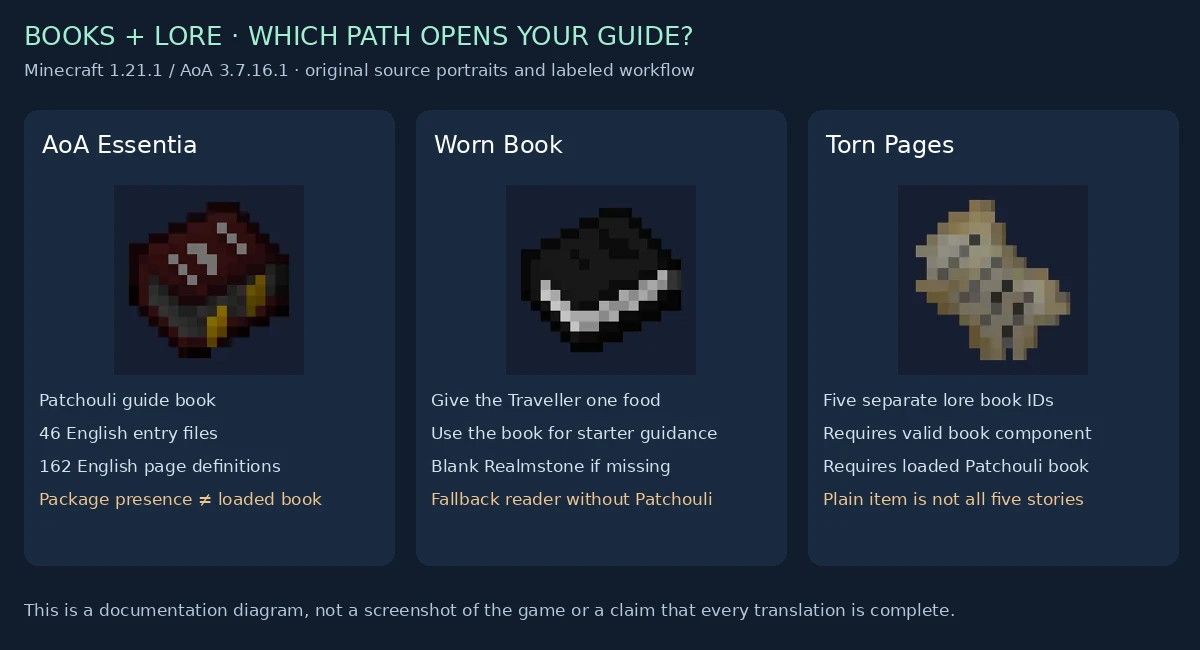
AoA Essentia is the broad Patchouli guide. Worn Book is the Traveller’s starter book. Discovery, Expedition, Lessons, Primitive and The Portal use the same Torn Pages item model but have distinct book identifiers.
The Torn Pages item checks all three conditions before its open/unlock path succeeds:
- Patchouli integration is active.
- The stack has the Patchouli book data component.
- That book ID exists in the loaded Patchouli book registry.
A plain Torn Pages stack, a stale component or an unloaded book is not equivalent to a valid lore entry. With integration disabled or an invalid ID, this item use returns pass; it does not use the Worn Book fallback reader.
Counts describe en_us entry files and page definitions in this exact archive. A page definition may be an image, recipe or other page type; it is not necessarily one screen of prose. Narrative text is intentionally not reproduced here.
| Book | Book ID | English entries | English page definitions | Representation |
|---|---|---|---|---|
| AoA Essentia | aoa3:aoa_essentia | 46 | 162 | Patchouli guide-book item |
| Discovery | aoa3:discovery | 1 | 7 | Torn Pages with this book ID |
| Expedition | aoa3:expedition | 1 | 4 | Torn Pages with this book ID |
| Lessons | aoa3:lessons | 1 | 3 | Torn Pages with this book ID |
| Primitive | aoa3:primitive | 1 | 3 | Torn Pages with this book ID |
| The Portal | aoa3:the_portal | 1 | 4 | Torn Pages with this book ID |
| Worn Book | aoa3:worn_book | 2 | 7 | Worn Book |
There are 53 English entry files and 190 English page definitions across these seven declarations. Category titles alone do not prove that a corresponding skill or system is implemented. In particular, the guide’s skill-category list must not override the checked modern skill unlocks.
Open the Advent GUI using your configured key binding and select Lore. See Controls and HUD settings for the released defaults and key-conflict checks. Its button is disabled when the checked integration reports Patchouli inactive. The client filters synchronized book IDs against loaded books before displaying them.
Opening a valid Torn Pages book records its ID in server storage. The storage uses a set, writes IDs under PatchouliBooks, and marks new additions for synchronization. The Lore display uses those IDs rather than requiring all book items to occupy inventory slots. Save/reload and multiplayer behavior still need target-build testing.
The UI can send a physical-book request after dragging outside its bounds, but the checked server handler permits the grant only through its command/operator permission checks. Ordinary survival players should not assume that dragging an icon returns a free physical copy.
The client’s drag path also stops if it finds any valid Patchouli book in the scanned main inventory, not just another copy of the requested title. That is a specific UI limitation worth checking when a permitted request seems unresponsive. Reading an unlocked entry and granting a physical item are separate operations.
The Worn Book fallback loader reads the selected language’s misc//worn_book.txt resource. It clears its cached text during resource reload and returns if that resource is absent. No explicit en_us retry appears in that loader.
Seven fallback text resources are supplied: en_us, fr_fr, ja_jp, ko_kr, lzh, ru_ru and zh_cn. Presence does not certify translation quality. For an empty fallback reader, check the selected language and resource-pack overrides before assuming the book item is broken.
Patchouli content has a different resource layout:
| Book group | Shipped entry locales | Important limitation |
|---|---|---|
| AoA Essentia | en_us, fr_fr | zh_cn category files exist, but no zh_cn entry files are supplied here |
| Worn Book | en_us, fr_fr, zh_cn | These are Patchouli entries, separate from the seven fallback text resources |
| Five Torn Pages books | en_us, fr_fr, zh_cn | lzh category files exist without matching lzh entry files in this archive |
Actual fallback presentation may be affected by Patchouli and resource packs. Do not interpret a category-file count as a complete translation. The resource index records the exact shipped files and hashes.
- Verify Minecraft/AoA versions and whether Patchouli is actually loaded; having guide JSON inside AoA is not enough to activate integration.
- If Lore is disabled, use the Worn Book fallback path or fix the matching optional integration setup.
- For Torn Pages, verify the book component and loaded ID. Do not replace five distinct lore IDs with one generic stack.
- For a blank fallback Worn Book, verify the selected-language text resource and any overriding pack.
- For missing Blank Realmstone recovery, check whether one already exists in the searched inventory.
- For physical-book drag recovery, check server permissions and the main-inventory valid-book guard.
- Keep optional integration paths safe when Patchouli is absent.
- Test valid, missing and unknown book components without a crash.
- Verify English fallback for an unsupported language if that is the intended product behavior.
- Test full inventory and remaining food when closing the Traveller menu.
- Preserve collected lore across save/reload, respawn and multiplayer synchronization.
- Separate reading permissions from privileged physical-item grants.
- Retain cached resource loading and set-based book lookup; avoid rescanning book files or inventory every frame.
These are documentation and target-build test recommendations, not completed runtime fixes.
- Seven book declarations, localized resource counts, released callbacks and eligibility cases
- Source-art diagram receipts
- Original Worn Book implementation
- Original Torn Pages implementation
Original AoA artwork and behavior by Tslat and contributors. Static inspection only; no game, mod or optional-integration code was executed.