Warp_Flight_School_Quick_Reference_Card - Angel-125/Blueshift GitHub Wiki
🛸 Warp Flight School: Quick Reference Card
Blueshift Warp Basics in One Page
✅ Shipbuilding Essentials
- Payload Mass + Warp Part Mass = Total Ship Mass
- Displacement Impulse ≥ Total Mass (from Warp Coil)
- Warp Capacity (Kochranes) = Speed Potential (≥ 10 Kochranes for basic FTL)
- Gravity Waves Produced ≥ Gravity Waves Required
✅ Parts Check
| Function | How to Check |
|---|---|
| Gravimetric Generator | Confirm on Gravimetric Generators Table |
| Warp Coil | Confirm on Warp Coils Table |
| Warp Engine | Confirm on Warp Engines Table |
✅ Step-by-Step Before Launch
- Pick warp parts that match your payload.
- Confirm each part's role using the right table.
- Ensure total ship mass fits within Displacement Impulse.
- Sum up Warp Capacity — you need enough to exceed lightspeed.
- Verify Gravity Wave production ≥ Gravity Wave needs.
- Assemble and double-check everything!
✨ Pro Tips
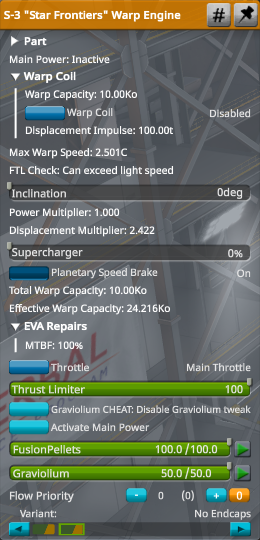
- Multi-role parts simplify builds (example: S-3 Warp Engine).
- Right-click the Warp Engine in flight to check FTL capability.
- Plan for extra margin on Displacement and Gravity Waves.
- Remember: Mass grows fast when adding parts!
🚀 Fly safe, warp smarter, and explore boldly!