QueryUSHCN Queries the Database - wtblock/ClimateSuite GitHub Wiki
In the previous pages, a command‑line program called ImportUSHCN was used to create a relational database from the United States Historical Climate Network (USHCN). The resulting database, ClimateUSHCN.db, resides in the climate workspace. This database is essential because the raw NOAA data is extremely difficult to work with: it is spread across 3,655 text files, each containing maximum, minimum, and average monthly temperatures. Converting these thousands of files into a single relational database allows the information to be accessed using standard tools—most notably Structured Query Language (SQL).
However, not everyone is familiar with SQL. To make the data accessible to a wider audience, QueryUSHCN is designed to interpret natural‑language queries. Whether or not the user knows SQL, understanding how the data is structured is still important. A relational database is composed of tables, and those tables collectively define the database schema.
| Column | Description |
|---|---|
| StationID | USHCN station identifier |
| GUID | Internal unique identifier |
| Latitude | GPS latitude |
| Longitude | GPS longitude |
| Elevation | Elevation in meters |
| State | Two-letter state code |
| Location | City or locality |
| Component1 | Metadata component |
| Component2 | Metadata component |
| Component3 | Metadata component |
| UTCOffset | Time zone offset |
| Column | Description |
|---|---|
| StationID | Station identifier |
| Year | Year of reading |
| Month | Month of reading |
| MeasurementType | tmax / tmin / tavg |
| CentigradeRaw | Raw temperature (100ths °C) |
| DMFlag | Data measurement flag |
| QCFlag | Quality control flag |
| DSFlag | Data source flag |
| Column | Description |
|---|---|
| StationID | Station identifier |
| Year | Year of reading |
| MeasurementType | tmax / tmin / tavg |
| MaxValue | Annual maximum |
| MinValue | Annual minimum |
| AvgValue | Annual average |
| ValidReadings | Count of valid monthly readings |
| Column | Description |
|---|---|
| StationID | Station identifier |
| Year | Year of reading |
| MeasurementType | tmax / tmin / tavg |
| ThresholdF | Threshold in °F |
| Count | Number of months exceeding threshold |
| Column | Description |
|---|---|
| Key | Metadata key |
| Value | Metadata value |
Using the Command Prompt, change directory to the Climate folder. When you enter the QueryUSHCN with no parameters, the program will provide some usage information:
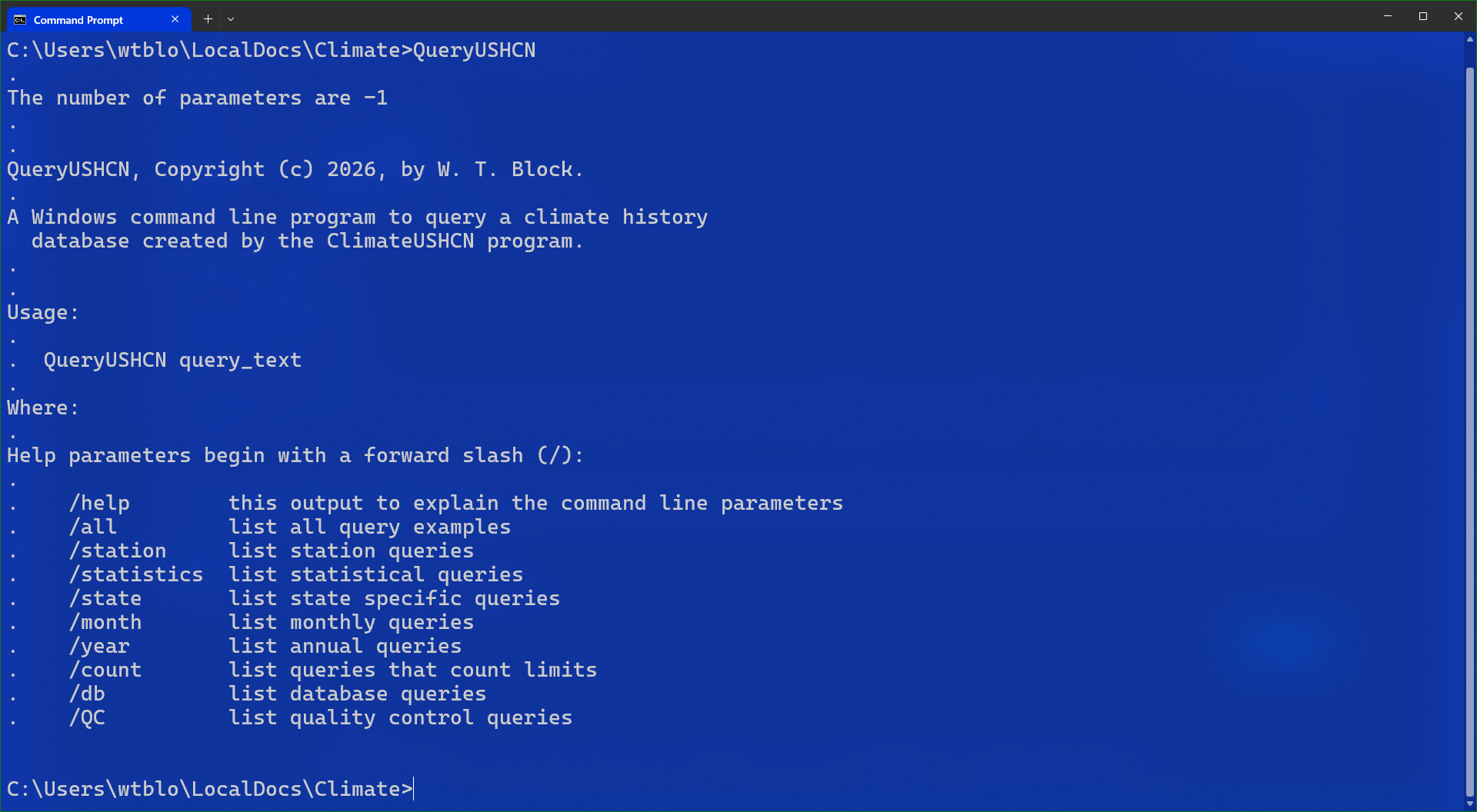
If for example, a command line of QueryUSHCN /db is entered, the following examples are displayed:
- QueryUSHCN List your table schemas.
- QueryUSHCN What version of the data is in the database?
QueryUSHCN is designed so that users do not need to know SQL to explore the climate database. Most queries can be written in plain English, and the program interprets the request, determines which tables are involved, constructs the appropriate SQL internally, and displays the results.
For example, a user can type:
QueryUSHCN "annual maximums in Texas from 1950 to 2000"
QueryUSHCN parses this sentence, identifies the relevant table (Years), determines the measurement type (TMAX), applies the state filter (TX), and constructs the SQL automatically. The user never sees the SQL and does not need to understand the database schema to retrieve useful information.
Natural‑language queries are flexible. They can reference states, stations, years, months, thresholds, QC vs non‑QC comparisons, and many other concepts. The goal is to make the USHCN data accessible to anyone, regardless of their familiarity with SQL or relational databases.
Although natural‑language queries are convenient, some users may prefer to write SQL directly. QueryUSHCN supports this by providing a special SQL mode. When the first token after the program name is sql, the remainder of the command is treated as a literal SQL statement.
Because command shells often interpret characters such as *, <, >, and ;, the SQL statement must be enclosed in double quotes. The entire SQL command must also appear on a single line.
For example, to count the number of rows in the Months table:
QueryUSHCN sql "SELECT COUNT(*) AS RowCount FROM Months;"
In SQL mode, QueryUSHCN does not attempt to interpret the query or convert it into natural language. The quoted text is passed directly to the query engine, and the result is displayed exactly as returned by the database engine.
SQL mode is useful for users who want precise control, wish to perform advanced filtering, or simply prefer writing SQL. Natural‑language queries and SQL mode can be used interchangeably depending on the user's preference.
The early goal of the QueryUSHCN application was to validate the database. This is an example of a query to reproduce the third decade of station USH00419532's maximum data:
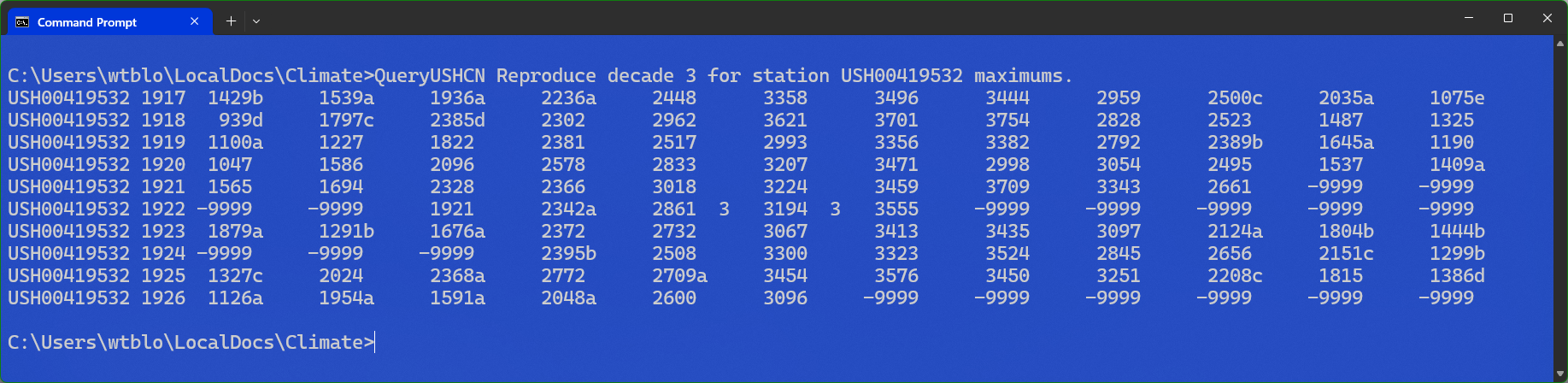
Under the covers, multiple SQL queries are run to generate that output. With the File Explorer opened in the Climate folder, enter the name of the station in the search box in the upper right corner:

The station shows up three times, once for each of the data types, but we are interested in maximum temperatures, so we right click and open the TMAX version:

The first year of recorded data for this station was 1897 so the beginning of the third decade is 1917, and the ten years of that decade are highlighted. Our query generated this exact data. From a quality control perspective, this validates the original source data can be regenerated from the database.
This is a short video demonstrating the use of QueryUSHCN: