Whats new 0.6.0 - wildware-uk/composegl GitHub Wiki
What's new in 0.6.0
Everything that landed between 0.5.0 and 0.6.0, in plain words. Each line points at the page that explains it. This is a big one: two new modules, a shelf of new widgets, and a set of debug tools you leave running while you play. If you are upgrading, read Breaking changes first — some types moved and your imports will need one edit each.
Two new modules
The toolkit used to be one jar with a game tier and a debug tier hidden inside it. Both are now modules of their own, so a project takes only what it uses.
composegl-gameholds the game widgets: bars, reticles, damage numbers, hotbars and everything else on Game widgets. A tool or a menu-only project carries none of it.composegl-debugholds the overlays, the inspector and the new debug tools. It is meant for a development build, so a shipped game does not carry it. See Debugging.
implementation("dev.wildware.composegl:composegl-game:0.6.0")
debugImplementation("dev.wildware.composegl:composegl-debug:0.6.0")
Both are built only from the public API of composegl-ui — the same one your own widgets
use — and the build checks it. The types that moved kept their names and their
behaviour; only the import changed. The full list is in
Breaking changes.
New widgets
All on Widgets.
-
Menu bars and context menus.
MenuBargives a desktop-style bar with shortcuts, submenus, ticks and greyed-out items;Modifier.contextMenugives the same menu on a right-click, or on a pad button. See menu bars and context menus.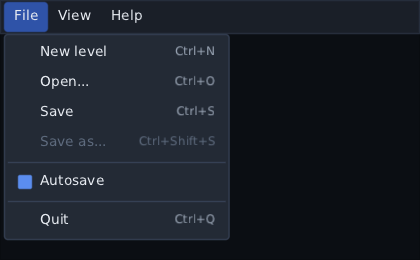
-
TreeViewshows nested rows that open and close, with indent guides — a scene tree, a quest log, a file list. See Trees. -
Tablehas a header that stays put, columns you can sort by clicking a title and resize by dragging the line between them. See Tables. -
CollapsingHeaderfolds a section away behind a title, animating as it goes. See Collapsing headers. -
Splittershares the space between two panes with a divider the player drags. See Splitters. -
SpinnerandIndeterminateBarfor work of unknown length — saving, loading, connecting. The spinner can be an arc the skin draws or a sprite strip of your own. See Spinners and indeterminate progress. -
ColourPicker, withColourSwatchandColourPickerButton. A player can drive it with the mouse, the keyboard or a pad, and it takes an alpha channel and a row of presets. See Colour pickers. -
PanZoomCanvasis a surface you drag and zoom, for a map, a graph or a skill tree. Text and edges are drawn at the zoomed scale, so it stays sharp however far in you go, andLazyPanZoomCanvasbuilds only what is in view. See Panning and zooming.
Debug tools you leave running
All on Debugging, in the new composegl-debug module.
-
Debug windows and the tweak DSL. Wrap the game once in
DebugWindowHost, then put aDebugWindowanywhere. Each line of it is one of your own properties:DebugWindow("Physics", initialPosition = Offset(20f, 20f)) { tweak("Gravity", physics::gravity, 0f..50f) toggle("God mode", cheats::godMode) choice("Difficulty", game::difficulty, Difficulty.entries) colour("Fog", world::fogColour) button("Spawn wave") { spawnWave() } }tweak,toggle,choice,colour,button,textandroware the whole vocabulary. The controls are the toolkit's own, so the keyboard and a pad work them and the skin draws them. A window remembers where it was left through aDebugWindowStore. See Tweaking values while the game runs.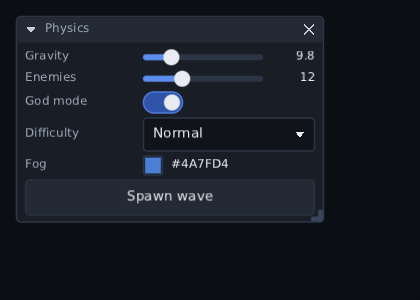
-
Docking. Once there are a few windows, drag one to an edge and it docks there; drop it on another and the two tab together.
DockSideisLeft,Right,ToporBottom. See Docking them. -
DevConsole, a drop-down console for typing commands at a running game, with typed arguments (arg), tab completion, history and a filtered log. See A console for typing commands. -
PlotandHistogramgraph a number that changes every frame — frame time, entity count, whatever you push into aPlotBuffer. See Graphing a number. -
NodeTreeis the whole screen as a browsable tree: every node, its size, and what it costs. See The whole screen as a tree. -
Inspectorgained a state you can hold yourself,InspectorStateandrememberInspectorState, so a game can open and close it from its own key. See Pointing at one widget.
New game widgets
All on Game widgets, in the new composegl-game module.
- World markers.
WorldMarkerLayerpins nameplates and waypoints to points in the world, projects them once per marker per frame, clamps the off-screen ones to the edge and declutters the ones that pile up. See World markers. CompassBar, the heading strip across the top with pins on it, andCompassLabelsso N, E, S and W come out in the player's language. See Compass bar.RadialMenu, a weapon wheel you aim rather than reach: a flick of the stick or the mouse picks a wedge, with a dead zone in the middle. See The weapon wheel.- Damage direction and hit markers.
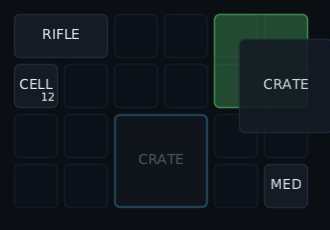
DamageDirectionLayerdraws arcs round the middle of the screen saying which way a hit came from;HitMarkertells an ordinary hit from a critical from a kill (HitKind) and hands the game the moment to play its own sound. See Damage direction and Hit markers. Subtitles, timed by a clock or by the audio, with the player's own size and background settings (SubtitleSize,SubtitleSettings) and a queue that makes lines wait their turn. See Subtitles and captions.DialogueBox, with answers, a portrait and a log (DialogueLog,DialogueHistory). See Dialogue.InventoryGrid, a bag you drag things around in, with the rules games expect: stacks, splitting a pile, items bigger than one square, and a refusal that shows. See The inventory grid.ItemTooltip, the card a looter decides with: the drop beside what is equipped, with arrows rather than colours carrying the answer (ItemMarks,ItemCompare). See Item cards.SkillTree, unlockable nodes joined by lines that light up as a branch opens, with pad navigation that follows the lines. See Skill trees.ObjectiveTracker, a pinned list of what the player is meant to be doing, whose steps tick themselves off. See The objective tracker.ChatBox, in-game chat with channels and names you can click. See Chat.
Breaking changes
Types that moved out of composegl-ui
The game widgets and the debug overlays are now in modules of their own. Add the dependency, then change the import. Nothing else about them changed — same names, same parameters, same behaviour.
To composegl-game
Every one of these moved from dev.wildware.composegl.ui.game to
dev.wildware.composegl.game:
| Was | Now |
|---|---|
dev.wildware.composegl.ui.game.Bar |
dev.wildware.composegl.game.Bar |
dev.wildware.composegl.ui.game.BarThreshold |
dev.wildware.composegl.game.BarThreshold |
dev.wildware.composegl.ui.game.DamageNumberLayer |
dev.wildware.composegl.game.DamageNumberLayer |
dev.wildware.composegl.ui.game.DamageNumbers |
dev.wildware.composegl.game.DamageNumbers |
dev.wildware.composegl.ui.game.rememberDamageNumbers |
dev.wildware.composegl.game.rememberDamageNumbers |
dev.wildware.composegl.ui.game.WorldPoint |
dev.wildware.composegl.game.WorldPoint |
dev.wildware.composegl.ui.game.WorldAnchor |
dev.wildware.composegl.game.WorldAnchor |
dev.wildware.composegl.ui.game.WorldProjection |
dev.wildware.composegl.game.WorldProjection |
dev.wildware.composegl.ui.game.Hotbar |
dev.wildware.composegl.game.Hotbar |
dev.wildware.composegl.ui.game.HotbarSlot |
dev.wildware.composegl.game.HotbarSlot |
dev.wildware.composegl.ui.game.HotbarState |
dev.wildware.composegl.game.HotbarState |
dev.wildware.composegl.ui.game.MinimapFrame |
dev.wildware.composegl.game.MinimapFrame |
dev.wildware.composegl.ui.game.MinimapMarker |
dev.wildware.composegl.game.MinimapMarker |
dev.wildware.composegl.ui.game.Notification |
dev.wildware.composegl.game.Notification |
dev.wildware.composegl.ui.game.NotificationQueue |
dev.wildware.composegl.game.NotificationQueue |
dev.wildware.composegl.ui.game.Notifications |
dev.wildware.composegl.game.Notifications |
dev.wildware.composegl.ui.game.rememberNotifications |
dev.wildware.composegl.game.rememberNotifications |
dev.wildware.composegl.ui.game.ParticleEmitter |
dev.wildware.composegl.game.ParticleEmitter |
dev.wildware.composegl.ui.game.ParticleLayer |
dev.wildware.composegl.game.ParticleLayer |
dev.wildware.composegl.ui.game.ParticleStyle |
dev.wildware.composegl.game.ParticleStyle |
dev.wildware.composegl.ui.game.rememberParticles |
dev.wildware.composegl.game.rememberParticles |
dev.wildware.composegl.ui.game.Cooldown |
dev.wildware.composegl.game.Cooldown |
dev.wildware.composegl.ui.game.RadialCooldown |
dev.wildware.composegl.game.RadialCooldown |
dev.wildware.composegl.ui.game.rememberCooldown |
dev.wildware.composegl.game.rememberCooldown |
dev.wildware.composegl.ui.game.Reticle |
dev.wildware.composegl.game.Reticle |
dev.wildware.composegl.ui.game.ReticleState |
dev.wildware.composegl.game.ReticleState |
dev.wildware.composegl.ui.game.rememberReticleState |
dev.wildware.composegl.game.rememberReticleState |
To composegl-debug
Every one of these moved from dev.wildware.composegl.ui.debug to
dev.wildware.composegl.debug:
| Was | Now |
|---|---|
dev.wildware.composegl.ui.debug.FocusOverlay |
dev.wildware.composegl.debug.FocusOverlay |
dev.wildware.composegl.ui.debug.FocusShow |
dev.wildware.composegl.debug.FocusShow |
dev.wildware.composegl.ui.debug.FrameBudgetOverlay |
dev.wildware.composegl.debug.FrameBudgetOverlay |
dev.wildware.composegl.ui.debug.Inspector |
dev.wildware.composegl.debug.Inspector |
dev.wildware.composegl.ui.debug.LayoutOverlay |
dev.wildware.composegl.debug.LayoutOverlay |
dev.wildware.composegl.ui.debug.Show |
dev.wildware.composegl.debug.Show |
dev.wildware.composegl.ui.debug.OverdrawOverlay |
dev.wildware.composegl.debug.OverdrawOverlay |
dev.wildware.composegl.ui.debug.RedrawOverlay |
dev.wildware.composegl.debug.RedrawOverlay |
dev.wildware.composegl.ui.debug.TextMetricsOverlay |
dev.wildware.composegl.debug.TextMetricsOverlay |
dev.wildware.composegl.ui.debug.TextGuide |
dev.wildware.composegl.debug.TextGuide |
What did not move. Modifier.debugBounds() stays in composegl-ui, and so does
everything the renderer measures — FrameBudget, BusyNode, FrameReading,
DrawCallTrace, DrawCallCulprit, BatchBreak, OverdrawMap, measureOverdraw and
DebugOverlay, all still in dev.wildware.composegl.ui.debug. A test can hold a screen
to a budget without depending on the debug module.
Behaviour that changed
These are the ones to look at if you were relying on the old behaviour.
- Right-to-left scrollbars moved to the correct side. The up-and-down bar used to be
pinned to the right whichever way the screen read, so on a Hebrew or Arabic screen it
lay across the first letter or two of every line. It now hangs on the edge the lines
end at: still the right in an ordinary screen, the left in a mirrored one. Done in
ScrollArea,LazyListandLazyGrid, which each place their own bar. Two knock-ons went with it: a row narrower than a vertical lazy list now starts against the right rather than the left, and a mirroredTablekeeps its scrollbar gutter on the left. See Right to left. - The item card compares with Ctrl, not Shift.
ItemTooltip'scompareKeynow defaults toKey.Control. Shift held while a pile is picked up splits a stack in half, here and in every game with a bag, so one held key armed both and a player reading the arrows could walk off with three of their five rings. PasscompareKeyif your game wants a different one. - Numbers like "3 / 5" now render "3/5". The spaces round the slash are neutral
characters that take the screen's direction, so on a Hebrew screen the two numbers
swapped and the player was told they had killed five of three wolves. With no spaces,
the bidirectional algorithm joins the whole thing into one number that nothing can turn
round. It affects
ObjectiveProgressin the objective tracker, the skill tree's rank, and the frame budget's redraw count. FrameBudgettakes its clock as a parameter. The constructor is nowFrameBudget(window, publishEveryMillis, busiest, nanoTime), wherenanoTime: () -> Longdefaults to the machine's own monotonic clock. A test hands in its own, so its assertions are arithmetic rather than a race with the machine. Existing calls keep working; the parameter is last and optional.
Fixed along the way
- The high-contrast skin is legible again, and a test says so.
- A slider squeezed to nothing no longer crashes a mirrored screen.
- A dragged divider stays pressed when a fast flick outruns it.
- The pad no longer drops focus onto a
PanZoomCanvasit cannot use. - The debug window in front is the one drawn lit.
- The inventory grid's focus ring follows the pile you dropped, and
rememberInventoryFocusnow tells a pad game which square the ring is on, so an item card can follow it. - The node tree no longer misses the widget redrawing every frame.
- Every glyph the shipped defaults draw is baked by every backend —
▼ ▽for the item card,€for the on-screen keyboard's symbol page,−for a Nintendo pad's Back button — with a test in each backend that fails if one is missing.