5. Firebase - waterglass2s/GraduationProject GitHub Wiki
Android Studio compileSdkVersion 29 / buildToolsVersion 29.0.3
firebase-core - 17.0.0
firebase-database - 19.3.1
firebase-auth - 19.3.1
gms:play-services-auth - 18.1.0
facebook.android:facebook-login - [5,6)
- Sign in to Firebase using your Google account.
- Create a Firebase project.
- Register project with Firebase.
- ADD SHA-1 key
- Open Android Studio and Click the Gradle button in the upper right.
- Go to app -> Tasks -> android -> signing report
- Copy SHA1
- Add a Firebase configuration file
--> More information, Click here
Firebase supports a variety of authentication ways.
WHAT's IN provides 3 representative ways of login service. (Google, Facebook, email).
Users can get authenticated by signing in with a registerd ID in advance. anyone can register members easily with one's email.
Otherwise, they can also sign in by their SNS accounts.
before you use Firebase Auth methods,
Add the latest Firebase auth libaray as a dependency in your build.gradle(:app)
dependencies {
   implementation 'com.google.firebase:firebase-core:17.0.0' // core firebase
   implementation 'com.google.firebase:firebase-auth:19.3.2' // firebase Auth - Email
   implementation 'com.google.android.gms:play-services-auth:19.0.0' // firebase Auth - Google
   implementation 'com.facebook.android:facebook-login:[5,6)' // firebase Auth - Facebook

}
In order to use Firebase auth library, first of all you shoul make an instance of FirebaseAuth class
private FirebaseAuth mAuth;
mAuth = FirebaseAuth.getInstance();
then, now you can facilitate firebase auth library for your own purpose with given many methods in detail) click following links
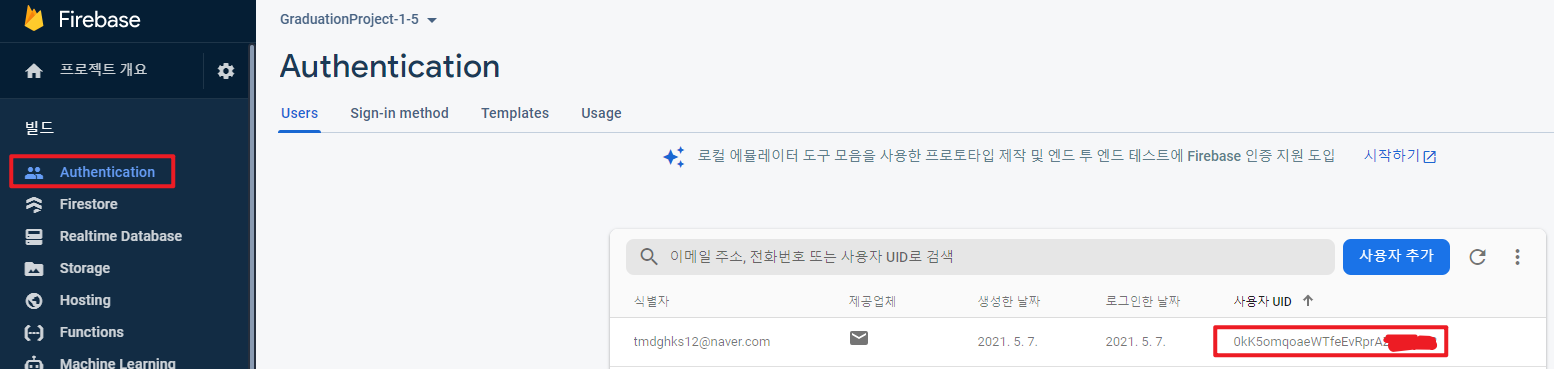
After signing up/logging in, you can check and manage user information in Firebase -> your project -> Authentication -> Users.
Using this function, you can store user's information and get UserID.
this is a significant phase for building the basis of databases for one's APP and managing it with authenticated users.
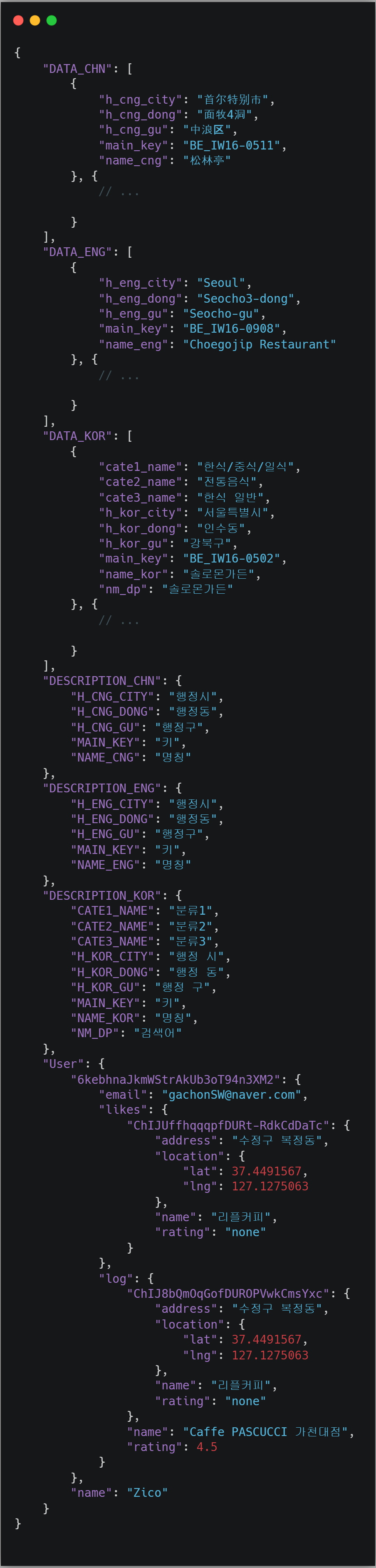
Using the realtime-database provided by Firebase, we were able to build a lightweight and reliable DBMS.
Users who have been logged in can use 'search logs' and 'likes' functions that record information about their searched and marked signboards while using the app.
-
Search logs
It stores search records of stores on signboards searched by users in real time, and users can view and manage them on the my list page. -
Likes
After detecting signboards you can mark them with likes and can manage the information of the places later
Add the latest Firebase realtime-database libaray as a dependency in your build.gradle(:app)
dependencies {
   implementation 'com.google.firebase:firebase-database:19.3.1'
}
In order to use realtime-database library, first of all you should make an instances of FirebaseDatabase and DatabaseReference
private FirebaseDatabase mDatabase;
mDatabase = FirebaseDatabase.getInstance();

private DatabaseReference userRef; // DatabaseReference for user data
private DatabaseReference logRef; // DatabaseReference for search log data
private DatabaseReference likesRef; // DatabaseReference for likes data
...
userRef = mDatabase.getReference().child("User") // User for key
Through this process, it succeeded to connect to a virtual Firebase server. now you can Read/Write data fom your firebase databse and also can view and execute operation of CRUD at project-console.
You can refer to the below for detailed methods.
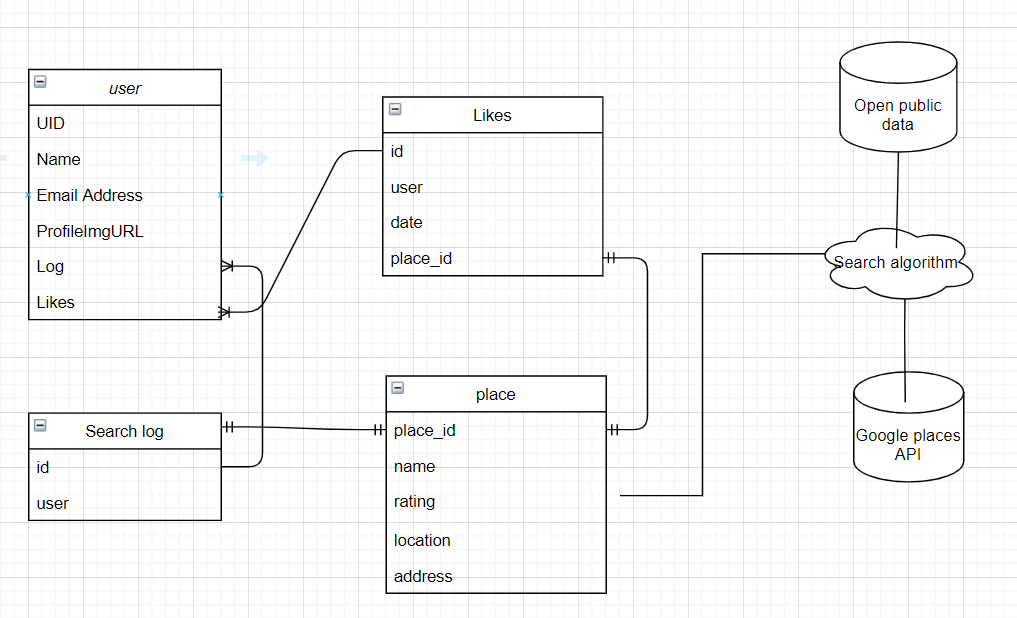
In practice, the database structure of Firebase is based on the json format, but we try to represent our data relationship in simple ERD.
Firebase real-time database is stored as JSON objectsts. Unlike a SQL database, there are no tables or records. you should avoid nesting data and it's recommended that keep the rule of flatten data structures.