Spark Streaming Programming Guide 1 - vaquarkhan/Apache-Kafka-poc-and-notes GitHub Wiki
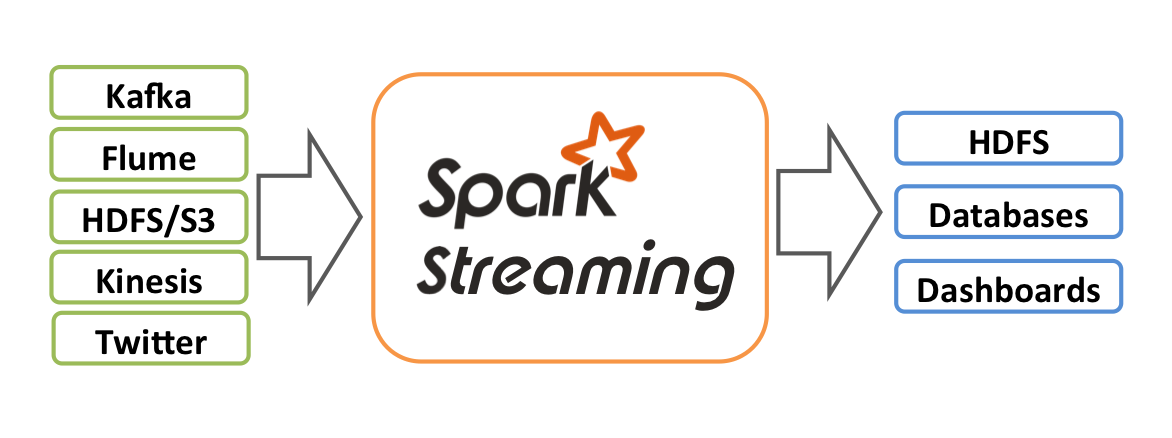
Streaming data is basically a continuous group of data records generated from sources like sensors, server traffic and online searches. Some of the examples of streaming data are user activity on websites, monitoring data, server logs, and other event data.
There are different streaming data processing frameworks as listed below:
- Apache Samza
- Storm
- Spark Streaming
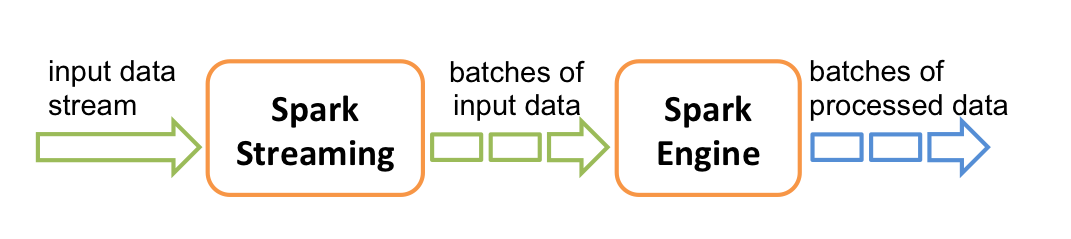
The way Spark Streaming works is it divides the live stream of data into batches (called microbatches) of a pre-defined interval (N seconds) and then treats each batch of data as Resilient Distributed Datasets (RDDs). Then we can process these RDDs using the operations like map, reduce, reduceByKey, join and window. The results of these RDD operations are returned in batches. We usually store these results into a data store for further analytics and to generate reports and dashboards or sending event based alerts.
It's important to decide the time interval for Spark Streaming, based on your use case and data processing requirements. It the value of N is too low, then the micStreaming data can come from many different sources. Some of these data sources include the following:
- Kafka
- Flume
- ZeroMQ
- Amazon’s Kinesis
- TCP sockets
- ro-batches will not have enough data to give meaningful results during the analysis.
Streaming Use Cases – From Uber to Pinterest While each business puts Spark Streaming into action in different ways, depending on their overall objectives and business case, there are four broad ways Spark Streaming is being used today.uber_logo
Streaming ETL – Data is continuously cleaned and aggregated before being pushed into data stores. Triggers – Anomalous behavior is detected in real-time and further downstream actions are triggered accordingly. E.g. unusual behavior of sensor devices generating actions. Data enrichment – Live data is enriched with more information by joining it with a static dataset allowing for a more complete real-time analysis. Complex sessions and continuous learning – Events related to a live session (e.g. user activity after logging into a website or application) are grouped together and analyzed. In some cases, the session information is used to continuously update machine learning models. In looking at use cases, Uber, for example, collects terabytes of event data every day from their mobile users for real-time telemetry analytics. By building a continuous ETL pipeline using Kafka, Spark Streaming, and HDFS, Uber can convert the raw unstructured event data into structured data as it is collected, making it ready for further complex analytics. Similarly, Pinterest built an ETL data pipeline starting with Kafka, which feeds that data into Spark via Spark Streaming to provide immediate insight into how users are engaging with Pins across the globe in real-time. This helps Pinterest become a better recommendation engine for showing related Pins as people use the service to plan products to buy, places to go, and recipes to cook, and more. Similarly, Netflix receives billions of events per day from various sources, and they have used Kafka and Spark Streaming to build a real-time engine that provide movie recommendations to its users.
The spike in Spark Streaming deployments in 2015 is just the tip of the iceberg to what we perceive to be an increasingly common trend. With the ability to react and make prompt decisions based on real-time processing, more businesses are beginning to expand beyond batch-processing methods to build new data products using Spark Streaming. We can expect the adoption of Spark Streaming to continue its rapid increase as more and more businesses learn, understand, and take advantage of the simplicity and real-time analysis that it helps provides.
Auther Tathagata Das
Some of the most interesting use cases of Spark Streaming include the following:
-
Uber, the company behind ride sharing service, uses Spark Streaming in their continuous Streaming ETL pipeline to collect terabytes of event data every day from their mobile users for real-time telemetry analytics.
-
Pinterest, the company behind the visual bookmarking tool, uses Spark Streaming, MemSQL and Apache Kafka technologies to provide insight into how their users are engaging with Pins across the globe in real-time.
-
Netflix uses Kafka and Spark Streaming to build a real-time online movie recommendation and data monitoring solution that processes billions of events received per day from different data sources. Other real world examples of Spark Streaming include:
-
Supply chain analytics
-
Real-time security intelligence operations to find threats
-
Ad auction platform
-
Real-time video analytics to help with personalized, interactive experiences to the viewers
DStream
DStream (short for Discretized Stream) is the basic abstraction in Spark Streaming and represents a continuous stream of data. DStreams can be created either from input data streams from sources such as Kafka, Flume, and Kinesis, or by applying operations on other DStreams. Internally, a DStream is represented as a sequence of RDD objects.
Steps in a Spark Streaming program
Before we discuss the sample application, let’s take a look at different steps involved in a typical Spark Streaming program.
Spark Streaming Context is used for processing the real-time data streams. So, the first step is to initialize the StreamingContext object using two parameters, SparkContext and sliding interval time. Sliding interval sets the update window where we process the data coming in as streams. Once the context is initialized, no new computations can be defined or added to the existing context. Also, only one StreamingContext object can be active at the same time. After Spark Streaming context is defined, we specify the input data sources by creating input DStreams. In our sample application, the input data source is a log message generator that uses Apache Kafka distributed database and messaging system. Log generator program creates random log messages to simulate a web server run-time environment where log messages are continuously generated as various web applications serve the user traffic. Define the computations using the Sparking Streaming Transformations API like map and reduce to DStreams. After streaming computation logic is defined, we can start receiving the data and process it using start method in StreamingContext object created earlier. Finally, we wait for the streaming data processing to be stopped using the awaitTermination method of StreamingContext object.
Reference Apps
- https://github.com/databricks/reference-apps
- https://www.gitbook.com/book/databricks/databricks-spark-reference-applications/details
- ZIP:
- https://cdn.infoq.com/statics_s2_20161122-0331/resource/articles/apache-spark-streaming/en/resources/spark-streaming-kafka-sample-app.zip
- https://www.infoq.com/articles/apache-spark-streaming
DStreams can be created either from input data streams from sources such as Kafka, Flume, and Kinesis, or by applying high-level operations on other DStreams. Internally, a DStream is represented as a sequence of RDDs.
PPT: http://www.slideshare.net/frodriguezolivera/apache-spark-streaming