Using Recogito - usaybia/usaybia-data GitHub Wiki
Arabic
Step 1
The first pass/tagging level should include the following:
- persons - Click "Person" then "OK" and apply to all other occurences. (We will check the accuracy of the automatically tagged people in a later step.) Do not add tags/links yet.
- places - Click "Place" then "OK" and apply to all other occurences. (We will check the accuracy of the automatically tagged places in a later step.) Do not add tags/links yet or confirm automatic matches.
- works - Select the title of the work or reference to it and add the tag "work", then press "OK" and apply to all other occurences. Example: القانون لابن سينا
Step 2
The next pass/tagging level includes the following (which can optionally be done during Step 1):
- tagging persons with URIs
- confirming place matches and/or tagging places with URIs
- tagging works with URIs
- tagging "relational-descriptor", "occupational-descriptor", and "affiliational-descriptor"
To first identify the usaybia.net URI of a person who hasn't previously been tagged, check the PDF at https://github.com/usaybia/usaybia-data/blob/index-uris/data/texts/pdf/IU-mueller-1884-indices-numbered.pdf.
Then find this URI in the spreadsheet https://github.com/usaybia/usaybia-data/blob/index-uris/data/index-ids.xlsx (or at the same location in the relevant branch).
Add URIs or stable links to identifiers or resources for the person in the additional columns of the spreadsheet. Always search for the following
- Onomasticon Arabicum (OA) -- Often you may want to do an advanced search (see https://onomasticon.irht.cnrs.fr/bundles/irhtoafront/pdf/advanced_search_elements.pdf). Click "Go to this person" and copy the link from the address bar. There might be multiple entries for the same person -- copy each of them into a different column (but make sure they are actually the same person).
- Wikipedia -- link to an article about the person in any language.
- Viaf.org -- Search in Arabic or in Latin script. You might need to try a few different transcriptions. Copy the "Permalink" listed on the page.
- Encyclopaedia of Islam -- Find the article in the latest edition of the encyclopedia and copy the link from the "Cite this page" box at the bottom. The spreadsheet will automatically remove the proxy (emdedien.ub.uni-muenchen.de). Note that different editions of the encyclopedia use different transliteration systems.
Mark XXX in any column where you have searched for a resource but not found anything. If you are unsure whether a link is correct, add it anyway but put a comment in the Comments column.
In certain situations you should also search the following sites:
- Encyclopaedia Iranica -- if the person is related to the area of Persia or is an especially important figure. Note the transliteration system here http://www.iranicaonline.org/pages/guidelines.
- Stanford Encyclopedia of Philosophy -- if the person is a moderately well-known philosopher or an ancient Greek author.
- Syriaca.org Persons -- if the person seems to be connected to Christian communities or is a Syriac or Greek author.
English
Open the corresponding Arabic and English documents in Transkribus in side-by-side browser windows and go through the steps below name-by-name.
Step 1
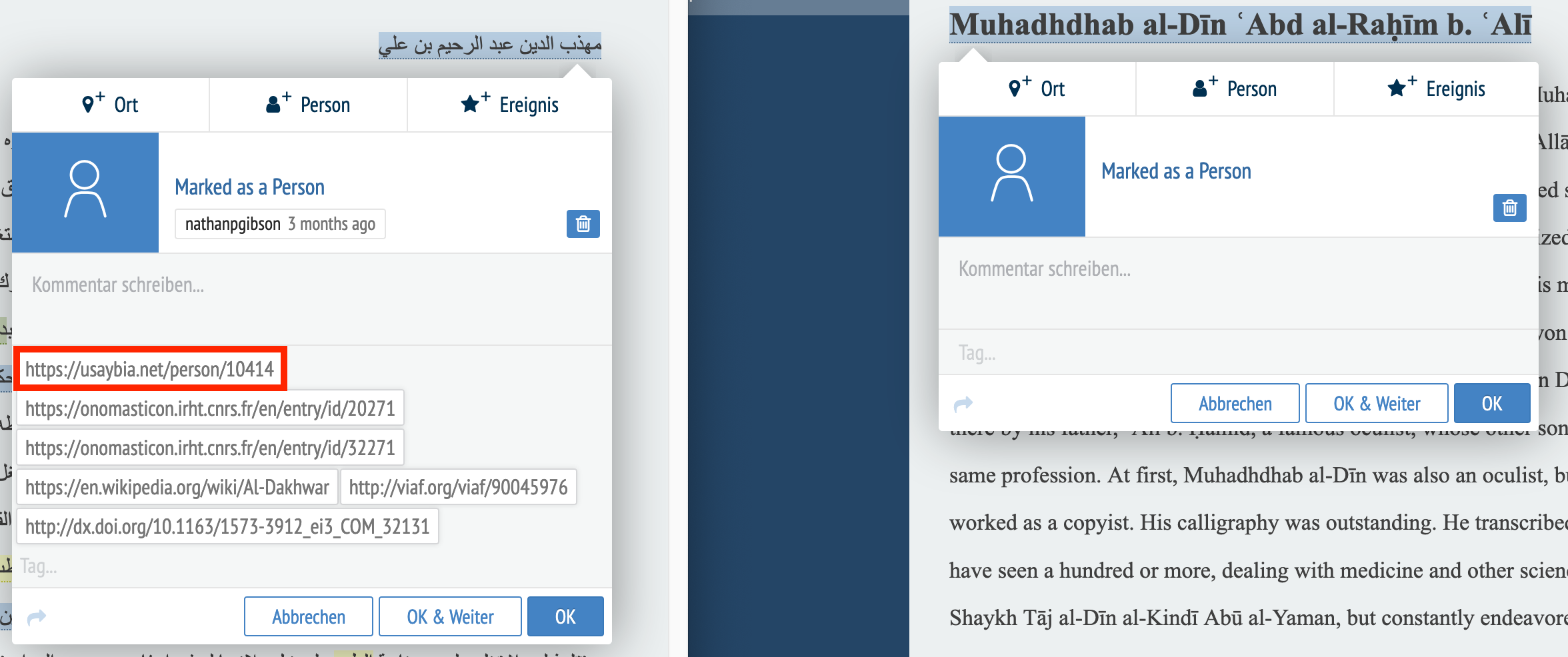
Tag each name as a "person" as with Arabic Step 1 above. If the name occurs more than once, Recogito will ask if you want to tag other occurences. If the name you tag can only be a name and not a word, it is fine to confirm these auto-suggested matches.
Step 2
Tag the person in the English document using the usaybia.net URI tagged for the person in the Arabic document. (This is the tag beginning with https://usaybia.net/person/.) You can export the tags from the Arabic document into a spreadsheet such as this one and use that to copy them in the same order as the Arabic text. Or you will need to view the Arabic document and write the number manually. The other tags do not need to be copied, as these will be matched automatically.
Alternatively, instead of copying the URI from the Recogito tag, you can find the person in this spreadsheet and copy the URI from there.
In this step, do not accept the auto-suggested matches unless you are sure that this name is specific enough to only refer to one person.