Tagging people and places - usaybia/usaybia-data GitHub Wiki
- The XML file of the chapter/text portion you're going to tag, such as https://github.com/usaybia/usaybia-data/blob/master/data/texts/tei/lhom-ar-15.xml. If you don't already have a dedicated GitHub branch for your tagging, please ask for one.
- This file containing URIs of the persons who, according to the LHOM index, should appear in each section: https://github.com/usaybia/usaybia-data/blob/master/data/texts/tei/lhom-person-list.xml
- Visual Studio Code installed on your computer. Update [2021-07-23]: Version 1.0.3 of the plugin restores compatibility with VS Code 1.57.
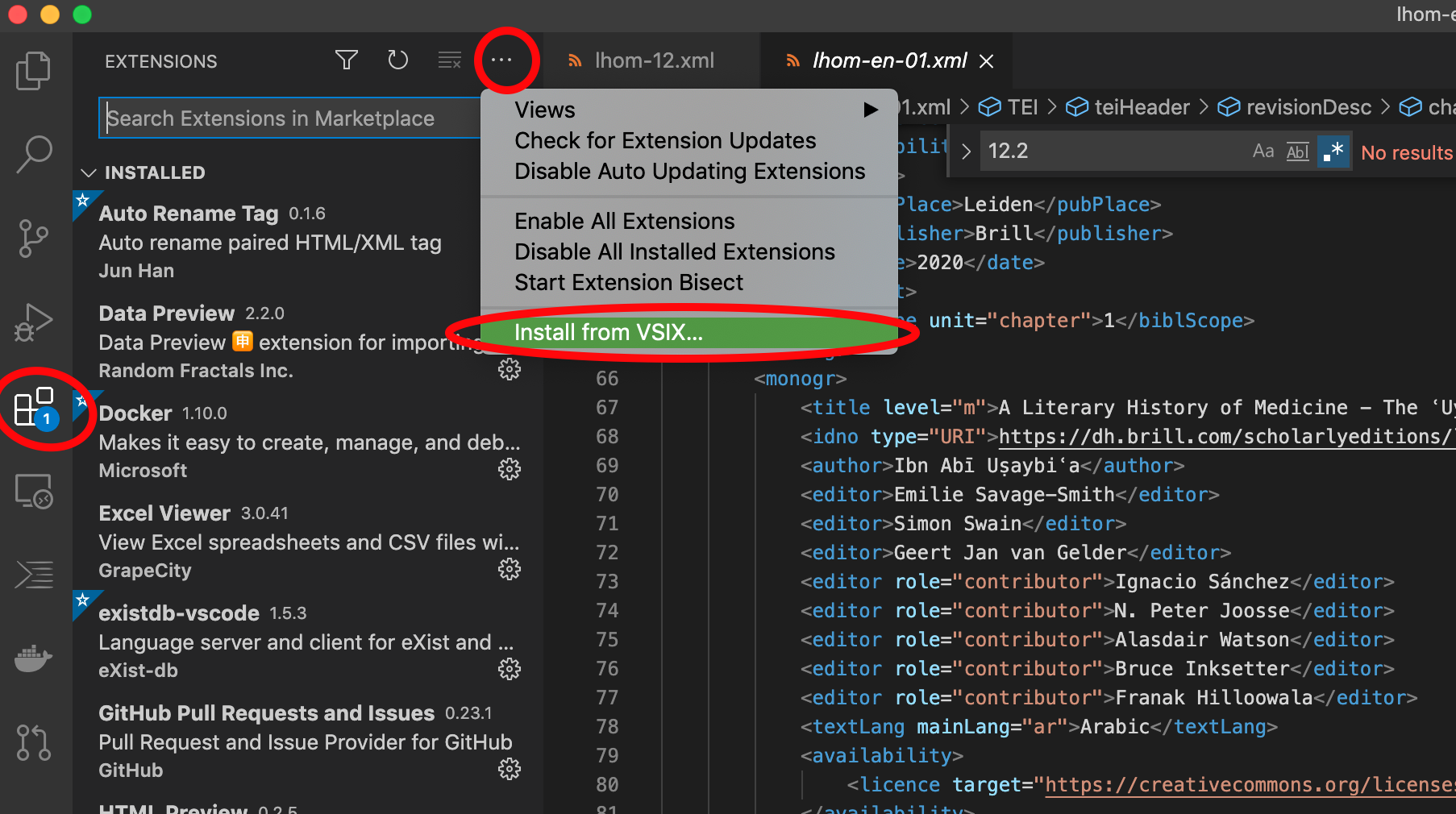
- The Usaybia.net plugin (forked from TEI Publisher) for tagging people and places. Important: Please uninstall the general (marketplace) TEI Publisher plugin before installing this. Download it by clicking on https://github.com/usaybia/tei-publisher-vscode/raw/master/sropheAuthority-vscode-1.0.3.vsix (latest version). Then in VS Code, click the Extensions button > ... > Install from VSIX and select the file you downloaded. (See screenshot.) You may have to reload VS Code before it will be active.
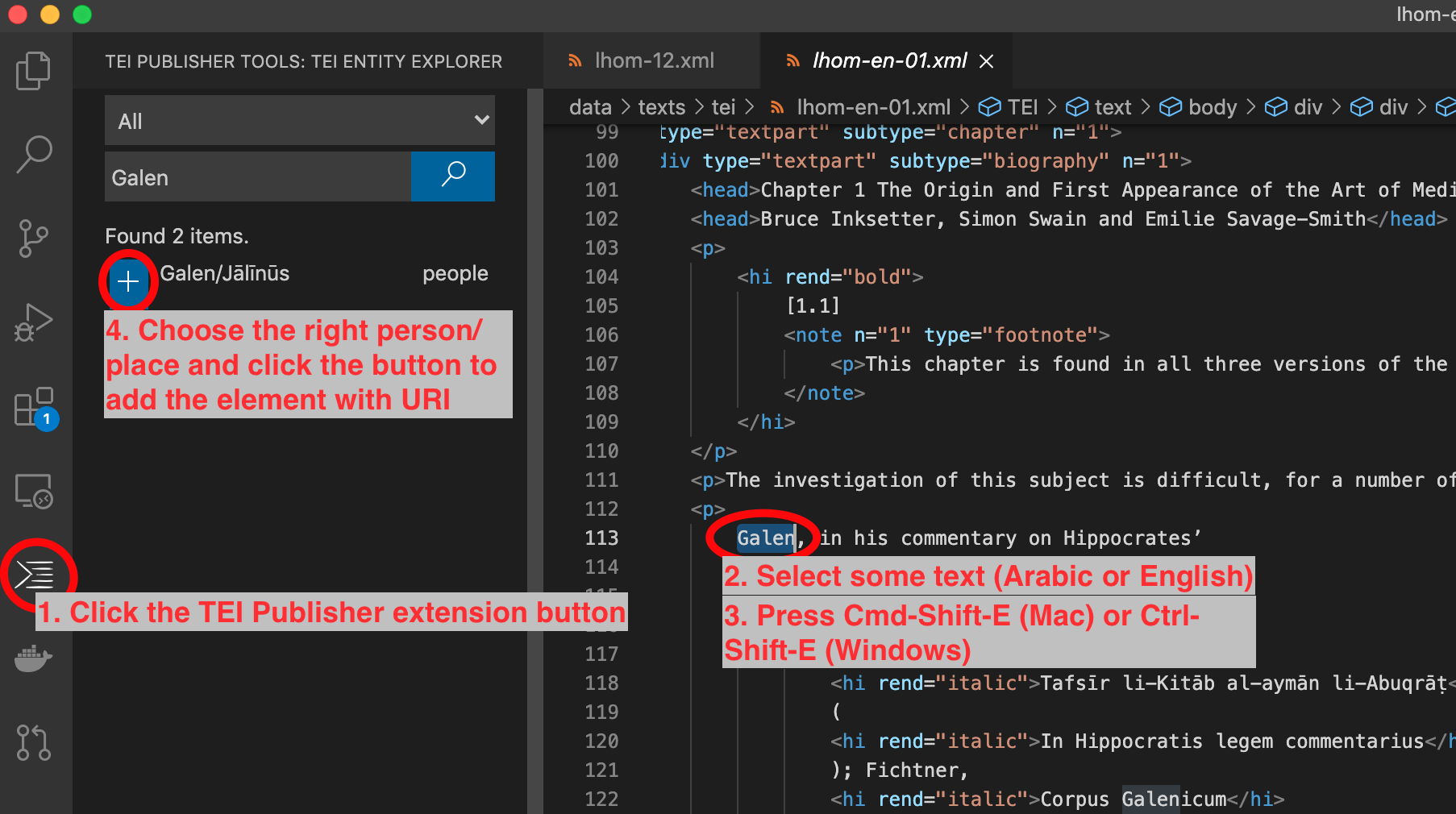
The idea is to link the names of persons and places to the URIs identifying them, by surrounding them with XML elements, such as <persName ref="https://usaybia.net/person/578">الأشعث بن قيس بن معدي كرب </persName>
The rule is, tag all the people and places referred to in each paragraph.
- If the same person or place is mentioned more than once in a paragraph (
<p>) or item (<item>), tag only the most specific reference (once per paragraph or item). - If the name of the person or place is not mentioned but the referent is clear from context, tag the reference with
<rs>and the URI. For example, "his mother" or "that city" would be tagged this way. - If you can't find a URI for the person or place, add it as a new entry to the relevant spreadsheet. In the process, you'll get a URI you can use to tag it.
Use the <placeName> tag for place names. Example: <placeName ref="https://usaybia.net/place/17">Aleppo</placeName>
- To add a new place (if you can't find an existing usaybia.net URI), add it as a row in this spreadsheet https://docs.google.com/spreadsheets/d/1B6vJjZjUbCX-oyqmrgVmVq7GmyqvaAjfBlzcIYnwhpQ/edit#gid=1970039361 in the tab "NewPlaces". To get the URI for the new place, please copy it from cell A2.
Use the <persName> tag for persons.
- To add a new person (if you can't find an existing usaybia.net URI), add a row to the spreadsheet https://docs.google.com/spreadsheets/d/1ujiT91ua3sA-WX86OWpuE-gDD_E-zONpI1dP70pXdWw/edit#gid=813408100 in the "New Persons" tab, copying the "Next URI" from cell A2.
- Sometimes persons are mentioned in a paragraph only with a pronominal suffix or as the implied subject of a verb. For possessives or objects, tag only the suffix, such as
حدث<rs ref="https://usaybia.net/person/926">ني</rs>. (The order will probably look wrong in your code editor.) For persons mentioned only as the subject in a verb form, tag the whole verb, such as<rs ref="https://usaybia.net/person/926">اقول</rs>. Note: Tag Ibn Abī Uṣaybiʿa himself when he is inserting himself into the isnād ("such and such was transmitted to me," "I told such and such person") but not when it is just authorial style ("I say so and so was the best ..."). - When you need to add an anonymous person to the spreadsheet of new URIs, use a short description of the person that identifies them uniquely, such as "father of al-Farābī" or "slave girl who ran away from Ibn Riḍwān". You can also create the description in Arabic if you feel confident doing so, e.g., أبو أبي نصر الفارابي. If you don't feel confident about it you can leave it blank and just include it in English. This is not meant to be a quotation but just an identifying description. There are also columns for "relationship" and "related person."
- Most groups of people are too generic to tag or create URIs for. For example, the Ikhwān al-Ṣafāʾ are too nebulous to create a person URI for. But if they are so specific that individuals could be identified as in the group, given enough information, you can create a URI for them in the spreadsheet and mark the "Group" column. Example (fictional): "the female patients whom Ibn Abī Uṣaybiʿa treated for stomachache in the al-Nūrī hospital."
In Visual Studio Code, the right-to-left/bi-directional issues can be challenging. VSC acts differently if the Arabic is in the middle of Arabic text or is between left-to-right text. Note: For right-to-left text in VSC, arrow keys work in the opposite direction.
- Try selecting the text using the mouse or the arrow keys. If this doesn't work, you can put the text you want to tag on a separate line by pressing enter before and after the text. Then select the whole line.
- Press CMD-Shift-E (Mac) or CTRL-Shift-E (Windows) to search Usaybia.net for the person or place. If there is a correct match, click the "+" button.
- If there is no match, find the URI in the spreadsheet or enter the new URI, then add the start and end tags with the URI manually. It may help to add extra blank lines before and after the text for inserting the tag. See https://github.com/usaybia/usaybia-data/issues/37#issuecomment-732196485.