2. Importing data from other file types - upalr/Python-camp GitHub Wiki
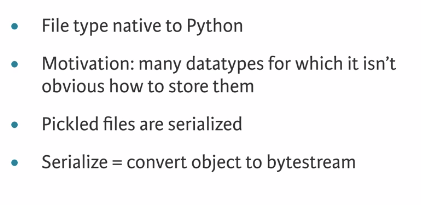
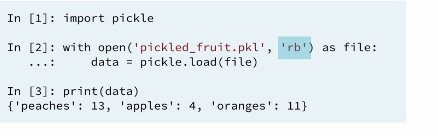
This is a file type native to python. The concept of pickling a file is motivated by the following. While it may be easy to save a Numpy Array or Pandas Data Frame to a flat file, there are many other data types such as Dictionaries and List for which it is not obvious how to store them. Pickle to the rescue.
There are a number of datatypes that cannot be saved easily to flat files, such as lists and dictionaries. If you want your files to be human readable, you may want to save them as text files in a clever manner. JSONs, which you will see in a later chapter, are appropriate for Python dictionaries.
However, if you merely want to be able to import them into Python, you can serialize them. All this means is converting the object into a sequence of bytes, or a bytestream.
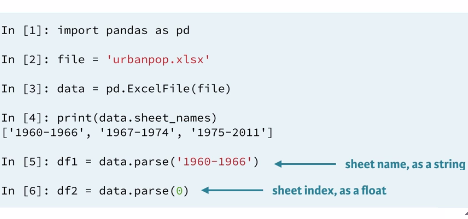
Congrats! You've just loaded a flat file from the web into a DataFrame without first saving it locally using the pandas function pd.read_csv(). This function is super cool because it has close relatives that allow you to load all types of files, not only flat ones. In this interactive exercise, you'll use pd.read_excel() to import an Excel spreadsheet.
The URL of the spreadsheet is
'http://s3.amazonaws.com/assets.datacamp.com/course/importing_data_into_r/latitude.xls'
Your job is to use pd.read_excel() to read in all of its sheets, print the sheet names and then print the head of the first sheet using its name, not its index.
Note that the output of pd.read_excel() is a Python dictionary with sheet names as keys and corresponding DataFrames as corresponding values.
ANSWER:
# Import package
import pandas as pd

# Assign url of file: url
url = 'http://s3.amazonaws.com/assets.datacamp.com/course/importing_data_into_r/latitude.xls'

# Read in all sheets of Excel file: xl
xl = pd.read_excel(url, sheetname=None)

# Print the sheetnames to the shell
print(xl.keys())

# Print the head of the first sheet (using its name, NOT its index)
print(xl['1700'].head())
<script.py> output:
dict_keys(['1900', '1700'])
country 1700
0 Afghanistan 34.565000
1 Akrotiri and Dhekelia 34.616667
2 Albania 41.312000
3 Algeria 36.720000
4 American Samoa -14.307000

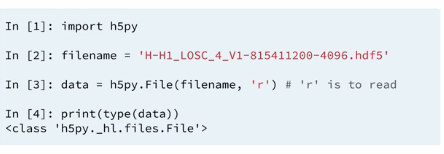
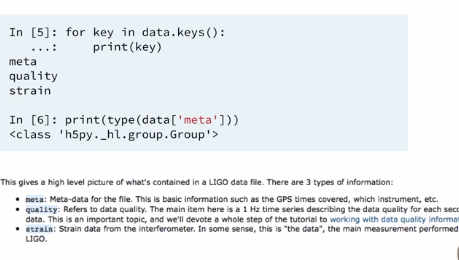
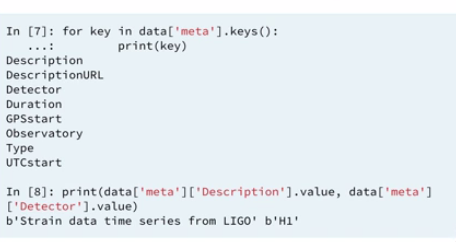
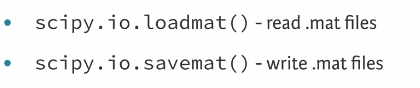
 NG)
NG)
[https://campus.datacamp.com/courses/importing-data-in-python-part-1/importing-data-from-other-file-types-2?ex=17](Example 1)
[https://campus.datacamp.com/courses/importing-data-in-python-part-1/importing-data-from-other-file-types-2?ex=18](Example 2)