Treemap - unipept/unipept-visualizations GitHub Wiki
The treemap is a visualization for hierarchical quantitative data that renders a collection of nested rectangles that visually depict the parent-child relationships of the provided hierarchy.
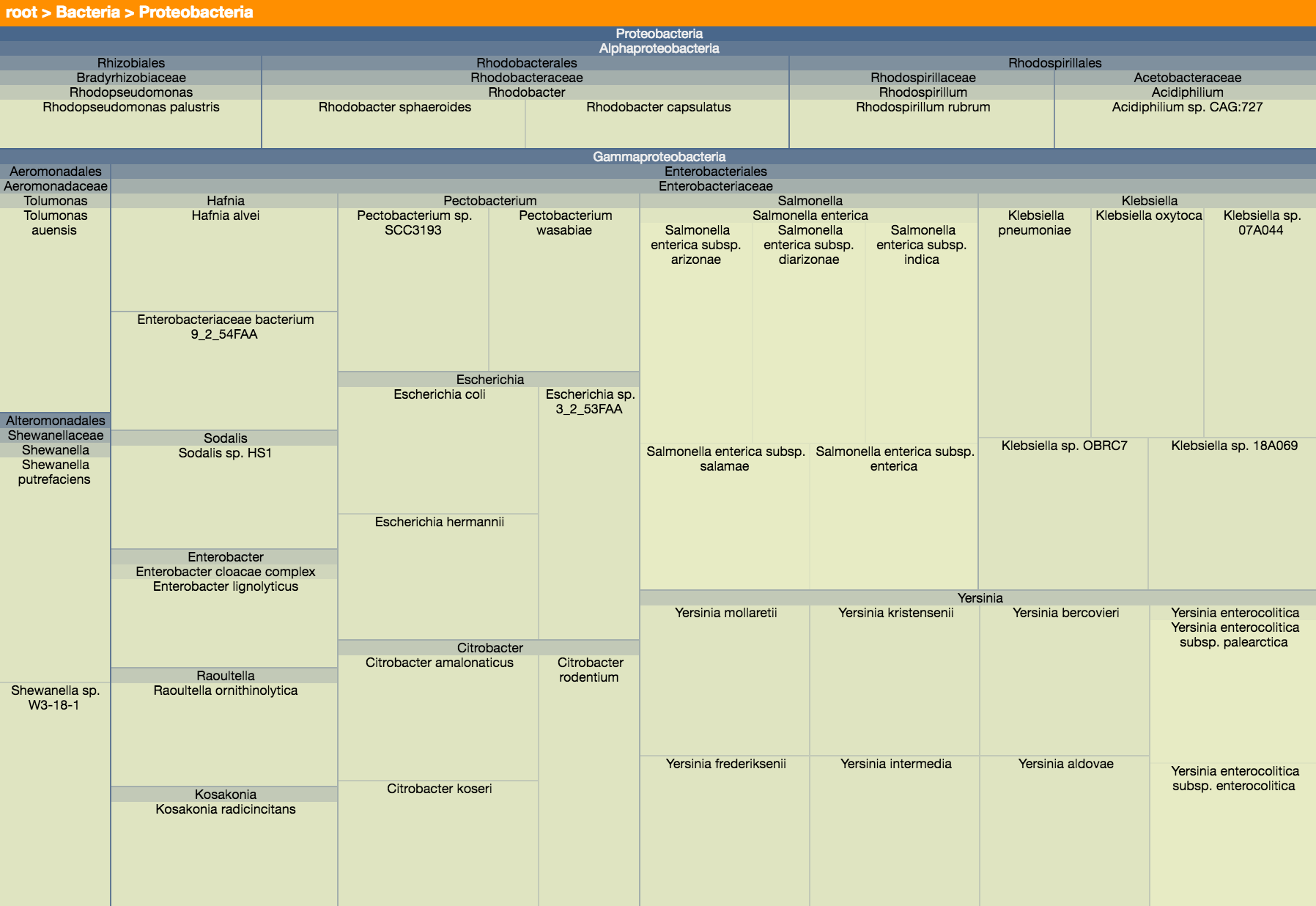 A live example of this visualization can be found on Observable.
The treemap visualization is rendered using plain HTML (div-tags). This means that the visualization cannot easily be exported as an SVG file. You can, however, convert the image to a PNG of an arbitrary size and export that, if required.
The constructor of the Treemap class automatically starts rendering the treemap upon invocation and has the following signature
-
element: HTMLElement: TheHTMLElementin which the treemap should be rendered. -
data: DataNodeLike: The root node of the hierarchical data that should be rendered by this treemap. SeeDataNodefor how to construct these objects properly. -
options: TreemapSettings(optional): Can be used to configure the treemap before rendering. See below for all the options that are currently supported.
Change the root of the visualization to the node with the given ID. The reroot is only carried out when a node with that ID exists; nothing happens when no node is found. This method takes the following arguments:
-
nodeId: number: ID of the node that should become the new root of the tree. -
triggerCallback: boolean = true: ShouldrerootCallbackbe called for this node?
Return the visualization to its initial view, with the root of the tree filling the treemap again. Unlike the
sunburst's reset, this does not call rerootCallback.
Resize the visualization without resetting the current view: the node that is currently rooted stays rooted. The following arguments are required:
-
newWidth: number: Desired new width of the visualization (in pixels). -
newHeight: number: Desired new height of the visualization (in pixels).
A TreemapSettings object can be used to fully configure the treemap and specifies a variety of different properties:
-
width: number(optional, default = 800): Maximum width of the visualization in pixels. -
height: number(optional, default = 800): Maximum height of the visualization in pixels. -
enableTooltips: boolean(optional, default = true): Are tooltips shown when hovering over a node in the treemap? -
tooltipContainer: HTMLElement | string | null(optional, default = null): Element the tooltip is appended to, or a selector for it. The default is the body of the document that holds the visualization, and visualizations that share a container also share a single tooltip element. Browsers that support the popover API show the tooltip in the top layer, which is painted above a fullscreen element, so this only needs to be set for fullscreen support in browsers that do not: point it at the element that is made fullscreen and the tooltip goes fullscreen along with it. -
className: string(optional, default = "treemap"): Class name associated with the element this treemap is rendered in. -
levels: number | undefined(optional, default = undefined): Maximum depth of the data object. By default the actual depth of the given data is used. -
labelHeight: number(optional, default = 10): Height (in pixels) of the breadcrumb bar. -
colorRoot: string(optional, default = "#104B7D"): Color of the root rectangle. Should be a valid HTML color string. -
colorLeaf: string(optional, default = "#FDFFCC"): Color of the leaves. Should be a valid HTML color string. -
colorBreadcrumbs: string(optional, default = "#FF8F00"): Color of the breadcrumb bar.
-
rerootCallback(optional, default = identity function): Function that's called whenever the user clicks on a node. This function should not return anything and is called with 1 parameter:-
d: DataNode: The node that has been clicked by the user and which will become the new root of the visualization.
-
-
getBreadcrumbTooltip: (optional, default = function that returns name of a node): Function that returns a string to use as tooltip for the breadcrumbs. This function should return a string and is called with 1 parameter:-
d: DataNode: The node for which a breadcrumb title needs to be retrieved.
-
-
getTooltip(optional, default = generic tooltip function) Returns the html to use as tooltip for a node. Is called with a node that represents the current node that's being hovered by the user. The result of getTooltipTitle is used for the header and getTooltipText is used for the body of the tooltip by default. This function needs to return a string representing HTML-code that will be executed and receives 1 parameter:-
d: DataNode: Node for which the tooltip should be returned. NOTE: Be very cautious in passing user input directly as a result of this function. Please always sanitize the user's input before returning it, as this might lead to reflected XSS-attacks.
-
-
getTooltipTitle(optional, default = generic title function) Returns text that's being used for the title of a tooltip. This tooltip provides information to the user about the node that's currently hovered by the mouse cursor. This function needs to return a string representing HTML-code that will be executed and receives 1 parameter:-
d: DataNode: Node for which the title should be returned. NOTE: Be very cautious in passing user input directly as a result of this function. Please always sanitize the user's input before returning it, as this might lead to reflected XSS-attacks.
-
-
getTooltipText(optional, default = generic body function) Returns text that's being used for the body of a tooltip. This tooltip provides information to the user about the node that's currently hovered by the mouse cursor. This function needs to return a string representing HTML-code that will be executed and receives 1 parameter:-
d: DataNode: Node for which the tooltip body text should be returned. NOTE: Be very cautious in passing user input directly as a result of this function. Please always sanitize the user's input before returning it, as this might lead to reflected XSS-attacks.
-
-
getLevel(optional, default = generic level function) Returns the level that's associated with the given node. This function should return an integer and receives one parameter:-
x: d3.HierarchyRectangularNode<DataNode>: The node for which the level should be returned. Please note that this is not a regularDataNode, but instead ad3.HierarchyRectangularNode<DataNode>.
-
-
getLabel(optional, default = function that returns the name of a node): Returns the label that should be rendered for a node. This function is called with 1 parameter and should return a string:-
x: DataNode: Node for which the label should be returned.
-