4 Debugging - theoriginalvisagie/JavaScript-Algorithms-and-Data-Structures GitHub Wiki
Debugging is the process of going through your code, finding any issues, and fixing them.
Issues in code generally come in three forms:
- syntax errors that prevent your program from running.
- runtime errors where your code has unexpected behavior.
- logical errors where your code doesn't do what you intended.
The Console:
Both Chrome and Firefox have excellent JavaScript consoles, also known as DevTools, for debugging your JavaScript.
You can find Developer tools in your Chrome's menu or Web Console in Firefox's menu. If you're using a different browser, or a mobile phone, we strongly recommend switching to desktop Firefox or Chrome.
You can also press the f12 key and it'll bring up the console for you:
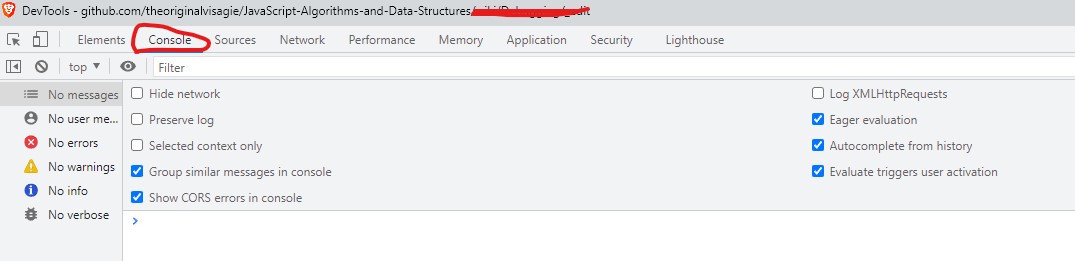
To print stuff to your console, you will use the console.log() method:
console.log('Hello world!');
Sometimes we run into issues, because our data types are incorrect. TO verify what data types you are using you can use the typeof() method:
console.log(typeof ""); // String
console.log(typeof 0); // Number
console.log(typeof []); // Object
console.log(typeof {}); // Object
Transposed, missing, or mis-capitalized characters in a variable or function name will have the browser looking for an object that doesn't exist - and complain in the form of a reference error. JavaScript variable and function names are case-sensitive.
Another syntax error to be aware of is that all opening parentheses, brackets, curly braces, and quotes have a closing pair. Forgetting a piece tends to happen when you're editing existing code and inserting items with one of the pair types. Also, take care when nesting code blocks into others, such as adding a callback function as an argument to a method.
JavaScript allows the use of both single (') and double (") quotes to declare a string. Deciding which one to use generally comes down to personal preference, with some exceptions.
Having two choices is great when a string has contractions or another piece of text that's in quotes. Just be careful that you don't close the string too early, which causes a syntax error.
Here are some examples of mixing quotes:
const grouchoContraction = "I've had a perfectly wonderful evening, but this wasn't it."; // Correct
const quoteInString = "Groucho Marx once said 'Quote me as saying I was mis-quoted.'"; // Correct
const uhOhGroucho = 'I've had a perfectly wonderful evening, but this wasn't it.'; // Incorrect
The assignment operator (=) in JavaScript assigns a value to a variable name. And the == and === operators check for equality (the triple === tests for strict equality, meaning both value and type are the same).
The code below assigns x to be 2, which evaluates as true. Almost every value on its own in JavaScript evaluates to true, except what are known as the "falsy" values: false, 0, "" (an empty string), NaN, undefined, and null.
let x = 1; // Correct
let y = 2; // Correct
if (x = y) { // Incorrect

} else {

}
The next bug to watch out for is when a function's arguments are supplied in the incorrect order. If the arguments are different types, such as a function expecting an array and an integer, this will likely throw a runtime error. If the arguments are the same type (all integers, for example), then the logic of the code won't make sense. Make sure to supply all required arguments, in the proper order to avoid these issues.
Off by one errors (sometimes called OBOE) crop up when you're trying to target a specific index of a string or array (to slice or access a segment), or when looping over the indices of them. JavaScript indexing starts at zero, not one, which means the last index is always one less than the length of the item. If you try to access an index equal to the length, the program may throw an "index out of range" reference error or print undefined.
Sometimes it's necessary to save information, increment counters, or re-set variables within a loop. A potential issue is when variables either should be reinitialized, and aren't, or vice versa. This is particularly dangerous if you accidentally reset the variable being used for the terminal condition, causing an infinite loop.
Printing variable values with each cycle of your loop by using console.log() can uncover buggy behavior related to resetting, or failing to reset a variable.
Loops are great tools when you need your program to run a code block a certain number of times or until a condition is met, but they need a terminal condition that ends the looping. Infinite loops are likely to freeze or crash the browser, and cause general program execution mayhem, which no one wants.
There was an example of an infinite loop in the introduction to this section - it had no terminal condition to break out of the while loop inside loopy(). Do NOT call this function!
function loopy() {
  while(true) {
    console.log("Hello, world!");
  }
}